
mcp-secrets-runner
v0.3.0
Published
Run MCP servers with secrets injected from Infisical, 1Password or HashiCorp Vault. No plaintext API keys in .mcp.json, no login sessions that expire.

Maintainers
 wiktormalyska
Readme
mcp-secrets-runner
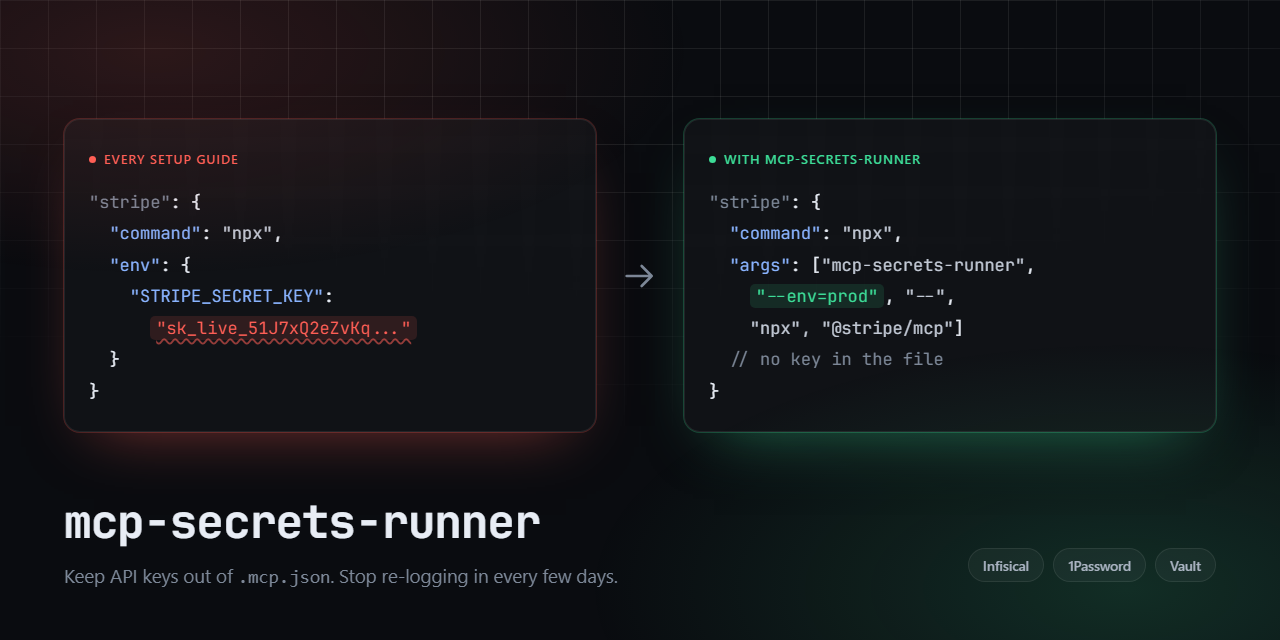

Start MCP servers with their secrets injected from a secret manager, so your .mcp.json
holds references instead of API keys, and nothing stops working three days later because a
login session expired.
Supports Infisical, 1Password and HashiCorp Vault.
The problem
Nearly every MCP setup guide tells you to do this:
{
  "mcpServers": {
    "stripe": {
      "command": "npx",
      "args": ["-y", "@stripe/mcp@latest"],
      "env": { "STRIPE_SECRET_KEY": "sk_live_51J..." }
    }
  }
}
That is a live production key in a config file that people commit, sync between machines, screenshot in tutorials, and paste into bug reports. It is the single biggest reason MCP stalls at the security review in a company.
The obvious fix, wrapping the server in your secret manager's CLI, has its own failure mode. Those CLIs authenticate with a developer session stored in your keyring, and that session expires. When it does, every MCP server wrapped this way stops starting at the same time, with an error that points at the MCP client rather than at the expired login.
What this does
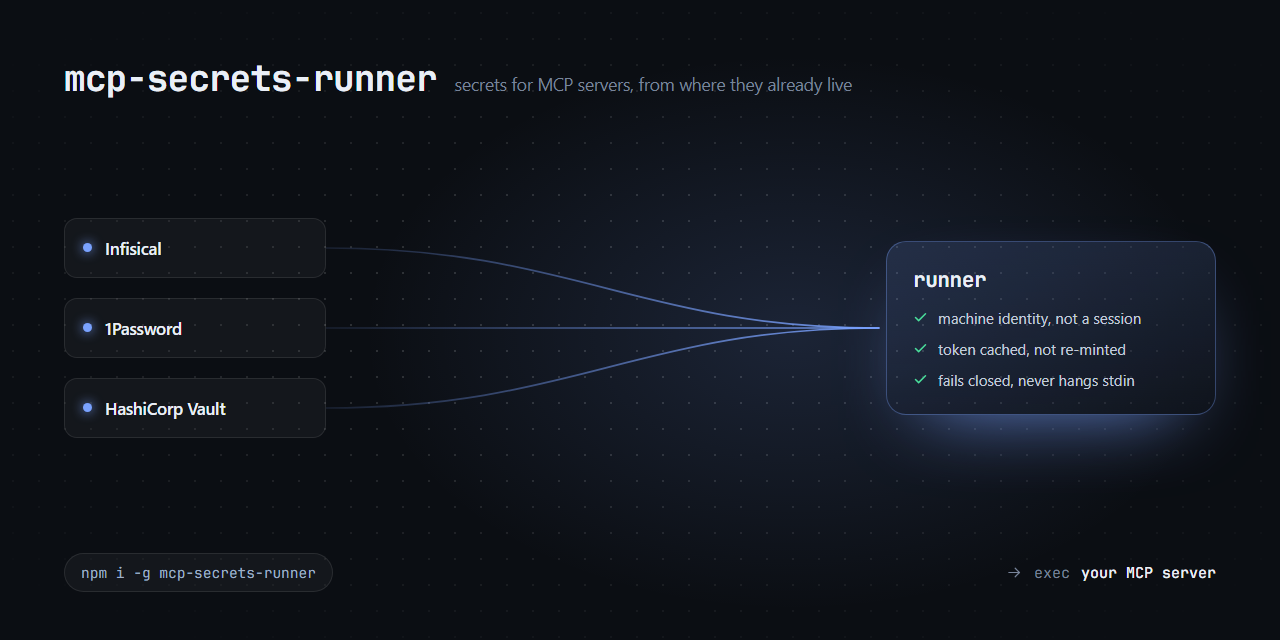
mcp-secrets-runner sits between the MCP client and the server. On startup it authenticates
with credentials built for unattended use, ones that do not expire out from under you,
fetches the secrets, and execs the real server.
{
  "mcpServers": {
    "stripe": {
      "type": "stdio",
      "command": "npx",
      "args": ["-y", "mcp-secrets-runner", "--env=prod", "--path=/mcp",
               "--", "npx", "-y", "@stripe/mcp@latest"]
    }
  }
}
No secret values in the file. No expiring sessions. The same config works on every machine that has the machine credentials in its environment.
Install
npm install -g mcp-secrets-runnerOr skip the install and let npx fetch it, as in the config above. Requires Node 18+.
Providers
Pick one with --provider=<name>, or set MCP_SECRETS_PROVIDER. Infisical is the default.
Infisical
Authenticates with a machine identity (Universal Auth) instead of the keyring session
that infisical login creates. The client secret has no TTL, so a short-lived token is
fetched as needed and nothing requires re-logging in.
"args": ["-y", "mcp-secrets-runner", "--env=prod", "--path=/mcp",
         "--", "npx", "-y", "@stripe/mcp@latest"]
| Variable | Purpose |
|---|---|
| INFISICAL_UA_CLIENT_ID | machine identity client id |
| INFISICAL_UA_CLIENT_SECRET | machine identity client secret |
| INFISICAL_DOMAIN | instance URL, overrides .infisical.json |
| INFISICAL_PROJECT_ID | overrides workspaceId from .infisical.json |
| INFISICAL_BIN | path to the infisical binary if it is not on PATH |
Flags before -- are passed to infisical run. Requires the
Infisical CLI.
1Password
Delegates to op run, which resolves op://vault/item/field references. Use a service
account token for unattended servers; an interactive op session works but expires, with
the same all-servers-at-once failure described above.
"args": ["-y", "mcp-secrets-runner", "--provider=1password", "--env-file=./mcp.env",
         "--", "npx", "-y", "@stripe/mcp@latest"]
| Variable | Purpose |
|---|---|
| OP_SERVICE_ACCOUNT_TOKEN | service account token |
| OP_BIN | path to the op binary if it is not on PATH |
Flags before -- are passed to op run. Requires the
1Password CLI.
Note that this provider passes --no-masking by default. op run otherwise rewrites secret
values in the child's output to <concealed by 1Password>. A stdio MCP server's stdout carries
framed JSON-RPC, so rewriting bytes in it corrupts the stream. Pass --masking to opt back in
if your server does not use stdio.
HashiCorp Vault
Reads the secret over Vault's HTTP API and starts the MCP server directly. No Vault CLI is required. Authenticates with AppRole, or with a token you supply.
"args": ["-y", "mcp-secrets-runner", "--provider=vault", "--path=mcp",
         "--", "npx", "-y", "@stripe/mcp@latest"]
| Variable | Purpose |
|---|---|
| VAULT_ROLE_ID + VAULT_SECRET_ID | AppRole credentials |
| VAULT_TOKEN | a token to use directly; skips AppRole |
| VAULT_ADDR | instance URL (default http://127.0.0.1:8200) |
| VAULT_NAMESPACE | namespace header, for Vault Enterprise / HCP |
| Flag | Purpose |
|---|---|
| --path=<path> | secret to read (required) |
| --mount=<mount> | KV mount (default secret) |
| --kv-version=1\|2 | KV engine version (default 2) |
Every key in the secret becomes an environment variable for the MCP server. Structured values are passed through as JSON.
doctor
"My MCP server won't start" is almost always one of four things, and an MCP client reports
all four identically. doctor checks them one at a time:
mcp-secrets-runner doctor --provider=vault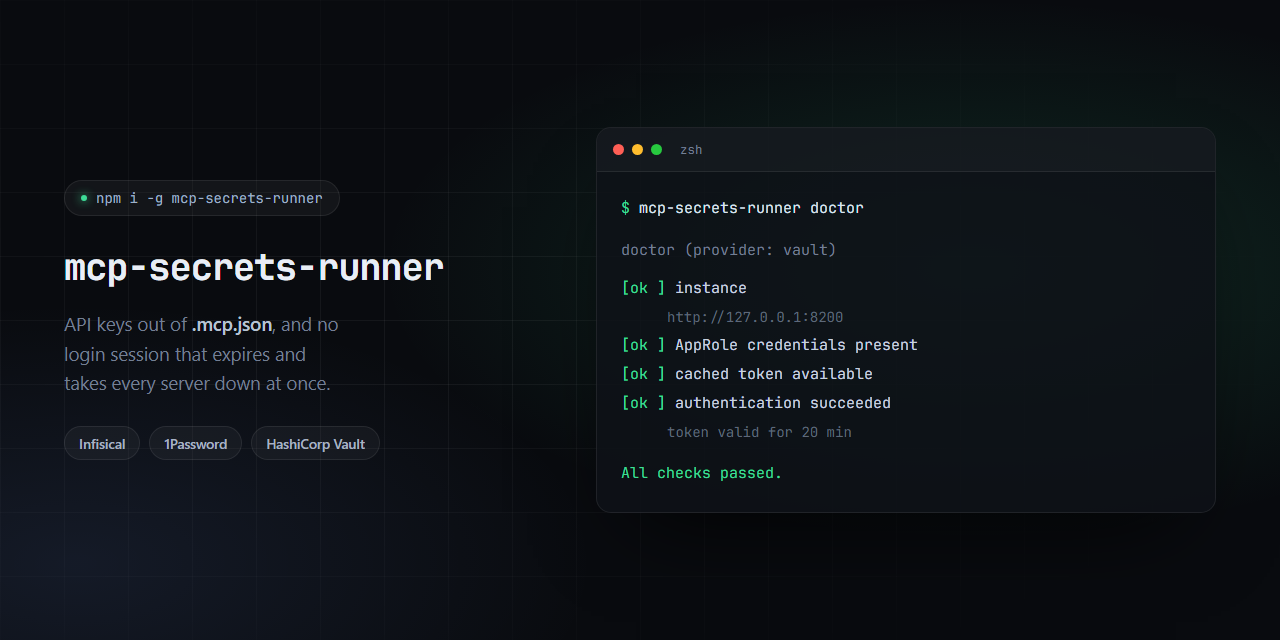
Add --offline to skip the authentication test when you do not want to touch the network.
Usage
mcp-secrets-runner [--provider=<name>] [provider flags...] -- <mcp server command>
mcp-secrets-runner doctor [--provider=<name>] [--offline]
Everything before -- configures the runner; everything after it is the server command,
passed through untouched.
Token caching
An MCP client starts every configured server at once. With ten servers, an uncached setup performs ten identical logins in the same second, which is slow for you and noisy for the auth backend. The runner caches the token in the per-user temp directory, keyed by identity and instance, and reuses it until shortly before it expires. In practice this roughly halves startup time.
What is cached is a short-lived token, never the long-lived credential that obtained it,
and that credential already sits in the process environment, so the cache is strictly less
sensitive than what is available to the same user anyway. The file is written with 0600
permissions, and a cache that cannot be read or written is treated as a miss rather than an
error. Pass --no-token-cache to authenticate every time.
Keep the token TTL on your machine identity or AppRole short. The cache honours whatever lifetime the backend returns, so a 30-day token means a 30-day file on disk.
Behaviour worth knowing about
These are deliberate, and each exists because the alternative broke something:
- Credentials never reach a command line. Infisical tokens are fetched over HTTPS rather
than by shelling out to
infisical login, which accepts the client secret only as a flag and so publishes it to the process list for the duration of the call. - All diagnostics go to stderr.
stdoutcarries the MCP protocol; one stray byte there corrupts the JSON-RPC stream, and the client reports it as an unrelated parse error. - It fails closed. If credentials are set but authentication fails, the runner exits
instead of falling back. A credential-less
infisical runopens an interactive browser login, which hangs the MCP server on stdin forever, and each failed attempt extends the server-side auth lockout. - It surfaces auth lockouts explicitly. Infisical locks an auth method after repeated failures (by default 3 attempts, 5 minutes), and every further attempt restarts that window. Retrying in a loop is the worst possible response, so the error says so.
- It injects
--projectIdwhen using Infisical token auth. With a token, the CLI stops readingworkspaceIdfrom.infisical.json, and secret fetching dies onProject ID is required. Without credentials it injects nothing, so your config keeps deciding. - Vault errors name the likely cause. A 403 is reported as a policy problem, a 404 points
at the
--mount/--path/--kv-versiontriple, since a KV v2 read uses a different URL than v1. - It resolves executables through
PATHEXTon Windows. Node refuses to spawn.cmdshims withoutshell: true, andshell: truewould push your server command throughcmd.exequoting. Resolving the path directly avoids both. - Exit codes pass through, and a killed child reports failure rather than a misleading
0.
Adding a provider
A provider exports prepare(flags, command, options) returning { command, args, env },
the child process that will hold the secrets, plus checks() for doctor, and gets listed
in src/providers/index.mjs.
The three shipped ones work quite differently: Infisical authenticates over HTTP then hands off to a CLI, 1Password hands off to a CLI that authenticates itself, and Vault does the whole thing over HTTP and starts the server directly. AWS Secrets Manager and Doppler would both fit. PRs welcome.
Development
npm testThe Vault provider has integration tests that run against a stub of Vault's HTTP API in the same process, so the suite needs no external services.
The images above are generated from HTML in assets/. Edit the source and re-run
assets/render.sh (needs Chrome) rather than editing the PNGs.
License
MIT