
md-html-tool
v1.2.1
Published
concat multiple md files together and convert it to a standalone html file


Readme
md-html-tool
concat multiple md files together and convert it to a standalone html file
Install
using npm as a devDependency
npm install --save-dev md-html-toolor using yarn as a devDependency
yarn add --dev md-html-toolHow to use
add setting to your package.json
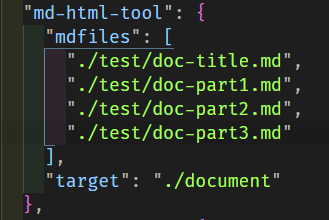
"md-html-tool": [
    "mdfiles": [
        // all your markdown files' paths
        // beware the orders of all md files
    ],
    "target": "" // the converted html file path
]
write code like this
  const mdhtml = require('md-html-tool');

  (async () => {
      await mdhtml.convert();
      console.log(`completed`);
  })();
API functions
| func | description | | :--- | :--- | | convert | concat all md files and convert them to one html file | | getconf | get all configuration from package.json |
Add TOC (Table of Content)
Converter will insert TOC (Table of Content) at the position that you put <!-- toc --> ... <!-- tocstop -->
<!-- toc -->
toc will be inserted here
<!-- tocstop -->
if there is no <!-- toc --> <!-- tocstop --> , no TOC will be inserted