
md.bootstrappersiandatetimepicker
v4.5.0
Published
Persian Date Time Picker with Bootstrap 5+


Readme
MD.BootstrapPersianDateTimePicker
Bootstrap 5+ Persian And Gregorian Date Time Picker
Major changes:
- Using Bootstrap 5
- jQuery Removed
- Rewrite all codes, better performance

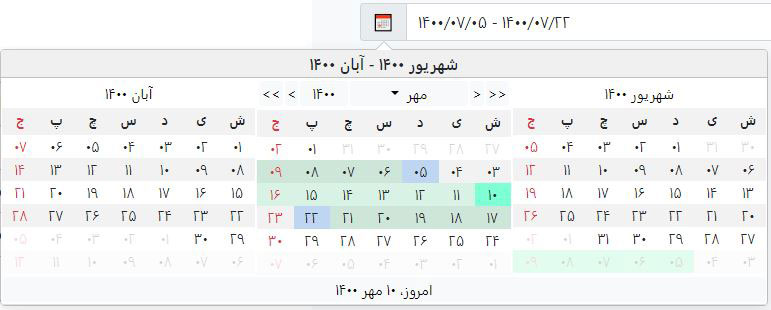
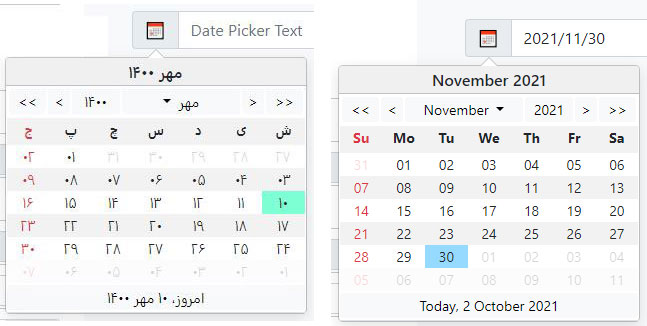
NOTE:
Bootstrap 3 version https://github.com/Mds92/MD.BootstrapPersianDateTimePicker/tree/master-bs3
Bootstrap 4 version https://github.com/Mds92/MD.BootstrapPersianDateTimePicker/tree/master-bs4
Installing:
First you have to install Bootstrap 5 and link it to your html file.
Then you can install latest version of the library via npm:
npm install md.bootstrappersiandatetimepicker@latest
Now add these files to you html:
<link href="/dist/mds.bs.datetimepicker.style.css" rel="stylesheet" />
<script src="/dist/mds.bs.datetimepicker.js"></script>
NOTE:
This library css file must be after bootstrap css file
I suggest to add scripts at the end of body tag and after bootstrap js file.
How to use:
const dtp1Instance = new mds.MdsPersianDateTimePicker(document.getElementById("dtp1"), {
  targetTextSelector: '[data-name="dtp1-text"]',
  targetDateSelector: '[data-name="dtp1-date"]',
});
Options:
Default values are into [ ]
| Name | Values | Description | Sample |
| ------------------------------ | ---------------------------------- | ------------------------------------------------------------------------------------------------------------------------------------------- | ---------------------------------------------------- |
| placement | top, right, [bottom], left | Position of date time picker |
| trigger | [click], mouse down, focus, ... | Event to show date time picker |
| enableTimePicker | [false], true | Time picker visibility |
| targetTextSelector | String | CSS selector to show selected date as format property into it | '#TextBoxId' |
| targetDateSelector | String | CSS selector to save selected date into it | '#InputHiddenId' |
| toDate | [false], true | When you want to set date picker as toDate to enable date range selecting |
| fromDate | [false], true | When you want to set date picker as fromDate to enable date range selecting |
| groupId | String | When you want to use toDate, fromDate you have to enter a group id to specify date time pickers | 'dateRangeSelector1' |
| disabled | [false], true | Disable date time picker |
| textFormat | String | format of selected date to show into targetTextSelector | 'yyyy/MM/dd HH:mm:ss' |
| dateFormat | String | format of selected date to save into targetDateSelector | 'yyyy/MM/dd HH:mm:ss' |
| isGregorian | [false], true | Is calendar Gregorian |
| inLine | [false], true | Is date time picker in line |
| modalMode | [false], true | Open in modal mode, suitable for smart phones |
| selectedDate | [undefined], Date | Selected date as JavaScript Date object | new Date('2018/9/30') |
| selectedDateToShow | [new Date()], Date | Selected date to start calendar from it as JavaScript Date object | new Date('2018/9/30') |
| selectedRangeDate | Array: Date[] | Selected range date as JavaScript Date object | [new Date('2020/8/5'), new Date('2020/8/15')] |
| yearOffset | Number | Number of years to select in year selector | 30 |
| holidays | Array: Date[] | Array of holidays to show in date time picker as holiday | [new Date(), new Date(2017, 3, 2)] |
| disabledDates | Array: Date[] | Array of disabled dates to prevent user to select them | [new Date(2017, 1, 1), new Date(2017, 1, 2)] |
| specialDates | Array: Date[] | Array of dates to mark some dates as special | [new Date(2017, 2, 1), new Date(2017, 3, 2)] |
| disabledDays | Array: number[] | Array of disabled week days to prevent user to select them | Disable all "Thursday", "Friday" in persian [ 5, 6 ] |
| disableBeforeToday | [false], true | Disable days before today |
| disableAfterToday | [false], true | Disable days after today |
| disableBeforeDate | Date | Disable days before this Date | new Date(2018, 11, 12) |
| disableAfterDate | Date | Disable days after this Date | new Date(2018, 12, 11) |
| rangeSelector | [false], true | Enables rangeSelector feature on date time picker |
| monthsToShow | Numeric array with 2 items, [0 ,0] | To show, number of month before and after selected date in date time picker, first item is for before month, second item is for after month | [1, 1] |
| persianNumber | [false], true | Convert numbers to persian characters |
| calendarViewOnChange(date) | function | Event fires on date picker's view change |
| onDayClick(event) | function | Event fires on day cell click |
String format:
| Format | English Description | Persian Description | | -------- | ----------------------- | -------------------------------- | | yyyy | Year, 4 digits | سال چهار رقمی | | yy | Year, 2 digits | سال دو رقمی | | MMMM | Month name | نام ماه | | MM | Month, 2 digits | عدد دو رقمی ماه | | M | Month, 1 digit | عدد تک رقمی ماه | | dddd | Week day name | نام روز هفته | | dd | Month's day, 2 digits | عدد دو رقمی روز | | d | Month's day, 1 digit | عدد تک رقمی روز | | HH | Hour, 2 digits - 0 - 24 | عدد دو رقمی ساعت با فرمت 0 تا 24 | | H | Hour, 1 digit - 0 - 24 | عدد تک رقمی ساعت با فرمت 0 تا 24 | | hh | Hour, 2 digits - 0 - 12 | عدد دو رقمی ساعت با فرمت 0 تا 12 | | h | Hour, 1 digit - 0 - 12 | عدد تک رقمی ساعت با فرمت 0 تا 12 | | mm | Minute, 2 digits | عدد دو رقمی دقیقه | | m | Minute, 1 digit | عدد تک رقمی دقیقه | | ss | Second, 2 digits | ثانیه دو رقمی | | s | Second, 1 digit | ثانیه تک رقمی | | tt | AM / PM | ب.ظ یا ق.ظ | | t | A / P | حرف اول از ب.ظ یا ق.ظ |
Functions:
| Name | Return Value | Description | Sample |
| -------------------------- | -------------------------- | -------------------------------------------------------------- | ----------------------------------------------------------------------------------------------------------------------------- |
| show | void | show date picker | dtp1Instance.show() |
| hide | void | hide date picker | dtp1Instance.hide() |
| toggle | void | show or hide date picker | dtp1Instance.toggle() |
| enable | void | enable date picker | dtp1Instance.enable() |
| disable | void | disable date picker | dtp1Instance.disable() |
| updatePosition | void | update position of date picker | dtp1Instance.updatePosition() |
| updateSelectedDateText | void | update targetTextSelector text | dtp1Instance.updateSelectedDateText() |
| dispose | void | dispose date picker | dtp1Instance.dispose() |
| getBsPopoverInstance | bootstrap.Popover | return instance of bootstrap popover | const bsPopover = dtp1Instance.getBsPopoverInstance() |
| getBsModalInstance | bootstrap.Modal | return instance of bootstrap modal | const bsModal = dtp1Instance.getBsModalInstance() |
| updateOption | void | update one option of date picker | dtp1Instance.updateOption('isGregorian', false) |
| updateOptions | void | update one option of date picker | dtp1Instance.updateOptions({ isGregorian: false, inLine: false, ... }) |
| getInstance | MdsPersianDateTimePicker | static method, get instance of MdsDatePicker by an element obj | const jalaliObj = mds.MdsPersianDateTimePicker.getInstance(document.getELementById('IdOfElement')); |
| getText | string | Get selected date text | const txt = dtp1Instance.getText() |
| getSelectedDate | Date | Get selected date | const dateObj = dtp1Instance.getDate() |
| getDateRange | [fromDate, toDate]: Date[] | Get selected date range | dtp1Instance.getDateRange(); |
| setDate | void | Set selected datetime with Date object argument | dtp1Instance.setDate(new Date('2021/09/22')); |
| setDatePersian | void | Set selected datetime with Date object argument | dtp1Instance.setDatePersian(1400, 06, 31); |
| setDateRange | void | Set selected datetime range with Date object argument | dtp1Instance.setDateRange(new Date('2021/09/04'), new Date('2021/09/22')); |
| clearDate | void | clear selected date | dtp1Instance.clearDate(); |
| convertDateToString | string | utility & static method, convert date object to string | const dateStr = mds.MdsPersianDateTimePicker.convertDateToString(date: new Date(), isGregorian: false, format: 'yyyy/MM/dd'); |
| convertDateToJalali | json | utility & static method, convert date object to Jalali | const jalaliObj = mds.MdsPersianDateTimePicker.convertDateToJalali(new Date()); |
Events:
MD.BootstrapPersianDateTimePicker uses Bootstrap's popover and modals. so you can use popover or modal events.
https://getbootstrap.com/docs/5.1/components/popovers/#events https://getbootstrap.com/docs/5.1/components/modal/#events
Backend:
If you are using .net in your backend I suggest you https://github.com/Mds92/MD.PersianDateTime to handle PersianDateTime as easy as DateTime.