
md.bs3-persian-date-time-picker
v2.4.0
Published
Persian Date Time Picker with jQuery & Bootstrap 3.3.*
Downloads
44


Readme
MD.BootstrapPersianDateTimePicker
Bootstrap 3
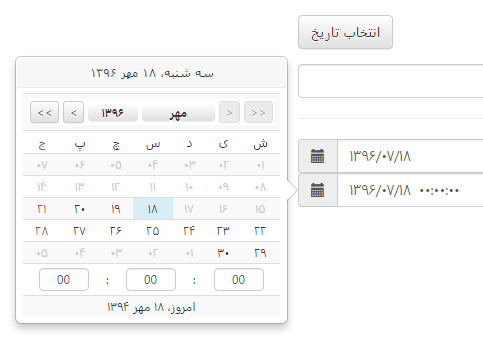
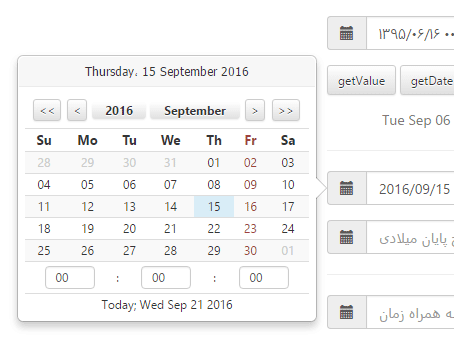
MD.BootstrapPersianDateTimePicker is a DateTimePicker plugin for jquery and Bootstrap 3.
Note:
This plugin is not compatible with Bootstrap4+.
To see demo just open Demo folder and run the html files. Don't build the project, it's not a C# project.
MD.BootstrapPersianDateTimePicker uses bootstrap Popovers, so it has felexibility of bootstrap's popover.
There is a file in Manual folder that you can learn how to use this plugin.
Installing:
npm install md.bs3-persian-date-time-picker
Now add these files to you html:
<link href="/Content/MdBootstrapPersianDateTimePicker/jquery.Bootstrap-PersianDateTimePicker.css" rel="stylesheet" />

<script src="/Scripts/MdBootstrapPersianDateTimePicker/jalali.js"></script>
<script src="/Scripts/MdBootstrapPersianDateTimePicker/jquery.Bootstrap-PersianDateTimePicker.js"></script>
I suggest to add scripts at the end of body tag and after jQuery library.
There are two approaches to use MdPersianDateTime
- Use JavaScript and jQuery.
<script type="text/javascript">
    $('#textBoxInputId').MdPersianDateTimePicker({
		Placement: 'left',
		Trigger: 'click',
		EnableTimePicker: false,
		TargetSelector: '#ElementId',
		GroupId: '',
		ToDate: false,
		FromDate: false,
		DisableBeforeToday: false,
		Disabled: false,
		Format: 'yyyy/MM/dd',
		IsGregorian: false,
		EnglishNumber: false,
		InLine: false
    });
</script>- Use html tags attributes. In this approach you can determine the settings with the following attributes:
data-mddatetimepicker="true" data-placement="bottom" data-trigger="focus" data-enabletimepicker="true" data-targetselector="#fromDate1" data-groupid="group1" data-todate="true"
data-fromdate="true" data-englishnumber="true" data-disabled="false" data-isgregorian="false" data-format="yyyy/MM/dd" data-disablebeforetoday="false" data-inline="false"
<button class="btn btn-default" data-MdDateTimePicker="true" data-TargetSelector="#input1" data-EnableTimePicker="true" data-Placement="left" data-Trigger="click">
انتخاب تاریخ
</button>Options:
Default values are into [ ]
| Name | Values | Description | Sample |
| -------------------- | ------------------------------ | --------------------------------------------------------------------------------------------------- | --------------------- |
| EnglishNumber | [false], true | Switch between English number or Persian number |
| Placement | top, right, [bottom], left | Position of date time picker |
| Trigger | [click], mousedown, focus, ... | Event to show date time picker |
| EnableTimePicker | [false], true | Time picker visibility |
| TargetSelector | String | CSS selector to show selected date into it | '#ElementId' |
| ToDate | [false], true | When you want to set date picker as toDate to enable date range selecting |
| FromDate | [false], true | When you want to set date picker as fromDate to enable date range selecting |
| GroupId | String | When you want to use toDate, fromDate you have to enter a group id to specify date time pickers | 'dateRangeSelector1' |
| Disabled | [false], true | Disable date time picker |
| Format | String | date selecting string format | 'yyyy/MM/dd HH:mm:ss' |
| IsGregorian | [false], true | Is calendar Gregorian |
| InLine | [false], true | Is date time picker in line |
String format:
| Format | English Description | Persian Description | | -------- | ----------------------- | -------------------------------- | | yyyy | Year, 4 digits | سال چهار رقمی | | yy | Year, 2 digits | سال دو رقمی | | MMMM | Month name | نام ماه | | MM | Month, 2 digits | عدد دو رقمی ماه | | M | Month, 1 digit | عدد تک رقمی ماه | | dddd | Week day name | نام روز هفته | | dd | Month's day, 2 digits | عدد دو رقمی روز | | d | Month's day, 1 digit | عدد تک رقمی روز | | HH | Hour, 2 digits - 0 - 24 | عدد دو رقمی ساعت با فرمت 0 تا 24 | | H | Hour, 1 digit - 0 - 24 | عدد تک رقمی ساعت با فرمت 0 تا 24 | | hh | Hour, 2 digits - 0 - 12 | عدد دو رقمی ساعت با فرمت 0 تا 12 | | h | Hour, 1 digit - 0 - 12 | عدد تک رقمی ساعت با فرمت 0 تا 12 | | mm | Minute, 2 digits | عدد دو رقمی دقیقه | | m | Minute, 1 digit | عدد تک رقمی دقیقه | | ss | Second, 2 digits | ثانیه دو رقمی | | s | Second, 1 digit | ثانیه تک رقمی | | tt | AM / PM | ب.ظ یا ق.ظ | | t | A / P |
Functions:
| Name | Description | Sample | | ------------ | -------------------------------------- | --------------------------------------------------------------------------------- | | getValue | Get value of datetime picker | $('[data-name="datepicker1"]').MdPersianDateTimePicker('getValue'); | | setValue | Set value of datetime picker as string | $('[data-name="datepicker1"]').MdPersianDateTimePicker('setValue', '1396-12-28'); | | getDate | Get Date object of datetime picker | $('[data-name="datepicker1"]').MdPersianDateTimePicker('getDate'); | | setDate | Set selected date of datetime picker | $('[data-name="datepicker1"]').MdPersianDateTimePicker('setDate', new Date()); | | hide | Hide datetime picker | $('[data-name="datepicker1"]').MdPersianDateTimePicker('hide'); | | show | Show datetime picker | $('[data-name="datepicker1"]').MdPersianDateTimePicker('show'); |
Events
MD.BootstrapPersianDateTimePicker uses Bootstrap's popover, so you can use popover events.
| Event Type | Description | Sample | | ----------------------- | ------------------------------------------------------------------------------------------------------------------------- | ------ | | show.bs.popover | This event fires immediately when the show instance method is called. | | shown.bs.popover | This event is fired when the popover has been made visible to the user (will wait for CSS transitions to complete). | | hide.bs.popover | This event is fired immediately when the hide instance method has been called. | | hidden.bs.popover | This event is fired when the popover has finished being hidden from the user (will wait for CSS transitions to complete). | | inserted.bs.popover | This event is fired after the show.bs.popover event when the popover template has been added to the DOM. |
If you are using .Net for programming, I recommend to use the following library to parse and use PersianDateTime as easy as DateTime.
MD.PersianDateTime