
md.bs4-persian-date-time-picker
v3.14.0
Published
Persian Date Time Picker with jQuery 3+ & Bootstrap 4+


Readme
MD.BootstrapPersianDateTimePicker
Bootstrap 4+ Persian And Gregorian Date Time Picker jQuery 3+ Plugin
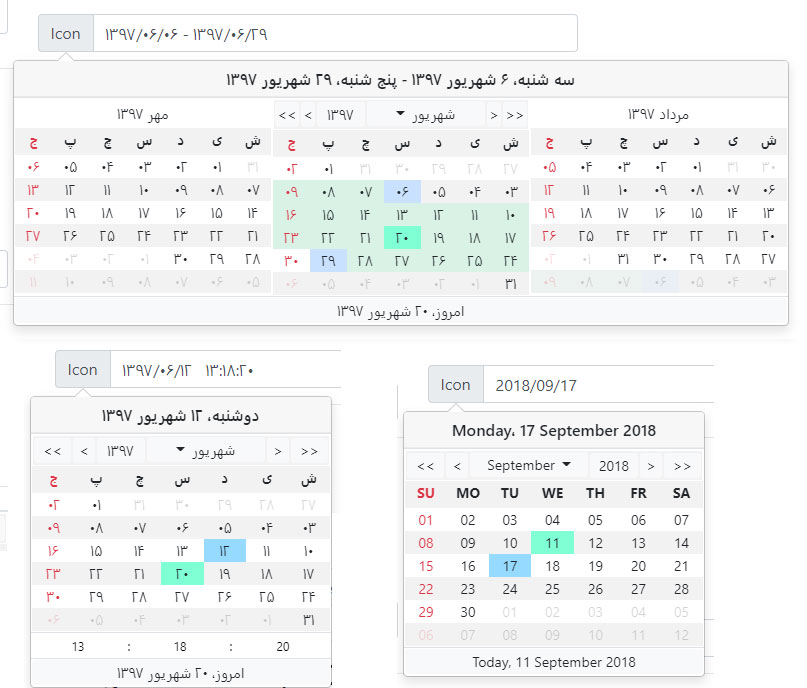
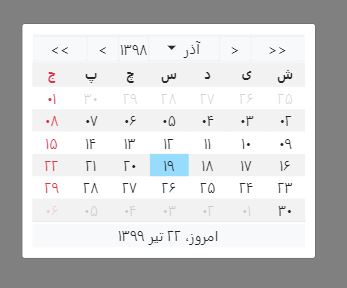
MD.BootstrapPersianDateTimePicker uses Bootstrap Popovers, and Bootstrap Modal. so it has flexibility of bootstrap's popover.
NOTE:
If you want Bootstrap 3 version see https://github.com/Mds92/MD.BootstrapPersianDateTimePicker/tree/master-bs3
Installing:
First you have to install Bootstrap 4+ and jQuery 3+ and link them to your html file.
Then you can install latest version of the plugin via npm:
npm install md.bs4-persian-date-time-picker@latest
Now add these files to you html:
<link href="/dist/jquery.md.bootstrap.datetimepicker.css" rel="stylesheet" />
<script src="/dist/jquery.md.bootstrap.datetimepicker.js"></script>
I suggest to add scripts at the end of body tag and after jQuery library.
How to use:
$("#id").MdPersianDateTimePicker({
  targetTextSelector: "#inputTextDate1",
  targetDateSelector: "#inputHiddenDate1",
});
Options:
Default values are into [ ]
| Name | Values | Description | Sample |
| ------------------------------ | ---------------------------------- | ------------------------------------------------------------------------------------------------------------------------------------------- | ---------------------------------------------------- |
| englishNumber | [false], true | Switch between English number or Persian number |
| placement | top, right, [bottom], left | Position of date time picker |
| trigger | [click], mouse down, focus, ... | Event to show date time picker |
| enableTimePicker | [false], true | Time picker visibility |
| targetTextSelector | String | CSS selector to show selected date as format property into it | '#TextBoxId' |
| targetDateSelector | String | CSS selector to save selected date into it | '#InputHiddenId' |
| toDate | [false], true | When you want to set date picker as toDate to enable date range selecting |
| fromDate | [false], true | When you want to set date picker as fromDate to enable date range selecting |
| groupId | String | When you want to use toDate, fromDate you have to enter a group id to specify date time pickers | 'dateRangeSelector1' |
| disabled | [false], true | Disable date time picker |
| textFormat | String | format of selected date to show into targetTextSelector | 'yyyy/MM/dd HH:mm:ss' |
| dateFormat | String | format of selected date to save into targetDateSelector | 'yyyy/MM/dd HH:mm:ss' |
| isGregorian | [false], true | Is calendar Gregorian |
| inLine | [false], true | Is date time picker in line |
| modalMode | [false], true | Open in modal mode, suitable for smart phones |
| selectedDate | [undefined], Date | Selected date as JavaScript Date object (Initial Value) | new Date('2018/9/30') |
| selectedDateToShow | [new Date()], Date | Selected date to start calendar from it as JavaScript Date object | new Date('2018/9/30') |
| selectedRangeDate | Array: Date[] | Selected range date as JavaScript Date object | [new Date('2020/8/5'), new Date('2020/8/15')] |
| monthsToShow | Numeric array with 2 items, [0 ,0] | To show, number of month before and after selected date in date time picker, first item is for before month, second item is for after month | [1, 1] |
| yearOffset | Number | Number of years to select in year selector | 30 |
| holiDays | Array: Date[] | Array of holidays to show in date time picker as holiday | [new Date(), new Date(2017, 3, 2)] |
| disabledDates | Array: Date[] | Array of disabled dates to prevent user to select them | [new Date(2017, 1, 1), new Date(2017, 1, 2)] |
| specialDates | Array: Date[] | Array of dates to mark some dates as special | [new Date(2017, 2, 1), new Date(2017, 3, 2)] |
| disabledDays | Array: number[] | Array of disabled days to prevent user to select them | Disable all "Thursday", "Friday" in persian [ 5, 6 ] |
| disableBeforeToday | [false], true | Disable days before today |
| disableAfterToday | [false], true | Disable days after today |
| disableBeforeDate | Date | Disable days before this Date | new Date(2018, 11, 12) |
| disableAfterDate | Date | Disable days after this Date | new Date(2018, 12, 11) |
| rangeSelector | [false], true | Enables rangeSelector feature on date time picker |
| calendarViewOnChange(date) | function | Event fires on date picker's view change |
| onDayClick(event) | function | Event fires on day cell click |
String format:
| Format | English Description | Persian Description | | -------- | ----------------------- | -------------------------------- | | yyyy | Year, 4 digits | سال چهار رقمی | | yy | Year, 2 digits | سال دو رقمی | | MMMM | Month name | نام ماه | | MM | Month, 2 digits | عدد دو رقمی ماه | | M | Month, 1 digit | عدد تک رقمی ماه | | dddd | Week day name | نام روز هفته | | dd | Month's day, 2 digits | عدد دو رقمی روز | | d | Month's day, 1 digit | عدد تک رقمی روز | | HH | Hour, 2 digits - 0 - 24 | عدد دو رقمی ساعت با فرمت 0 تا 24 | | H | Hour, 1 digit - 0 - 24 | عدد تک رقمی ساعت با فرمت 0 تا 24 | | hh | Hour, 2 digits - 0 - 12 | عدد دو رقمی ساعت با فرمت 0 تا 12 | | h | Hour, 1 digit - 0 - 12 | عدد تک رقمی ساعت با فرمت 0 تا 12 | | mm | Minute, 2 digits | عدد دو رقمی دقیقه | | m | Minute, 1 digit | عدد تک رقمی دقیقه | | ss | Second, 2 digits | ثانیه دو رقمی | | s | Second, 1 digit | ثانیه تک رقمی | | tt | AM / PM | ب.ظ یا ق.ظ | | t | A / P | حرف اول از ب.ظ یا ق.ظ |
Functions:
| Name | Return | Description | Sample | | ------------------ | -------------------------- | ----------------------------------------------------- | ------------------------------------------------------------------------------------------------------------------ | | getText | string | Get selected date text | $('#id').MdPersianDateTimePicker('getText'); | | getDate | Date | Get selected date | $('#id').MdPersianDateTimePicker('getDate'); | | getDateRange | [fromDate, toDate]: Date[] | Get selected date range | $('#id').MdPersianDateTimePicker('getDateRange'); | | setDate | void | Set selected datetime with Date object argument | $('#id').MdPersianDateTimePicker('setDate', new Date(2018, 11, 12)); | | setDateRange | void | Set selected datetime range with Date object argument | $('#id').MdPersianDateTimePicker('setDateRange', new Date(2018, 11, 01), new Date(2018, 11, 12)); | | clearDate | void | clear selected date | $('#id').MdPersianDateTimePicker('clearDate'); | | setDatePersian | void | Set selected datetime with persian json argument | $('#id').MdPersianDateTimePicker('setDatePersian', {year: 1397, month: 1, day: 1, hour: 0, minute: 0, second: 0}); | | hide | void | Hide date time picker | $('#id').MdPersianDateTimePicker('hide'); | | show | void | Show date time picker | $('#id').MdPersianDateTimePicker('show'); | | disable | void | Disable or enable date time picker | $('#id').MdPersianDateTimePicker('disable', /isDisable/ true); | | destroy | void | Dispose date time picker | $('#id').MdPersianDateTimePicker('destroy'); | | changeType | void | Switch between Persian or Gregorian calendar | $('#id').MdPersianDateTimePicker('changeType', /isGregorian/ true, /_ englishNumber _/ true); | | setOption | void | Set an option | $('#id').MdPersianDateTimePicker('setOption', 'yearOffset', 5); |
Events:
MD.BootstrapPersianDateTimePicker uses Bootstrap's popover, and Bootstrap's modals. so you can use popover or modal events.
https://getbootstrap.com/docs/4.5/components/popovers/#events https://getbootstrap.com/docs/4.5/components/modal/#events
$("#date1").on("hidden.bs.popover", function () {
  // do something…
});
Backend:
If you are using .net in your backend I suggest you https://github.com/Mds92/MD.PersianDateTime to handle PersianDateTime as easy as DateTime.