
melonjs
v20.8.0
Published
melonJS Game Engine


Readme
melonJS 2







A modern & fully featured HTML5 game engine
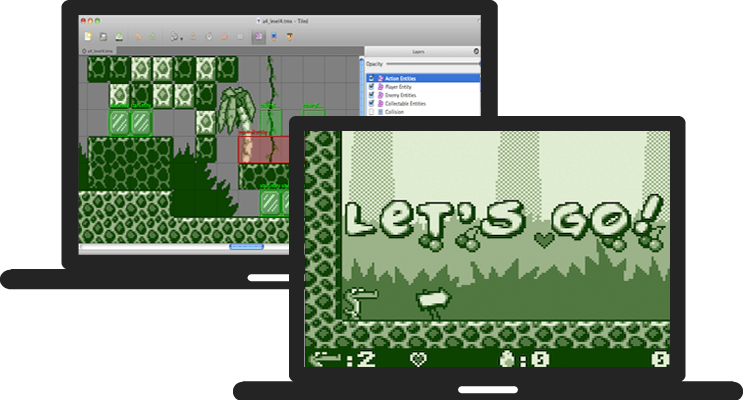
melonJS is an open-source 2.5D game engine designed for indie developers — perspective and orthogonal cameras, GPU-accelerated tilemap rendering, post-processing effects, custom shaders, 3D mesh support, polygon-accurate physics, modern Tiled workflows, and high performance. Runs on WebGPU, WebGL 2 or Canvas2D with automatic fallback. The whole engine is ~250 KB minzipped of vanilla JS/TS, with no dependencies and no toolchain lock-in. Built with modern class syntax and bundled with esbuild.
melonJS is licensed under the MIT License and actively maintained by the team at AltByte in Singapore.
Why melonJS
melonJS is designed so you can focus on making games, not on graphics plumbing.
Canvas2D-inspired rendering API — If you've used the HTML5 Canvas, you already know melonJS. The rendering API (
save,restore,translate,rotate,setColor,fillRect, ...) follows the same familiar patterns — no render graphs, no shader pipelines, no instruction sets to learn.True renderer abstraction — Write your game once, run it on WebGPU, WebGL 2 or Canvas2D with zero code changes. The engine handles all GPU complexity behind a unified API: the default
AUTOmode tries WebGPU first at startup, falls back to WebGL 2 if that is unavailable, and ultimately to Canvas, and the entire feature set renders identically on both GPU backends.Complete engine, minimal footprint — Physics, tilemaps, audio, input, cameras, tweens, particles, UI — a full game stack in a single tree-shakeable ES module. No dependency sprawl, no library stitching.
Scenes, loaded in one call —
level.load(name)brings an authored scene straight into your world. Tiled is a first-class citizen for 2D — orthogonal, isometric, hexagonal & staggered maps, animated tilesets, collision shapes, object properties, compressed formats, with GPU-accelerated tile rendering on the GPU backends — and glTF / GLB is the equivalent for 3D scenes: author in Blender (or any DCC tool), export a.glb, and the whole scene — meshes, materials, cameras, lights, and node animation — loads under aCamera3d, no per-mesh wiring. Animated models play back through the same animation API as a 2DSprite.Batteries included, hackable by design — Get started in minutes with minimal setup. When you need to go deeper: modern class-based architecture, a plugin system for engine extensions, and a clean architecture that's easy to extend without fighting the framework.
About melonJS
melonJS is a fully featured game engine :
Compatibility
- Standalone library (does not rely on anything else, except a HTML5 capable browser)
- Compatible with all major browsers (Chrome, Safari, Firefox, Opera, Edge) and mobile devices
Graphics
- Fast GPU renderers (WebGPU and WebGL 2) for desktop and mobile devices, with fallback to Canvas rendering
- Since 20.0 the aging WebGL 1 path is retired and WebGL 2 is the baseline; devices offering only WebGL 1 fall back to the Canvas renderer under
AUTO - Extensible batcher system for custom rendering pipelines, with backend-neutral vertex formats and draw topologies (declare a layout once, describe it to either GPU backend)
- High DPI resolution & Canvas advanced auto scaling
- Sprite with 9-slice scaling option and frame animation
- Built-in effects such as tinting, masking, and the full set of CSS-style blend modes (normal, none, additive, multiply, screen, exclusion, darken, lighten, overlay, hard-light, color-dodge, color-burn, soft-light, difference) — all of them supported identically on WebGPU, WebGL 2 and Canvas since 20.2
- Standard spritesheet, single and multiple Packed Textures support
- Compressed texture support (DDS, KTX, KTX2, PVR, PKM) with automatic format detection and fallback
- Hardware antialiasing (
antiAlias: true) on both GPU backends — and it survives post-processing, since the offscreen targets a post-effect chain renders into are multisampled to match - Procedural noise textures:
Noise(simplex/perlin/value/cellular, fBm / ridged / ping-pong fractal, domain warp; renderer-free and CPU-samplable for heightmaps, terrain, and spawn jitter) andNoiseTexture2d— bake a noise field into a sprite image, aGradientcolor ramp, or a live-animated tangent-space normal map for lit water and surfaces; unified under a newTexture2dbase alongsideTextureAtlas - 3D mesh rendering with OBJ/MTL model loading, multi-material support, hardware depth testing, and perspective projection via
Camera3d— retained-mode geometry, uploaded to the GPU once and re-drawn from there, so moving, rotating, scaling or re-tinting a mesh costs no vertex upload and no per-vertex CPU work at all - Mipmapped and anisotropically-filtered mesh textures on both GPU backends, so distant and grazing-angle geometry stops shimmering (opt out per mesh with
textureFilter: "nearest"for crisp pixel-art models) - Lighting, in 2D and 3D:
- 2D —
Light2das a first-classRenderable(multiple dynamic lights, radial-gradient falloff, illumination-only mode, procedural rendering viadrawLight), plus optional per-pixel normal-map shading on sprites for 3D-looking dynamic lights - 3D —
Light3ddirectional, point, spot and ambient lights, added to the world likeLight2d(half-Lambert diffuse + ambient fill, quadratic falloff and cone angles on the punctual types, runtime-manipulable for day/night), auto-loaded from a glTF scene's authored suns and lamps - up to 32 simultaneous lights on either path, with light data travelling in a uniform buffer — a static light rig costs zero GPU state changes per frame
- 2D —
- Ground ("blob") shadows for 3D objects — on by default — so characters and props read as standing on the floor instead of hovering. An ellipse matching the caster's own footprint and rotation, shrinking and fading with height above the ground; one extra draw per object, and one for an entire
InstancedMeshscatter regardless of instance count. Shaped by the light rather than always straight down:shadowLightpoints a blob at aLight3dand is re-read every draw, so a day/night cycle carries every shadow with it, whileshadowOffsetslides it out from the caster's feet,shadowStretchlengthens it for a low sun,shadowScalesizes it independently of the object, andshadowGroundNormallays it on a floor that is not level. All of them work on anInstancedMeshtoo, as one value for the whole set. Controllable per object, per glTF scene (level.load(name, { castGroundShadow, shadowLight, … })) or application-wide. Deliberately not shadow mapping: it answers "where is this standing", which is what a 2.5D scene needs - Built-in shader effects (Flash, Outline, Glow, Bloom, ToneMapping, Dissolve, CRT, Hologram, etc.) with multi-pass chaining via
addPostEffect(), plus custom shader support on both GPU backends:ShaderEffectfor per-sprite fragment effects (GLSL and/or WGSL bodies) and complete custom mesh shader programs viamesh.shader(a dual-languageGLShader: GLSL pair and/or WGSL module) - Optional HDR rendering (
hdr: true) — the camera's render targets become half-float, so additive light stops saturating on every write andBloomEffectthresholds on genuinely over-bright pixels instead of merely bright ones, withToneMappingEffectand atoneMappingsetting to compress the result back into display range when your art calls for it. Off by default and additive: nothing is inserted into your effect chain, so turning it on does not restyle a game whose look is built on clipped whites. On WebGPU it goes one step further —hdrOutput: truepresents the frame in the display's own dynamic range rather than clamping it to SDR at the last step - Trail renderable for fading, tapering ribbons behind moving objects (speed lines, sword slashes, magic trails)
- System & Bitmap Text with built-in typewriter effect
- Video sprite playback
Sound
- Web Audio support with 3D spatial audio and stereo panning, plus a procedural tone/noise API. The playback backend began as howler.js and is now a customized derivative vendored into the engine, so this is not a runtime dependency (see
src/audio/backend/LICENSE) - Built-in procedural audio primitives (envelope-shaped oscillators, white/pink/brown noise) for SFX without sample assets
- Direct
AudioContext/ master-gain accessors for custom WebAudio graphs that mix with the engine's master volume / mute
Physics
- Polygon (SAT) based collision algorithm for accurate detection and response
- Fast broad-phase collision detection using spatial partitioning (QuadTree in 2D, Octree in 3D, swapped automatically)
- Raycast, AABB and sphere region queries with precise entry geometry, including 3D raycasts (
raycast3d) - Collision lifecycle hooks on every
Renderable - Collision filtering for optimized automatic collision detection
- Multiple shapes per body for complex hitboxes
- Pluggable
PhysicsAdapterinterface for custom physics via official adapters
Input
- Mouse and Touch device support (with mouse emulation)
- Gamepad support with button and axes binding
- Keyboard event handling with key binding system
- Device motion & accelerometer support
Camera
- Multi-camera support (split-screen, minimaps, multiple viewports)
- Optional perspective camera (
Camera3d) with frustum culling for 2.5D / 3D-projected scenes — drop-in subclass of the default 2D camera - Camera follow with configurable deadzone and frame-rate-independent damping
- Built-in shake, fade, flash, and mask-based transition effects
- Per-camera post-processing pipeline with stackable shader effects and color grading (ColorMatrix)
UI
UIBaseElement/UISpriteElementcontainers for clickable, hoverable and holdable elements with full pointer-event wiringDraggable/DropTargetfor drag-and-drop with configurable overlap or contains-checkUITextButtontext button with hover, press, and key-bind support — built onBitmapText
Scenes
- Load a scene in one call with
level.load(name)— 2D Tiled maps and 3D glTF scenes alike, auto-registered on preload - Tiled map format up to 1.12 built-in support for easy level design
- GPU-accelerated tile rendering for orthogonal maps on the GPU backends (WebGL 2 and WebGPU) — each layer draws as a single quad with no per-tile loop, ~5–8× faster than the legacy CPU renderer on dense maps. Honors animated tiles, flip bits, per-layer opacity/tint/blend, and oversized bottom-aligned tiles; falls back transparently to the CPU renderer on isometric/staggered/hexagonal layers or under the Canvas renderer
- Uncompressed and compressed Plain, Base64, CSV and JSON encoded XML tilemap loading
- Orthogonal, Isometric, Hexagonal (both normal and staggered) and Oblique maps
- Multiple layers with per-layer alpha, tinting and blend modes (multiple background/foreground, collision and Image layers)
- Parallax scrolling via Image layers, with parallax origin support
- Animated and multiple Tileset support, tile sub-rectangles, embedded base64 images
- Native
.aseprite/.asetileset images (Tiled 1.11+ qaseprite plugin workflow), with frame tags auto-mapped to per-tile animations — no PNG export step required - Tileset transparency settings
- Rectangle, Ellipse, Polygon, Polyline and Capsule (round-rect) object shapes
- Tiled Objects with custom properties (string, number, boolean, color, file, object, list/array and class-typed)
- Per-object opacity and visibility
- Concave collision polygons auto-decomposed via earcut triangulation
- Flipped & rotated Tiles
- Dynamic Layer and Object/Group ordering
- Dynamic Entity loading via an extensible object factory registry — register custom handlers for any Tiled class name without modifying engine code
- Shape based Tile collision support
- glTF / GLB 3D scenes — load an authored 3D scene with
level.load(...), the same one call as a Tiled map- The whole scene loads at once — meshes, materials, cameras and lights — viewed under a
Camera3d - Automatically lit by the scene's authored lights — the sun plus any point/spot lamps set up in the authoring tool, each keeping its authored name so
getChildByName("Sun")finds it for runtime tuning - Textured, solid-colored, and vertex-colored materials
- Node animation — walk/idle/sprint characters, spinning pickups, doors, lifts — played through the same
setCurrentAnimation/play/pause/stopAPI as a 2DSprite .glband.gltffiles, with embedded or external buffers & textures- Works with any glTF authoring tool (Blender, Maya, 3ds Max, Cinema 4D, …)
- The whole scene loads at once — meshes, materials, cameras and lights — viewed under a
Assets
- Asynchronous asset loading with progress tracking
- A fully customizable preloader
- Support for images, JSON, TMX/TSX, glTF / GLB 3D scenes,
.aseprite/.asebinary, audio, video, binary and fonts
Core
Applicationclass as the modern entry point — construct it, thenawait app.init()(asynchronous since 20.0, so the WebGPU device can be acquired) — with built-in pause, resume, andfreeze()(hit-stop) primitives- A state manager (to easily manage loading, menu, options, in-game state)
- Tween effects with multiple easing functions (Quadratic, Cubic, Elastic, Bounce, etc.) and Bezier/Catmull-Rom interpolation
- Transition effects
- Pooling support for object recycling
- Particle system with
ParticleEmitter(emission rate, lifetime, velocity, gravity, blend modes), and a reference space so particles can be measured from the emitter, from the world, or from any container — a moving emitter leaves a trail instead of dragging its cloud along - EventEmitter based event system
- Persistent data storage (save/load via localStorage)
- Plugin system for extending engine capabilities
Tools integration
melonJS is supporting the below tools and frameworks natively or through our official plugin(s) :


Tools integration and usage with melonJS is documented in our Wiki.
Getting Started
The fastest way to create a new game:
npm create melonjs my-game
cd my-game
npm install
npm run dev
This scaffolds a ready-to-run project with TypeScript, Vite, and the debug plugin. It also works with plain JavaScript — just rename .ts files to .js.
You can also start from the boilerplate directly, or follow the step-by-step Platformer Tutorial.
For more details, check the wiki Details & Usage guide.
Examples
- Platformer (source)
- Isometric RPG (source)
- SVG Shapes (source)
- Graphics (source)
- Hello World (source)
- Hello WebGPU (source) — the WebGPU backend in action, with the renderer negotiation surfaced on screen
- Whac-A-Mole (source)
- Compressed Textures (source)
- Aquarium (source) — screen-space water refraction with
renderer.toFrameTexture(): fish swim across a seabed, then a water surface captures the live frame on the GPU and re-samples it through a scrollingNoiseTexture2dflow map (the standard screen-texture / opaque-frame-copy pattern) - Heat Haze (source) —
renderer.toFrameTexture()over a lit scene: normal-mapped tiles under a movingLight2d, distorted by a rising heat-haze that captures and ripples the lit frame - 3D Mesh (source)
- 3D Mesh Material (source)
- AfterBurner Clone (source) —
Camera3d+ 3D Mesh arcade shooter - Ground Shadows (source) — every blob-shadow setting side by side under an orbiting sun, including blobs lying on a slope and a 70-instance scatter that costs one extra draw
- Jungle Rabbit (source) — a low-poly river endless runner: Blender-modelled props through
InstancedMesh, a rigged paddling boat, a procedural valley and shadows laid on its banks - glTF Scene (source) — a Blender-authored, lit 3D scene loaded with
level.load - glTF Animated Model (source) — a rigged character (Kenney Blocky Characters) with node animation, driven by the Sprite-aligned
setCurrentAnimation/play/pause/stopAPI - Trail (source)
- Shader Effects (source)
- Spine (source)
Browse all examples here
Basic Hello World Example
import { Application, Text } from "https://cdn.jsdelivr.net/npm/melonjs/+esm";

// create a new melonJS application
const app = new Application(1218, 562, {
    parent: "screen",
    scale: "auto",
    backgroundColor: "#202020",
});

// initialize it (builds the renderer and appends the canvas)
await app.init();

// set a gray background color
app.world.backgroundColor.parseCSS("#202020");

// add a font text display object
app.world.addChild(new Text(609, 281, {
    font: "Arial",
    size: 160,
    fillStyle: "#FFFFFF",
    textBaseline: "middle",
    textAlign: "center",
    text: "Hello World !",
}));
Simple hello world using melonJS
Note: since version 20.0,
await app.init()is required after constructing theApplication. The WebGPU backend, whichAUTOtries first on browsers that support it, acquires its GPU device asynchronously, so initialization had to become an async step; it resolves without suspending on the WebGL and Canvas backends. On 19.x the call is optional and this example works without it.
Documentation
Plugins
melonJS provides a plugin system allowing to extend the engine capabilities.
Here is the list of official plugins maintained by the melonJS team:
- debug-plugin - a debug panel for inspecting game objects
- tiled-inflate-plugin - enable loading and parsing of zlib, gzip and zstd compressed Tiled maps
- spine-plugin - Spine runtime integration to render Spine skeletal animations, with a dedicated batcher on each renderer (WebGPU, WebGL and Canvas)
- capacitor-plugin - bridges Capacitor's native lifecycle (pause/resume, hardware back-button, orientation lock, splash) for melonJS games wrapped as iOS / Android apps
If you wish to develop your own plugin, we also provide a plugin template to help you get started.
Physics Adapters
Since 19.5, melonJS exposes a PhysicsAdapter interface so the same game code can run on either the built-in SAT physics (default) or a third-party rigid-body engine, selected via the physic option on Application. Two official adapter packages, maintained by the melonJS team:
- @melonjs/matter-adapter — matter-js integration. Rotational dynamics, constraints (springs / hinges / pins), sleeping bodies, continuous collision detection, raycasts. Showcased by the Matter Platformer and Pool (Matter) examples.
- @melonjs/planck-adapter — planck.js integration (faithful Box2D 2.3.0 port). Native joints, CCD bullet flag, sleeping bodies, native raycasts, per-body gravity scale. Showcased by the Neon Plinko (Planck) example.
See the Migrating to the Physics Adapter API, Switching Physics Adapters, and BuiltinAdapter Quirks wiki pages for migration guides and the per-adapter behaviour table.
Installation
melonJS is distributed as a tree-shakeable ES module with TypeScript declarations included. The published bundle targets ES2022 — transpile it if you need to support older browsers.
Install via npm :
npm install melonjsThen import what you need in your project :
import { Application, Sprite, loader } from 'melonjs';Or use it directly via jsDelivr CDN :
<!-- load the ES module bundle of melonJS v20.x -->
<script type="module" src="https://cdn.jsdelivr.net/npm/melonjs@20/+esm"></script>
<!-- omit the version completely to get the latest one -->
<!-- you should NOT use this in production -->
<script type="module" src="https://cdn.jsdelivr.net/npm/melonjs/+esm"></script>
Note: the debug plugin is available separately as
@melonjs/debug-plugin
Supporting older browsers
The published bundle targets ES2022, so it uses private class members and other modern syntax. A browser that predates those cannot parse the file at all — this fails at load, not at the point a feature is used.
To support older browsers, transpile melonJS together with your own code.
The usual trap is that build setups skip node_modules by default, which leaves
melonJS untouched no matter how low you set your target.
With Vite :
// vite.config.js
export default {
    build: {
        // esbuild downlevels dependencies too, melonjs included
        target: "es2020",
    },
};
With Babel, make sure melonJS is not excluded :
// webpack.config.js
{
    test: /\.js$/,
    // the default `exclude: /node_modules/` would skip melonjs
    exclude: /node_modules\/(?!melonjs)/,
    use: "babel-loader",
}
Transpiling costs some size and speed: private class members become WeakMap
lookups, which are on hot paths in the renderer. Only reach for it if you have
users on browsers that need it.
Building with AI agents
melonJS ships skills — guidance files that teach AI coding assistants the engine's conventions and, more usefully, the mistakes that fail silently rather than raising an error.
They are versioned with the engine and ship inside the package, at
node_modules/melonjs/skills/ — so a copy matching the exact release you are
running is always on disk.
Install them into whatever assistant you use, with one command :
npx skills add https://github.com/melonjs/melonJS/tree/master/packages/melonjs/skillsIt detects the assistants in your project and installs one copy of each skill
under .agents/skills/<skill-name>, then symlinks that copy into every
assistant's own directory, so .claude/skills/melonjs points back at
.agents/skills/melonjs and there is nothing to place by hand. It reports the
assistants it covers as it runs (77 of them at the time of writing). Add
-a claude-code -a cursor to target specific ones.
The set includes an AGENTS.md for anything following that convention (Codex,
Cursor, Gemini CLI); GitHub Copilot reads the same content from
.github/copilot-instructions.md. It names the three rules that produce code
which runs and is wrong, and links the API index below — if you already keep an
AGENTS.md, paste its sections into yours.
The command installs from master. To pin to the release you are running,
point it at that tag instead of master in the URL above.
The skills are plain markdown and can be read by any agent, or by a human.
For anything the skills do not cover, the complete API is indexed for agents at llms.txt — every exported class, function and type with a one-line summary and a link to its reference page, regenerated on every docs build.
Community
Join us and get help or share your projects :
Contributing
We welcome contributions! Please read our Contributing Guide before submitting changes or new features.
Sponsors
Support the development of melonJS by becoming a sponsor. Get your logo in our README with a link to your site or become a backer and get your name in the BACKERS list. Any level of support is really appreciated and goes a long way !

