
meo-skia-canvas
v5.6.6
Published
A multi-threaded, GPU-accelerated 2D graphics environment for Node: the HTML Canvas API on Skia, with GUI windows, animation, and export to raster and vector formats

Maintainers
 l7aromeo
Readme






The HTML Canvas 2D API, off-screen and
on-screen, on Google's Skia engine — so output matches Chrome's
<canvas> closely, while doing a number of
things the browser's canvas cannot.
One library, two surfaces. The same source tree ships a Rust crate and a Node addon, and they are the same API seen twice: same method names, same argument order, same state model, one implementation of the colour parser and the font stack underneath. One thing remains JavaScript-only — writing a gradient stop as a CSS string.
A fork of samizdatco/skia-canvas, by way of phyrondev/phyron-skia-canvas, and substantially diverged from both. The design is theirs; see Acknowledgements.
Contents
Quick start · What it does · Colour and precision · Performance and memory · Examples · Documentation · Platform support · Why this fork exists
Quick start
Node.js
Requires Node 22 or newer.
npm install meo-skia-canvasimport { Canvas } from "meo-skia-canvas";
let canvas = new Canvas(800, 600),
ctx = canvas.getContext("2d");
ctx.fillStyle = "#1e293b";
ctx.fillRect(0, 0, 800, 600);
ctx.font = "600 72px Helvetica";
ctx.fillStyle = "#f8fafc";
ctx.textWrap = true;
ctx.fillText("Hello", 60, 140, 680);
await canvas.toFile("out.png"); // or .pdf, .svg, .jpg, .webpNo trustedDependencies entry and no --ignore-scripts exception is needed — see
Why this fork exists.
Rust
Requires Rust 1.90 or newer.
[dependencies]
meo-skia-canvas = { version = "0.10", default-features = false, features = ["vulkan", "freetype"] }
use meo_skia_canvas::prelude::*;
let mut canvas = Canvas::new(800.0, 600.0);
{
let ctx = canvas.context();
ctx.set_fill_style_css("#1e293b")?;
ctx.fill_rect(0.0, 0.0, 800.0, 600.0);
let mut font = Font::new("Helvetica", 72.0);
font.weight = 600;
ctx.set_font(&font);
ctx.set_fill_style_css("#f8fafc")?;
ctx.fill_text("Hello", 60.0, 140.0, Some(680.0));
}
canvas.to_file("out.png", &EncodeOptions::default())?;The crate is a consumer API, not a byproduct of building the addon. Every public type is reachable
as meo_skia_canvas::Thing — the modules group them by subject for reading, but one drawing reaches
across several and nothing should require knowing which — and the prelude globs the same set. The
Node binding stays behind an internal module, and no signature anywhere in the crate hands you a
skia_safe or neon type — windowing included. scripts/check-public-api.mjs reads rustdoc's JSON
in CI and fails on a leak, with no module exempted, so the promise is checked rather than kept by
hand.
Reference: docs/rust.md. Runnable code:
examples/rust — six programs, four of them line-for-line translations of their
examples/node counterparts, so anything one surface can draw the other can too.
Cargo features
| Feature | Notes |
| ------------ | ---------------------------------------------------------------------------------------- |
| vulkan | Vulkan backend (Linux / Windows). |
| metal | Metal backend (macOS). |
| window | winit-backed event loop. |
| freetype | Bundle FreeType + WOFF2 (recommended on minimal containers). |
| node-addon | Register the #[neon::main] Node addon entry point. Pure-Rust consumers leave this off. |
The default feature set is empty; opt in to the backend you need.
Skia version
Built on skia-safe 0.99, which pins Skia
M150 — the branch
Chrome 150 builds from, which is what "output matches Chrome's canvas" is measured against.
The Skia revision comes from skia-safe; bumping it is a minor-version event for this crate, and
the changelog records which pairing each release shipped.
What it does
Everything a browser canvas does, and then:
- Raster and vector export — PNG, JPEG, WebP, GIF, APNG, TIFF, ICO, BMP, AVIF, PDF, SVG and raw pixel buffers. Skia encodes three of them; the rest are written here.
- The depth the drawing has — a float canvas is written at sixteen bits a channel as a PNG,
APNG or TIFF rather than rounded to eight on the way out, and AVIF codes 8, 10 or 12 through
bitDepth. JPEG, WebP, GIF, ICO and BMP are eight-bit by definition and narrow what they are handed. - Animation — pages are frames. WebP, GIF, APNG and AVIF take
fpsor a per-frameframeDelaysarray. All four send only the rectangle each frame changed; AVIF also codes frames against each other, which is why eight frames of a moving square come to 1146 bytes where a single still is 285. - An animation read back reports its own
framesanddelays, so re-encoding one is a round trip. Skia decodes neither APNG nor AVIF — it opens an APNG as the still inside it — so this library demuxes both itself,fcTLrectangles, disposal and blending included, and reads AVIF end to end: tile grids,irot/imirorientation, ICC profiles, narrow-range levels, 4:2:0 chroma. - AVIF has dials the others do not —
chromaSampling("4:4:4","4:2:2","4:2:0") andlossless. Both default to the conservative answer; both are measured in Performance. - An SVG says what the canvas drew — a conic gradient, shadow, blend mode or filter is embedded as pixels where SVG cannot describe it rather than silently dropped; everything else stays vector.
- Multi-page documents —
newPage()builds a canvas up as pages, written as one PDF, TIFF or ICO, or as an image sequence.pageRangetakes a span rather than one page or all of them — which is how an animation that plays an introduction once then cycles forever is written from one canvas, since a file carries one loop count. - A canvas drawn onto a canvas is replayed, not resampled.
drawCanvasre-rasterizes the source recording at the destination scale, so scaling up has no resampling artifacts — where a browser would rasterize first and filter after. Its compositing stays its own. One exception: a source that has itself drawn a canvas is rasterized at its own size before it is drawn, so scaling that up does resample — a hard diagonal blown up eight times leaves 4778 intermediate pixels against 400 for a source with nothing nested in it. - GUI windows with a browser-like event framework
(
Window,App), from Rust as well as Node, behind thewindowfeature. - Path geometry — boolean operations plus
simplify,round,trim,jitter,points,interpolate; 3D perspective viacreateProjection(); vector textures (createTexture()) as a fill style; custom line-dash markers. - The full CSS filter set — blur, drop-shadow, hue-rotate and the rest — plus CanvasKit's
ColorFilter,ImageFilter,MaskFilter,ShaderandColorMatrix. - Typography — word-wrapped multi-line text, per-line metrics, variable-font axes, OpenType
features through
font-variant, letter/word spacing, fonts from disk or memory, andParagraphBuilder/Paragraphfor rich text with mixed styles, per-run shadows and hit-testing. - Threaded rendering and I/O — a worker pool handles asynchronous export off the main thread.
Colour and precision
A canvas composites in the space you name and exports in it, rather than compositing in sRGB and converting at the end:
let canvas = new Canvas(1920, 1080, {
  colorType: "RGBAF16", // case-sensitive; an unrecognized name silently means RGBA8888
  colorSpace: "display-p3", // or rec2020, srgb-linear, rec2020-pq, ...
});
Fifteen names across eight spaces — sRGB, Display P3, Rec. 2020, HDR10 (PQ), HLG and linear variants
— on both surfaces. getImageData reads back in any of them, and the CSS Color 4 functions parse:
lab(), lch(), oklab(), oklch(), hwb() and color(<space> r g b / a). The same sRGB red,
read four ways: srgb 255,0,0 · display-p3 234,51,35 · rec2020 210,84,46 · rec2020-pq
136,83,56.
A float colorType composites in float, not merely reads back in it. Sixty fills at 0.6% alpha
land on 0.30308 (RGBAF32) and 0.30298 (RGBAF16) against an arithmetic answer of 0.30308.
At eight bits every layer rounds to a whole level and the error compounds: 0.23922 on the CPU, and
0.36078 on the GPU, which misses in the other direction. It costs twice the memory for RGBAF16
and four times for RGBAF32; the time cost depends entirely on what you draw, and is measured under
Performance and memory. Such a canvas renders on the raster backend
whatever gpu says, because no GPU backend Skia ships today composites in float accurately, and
canvas.engine reports which engine took it.
The rec2020-pq and rec2020-hlg spaces build a canvas with that transfer function and tag exports
with it, which is what a Rec. 2020 pipeline wants. They do not carry HDR values: a colour still
clamps at 1.0 on the way in, and none of the formats Skia encodes here — PNG, JPEG, WebP — is an HDR
container.
Performance and memory
just bench runs examples/node/benchmark.js and prints all of
this. Figures are one machine — an Apple M4 Pro on Metal, 1200×900. Treat the ratios as the
transferable part and the milliseconds as local colour.
Drawing. A mixed vector scene — 300 bezier strokes, 60 shadowed rounded panels, 40 lines of text — takes 2.4 ms on the GPU against 4.1 on the CPU. What a float canvas costs runs in both directions, which is why there is no single multiplier:
| workload (CPU) | RGBA8888 | RGBAF16 | RGBAF32 |
| ---------------------- | ---------- | --------- | --------- |
| mixed vector scene | 4.2 ms | 1.11× | 1.15× |
| 120 translucent layers | 6.4 ms | 0.74× | 0.75× |
| 120 opaque fills | 0.5 ms | 1.34× | 7.33× |
Blending translucent layers is faster in float: an eight-bit surface converts through its
transfer function on every layer and a float one does not. Opaque fills go the other way, and
RGBAF32 falls off a cliff rather than scaling with its byte count. RGBAF16 stays close to its
memory cost throughout, which makes it the one to reach for unless you need 32-bit precision.
A canvas drawn into a canvas, behind a clip. Only a source that has itself drawn a canvas is rasterized at all; the cost of that is the clip's rather than the source's, so a hundredfold heavier source does not cost a hundredfold more:
| ops in the source | cpu | gpu | | ----------------- | ------- | ------- | | 200 | 0.07 ms | 0.48 ms | | 20,000 | 0.07 ms | 0.53 ms |
Both round into the same tenth of a millisecond from JavaScript because the per-call cost of the binding is larger than the difference. The crate shows what is underneath — 14.7 microseconds against 43.8 for the same two sources — so it is sub-linear rather than flat: replaying the source still walks its picture to cull it. The gpu column is higher because each round ends in a read, and reading a gpu surface waits for the device.
Encoding. One page, and the same page as a thirty-frame animation with one moving element — the four formats that carry a clock send only the rectangle each frame changed, so a still background is compressed once rather than thirty times:
| format | one page | size | 30 frames | size | | ------ | -------: | ------: | --------: | ------: | | JPEG | 13.3 ms | 802 KB | — | — | | BMP | 25.1 ms | 4219 KB | — | — | | PDF | 27.6 ms | 164 KB | — | — | | PNG | 45.5 ms | 1031 KB | — | — | | SVG | 46.8 ms | 175 KB | — | — | | GIF | 65.1 ms | 492 KB | 291.3 ms | 724 KB | | WebP | 72.6 ms | 378 KB | 195.9 ms | 570 KB | | TIFF | 81.9 ms | 1034 KB | — | — | | APNG | 82.9 ms | 1033 KB | 178.9 ms | 1535 KB | | AVIF | 91.1 ms | 566 KB | 720.0 ms | 1705 KB |
Neither column means much alone — the fastest encoder here writes the largest file and the slowest writes the smallest. Five rows need a word. BMP is uncompressed, so it is the size of the raw buffer. SVG's 46 ms is this scene, which is shadowed — a page SVG can describe whole takes 8 ms.
The other three are one idea three times. PNG, APNG and TIFF all sample the page and ask whether storing a neighbour's difference makes the file smaller, because the answer is a property of the drawing rather than of the format: on this page filtering does not pay, on a gradient it does not either, and on a photograph it does. PNG then compresses at Skia's own level rather than a cheaper one, which here is 45 ms and 1031 KB against 37 and 1090. A one-page APNG has no animation chunks and so is a PNG, which is why the two land within two kilobytes of each other; it costs more time because it is this crate's writer rather than Skia's. TIFF is deflate with the same question asked along the row instead of down the page.
Decoding: PNG 4.7 ms, AVIF 69.2 — AVIF both ways is this library's own code, since Skia reads none of it, and the decode is the one direction that is still single-threaded.
AVIF is the interesting row, and it buys something: 566 KB at 41.8 dB PSNR where JPEG is 802 KB at 34.9 — smaller and closer to the original. WebP lands at 411 KB and 25.6 dB, which is libwebp targeting a perceptual metric rather than PSNR on the hardest case for it, antialiased diagonals and small type. It used to be the slow one by a distance, at 237 ms; a page is now divided into tiles the encoder can code in parallel, which is 90. Across frames it is still the slowest, and that part is structural: AV1 predicts each frame from the one before it, so its frames genuinely cannot be coded in parallel where the other three are. Its own dials move both axes at once:
| AVIF option | time | size | | AVIF option | time | size |
| -------------- | ------- | ------- | --- | ------------------------- | ------- | ------- |
| quality 0.5 | 84.0 ms | 217 KB | | chromaSampling: "4:2:2" | 82.4 ms | 447 KB |
| quality 0.92 | 89.9 ms | 566 KB | | chromaSampling: "4:2:0" | 78.2 ms | 372 KB |
| quality 1.0 | 94.9 ms | 2021 KB | | lossless: true | 91.6 ms | 2365 KB |
Subsampling is cheaper and smaller, but on text and flat panels it costs far more quality than
it saves bytes — right for a photograph, wrong for a chart, hence the "4:4:4" default.
Memory is 4, 8 and 16 bytes a pixel for a surface — but a canvas only pays that when something makes it draw a whole one. Reads composite the tiles they touch, so a canvas read one pixel at a time holds a fraction of its surface, and one read whole holds more than it:
| resident per canvas | read one pixel | read whole page | a full surface |
| ------------------- | -------------: | --------------: | -------------: |
| RGBA8888 | 0.33 MB | 9.41 MB | 4.12 MB |
| RGBAF16 | 0.59 MB | 12.91 MB | 8.24 MB |
| RGBAF32 | 1.09 MB | 23.20 MB | 16.48 MB |
The middle column runs past the surface because a whole-page read materializes the surface and hands a copy of it to the caller, so the arithmetic is paid twice over.
Twenty 1200×900 canvases held at once, resident memory either side of the loop, in a process that
does nothing else, median of three. It needs repeating before it is believed, either way: a single
pass reads whatever the allocator happened to do, and has come back at 2.91 MB for the eight-bit
case and at a negative number for RGBAF32.
Antialiasing coverage is where the GPU and the CPU disagree, and neither GPU path matches the raster one. Sweeping a rectangle's width from 0.05 to 1 pixel: the CPU renderer is exact to within a level; 4𝗑 MSAA quantizes to quarters — 0, 64, 127, 191, 255 — so a shape thinner than about an eighth of a pixel drops out entirely; shader-based AA is smooth but reads systematically low, putting 159 where a half-covered black edge should read 127. Total error runs 10, 307 and 427 respectively, identical on Metal and Vulkan. The default is the closer of the two GPU options; if coverage has to match the CPU exactly, render on the CPU.
Two caveats. Benchmark on a release build or not at all. Most rows barely move — that work is inside Skia and is optimized either way — but AVIF is 788 ms on a dev build against 90 on release and GIF 3881 against 63, because both reach their codec through this crate's own per-pixel work, and that is Rust: a colour conversion for one, a k-means palette for the other. And the GPU row is the least reproducible, moving between 2.9 and 3.6 ms across runs where the CPU row held between 4.3 and 4.7.
Examples
Three runnable scripts in examples/node. The images below are their actual output
and just examples redraws them, so they cannot drift from what the library does. The two still
sheets pin {gpu: false} so their files are byte-identical between machines: the renderers
antialias differently enough that 19% of bytes differ on the same drawing, and a committed image
that changes on every regeneration is noise in every diff. The animation draws on the GPU, which is
what you would actually use, and so is not byte-reproducible across machines; MEO_EYE_CPU=1 pins
it to the CPU, which is. Build the release binary before regenerating: the animation is 150 frames
in three formats and takes about 27 seconds through just build-release, against minutes on a
debug build — the same code with the optimizer switched off, and most of the difference is this
crate's own Rust rather than Skia's C++.
Each has a Rust twin in examples/rust that draws the same picture —
cargo run --example report_card, feature_sheet, animated_eye, benchmark. They are the
parity test that matters: an operation the crate cannot express is one the port cannot compile, and
writing them turned up five real bugs, including gradient stops rendering far too dark and a
rects_for_placeholders that could only ever return empty.
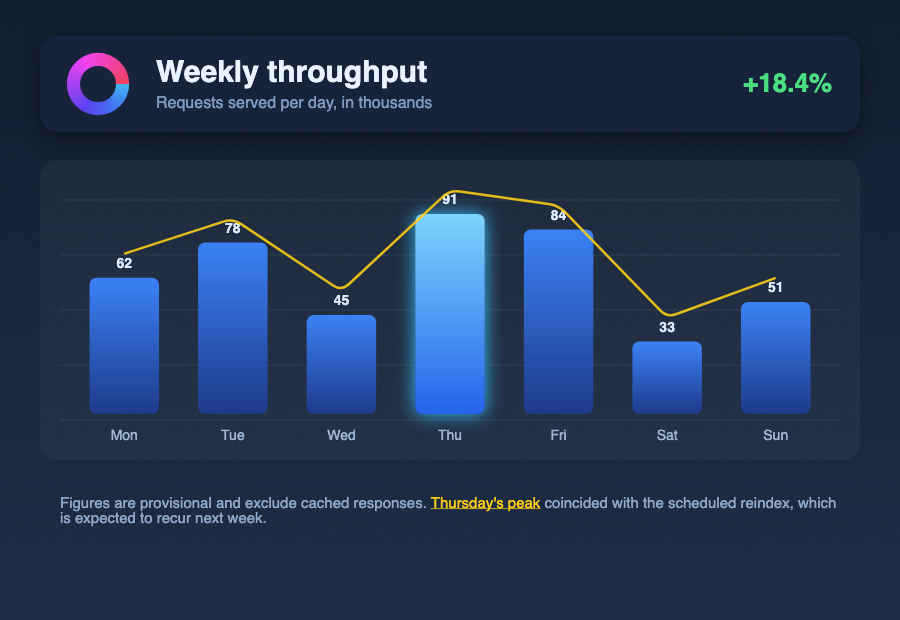
report-card.js
The sort of composition a report generator produces: gradients, a conic-gradient logo drawn on its
own canvas, rounded panels with shadows, a MaskFilter glow on the tallest bar, a noise Shader
background, a Path2D.round() trend line, and a wrapping Paragraph with a styled run. It exports
the same drawing to PNG, JPEG, WebP, PDF and SVG, and writes a three-page PDF through newPage().
feature-sheet.js
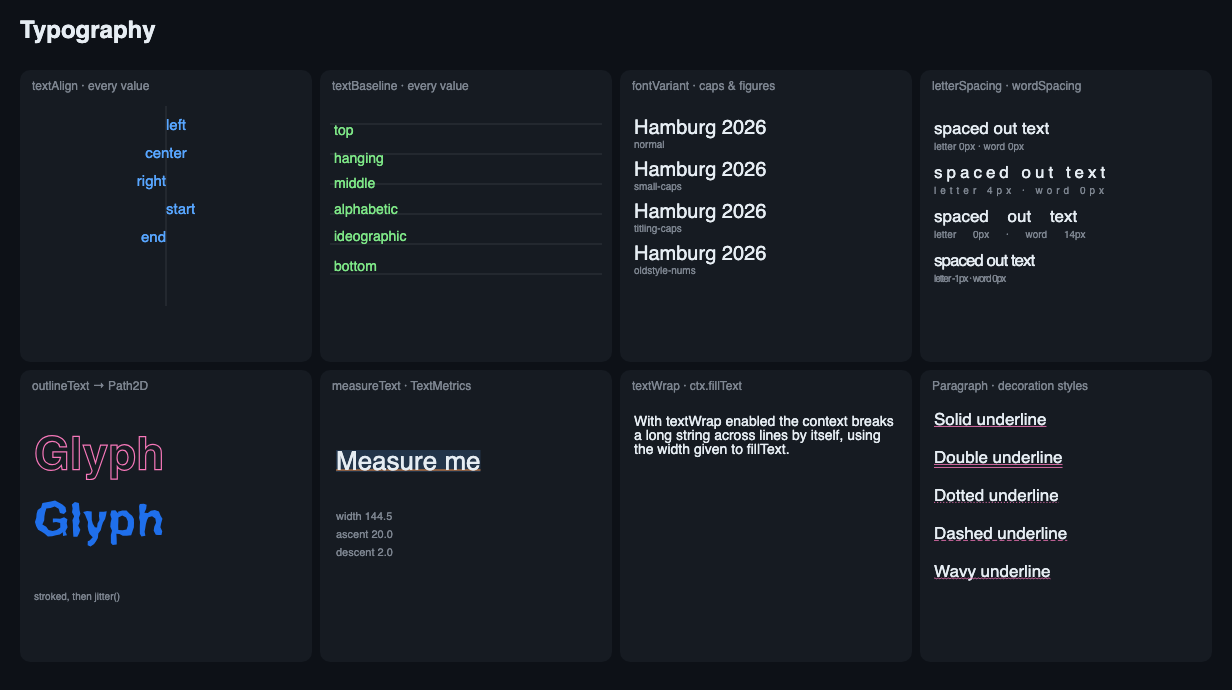
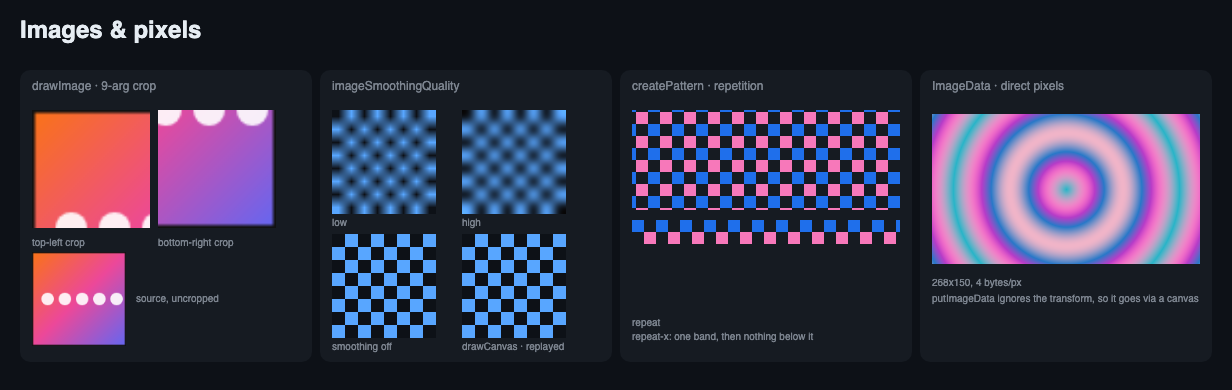
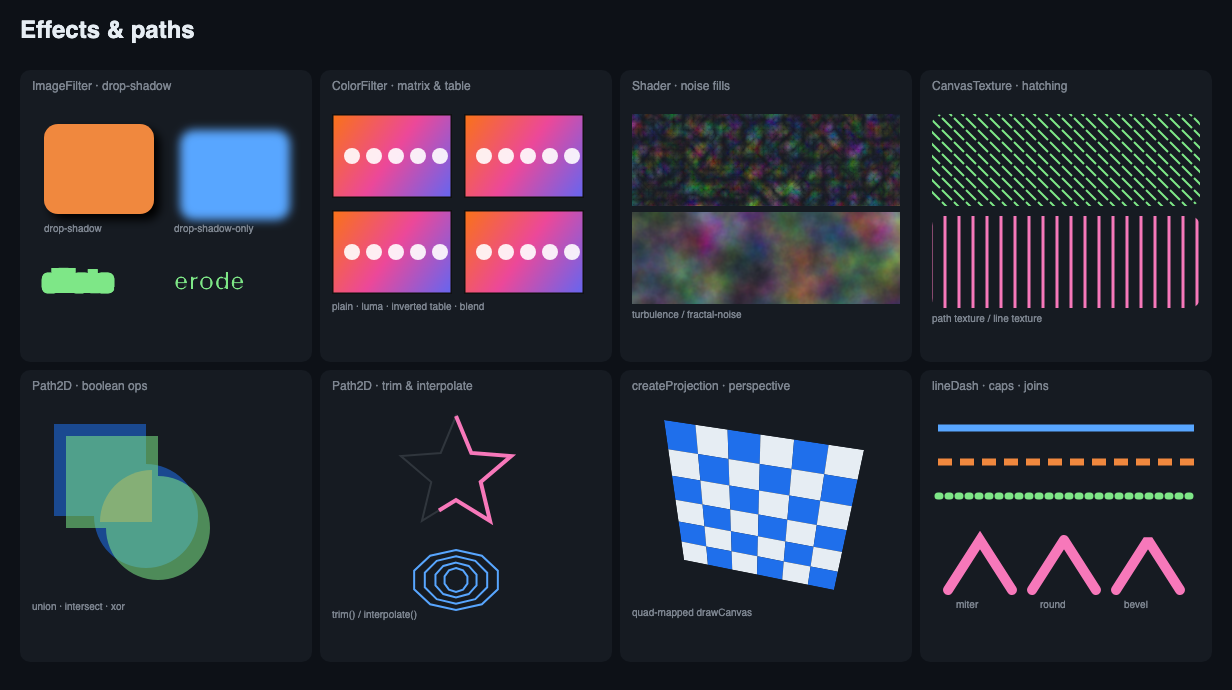
Test cards, one labelled panel per feature area — the shape of thing worth checking by eye after a change that could move pixels, since a diff against a previous build only proves nothing changed.
animated-eye.js

An eye that winks, written without a single keyframe. The lid, pupil, gaze, brow and all 200 lashes are spring-dampers integrated at a fixed 240 Hz, so the motion is what the forces produce rather than a curve someone drew. The lid spring is deliberately asymmetric — stiff closing, soft opening — so the wink snaps shut and drifts back open past its resting point, and lid velocity draws a second ghost copy of every lash, which is motion blur that costs nothing and shows only on the snap. Two details are there because eyes have them and drawings usually do not: the ball rolls up as the lid falls, and the catchlights sit on the cornea rather than the iris plane, tracking the gaze at half speed. That parallax is most of what makes it read as a dome rather than a disc.
It leans on four things a browser canvas has no answer for: Path2D.jitter() for a hand-drawn edge
on every hair, MaskFilter for the occlusion in the socket, a Display P3 canvas for iris blues
outside sRGB, and writing the animation straight out of the canvas's own pages.
The same 150 frames are 2.7 MB as an AVIF, 4.7 MB as a WebP and 12.2 MB as a GIF. AVIF wins because it codes each frame against the ones before it. GIF loses on colour, not on structure: it quantises each frame to 256 entries and this drawing is mostly smooth gradient, which is what banding shows up in worst. It is also the drawing where dirty rectangles buy nothing — 260 film-grain specks are reseeded every frame, so nearly the whole page changes and every format's rectangle is nearly the whole page. Both AVIF and WebP carry the Display P3 profile, which GIF has nowhere to put.
Timing separates them the other way, and AVIF does not win it. GIF stores a delay in hundredths of a second, so a 60fps frame is not a whole number of them; the delays are spread so the average rate is right, but a browser will not play it — Firefox and Chrome both render any frame of 10ms or less at 100ms, so above 50fps the short frames stretch and the animation limps. AVIF and WebP store whole milliseconds, alternating 16 and 17. The one format exact at 60fps is APNG, which stores the delay as a fraction, and it cost 34 MB to be right about a third of a millisecond a frame; this example stopped writing one.
The showcase below is the WebP, for a reason unrelated to encoding: browsers do not loop an animated AVIF. They play it through once, so the smallest of the three is the one that stops after a single wink.
Documentation
Both surfaces have a generated reference, built from the source they ship rather than written alongside it:
| Reference | Built from | Tracks | | ----------------------------------------------------------------- | ---------------------------------------------- | ---------------------- | | JavaScript API | The type declarations that ship in the package | Published, per version | | docs.rs | The Rust crate, from its own doc comments | Published | | jsdocs.io | The same declarations, hosted elsewhere | Published |
The JavaScript reference is published per release: latest/ follows the newest published version,
and every release keeps its own copy at /vX.Y.Z/, so a project pinned to an older one still has
its documentation. It deliberately does not track main — a reference describing methods that are
not in anyone's node_modules yet is worse than none, because the reader cannot tell which half of
the page they can call.
It is the same TypeDoc build locally: just docs runs it against the working tree, and fails on a
broken link or a type that reaches a signature without being exported, which a rendered page would
show you no sign of.
Only the JavaScript half is self-hosted. TypeDoc reads the declarations and needs no native module;
cargo doc needs a full Skia build, and docs.rs already publishes that result, per version, for
nothing.
The pages below are written by hand, and are the half a generator has nothing to say about:
| Guide | Covers | | ------------------------------------------ | ------------------------------------------------------------------------ | | Getting started | Install and first render. | | Node API | Platform notes, JavaScript API, benchmarks. | | Rust crate | The crate surface, and how it differs from the JavaScript one. | | Drawing context | The illustrated tour — conic curves, textures, dash markers, projection. | | Path geometry | Boolean operations, trim, jitter, interpolate, with pictures. | | Changelog | Both release channels. |
Platform support
Prebuilt binaries are published for Linux (x64/arm64, glibc and musl), macOS (arm64) and Windows (x64/arm64). The Linux floors are measured on the released artifacts rather than assumed:
| distribution | glibc | support window | | ------------------------------ | ----- | ----------------- | | RHEL / Rocky / Alma 8 | 2.28 | supported to 2029 | | Ubuntu 20.04, Debian 11 | 2.31 | | | AWS Lambda / Amazon Linux 2023 | 2.34 | supported to 2028 | | RHEL / Rocky / Alma 9 | 2.34 | supported to 2032 |
There are two floors, not one: the module links libstdc++ as well, and a symbol newer than the
target's fails to load exactly like a glibc one. The build asserts both ceilings on every Linux
artifact — glibc 2.34, GLIBCXX 3.4.25 — which is what makes the table above a commitment
rather than a description.
Why this fork exists
Two surfaces, one implementation. The reason this tree exists rather than a patch set. A Rust
crate and a Node addon are built from the same source, and they are the same API seen twice —
same method names, same argument order, same state model, one colour parser and one font stack
underneath. The crate is a consumer API rather than a byproduct of building the addon: no
signature anywhere hands you a skia_safe or neon type, windowing included, and
scripts/check-public-api.mjs reads rustdoc's JSON in CI and fails on a leak with no module
exempted. A Rust program and a Node program drawing the same picture reach the same code.
The binary arrives without running anything. One npm package per target, selected by
os/cpu/libc, rather than fetched by an install script. bun blocks install scripts unless the
package appears in the consuming project's trustedDependencies — a list that is not inherited
from dependencies, so no package depending on this one could fix it for its own users — and
--ignore-scripts blocks them everywhere else. The download remains as a fallback.
The Linux floors are commitments, not descriptions. Two of them, because the module links
libstdc++ as well and a symbol newer than the target's fails to load exactly like a glibc one.
Every Linux artifact is asserted against both — glibc 2.34, GLIBCXX 3.4.25 — on every build,
and a separate job loads the published AWS layer and renders through it. See
Platform support.
It is built for processes that run for hours. A canvas library is easy to get right for one drawing and hard to get right for a hundred thousand, and that is where most of the work here has gone. Every cache states what bounds it, what invalidates an entry that has gone wrong, and what releases it when its owner is gone — the rasterized-page memoization by bytes rather than count, because pages are not one size; the tile grid a read composites through; the font, variant and filter parses. Rendering that stops hands its memory back rather than holding a high-water mark. None of that is visible in a single draw: the cache, the garbage collector's finalizer and the allocator each behave exactly as documented, and it is the three together, under sustained load, that hold the memory.
Nothing here is tuned by assertion. Where a setting could go either way, the drawing decides and the probe is measured: whether filtering a PNG's rows makes the file smaller, whether TIFF's predictor pays, how many tiles an AVIF frame is worth splitting into. Where a setting is pinned, the comment says what pinning costs and what the alternative was measured at. The changelog records each change with the measurement that identified it, including the ones that turned out to be measurement error.
This began as a fork and the architecture is inherited — the Skia binding, the canvas state model, the font stack. It has since diverged substantially, in the API surface it offers, in what it publishes, and in what it holds while it runs. See Acknowledgements.
Acknowledgements
Built on rust-skia (skia-safe + skia-bindings).
Forked from samizdatco/skia-canvas, by way of phyrondev/phyron-skia-canvas. The architecture here is theirs — the Skia binding, the canvas state model, the font stack — and so is the groundwork everything since has been built on; thanks to the contributors of both projects.
License
MIT. See LICENSE.
© 2020–2026 Samizdat Drafting Co., Phyron AB and contributors. © 2026 L A Romeo, for changes made in this fork.