
mer-inkdrop
v1.0.0
Published
Generate Mermaid flow diagram images for GitHub PRs


Readme
mer-inkdrop
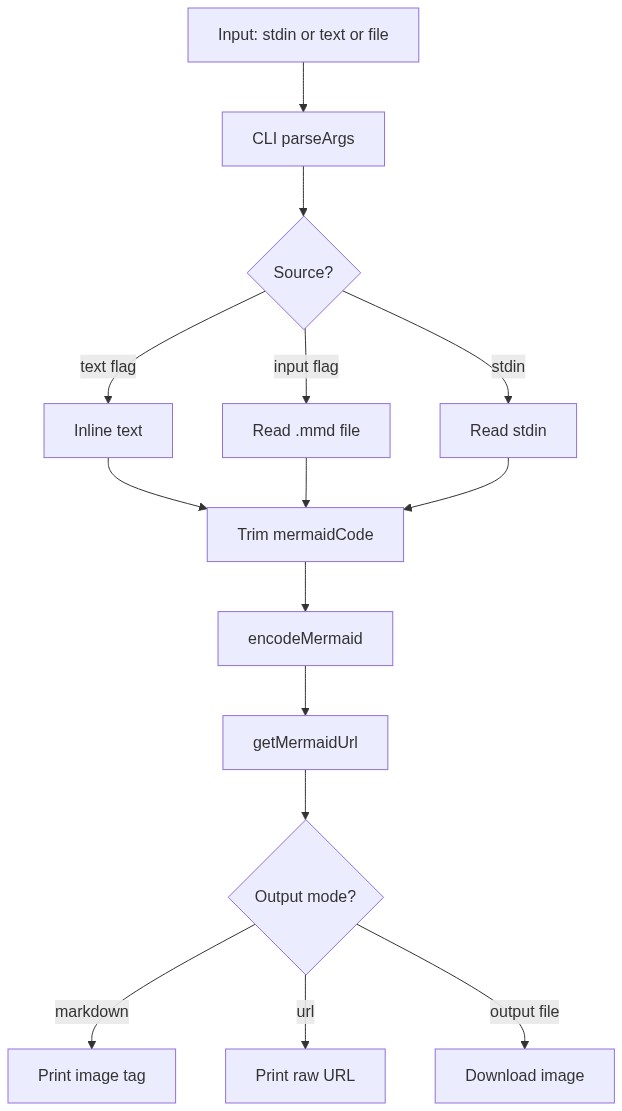
A CLI tool that generates rendered Mermaid flow diagram images for GitHub PRs. Instead of embedding raw Mermaid code blocks in PR descriptions, mer-inkdrop encodes diagrams and returns a mermaid.ink hosted image URL — ready to paste as a markdown image tag.
Install
The package is not yet published to npm. Install locally from source:
git clone <this-repo>
cd mer-inkdrop
pnpm install
pnpm run build
pnpm link          # makes `mer-inkdrop` available in PATH
# or: pnpm install -g .
Verify:
which mer-inkdrop
mer-inkdrop --help
Usage
# Inline diagram → markdown image tag (default output)
mer-inkdrop -t "graph TD; A-->B" --markdown

# From a .mmd file
mer-inkdrop -i flow.mmd --markdown

# Pipe from stdin
echo "graph TD; A-->B" | mer-inkdrop

# Output options
mer-inkdrop -i flow.mmd --url           # print raw URL
mer-inkdrop -i flow.mmd -o flow.png     # download image locally

# Styling
mer-inkdrop -i flow.mmd --format svg --theme dark --alt "Order Flow" --markdown
mer-inkdrop -i flow.mmd --bg white --width 800 --height 600
Options
| Flag | Short | Description | Default |
| ----------------- | ----- | --------------------------------------- | -------------- |
| --input <file> | -i | Path to .mmd file | — |
| --text <text> | -t | Inline Mermaid diagram | — |
| --output <file> | -o | Download image to file | — |
| --url | | Print raw image URL | — |
| --markdown | | Print markdown image tag | ✓ |
| --format <fmt> | -f | png or svg | png |
| --theme <theme> | | default, dark, forest, neutral | default |
| --alt <text> | | Alt text for markdown image | Flow Diagram |
| --bg <color> | | Background color (e.g. white, !fff) | — |
| --width <px> | | Image width in pixels | — |
| --height <px> | | Image height in pixels | — |
Claude Code Skill
mer-inkdrop is designed to be used with the /pr-automation Claude Code skill, which automates PR creation with structured descriptions and optional flow diagrams.
The skill file is included in this repo at .claude/commands/pr-automation.md. To install it globally so it works across all your projects:
cp .claude/commands/pr-automation.md ~/.claude/commands/pr-automation.mdmer-inkdrop must be in your PATH for the skill to work (see Install above).
Once installed, use /pr-automation in Claude Code to:
- Commit, push, and open a PR in one step
- Auto-generate a Mermaid flow diagram for PRs that introduce new workflows or API patterns
- Produce consistent PR descriptions with overview, changes table, and testing notes
Development
Built with Vite+ for blazing-fast builds and type checking.
pnpm install
pnpm test                 # run tests (vitest)
pnpm run typecheck        # type check (tsc)
pnpm run build            # bundle to dist/