mercator-proj
v1.0.1
Published
[](https://travis-ci.com/sakitam-gis/mercator-proj) [
Maintainers
 sakitam-fdd
Readme




mercator-proj is a tool library for calculating web Mercator projection on GPU using webgl This project using a technique borrowed from deck.gl, all codes are from deck.gl. The community already has projects like mercator-gl, but I also found some problems in practical application see link, And by comparison deck.gl More abundant tool functions are provided.
Other technical solutions
RTE(Relative to Eye) scheme for mapbox-gl,here is the simplest example for this solution, but what cannot be solved for the time being is the floating point precision problem of some mobile devices, such as iPhone 11 (IOS 14.4) at the high level (> 20)
<!DOCTYPE html>
<html lang="zh">
<head>
  <meta charset="utf-8" />
  <title>Triangle</title>
  <meta name="viewport" content="initial-scale=1,maximum-scale=1,user-scalable=no" />
  <link href="https://cdn.jsdelivr.net/npm/@sakitam-gis/[email protected]/dist/mapbox-gl.css" rel="stylesheet" />
  <style>
    body { margin: 0; padding: 0; }
    #map { position: absolute; top: 0; bottom: 0; width: 100%; }
  </style>
</head>
<body>
<div id="map"></div>
<script src="https://cdn.jsdelivr.net/npm/@sakitam-gis/[email protected]/dist/mapbox-gl.js"></script>
<script type="module">
  import REGL from 'https://cdn.skypack.dev/regl';
  import { mat4, vec4 } from 'https://cdn.skypack.dev/gl-matrix';
  mapboxgl.accessToken = "pk.eyJ1Ijoic21pbGVmZGQiLCJhIjoiY2tnN2Iybm91MDIzajJ5bHM1N3o5YzgybiJ9.KI0dCXX1rAfcLO1iwGKwHg"; // eslint-disable-line

  const length = 10;
  function random(min, max) {
    return (Math.random() * (max - min)) + min;
  }

  function fp64LowPart(x) {
    return x - Math.fround(x);
  }

  function generateData (count) {
    const data = [];
    for (let i = 0; i < count; i++) {
      let val = Math.random() * 512;
      const x = random(-180, 179);
      const y = random(-85, 85);
      data.push([x, y, val]);
    }
    return data;
  }

  function generateColors (count) {
    const data = [];
    for (let i = 0; i < count; i++) {
      data.push(random(0, 1), random(0, 1), random(0, 1));
    }
    return data;
  }

  function transformMat4(out, a, m) {
    var x = a[0], y = a[1], z = a[2], w = a[3];
    out[0] = m[0] * x + m[4] * y + m[8] * z + m[12] * w; // 0
    out[1] = m[1] * x + m[5] * y + m[9] * z + m[13] * w; // 0
    out[2] = m[2] * x + m[6] * y + m[10] * z + m[14] * w; // 0
    out[3] = m[3] * x + m[7] * y + m[11] * z + m[15] * w; // 1
    return out;
  }

  function getEye (matrix) {
		const defaultMat4 = [1, 0, 0, 0, 0, 1, 0, 0, 0, 0, 1, 0, 0, 0, 0, 1]; // insted of mat4.create()
    let eye = transformMat4([], [0, 0, 0, 1], mat4.invert(defaultMat4, matrix))
    // const b = transformMat4([], eye, matrix); // will be [0, 0, 0, 1]
    // console.log(b);
    const clip_w = 1.0 / eye[3];
    eye = eye.map(item => item / eye[3]);
    eye[3] = clip_w;
    return eye;
  }

  const coordinates = generateData(length * 3);
  const colors = generateColors(length * 3);

  class CustomLayer {
    constructor(options) {
      this.id = 'custom-layer';
      this.type = 'custom';
      this.renderingMode = '2d';

      this.options = { ...options };
    }

    onAdd(m, gl) {
      this.map = m;

      this.regl = REGL({
        gl: gl,
      });

      let i = 0;
      const len = coordinates.length;
      const instancePositions = new Float32Array(len * 3);
      const instancePositions64Low = new Float32Array(len * 3);

      for (; i < len; i++) {
        const coords = coordinates[i];
        const mc = mapboxgl.MercatorCoordinate.fromLngLat([coords[0], coords[1]], coords[2]);
        instancePositions[i * 3] = mc.x;
        instancePositions[i * 3 + 1] = mc.y;
        instancePositions[i * 3 + 2] = 0;

        instancePositions64Low[i * 3] = fp64LowPart(mc.x);
        instancePositions64Low[i * 3 + 1] = fp64LowPart(mc.y);
        instancePositions64Low[i * 3 + 2] = 0;
      }

      this.drawTriangle = this.regl({

        // Shaders in regl are just strings.  You can use glslify or whatever you want
        // to define them.  No need to manually create shader objects.
        frag: `precision highp float;
varying vec3 vColor;
void main() {
  gl_FragColor = vec4(vColor, 0.5);
}
`,

        vert: `attribute vec3 instancePositions;
attribute vec3 instancePositions64Low;
attribute vec3 a_colors;

uniform mat4 u_matrix;
uniform vec4 u_cameraEye;
uniform vec4 u_cameraEye64Low;
uniform float u_offset;
varying vec3 vColor;

void main(void) {
  vec4 pos = vec4(instancePositions - u_cameraEye.xyz, 0.0);
  pos += vec4(instancePositions64Low - u_cameraEye64Low.xyz, 0.0);
  gl_Position = u_matrix * vec4(pos.xy + vec2(u_offset, 0.0), pos.zw);
  gl_Position.w += u_cameraEye.w;
  vColor = a_colors;
}`,

        // Here we define the vertex attributes for the above shader
        attributes: {
          instancePositions: this.regl.buffer(instancePositions),
          instancePositions64Low: this.regl.buffer(instancePositions64Low),
          a_colors: this.regl.buffer(colors),
        },

        uniforms: {
          u_matrix: this.regl.prop('u_matrix'),
          u_cameraEye: this.regl.prop('u_cameraEye'),
          u_cameraEye64Low: this.regl.prop('u_cameraEye64Low'),
          u_offset: this.regl.prop('u_offset'),
        },

        // This tells regl the number of vertices to draw in this command
        count: length * 3,
        primitive: 'triangles',
        blend: {
          enable: true,
          func: {
            src: 'src alpha',
            dst: 'one minus src alpha',
          },
          equation: {
            rgb: 'add',
            alpha: 'add',
          },
          color: [0, 0, 0, 0],
        },
      });
    }

    render(gl, matrix) {
      const cameraEye = getEye(matrix);
      const cameraEye64Low = cameraEye.map(item => fp64LowPart(item));

      const worlds = this.getWrappedWorlds();
      for (let i = 0; i < worlds.length; i++) {
        this.drawTriangle({
          u_matrix: matrix,
          u_offset: worlds[i],
          u_cameraEye: cameraEye,
          u_cameraEye64Low: cameraEye64Low,
        });
      }
      this.regl._refresh();
      console.timeEnd('render');
    }

    getWrappedWorlds() {
      const result = [0];

      // const bounds = this.map.getBounds();
      // const eastIter = Math.max(0, Math.ceil((bounds.getEast() - 180) / 360));
      // const westIter = Math.max(0, Math.ceil((bounds.getWest() + 180) / -360));
      // for (let i = 1; i <= eastIter; i++) {
      //   result.push(i);
      // }
      // for (let i = 1; i <= westIter; i++) {
      //   result.push(-i);
      // }

      if (this.options.wrapX) {
        const { width, height, worldSize } = this.map.transform;
        const utl = this.map.transform.pointCoordinate(new mapboxgl.Point(0, 0));
        const utr = this.map.transform.pointCoordinate(new mapboxgl.Point(width, 0));
        const ubl = this.map.transform.pointCoordinate(new mapboxgl.Point(width, height));
        const ubr = this.map.transform.pointCoordinate(new mapboxgl.Point(0, height));
        const w0 = Math.floor(Math.min(utl.x, utr.x, ubl.x, ubr.x));
        const w1 = Math.floor(Math.max(utl.x, utr.x, ubl.x, ubr.x));

        const extraWorldCopy = 1;

        for (let w = w0 - extraWorldCopy; w <= w1 + extraWorldCopy; w++) {
          if (w === 0) continue;
          result.push(w);
        }
      }
      return result;
    }

    onRemove() {
    }
  }

  class AppAnimationLoop {
    start() {
      const bearing = 0;
      const pitch = 0;
      this.map = new mapboxgl.Map({
        container: 'map',
        style: 'mapbox://styles/mapbox/dark-v10',
        // center: [113.5958870877729, 38.27348780477419],
        center: coordinates[0], // [114.17610137108795, 38.89409734122748],
        zoom: 21,
        // zoom: 2,
        pitch,
        bearing,
        maxZoom: 24,
        antialias: true
      });

      this.map.on('load', () => {
        const layer = new CustomLayer({
          wrapX: true,
        });
        this.map.addLayer(layer);

        this.map.addSource('points', {
          'type': 'geojson',
          'data': {
            'type': 'FeatureCollection',
            'features': coordinates.map(coords => ({
              'type': 'Feature',
              'geometry': {
                'type': 'Point',
                'coordinates': coords
              },
              'properties': {
              }
            }))
          }
        });

        this.map.addLayer({
          'id': 'points',
          'type': 'circle',
          'source': 'points',
          'paint': {
            'circle-radius': 2,
            'circle-color': '#ff2200'
          }
        });
      });

      window.map = this.map;
    }

    delete() {
      this.map.remove();
    }
  }

  new AppAnimationLoop().start();
</script>

</body>
</html>
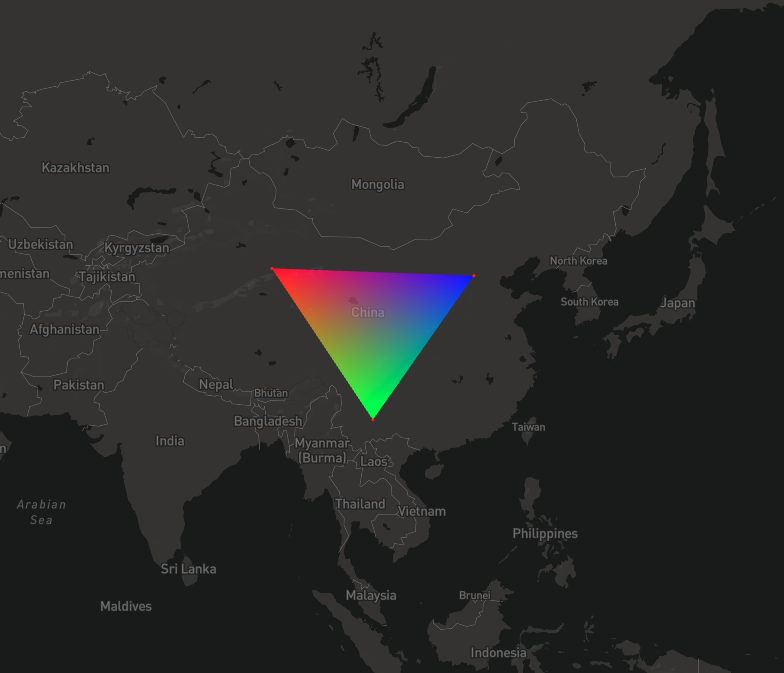
Use
  const coordinates = [
    // [90.55771935117303, 39.90989714727357],
    // [102.51084435117338, 24.846755709924764],
    // [114.46396935117377, 39.232415634606724]
    [114.10487758204431, 38.88828732993963],
    [114.14962984763685, 38.8959443667861],
    [114.14943694993866, 38.87387184490794]
  ];

  class CustomLayer {
    constructor(options) {
      this.id = 'custom-layer';
      this.type = 'custom';
      this.renderingMode = '2d';

      this.options = { ...options };
    }

    onAdd(m, gl) {
      this.map = m;

      this.regl = createREGL({
        gl: gl,
      });

      const positions = [];

      coordinates.forEach((coords, i) => {
        // eslint-disable-next-line prefer-destructuring
        positions[i * 2] = coords[0];
        // eslint-disable-next-line prefer-destructuring
        positions[i * 2 + 1] = coords[1];
      });

      const precisionData = mercatorProj.highPrecisionLngLat(positions);

      const uniforms = {};

      const keys = mercatorProj.getUniformKeys();
      keys.forEach(key => {
        uniforms[key] = this.regl.prop(key);
      });

      this.drawTriangle = this.regl({

        // Shaders in regl are just strings.  You can use glslify or whatever you want
        // to define them.  No need to manually create shader objects.
        frag: `precision highp float;
varying vec3 vColor;
void main() {
  gl_FragColor = vec4(vColor, 0.5);
}
`,

        vert: mercatorProj.injectMercatorGLSL(gl, `attribute vec2 positions;
attribute vec2 precisionBits;
attribute vec3 a_colors;
varying vec3 vColor;

void main(void) {
  gl_Position = project_position_to_clipspace(vec3(positions, 0.0), vec3(precisionBits, 0.0), vec3(0.0));
  vColor = a_colors;
}
`),

        // Here we define the vertex attributes for the above shader
        attributes: {
          // regl.buffer creates a new array buffer object
          positions: this.regl.buffer(positions),
          precisionBits: this.regl.buffer(precisionData),
          a_colors: this.regl.buffer([1.0, 0.0, 0.0, 0.0, 1.0, 0.0, 0.0, 0.0, 1.0]),
        },

        uniforms: uniforms,

        // This tells regl the number of vertices to draw in this command
        count: 3,
        primitive: 'triangle'
      });
    }

    render(gl, matrix) {
      const center = this.map.getCenter();
      const centerArray = center.toArray();
      const zoom = this.map.getZoom();
      const { width, height } = gl.canvas;

      // console.log(scale);
      // Mapbox passes us a projection matrix
      // const { projMatrix, invProjMatrix, glCoordMatrix, mercatorMatrix, width, height, pixelMatrix, pixelMatrixInverse } = this.map.transform;

      this.viewport = new mercatorProj.WebMercatorViewport({
        width: width,
        height: height,
        longitude: center && centerArray[0],
        latitude: center && centerArray[1],
        zoom,
        pitch: this.map.getPitch(),
        bearing: this.map.getBearing(),
      });

      const projectUniforms = mercatorProj.getUniforms({
        viewport: this.viewport,
        devicePixelRatio: 1,
        projectOffsetZoom: 12
      });

      const uniforms = {
        u_zoom: zoom,
        u_radiusScale: projectUniforms.project_metersPerPixel,
        ...projectUniforms,
      };

      window.uniforms = uniforms;
      window.viewport = this.viewport;

      this.drawTriangle(uniforms);
    }

    onRemove() {
    }
  }
Examples