
mermaid-erd-cli
v0.3.0
Published
Generate a Mermaid ER diagram from a live database (PostgreSQL/MySQL/SQLite) or a schema dump. Outputs an interactive HTML viewer or raw Mermaid/JSON to stdout. No ORM or framework required.

Maintainers
 unchidev
Readme
English | 日本語 | 简体中文 | 한국어 | Español | Français | Deutsch | Português | Русский
mermaid-erd-cli



从实际数据库或模式转储生成 Mermaid ER 图——无需 ORM 或框架。
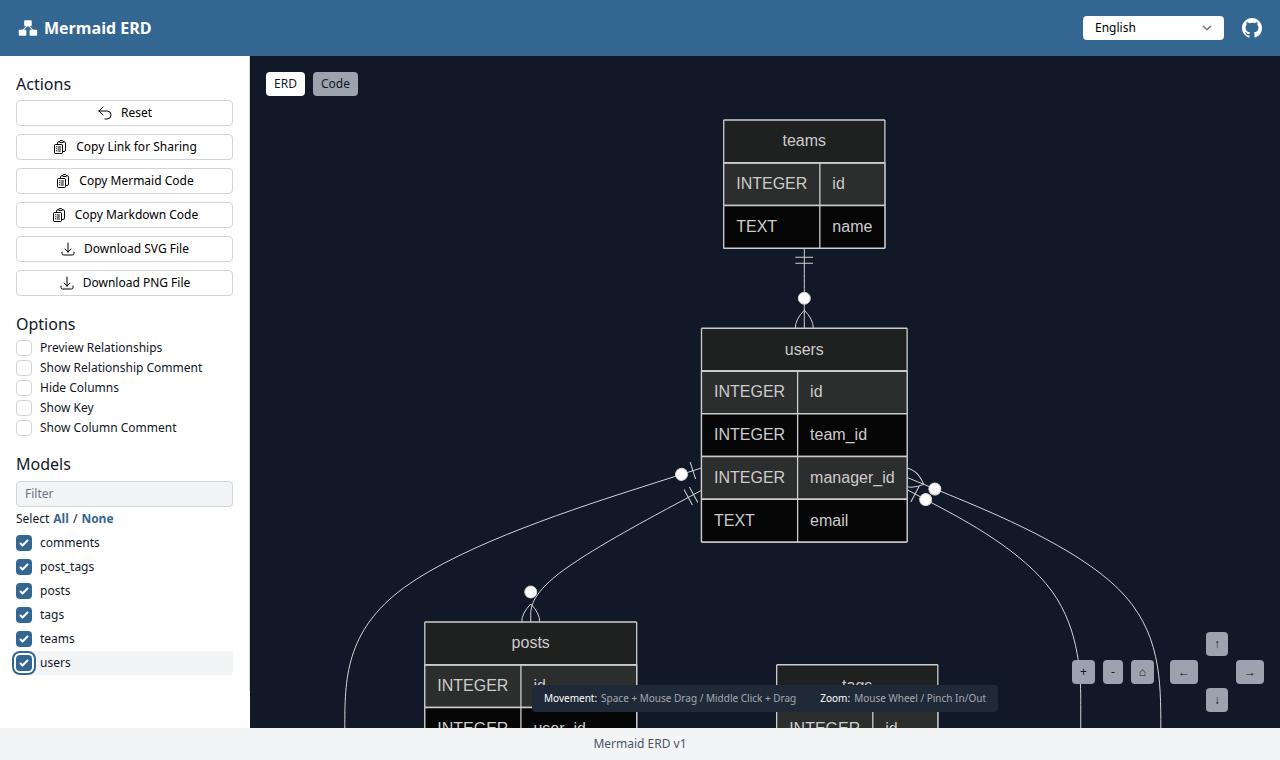
▶ 在线演示
它会内省你的模式(表、列、主键、外键、注释),并可输出以下任意一种:
- 单个自包含的 HTML 查看器(内联打包 Mermaid、Vue、Tailwind,可离线使用),可在其中选择表并导出 SVG/PNG;或
- 将原始 Mermaid 文本 / JSON 输出到 标准输出,便于与其他工具组合。
关系由外键推导:被引用的表为「一」方,持有外键的表为「多」方。NOT NULL 的外键渲染为强制关系(||--o{),可空的外键渲染为可选关系(|o--o{)。
用法
# 交互式 HTML 查看器(默认 → erd/index.html)
npx mermaid-erd-cli --db "postgres://user:pass@localhost:5432/mydb"
npx mermaid-erd-cli --db ./dev.sqlite3
npx mermaid-erd-cli --db ./dev.sqlite3 --serve        # 通过 HTTP 提供(随机端口)
npx mermaid-erd-cli --db ./dev.sqlite3 --serve --port 5173   # 使用固定端口提供

# 模式转储——无需数据库连接
npx mermaid-erd-cli --schema ./db/schema.rb           # Rails schema.rb
npx mermaid-erd-cli --schema ./dump.sql               # SQL DDL(CREATE TABLE ...)

# 将 Mermaid / JSON 输出到标准输出(可管道接入任何工具)
npx mermaid-erd-cli --db ./dev.sqlite3 --format mermaid           # erDiagram 文本
npx mermaid-erd-cli --db ./dev.sqlite3 --format mermaid > er.mmd
npx mermaid-erd-cli --schema schema.rb --format mermaid | mmdc -i - -o er.svg
npx mermaid-erd-cli --db ./dev.sqlite3 --format json | jq '.Models[].TableName'
使用 --out - 可将任意格式(包括 HTML)强制输出到标准输出。
支持的数据库
数据库驱动仅在需要时加载,因此只需安装你所使用的那一个:
| 来源 | 驱动包 |
| --- | --- |
| PostgreSQL | pg |
| MySQL | mysql2 |
| SQLite | better-sqlite3 |
模式转储解析(--schema)完全不需要任何驱动。
Docker
每次发布时,预构建镜像都会同步发布到 GitHub Container Registry 和 Docker Hub。运行时使用最小化的 distroless 镜像,内置全部三种数据库驱动, 因此实时自省(introspection)无需额外安装任何东西即可使用。
docker pull ghcr.io/koedame/mermaid-erd-cli # 或: docker pull koedame/mermaid-erd-cli容器的工作目录是 /work;把你需要读写的目录挂载到这里。以下示例使用 GHCR 镜像——
如需使用 Docker Hub,请将 ghcr.io/koedame/mermaid-erd-cli 替换为
koedame/mermaid-erd-cli。
# 当前目录中的模式转储 -> 在同一位置生成 erd/index.html
docker run --rm -u "$(id -u):$(id -g)" -v "$PWD:/work" \
  ghcr.io/koedame/mermaid-erd-cli --schema schema.rb

# 将 Mermaid / JSON 输出到标准输出
docker run --rm -v "$PWD:/work" ghcr.io/koedame/mermaid-erd-cli --schema dump.sql --format mermaid

# 实时 SQLite 文件
docker run --rm -v "$PWD:/work" ghcr.io/koedame/mermaid-erd-cli --db /work/dev.sqlite3 --format mermaid
镜像以非 root 用户运行,因此当它需要向你拥有的宿主目录写入时(如第一个示例),
请添加 -u "$(id -u):$(id -g)";仅输出到标准输出的命令则无需此参数。
要连接运行在宿主机上的数据库时,请注意容器内的 localhost 指向容器自身。
请使用 host.docker.internal(Docker Desktop)或 --network host(Linux):
docker run --rm --network host ghcr.io/koedame/mermaid-erd-cli \
  --db "postgres://user:pass@localhost:5432/mydb" --format mermaid
要提供查看器服务时,在容器内绑定到 0.0.0.0 并发布端口——它只能通过你发布的
端口访问:
docker run --rm -p 8080:8080 -v "$PWD:/work" ghcr.io/koedame/mermaid-erd-cli \
  --db /work/dev.sqlite3 --serve --host 0.0.0.0 --port 8080
# 然后打开 http://localhost:8080
如需自行构建镜像而非拉取:
docker build -t mermaid-erd-cli .
docker run --rm -v "$PWD:/work" mermaid-erd-cli --schema schema.rb
选项
| 选项 | 说明 | 默认值 |
| --- | --- | --- |
| --db <url> | 连接 URL 或 SQLite 路径 | — |
| --schema <path> | 模式转储(.rb 为 Rails schema,.sql 为 DDL) | — |
| --pg-schema <name> | 要内省的 PostgreSQL 模式 | public |
| --format <html\|mermaid\|json> | 输出格式(mmd 是 mermaid 的别名) | html |
| --out <path> | 输出路径;- 表示标准输出 | erd/index.html(html);标准输出(mermaid/json) |
| --serve | 渲染 HTML 并通过 HTTP 提供 | 关闭 |
| --port <number> | --serve 监听的端口 | 随机 |
| --host <address> | --serve 绑定的地址。0.0.0.0 会将完整架构暴露在所有网络接口上——仅在可信网络中使用 | 127.0.0.1 |
| --ignore-tables <patterns> | 要排除的表的正则表达式(逗号分隔) | ^schema_migrations$,^ar_internal_metadata$ |
| --config <path> | 配置文件路径 | mermaid-erd.yml |
| --title <name> | HTML 查看器中显示的标题 | Database |
也可以将忽略规则写入 mermaid-erd.yml:
ignore_tables:
  - "^schema_migrations$"
  - "_old$"
开发
npm install
npm run build      # 将 TypeScript 编译到 dist/
npm test           # 单元 + 集成测试(vitest)
npm run e2e        # 对生成的查看器进行无头浏览器检查
致谢
HTML 查看器及内置的前端库派生自 rails-mermaid_erd(MIT)。本项目沿用了相同的查看器与 SCHEMA_DATA 约定,将 Rails/ActiveRecord 的抽取替换为直接的数据库内省与模式转储解析。内置的 Mermaid、Vue 和 Tailwind 构建按各自的 MIT 许可证再分发;参见 assets/vendor/LICENSES.md。
许可证
MIT——参见 LICENSE。