
mermaid-viewer-cli
v1.0.4
Published
> ✨ A sleek Node.js CLI tool to **view, edit, and export Mermaid diagrams** — powered by 🐚 `commander`, ⚡ `TailwindCSS`, and 🧠 `Mermaid.js`.

Maintainers
 mohanchinnappan
Readme
🧭 Mermaid Diagram Viewer CLI
✨ A sleek Node.js CLI tool to view, edit, and export Mermaid diagrams — powered by 🐚
commander, ⚡TailwindCSS, and 🧠Mermaid.js.


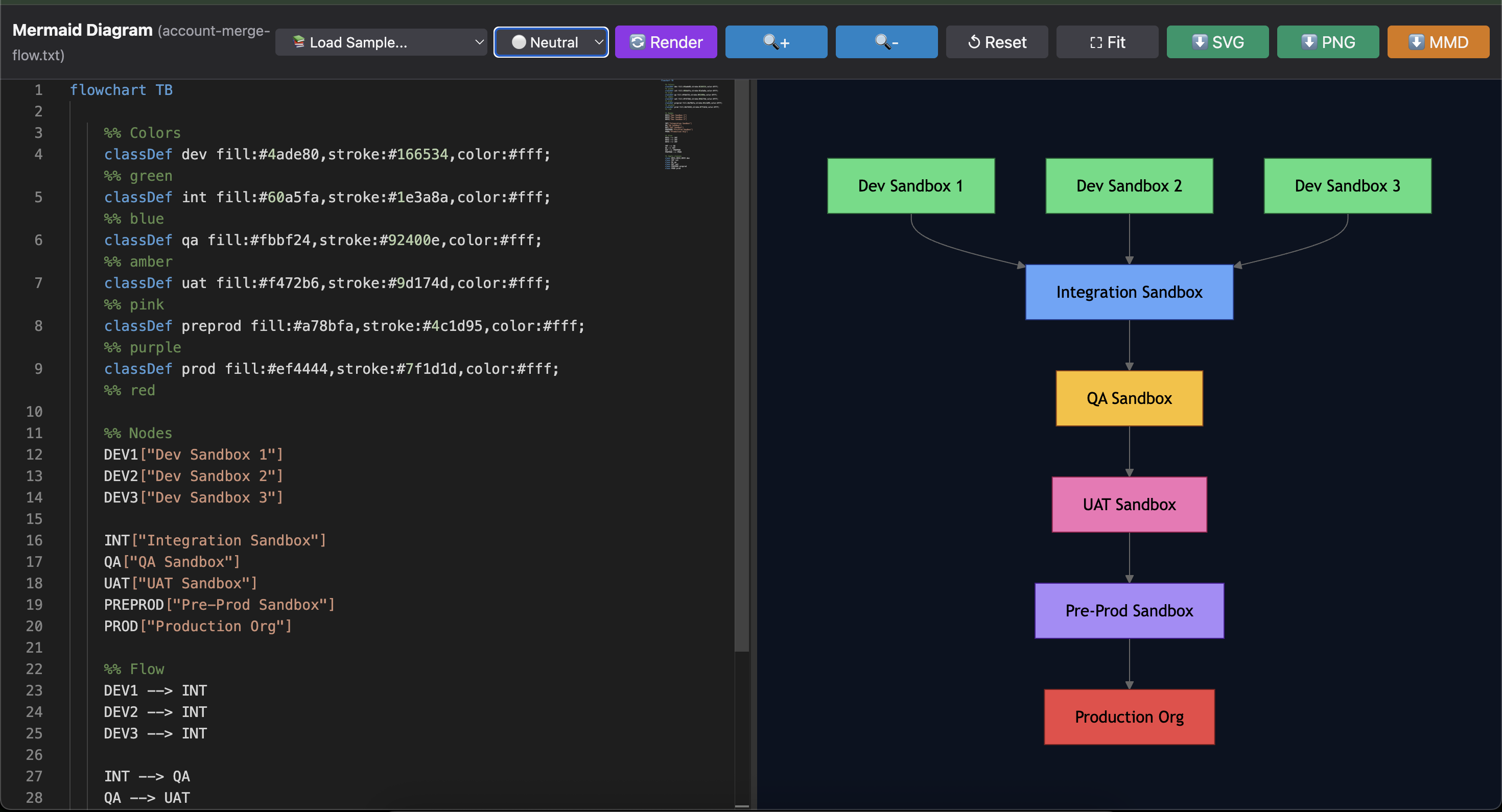
📸 Screenshot
🎨 Features
- ✅ Beautiful HTML Preview — dark mode using TailwindCSS 🌙
- ✅ Monaco Editor — professional code editor with syntax highlighting 💻
- ✅ Split View — source on the left, live-rendered diagram on the right 🪞
- ✅ Live Editing — instantly re-render as you type ✍️
- ✅ Multiple Themes — Dark, Light, Forest, and Neutral themes 🎨
- ✅ Sample Library — 14+ pre-built diagram examples to learn from 📚
- ✅ Zoom Controls — smooth control for detailed diagrams 🔍
- ✅ Export Options — download as SVG 🖼️, PNG 📸, or MMD source 💾
- ✅ Keyboard Shortcuts — save & refresh with ease ⌨️
- ✅ Stdin Support — pipe diagrams from other commands 🔄
- ✅ Draggable Splitter — resize panes to your preference ↔️
🚀 Installation
npm install -g mermaid-viewer-clior run directly with npx:
npx mermaid-viewer-cli -f diagram.mmd⚙️ Usage
🔧 Basic Commands
From a file:
mermaid-viewer -f your-diagram.mmdFrom stdin (auto-detected):
echo "graph TD; A-->B" | mermaid-viewer

cat diagram.mmd | mermaid-viewer -o output.html

# Using heredoc
mermaid-viewer -o chart.html <<EOF
graph TD
    A[Start] --> B[Process]
    B --> C[End]
EOF
Pipe from other commands:
# From a script
./generate-diagram.sh | mermaid-viewer --open

# From curl
curl -s https://example.com/diagram.mmd | mermaid-viewer
📂 Options
| Option | Description |
| ----------------------- | ------------------------------------------------ |
| -f, --file <path> | Path to the Mermaid file (.mmd or .txt) |
| -o, --out-html <path> | Output HTML file (default: mermaid-diagram.html) |
| -t, --title <text> | Title for HTML page (default: Mermaid Diagram) |
| --open | Open generated HTML in browser automatically |
Note: The tool auto-detects stdin input. If you pipe data, you don't need any special flag!
🧑💻 Live Editing
- 💡 The left pane is a Monaco editor with Mermaid syntax highlighting.
- 🪄 The right pane shows the rendered diagram in real time.
- 🔄 Changes auto-render after 800ms of inactivity (debounced).
- 📚 Load sample diagrams from the dropdown menu to learn syntax.
⌨️ Keyboard Shortcuts
| Shortcut | Action |
| --------------- | ------------------------------- |
| Ctrl+S / Cmd+S | Download Mermaid source (.mmd) |
| Ctrl+R / Cmd+R | Re-render diagram |
| Ctrl+B / Cmd+B | Toggle minimap in editor |
📤 Export Options
At the top-right corner, you'll find export buttons:
- 🖼️ Download SVG — for scalable vector diagrams
- 📸 Download PNG — for raster images (high resolution)
- 💾 Download MMD — save the Mermaid source code
🎨 Theme Support
Choose from 4 beautiful themes:
- 🌙 Dark (default)
- ☀️ Light
- 🌲 Forest
- ⚪ Neutral
Switch themes using the dropdown menu and see your diagram update instantly!
📚 Sample Library
Load pre-built examples to learn Mermaid syntax:
- Account Merge Flow
- Apex Class Writing Flow
- Git Operations Flow
- ReactJS Development Flow
- Performance Testing Flow
- And 10+ more!
🌈 Examples
Example 1: Simple Flowchart
graph TD
    A[Start] --> B{Is it working?}
    B -->|Yes| C[Awesome! 🎉]
    B -->|No| D[Check your syntax 🧩]
    D --> B
Save it as example.mmd, then run:
mermaid-viewer -f example.mmd --openExample 2: Salesforce Sandboxes Flow
flowchart TB

    %% Colors
    classDef dev fill:#4ade80,stroke:#166534,color:#fff;          %% green
    classDef int fill:#60a5fa,stroke:#1e3a8a,color:#fff;          %% blue
    classDef qa fill:#fbbf24,stroke:#92400e,color:#fff;           %% amber
    classDef uat fill:#f472b6,stroke:#9d174d,color:#fff;          %% pink
    classDef preprod fill:#a78bfa,stroke:#4c1d95,color:#fff;      %% purple
    classDef prod fill:#ef4444,stroke:#7f1d1d,color:#fff;         %% red

    %% Nodes
    DEV1["Dev Sandbox 1"]
    DEV2["Dev Sandbox 2"]
    DEV3["Dev Sandbox 3"]

    INT["Integration Sandbox"]
    QA["QA Sandbox"]
    UAT["UAT Sandbox"]
    PREPROD["Pre-Prod Sandbox"]
    PROD["Production Org"]

    %% Flow
    DEV1 --> INT
    DEV2 --> INT
    DEV3 --> INT

    INT --> QA
    QA --> UAT
    UAT --> PREPROD
    PREPROD --> PROD

    %% Apply classes
    class DEV1,DEV2,DEV3 dev
    class INT int
    class QA qa
    class UAT uat
    class PREPROD preprod
    class PROD prod
Pipe it directly:
cat salesforce-flow.mmd | mermaid-viewer -t "Salesforce Sandboxes" --openExample 3: Generate from Script
#!/bin/bash
# generate-diagram.sh

echo "graph LR"
echo "    A[CI/CD Pipeline]"
echo "    A --> B[Build]"
echo "    B --> C[Test]"
echo "    C --> D[Deploy]"
Run:
./generate-diagram.sh | mermaid-viewer -o pipeline.html🧾 UI Layout
+-------------------------------------------+-------------------------------------------+
| 📝 Monaco Editor (Mermaid Source)        | 🧩 Live Diagram Preview                   |
|                                           |                                           |
| - Syntax highlighting                     | - Real-time rendering                     |
| - Line numbers                            | - Zoom controls                           |
| - Minimap                                 | - Pan & scroll                            |
| - Auto-complete                           | - Grid background                         |
|-------------------------------------------|-------------------------------------------|
|                    Status Bar: Stats, Render time, Node count                        |
+--------------------------------------------------------------------------------------+
🔧 Advanced Usage
Pipeline Integration
# Generate diagram from database query
psql -c "SELECT * FROM workflow" | \
  awk '{print "graph TD; " $1 "-->" $2}' | \
  mermaid-viewer -o db-flow.html

# From API response
curl -s https://api.example.com/diagram | \
  jq -r '.mermaid' | \
  mermaid-viewer --open
Continuous Preview
# Watch file and regenerate on changes
watch -n 2 'cat diagram.mmd | mermaid-viewer -o preview.html'🧑🎨 Future Enhancements
- 🧭 Multiple tabs for multiple diagrams
- 🔄 Auto-save + diagram history snapshots
- 🌐 Web server mode for live collaboration
- 📱 Responsive mobile view
- 🎯 Direct GitHub integration
📄 License
MIT License - feel free to use this in your projects!
🧡 Credits
Built with ❤️ by Mohan Chinnappan
Happy Diagramming! 🎨📊