
mgsdatatable
v1.1.5
Published
A lightweight and beginner-friendly JavaScript table generator with built-in pagination, sorting, searching, and row-limit controls. This library helps you quickly display tabular data with a clean, responsive design and minimal setup — no external depend

Maintainers
 mangeshwar
Readme
mgsdatatable
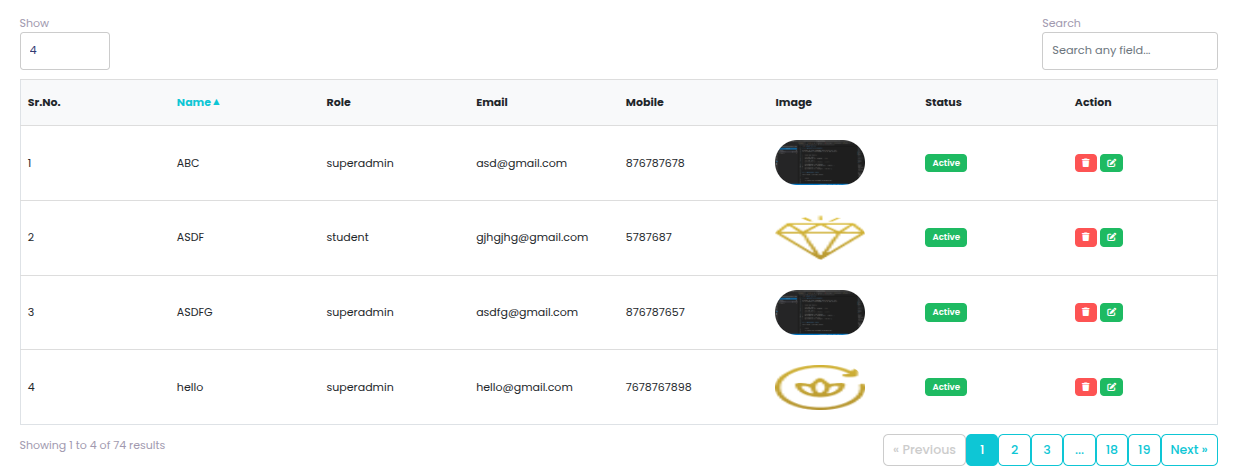
A simple, lightweight JavaScript library to create tables with pagination, sorting, searching, and rows-per-page limits — all with minimal setup and no external dependencies.
All functions are globally accessible via window.
✨ Features
- 🔍 Search — Filter rows you type then enter keyword.
- ↕ Sorting — Click column headers to sort (ascending/descending).
- 📄 Pagination — Navigate between pages easily.
- 📏 Rows Limit — Set how many rows appear per page.
- 🎨 Result summary — (e.g. Showing 1–10 of 50).
- 🎨 Custom Serial Number — (e.g. Sr.No.).
- 📦 No Dependencies — Works in all modern browsers.
Function Uses
    <div id="myTable"> </div>
    <script>
        mgsDataTable({
            target: "#myTable", // Required
            url: "http://localhost/mgs/users", // Required
            data: {}, // Optional, if use laravel then send Laravel CSRF Token {token: "{{csrf_token()}}"}, if use api with Bearer Token (Auth API) to send {bearerToken: 'bearerToken'} other wise No auth / extra filters to send your data.
            pageLimits:[2,3,4,5], // Optional, default: [10,20,30,50,100]
            isLimit: true,        // Optional, default: true
            isSearch: true,       // Optional, default: true
            isResult: true,       // Optional, default: true
            isPagination: true,   // Optional, default: true
            isSorting: true,      // Optional, default: true
            isSrno: true,         // Optional, default: false
            isSrnoText: "ID"      // Optional, default: "Sr.No",
            isAllData: false      // Optional, default: false,
                                  // true  → Load ALL records once and handle
                                  //         searching, sorting, pagination
                                  //         entirely on the frontend (no API calls)
                                  // false → Fetch data from server on each
                                  //         search/sort/pagination action
        });
    </script>

🔎Explanation of Each Option -

    1 - target (string) – Required

        The selector for the table where data will be rendered.
        Example: "#myTable" or ".userTable"
        Without this, the plugin won’t know which table to build.

    2 - url (string) – Required
        API endpoint to fetch data.
        Example: "http://localhost/mgs/users"
        The API should return a JSON response.

        Payload -
        {
            "page": 1,
            "limit": 10,
            "column": "2",  //Optional column index
            "sort": "desc", //Optional
            "search": ""    //Optional
        }


        Response -

        i)- If case isAllData:false then --- (Fetch data from server on each search/sort/pagination action)-

            {
                "status": true,
                "message": "Data Found",
                "column": [
                    "name",
                    "role",
                    "email",
                    "mobile",
                    "image",
                    "status",
                    "action"
                ],
                "data": {
                    "data": [
                        {
                            "id": 1,
                            "name": "Mangesh",
                            "role": "superadmin",
                            "email": "[email protected]",
                            "mobile": "1234567890",
                            "image": "<img src='http://localhost/mgs/storage/user/1692380264.avif' style='height: 50px; width: 100px; border-radius: 50px;'>",
                            "status": "<span data-id='1' class='status badge badge-sm badge-success' data-status='Inactive'>Active</span>",
                            "action": "<span data-id='1' class='btn-danger badge badge-sm badge-danger delete' title='Delete'><i class='fa fa-trash'></i></span> <a href='http://localhost/mgs/user-update/1' class='btn-success badge badge-sm badge-success' title='Update'><i class='fa fa-edit'></i></a>"
                        },
                        {
                            "id": 2,
                            "name": "Ashwani",
                            "role": "superadmin",
                            "email": "[email protected]",
                            "mobile": "1234567891",
                            "image": "<img src='http://localhost/mgs/storage/user/1692380264.avif' style='height: 50px; width: 100px; border-radius: 50px;'>",
                            "status": "<span data-id='2' class='status badge badge-sm badge-success' data-status='Inactive'>Active</span>",
                            "action": "<span data-id='2' class='btn-danger badge badge-sm badge-danger delete' title='Delete'><i class='fa fa-trash'></i></span> <a href='http://localhost/mgs/user-update/2' class='btn-success badge badge-sm badge-success' title='Update'><i class='fa fa-edit'></i></a>"
                        }
                    ],
                    "from": 1,
                    "to": 10,
                    "total": 30
                }
            }

        ii)- If case isAllData:true then --- (Load ALL records once and handle searching, sorting, pagination entirely on the frontend (no API calls))-

            {
                "status": true,
                "message": "Data Found",
                "column": [
                    "name",
                    "role",
                    "email",
                    "mobile",
                    "image",
                    "status",
                    "action"
                ],
                "data": {
                    "data": [
                        {
                            "id": 1,
                            "name": "Mangesh",
                            "role": "superadmin",
                            "email": "[email protected]",
                            "mobile": "1234567890",
                            "image": "<img src='http://localhost/mgs/storage/user/1692380264.avif' style='height: 50px; width: 100px; border-radius: 50px;'>",
                            "status": "<span data-id='1' class='status badge badge-sm badge-success' data-status='Inactive'>Active</span>",
                            "action": "<span data-id='1' class='btn-danger badge badge-sm badge-danger delete' title='Delete'><i class='fa fa-trash'></i></span> <a href='http://localhost/mgs/user-update/1' class='btn-success badge badge-sm badge-success' title='Update'><i class='fa fa-edit'></i></a>"
                        },
                        {
                            "id": 2,
                            "name": "Ashwani",
                            "role": "superadmin",
                            "email": "[email protected]",
                            "mobile": "1234567891",
                            "image": "<img src='http://localhost/mgs/storage/user/1692380264.avif' style='height: 50px; width: 100px; border-radius: 50px;'>",
                            "status": "<span data-id='2' class='status badge badge-sm badge-success' data-status='Inactive'>Active</span>",
                            "action": "<span data-id='2' class='btn-danger badge badge-sm badge-danger delete' title='Delete'><i class='fa fa-trash'></i></span> <a href='http://localhost/mgs/user-update/2' class='btn-success badge badge-sm badge-success' title='Update'><i class='fa fa-edit'></i></a>"
                        }
                    ]
                }
            }

    3 - data (object) – Optional

        Extra parameters sent with API requests.
        Examples:
        Laravel CSRF Token-
            data: { token: "{{csrf_token()}}" }

        Bearer Token (Auth API) -
            data: { bearerToken: "yourAccessTokenHere" }

        No auth / extra filters -
            data: {}

    4 - pageLimits (array) – Optional

        Defines the dropdown options for "Items per page".
        Default: [10, 20, 30, 50, 100]
        Example: [2,3,4,5] → lets user pick 2, 3, 4, or 5 rows per page.

    5 - isLimit (boolean) – Optional

        Default: true
        Example:
            true → Shows the page limit dropdown.
            false → Hides the page limit dropdown.

    6 - isSearch (boolean) – Optional

        Default: true
        Shows/hides the search bar above the table.
        Example:
            true → search enabled.
            false → no search bar.

    7 - isResult (boolean) – Optional

        Default: true
        Shows/hides the result count summary (e.g., Showing 1–10 of 50).
        Example:
            true → Shows the result count summary.
            false → Hides the result count summary.

    8 - isPagination (boolean) – Optional

        Default: true
        Shows/hides pagination controls (next/previous buttons, page numbers).
        Example:
            true → Shows the pagination controls.
            false → Hides the pagination controls.

    9 - isSorting (boolean) – Optional

        Default: true
        Enables column sorting (clicking on header sorts ASC/DESC).
        Example:
            true → Enables column sorting.
            false → Disables column sorting.

    10 - isSrno (boolean) – Optional

        Default: false
        Adds a Serial Number column at the start of the table.
        Numbers auto-increment row by row.

    11 - isSrnoText (string) – Optional

        Default: "Sr.No"
        Lets you rename the serial number column header.
        Example:
            isSrno: true,
            isSrnoText: "User ID"
        Column header will show User ID instead of Sr.No.

    12 - isAllData (boolean) – Optional

        Default: false
        When enabled, all records are loaded once at initial load.
        Searching, sorting, pagination, and page limits are handled
        entirely on the frontend without any server-side requests.
📄 Usage via CDN
    <!DOCTYPE html>
    <html>
    <head>
        <title>mgsDataTable</title>
        <script src="https://cdn.jsdelivr.net/npm/[email protected]/dist/mgsdatatable.min.js"></script>
    </head>
    <body>
        <div id="myTable"> </div>
        <script>
            mgsDataTable({
                target: "#myTable", // Required
                url: "http://localhost/mgs/users", // Required
                data: {}, // Optional, if use laravel then send Laravel CSRF Token {token: "{{csrf_token()}}"}, if use api with Bearer Token (Auth API) to send {bearerToken: 'bearerToken'} other wise No auth / extra filters to send your data.
                pageLimits:[2,3,4,5], // Optional, default: [10,20,30,50,100]
                isLimit: true,        // Optional, default: true
                isSearch: true,       // Optional, default: true
                isResult: true,       // Optional, default: true
                isPagination: true,   // Optional, default: true
                isSorting: true,      // Optional, default: true
                isSrno: true,         // Optional, default: false
                isSrnoText: "ID",     // Optional, default: "Sr.No"
                isAllData: false      // Optional, default: false,
                                      // true  → Load ALL records once and handle
                                      //         searching, sorting, pagination
                                      //         entirely on the frontend (no API calls)
                                      // false → Fetch data from server on each
                                      //         search/sort/pagination action
            });
        </script>
    </body>
    </html>
📦 Installation via NPM
npm install mgsdatatable
after installation then use it-
Example Usage (ES Module) -
    <!DOCTYPE html>
    <html>
    <head>
        <title>mgsDataTable</title>
    </head>
    <body>

        <div id="myTable"> </div>

        <script type="module">
            import mgsDataTable from 'mgsdatatable';

            mgsDataTable({
                target: "#myTable", // Required
                url: "http://localhost/mgs/users", // Required
                data: {}, // Optional, if use laravel then send Laravel CSRF Token {token: "{{csrf_token()}}"}, if use api with Bearer Token (Auth API) to send {bearerToken: 'bearerToken'} other wise No auth / extra filters to send your data.
                pageLimits:[2,3,4,5], // Optional, default: [10,20,30,50,100]
                isLimit: true,        // Optional, default: true
                isSearch: true,       // Optional, default: true
                isResult: true,       // Optional, default: true
                isPagination: true,   // Optional, default: true
                isSorting: true,      // Optional, default: true
                isSrno: true,         // Optional, default: false
                isSrnoText: "ID",     // Optional, default: "Sr.No"
                isAllData: false      // Optional, default: false,
                                      // true  → Load ALL records once and handle
                                      //         searching, sorting, pagination
                                      //         entirely on the frontend (no API calls)
                                      // false → Fetch data from server on each
                                      //         search/sort/pagination action
            });
        </script>
    </body>
    </html>
📡 API Response Format
The API endpoint (http://localhost/mgs/users) should return a JSON response in the following format:
    Payload -
        {
            "page": 1,
            "limit": 10,
            "column": "2",  //Optional column index
            "sort": "desc", //Optional
            "search": ""    //Optional
        }

    Response -
        {
            "status": true,
            "data": {
                "column": [
                    "name",
                    "role",
                    "email",
                    "mobile",
                    "image",
                    "status",
                    "action"
                ],
                "data": [
                    {
                        "id": 1,
                        "name": "Mangesh",
                        "role": "superadmin",
                        "email": "[email protected]",
                        "mobile": "1234567890",
                        "image": "<img src='http://localhost/mgs/storage/user/1692380264.avif' style='height: 50px; width: 100px; border-radius: 50px;'>",
                        "status": "<span data-id='1' class='status badge badge-sm badge-success' data-status='Inactive'>Active</span>",
                        "action": "<span data-id='1' class='btn-danger badge badge-sm badge-danger delete' title='Delete'><i class='fa fa-trash'></i></span> <a href='http://localhost/mgs/user-update/1' class='btn-success badge badge-sm badge-success' title='Update'><i class='fa fa-edit'></i></a>"
                    },
                    {
                        "id": 2,
                        "name": "Ashwani",
                        "role": "superadmin",
                        "email": "[email protected]",
                        "mobile": "1234567891",
                        "image": "<img src='http://localhost/mgs/storage/user/1692380264.avif' style='height: 50px; width: 100px; border-radius: 50px;'>",
                        "status": "<span data-id='2' class='status badge badge-sm badge-success' data-status='Inactive'>Active</span>",
                        "action": "<span data-id='2' class='btn-danger badge badge-sm badge-danger delete' title='Delete'><i class='fa fa-trash'></i></span> <a href='http://localhost/mgs/user-update/2' class='btn-success badge badge-sm badge-success' title='Update'><i class='fa fa-edit'></i></a>"
                    }
                ],
                "from": 1,
                "to": 10,
                "total": 30
            },
            "message": "Data found"
        }