
mgsformvalidation
v1.0.14
Published
Form validate like require field check empty by class or id name


Readme
mgsformvalidation
A lightweight JavaScript form validation and utility library for quick input validation, event handling, and form submission with built-in error handling - all with minimal setup and no external dependencies..
All functions are globally accessible via window.
Demo
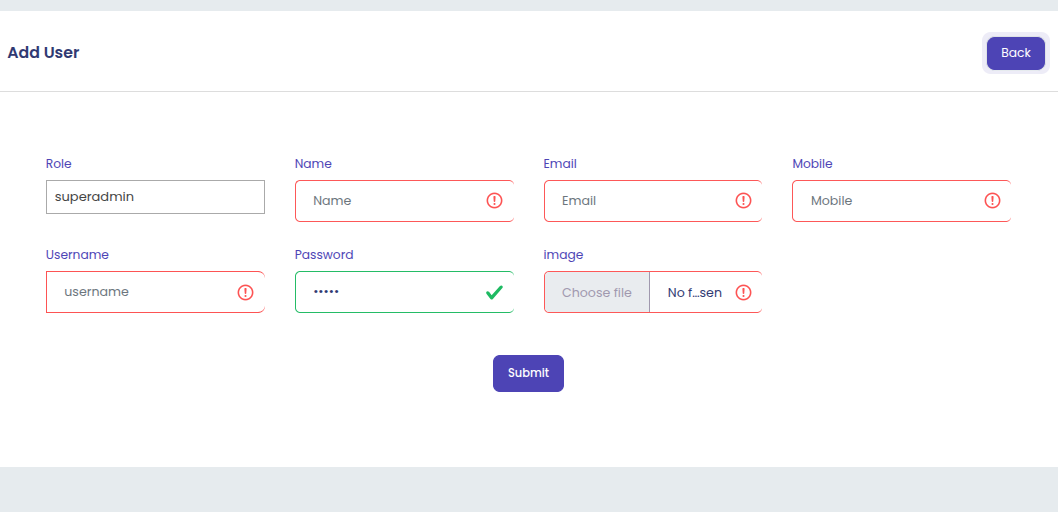
Example — Single Validation (Whole Form with Single Input Name)
Below is an example UI demonstrating how form fields are validated when all inputs share the same class name — meaning the entire form is treated as one validation group.
This setup ensures that every input with the same class (for example, .name, .email, .mobile, .image) is checked together before submission, making it ideal for single-form validation.
Example — Add More Validation
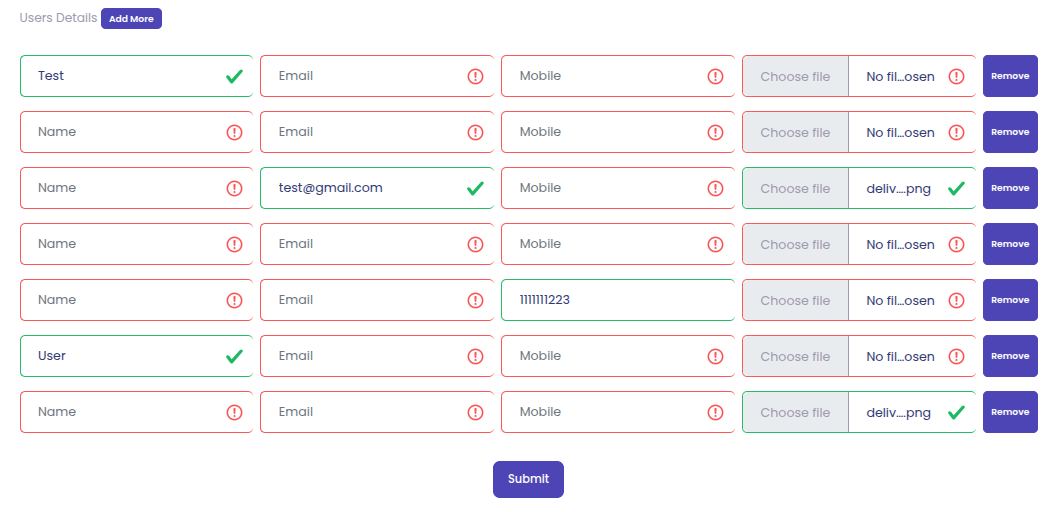
Below is an example UI demonstrating how multiple dynamic fields are validated using the “Add More” functionality.
This setup ensures that each dynamically added input group is validated individually — making it ideal for forms where users can add multiple entries (e.g., multiple name, email, mobile, and image).
🚀 Available Functions
You can use single or multiple selectors:
    let selector = ".name";
    let selector1 = ".name, .email, .mobile, .gender";
    let selector2 = "#name, #email, #mobile, #gender";
    let selector3 = ".name, #email, #mobile, .gender";
1. mgsOnlyNumber(selector)
Restricts input to numbers only.
    Example:

    mgsOnlyNumber('#phone');
     or
    mgsOnlyNumber('#phone, #pin');
2. mgsNumberDot(selector)
Allows numbers and a dot (.) — useful for decimal values.
3. mgsCutCopyPaste(selector)
Disables cut, copy, and paste actions on selected input(s).
4. mgsa2zSpace(selector)
Allows lowercase letters (a–z) and spaces.
5. mgsa2z(selector)
Allows lowercase letters only.
6. mgsA2Zspace(selector)
Allows uppercase letters (A–Z) and spaces.
7. mgsA2Z(selector)
Allows uppercase letters only.
8. mgsa2Zspace(selector)
Allows both lowercase and uppercase letters with spaces.
9. mgsa2Z(selector)
Allows both lowercase and uppercase letters without spaces.
10. mgsAlphaNumeric(selector)
Allows alphanumeric.
11. mgsCustomValidation(selector)
Allows alphanumeric with spaces
12. mgsCustomValidation(selector)
By default, it allows alphanumeric characters (A–Z, a–z, 0–9). You can customize allowed characters using the regex parameter.
    Custom Usage Examples:

    Allow only numbers -
    mgsCustomValidation('.onlyNumber', '0-9');

    Allow only letters -
    mgsCustomValidation('.onlyLetter', 'a-zA-Z');

    Allow alphanumeric and underscore -
    mgsCustomValidation('.alphaUnderscore', '0-9a-zA-Z_');

    Allow alphanumeric and space -
    mgsCustomValidation('.alphaSpace', '0-9a-zA-Z ');
13. mgsIsValidEmail(email)
Checks whether a given email is valid.
    Example:

    let isValid = mgsIsValidEmail('[email protected]');
15. mgsValidateEmail(selector)
Validates one or more email input fields using a selector.
    Example:

    let check = mgsValidateEmail('.email'); // This function return true or false
16. mgsShowMessage(message, type='success', time=4000)
    Example:

    // type and time Optional, type default is success, time default is 4000ms.
    mgsShowMessage('Data saved successfully');
    mgsShowMessage('Data saved successfully', 'success', 4000);
    mgsShowMessage('Something went wrong', 'error', 4000);
17. mgsCheckRequired(selector,showBorderError = false, sameInputFieldClass = null, formId = null)
Attaches keyup and change event listeners to input fields for tracking required values dynamically. This function helps ensure that all marked fields are filled before form submission.
⚠️ Note:
This function should always be called first before using any other validation functions.
It initializes the base validation tracking system for required inputs
🧠 Function Parameters
    selector - reqired
        selector for input fields to validate (e.g., .name, .email).

    showBorderError - By Default false
        If false, shows both error message and red border for invalid fields. If true, shows only border highlight.

    sameInputFieldClass - By Default null
        The sameInputFieldClass parameter is used when you have multiple repeated input groups — for example, in “Add More” functionality where you clone input fields dynamically (like multiple product rows, images, or contact entries).

    formId - By Default null
        Optional specific form ID if validation should be scoped to one form.
Example:
let selector = ".name, .email, .mobile, .image";
1 - Show error message with input border highlight using -
mgsCheckRequired(selector);
2 - Show only input border highlight using-
mgsCheckRequired(selector, false);
3 - Show only input border highlight using-
mgsCheckRequired(selector, false); 18. mgsFormValidate(inputSelector, formSelector, inputSameClass=null)
Performs full form validation based on input attributes and rules.
Returns true if required fields are filled; otherwise, returns false.
🧠 Function Parameters
    selector - reqired
        selector for input fields to validate (e.g., .name, .email).

    inputSameClass - By Default null
        The inputSameClass parameter is used when you have multiple repeated input groups — for example, in “Add More” functionality where you clone input fields dynamically (like multiple product rows, images, or contact entries).

    formId - By Default null
        Optional specific form ID if validation should be scoped to one form.
Example:
let inputSelector = ".name, .email, .mobile, .image";
let isValid = mgsFormValidate(inputSelector, "#myForm");
if (isValid) {
// Proceed with form submission
}19. msgSubmitData(config)
Submits form data via fetch, with a loader, error handling, and redirect.
    Example:
    response -

    {
        "status": true,
        "message": "Data saved successfully."
    }

    Note:  When the form is submitted and errors are returned, display them

    Error response -
    {
        "status": false,
        "error": {
            "name": "The name is required.",
            "email": "The email has already been taken.",
            "username": "The username has already been taken."
        },
        "message": "Something went wrong, Please try again."
    }

    let selector = '.name, .email, .mobile, .image';
    mgsCheckRequired(selector); // Always call this first
    mgsOnlyNumber('#phone');
    mgsValidateEmail('.email, .emails');

    if (mgsFormValidate(selector,"#myForm")) {

        1- Usage Example: Stay on the Same Page

        If you want to stay on the same page after form submission, simply omit the returnUrl or leave it blank.
        The form will reset, and no redirection will occur.

        msgSubmitData({
            url: 'http://localhost/mgs/user-add',     // API endpoint
            formId: '#myForm',                        // Form selector
            formData: {},                             // FormData object
            methodType: 'post'                        // Optional (default is 'post'),
            formReset:false                           // Optional (default is true) is is by default form reset after form submition you want to not reset after form submition then use formReset:false ,
        });


        returnUrl is optional. If not provided, the user will stay on the same page.

        2 - Usage Example: Redirect to Another Page

        If you want to redirect to another page after successful form submission, provide the returnUrl.

        msgSubmitData({
            url: 'http://localhost/mgs/user-add',     // API endpoint
            returnUrl: 'http://localhost/mgs/user',   // Redirect URL after success
            formId: '#myForm',                        // Form selector
            formData: {},                             // FormData object
            methodType: 'post'                        // Optional (default is 'post'),
            formReset:false                           // Optional (default is true) is is by default form reset after form submition you want to not reset after form submition then use formReset:false ,
        });


        After successful submission, the user will be redirected to the URL provided in returnUrl.
    }
🌐 Usage via CDN
Note:
    In your HTML, you can use the same value for class, id, and name like:
    <input type="text" class="name" id="name" name="name">
<!DOCTYPE html>
<html>
<head>
<title>mgsFormValidation</title>
<script src="https://cdn.jsdelivr.net/npm/[email protected]/dist/mgsformvalidation.min.js"></script>
</head>
<body>
<form method="post" action="javascript:void(0)" id="myForm" enctype="multipart/form-data">
<div class="form-group col-md-4">
<label for="name" class="text-heading">Name</label>
<input type="text" class="form-control name" id="name" placeholder="Name" name="name">
</div>
<div class="form-group col-md-4">
<label for="email" class="text-heading">Email</label>
<input type="email" class="form-control email" id="email" placeholder="Email" name="email">
</div>
<div class="form-group col-md-4">
<label for="mobile" class="text-heading">Mobile</label>
<input type="text" class="form-control mobile" id="mobile" placeholder="Mobile" name="mobile">
</div>
<div class="col-md-12 text-center">
<button type="submit" class="btn btn-primary">Submit</button>
</div>
</form>
<script>
let selector = ".name, .email, .mobile";
mgsCheckRequired(selector); // Call first
mgsOnlyNumber('#phone');
mgsValidateEmail(".email, .emails");
document.querySelector('#myForm').addEventListener('submit', function (e) {
e.preventDefault();
if (mgsFormValidate(selector, '#myForm')) {
let form_data = new FormData(this);
msgSubmitData({
url: 'http://localhost/mgs/user-add',
returnUrl: 'http://localhost/mgs/user', // Optional — provide this only if you want to redirect to another page after successful submission.
formId: '#myForm',
formData: form_data,
methodType: 'post',
formReset:false // Optional (default is true) is is by default form reset after form submition you want to not reset after form submition then use formReset:false ,
});
}
});
</script>
</body>
</html>📦 Installation via NPM -
npm install mgsformvalidation
🧩 Usage with ES Modules
    <!DOCTYPE html>
    <html>
    <head>
        <title>mgsFormValidation</title>
    </head>
    <body>
        <form method="post" action="javascript:void(0)" id="myForm" enctype="multipart/form-data">
            <div class="form-group col-md-4">
                <label for="name" class="text-heading">Name</label>
                <input type="text" class="form-control name" id="name" placeholder="Name" name="name">
            </div>
            <div class="form-group col-md-4">
                <label for="email" class="text-heading">Email</label>
                <input type="email" class="form-control email" id="email" placeholder="Email" name="email">
            </div>
            <div class="form-group col-md-4">
                <label for="mobile" class="text-heading">Mobile</label>
                <input type="text" class="form-control mobile" id="mobile" placeholder="Mobile" name="mobile">
            </div>
            <div class="col-md-12 text-center">
                <button type="submit" class="btn btn-primary">Submit</button>
            </div>
        </form>

        <script type="module">
            import { mgsOnlyNumber, mgsValidateEmail, mgsFormValidate, msgSubmitData, mgsCheckRequired } from 'mgsformvalidation';

            let selector = ".name, .email, .mobile";
            mgsCheckRequired(selector); // Call first
            mgsOnlyNumber('#phone');
            mgsValidateEmail(".email, .emails");

            document.querySelector('#myForm').addEventListener('submit', function (e) {
                e.preventDefault();

                if (mgsFormValidate(selector, '#myForm')) {
                    let form_data = new FormData(this);
                    msgSubmitData({
                        url: 'http://localhost/mgs/user-add',
                        returnUrl: 'http://localhost/mgs/user', // Optional — provide this only if you want to redirect to another page after successful submission.
                        formId: '$myForm',
                        formData: form_data,
                        methodType: 'post',
                        formReset:false                           // Optional (default is true) is is by default form reset after form submition you want to not reset after form submition then use formReset:false ,
                    });
                }
            });
        </script>
    </body>
    </html>