
mikuparser
v1.0.6
Published
<center><img src="https://cdn.jsdelivr.net/gh/coder-th/static/202109131502192.png"/></center>

Maintainers
 tianheng
Readme
mikuparser
前言
mikuparser是一款转换工具,负责的事情很简单就是将一系列解析markdown的插件集成到一起,将字符串转换成html字符串。底层核心利用的就是markdown-it以及周边生态插件的集合。
开发这款转换器的原因是,由于markdown转html是一个非常常见的需求,但是往往当我想要使用其做转换的时候,发现它操作或者配置比较复杂,大部分应用场景也跟一些常见的需求强绑定(比如做博客解析,编辑器渲染),做不到解耦的目的。所以为了方便以后的解析更加方便,也不与特定的场景或者技术栈强绑定,mikuparser就诞生了。
技术栈



架构图
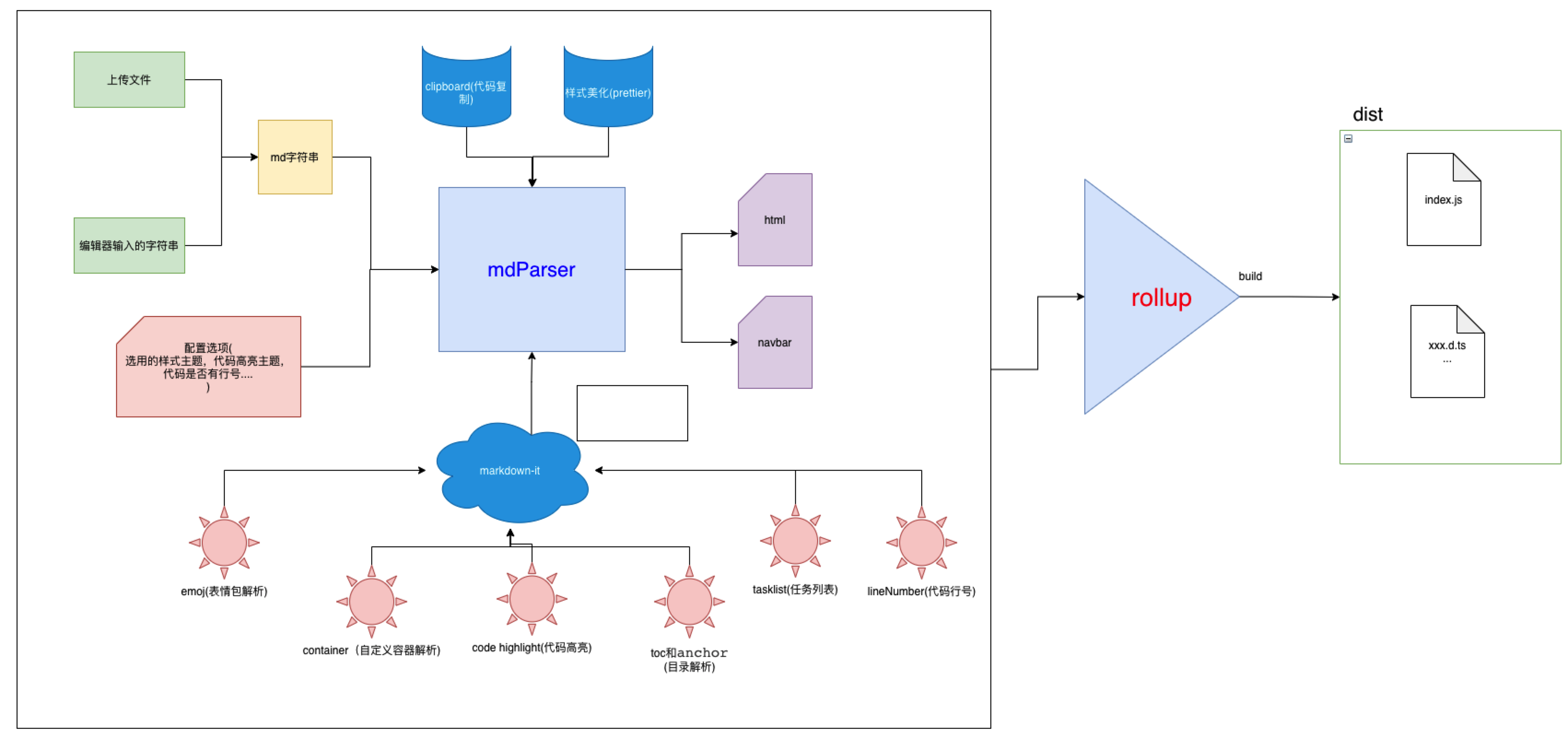
安装
// npm
npm install mikuparser
// yarn
yarn add mikuparser
使用
Vue
<template>
  <div>
    <input type="file" @change="importMd" />
    <div v-html="htmlStr"></div>
  </div>
</template>
<script setup lang="ts">
  import { ref } from '@vue/reactivity';
  import { createMdParser } from 'mikuparser';
  const htmlStr = ref('');
  function importMd(e) {
    const files = e.target.files;
    if (!files || !files.length) return;
    let reader = new FileReader();
    reader.readAsText(files[0]);
    reader.onload = () => {
      // 创建渲染器
      const md = createMdParser({ theme: 'blue', codeTheme: 'atom-one-dark' });
      // 渲染导出html字符串
      htmlStr.value = md.renderMd(reader.result as string).html;
    };
  }
</script>
React
import React, { ChangeEvent, Ref, useEffect, useRef, useState } from 'react';
import { createMdParser } from 'mikuparser';

function App() {
  const [htmlStr, setHtmlStr] = useState('');
  const htmlRef = useRef(null) as unknown as React.MutableRefObject<HTMLDivElement>;
  const handleImportFile = (e: ChangeEvent<HTMLInputElement>) => {
    const files = e.target.files;
    if (!files || !files.length) return;
    let reader = new FileReader();
    reader.readAsText(files[0]);
    reader.onload = () => {
      const md = createMdParser({ theme: 'blue', codeTheme: 'atom-one-dark' });
      setHtmlStr(md.renderMd(reader.result as string).html);
    };
  };
  useEffect(() => {
    htmlRef.current.innerHTML = htmlStr;
  }, [htmlStr]);
  return (
    <div>
      <input type="file" onChange={(e) => handleImportFile(e)} />
      <div ref={htmlRef}></div>
    </div>
  );
}

export default App;
效果
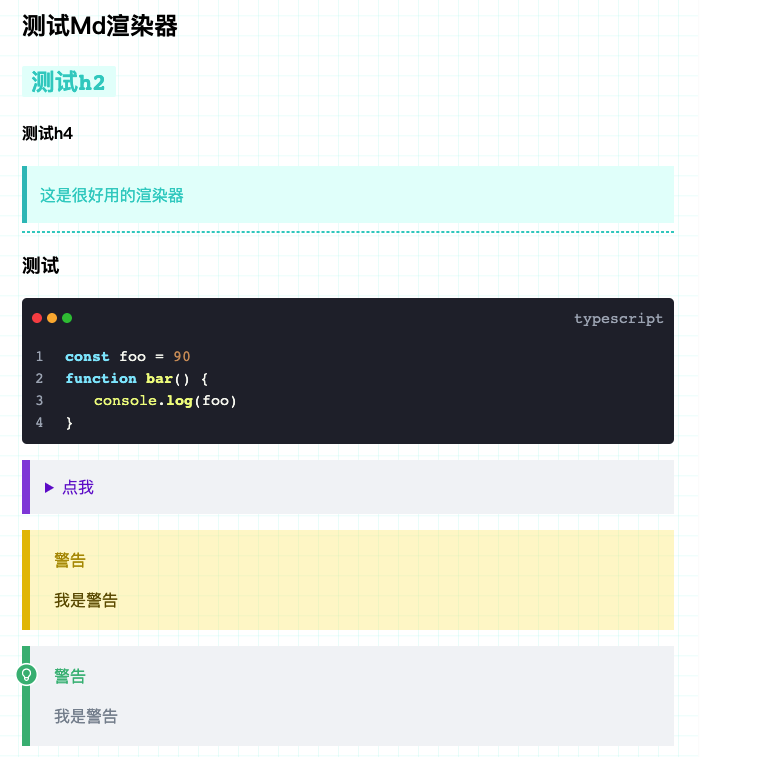
体验地址

Api说明
:warning: 由于
mikuparser是对markdown-it的扩展,所以markdown相关的 api 可以无缝切换使用,并不影响。以下提供的api也仅是提供参考使用
createMdParser
说明: 创建一个
Markdown解析器,在创建解析器的时候可以配置一些选项,从而定制化您的解析器解析设置。配置项说明如下:| 字段名 | 类型(参考值) | 说明 | | ----------- | ------------------ | ---------------------------------- | |
toc|{enable:boolean}| 是否启用目录解析 | |theme|MdThemeType| 当前解析器的主题颜色,默认为blue| |grid|boolean| 是否启用背景网格图 | |codeTheme|CodeTheme;| 代码高亮的主题 | |copy|{enable:boolean}| 是否启用代码复制功能 |:angel:: 以上提到的类型可以在
mikuparser中导入使用案例
import { createMdParser } from 'mikuparser';
const md = createMdParser({ theme: 'red', codeTheme: 'vs2015' });
renderMd
- 说明: 渲染
markdown字符串为html字符串,以及解析出toc
:warning::请注意,
- 由于内部集成了对 dom 结构的处理,所以,该方法,请确保在组件已经挂载到组件树之后调用。
- 该方法支持链式调用
使用实例:
import { createMdParser } from 'mikuparser';
const content =
  '# 测试Md渲染器\n\n## `测试h2`\n\n#### 测试h4\n\n> 这是很好用的渲染器\n\n[很好]: www.baidu.com\n\n[^12]: 测试\n\n------\n\n\n\n### **测试**\n\n```typescript\nconst foo = 90\nfunction bar() {\n  \tconsole.log(foo)\n}\n```\n\n::: details 点我\n\n- henhao\n- Jjj\n\n:::\n\n\n\n::: warning 警告\n\n我是警告\n\n:::\n\n::: success 警告\n\n我是警告\n\n:::\n\n::: danger 警告\n\n我是警告\n\n:::\n\n::: tip 警告\n\n我是警告\n\n:::\n\n\n| hhsfddd | Gtrfgh    | Gads       |\n| ------- | --------- | ---------- |\n| gadefg  | hgtree    | **gsedgf** |\n| `ggdf`  | ghertgewr | Gieoajg    |\n| Gasdgr  | Gdf       | gsdf       |';
const md = createMdParser({ theme: 'red', codeTheme: 'vs2015' }).renderMd(content); // 会返回{html:"...",toc:"..."}
addPlugin
说明: 您如果想要为
markdown-it添加插件,那可以调用这个api,具体使用参照您使用的插件的使用说明,进行设置即可,当前包会自动收集您添加的插件扩展解析能力(同样支持链式调用)。使用案例:
// 我想要添加表情包的解析
import { createMdParser } from 'mikuparser';
import markdownItEmoji from 'markdown-it-emoji';
const md = createMdParser()
  .renderMd(content)
  .addPlugin((md) => {
    md.use(markdownItEmoji, {
      /**your config*/
    });
  });
setPlugin
说明: 当前解析器内置了
"TASK_LIST" | "ANCHOR" | "TABLE_CONTENT" | "EMOJI" | "SUB" | "SUP" | "MARK" | "ABBR" | "INS" | "BASE_CONTAINER" | "PRE_WRAPPER" | "LINE_NUMBERS"等一系列的插件,如果相对其中的插件更改设置,同样支持操作,具体配置可以参考每个插件官方文档的使用说明进行传入即可修改。由于使用typescript开发,所以每个插件也可以通过的编辑器的智能提示快速配置使用案例
// 我想让目录只显示3级标题
import { createMdParser } from 'mikuparser';
const md = createMdParser()
  .renderMd(content)
  .setPlugin('TABLE_CONTENT', { includeLevel: [3] });
changeCodeTheme
说明: 切换代码高亮主题,调用此
api有可能会失败,因为代码主题的切换采用的是加载hls的cdn样式文件替换,从而实现代码高亮替换使用实例
// 切换代码高亮主题
import { createMdParser, changeCodeTheme } from 'mikuparser';
const md = createMdParser().renderMd(content);
changeCodeTheme('vs2015');
原理实现:
/**
 * 切换代码高亮的主题
 * @param codeHighLightTheme
 */
export function changeCodeTheme(codeHighLightTheme: CodeTheme) {
  const head = document.head;
  const oldLink = head.getElementsByClassName('highlightjs-style-link');

  if (oldLink.length) head.removeChild(oldLink[0]);

  const newLink = document.createElement('link');
  newLink.setAttribute('rel', 'stylesheet');
  newLink.setAttribute('type', 'text/css');
  newLink.setAttribute('class', 'highlightjs-style-link');
  newLink.setAttribute(
    'href',
    `https://cdnjs.cloudflare.com/ajax/libs/highlight.js/10.7.2/styles/${codeHighLightTheme}.min.css`
  );
  newLink.onerror = () => {
    console.error('主题获取失败,请稍后重试或尝试其它主题');
  };
  head.appendChild(newLink);
}
changeTheme
说明: 切换解析的颜色主题,该颜色是内置的主题颜色
使用实例
import { changeTheme } from 'mikuparser';
// 解析器切换为红色的主题
changeTheme('red');
setBuiltInTheme
说明: 如果您觉得内置的颜色主题的颜色不符合您的审美,您想要修改内置的颜色色板,那可以传入内置的颜色类型和您的配置,即可修改内置的颜色主题
使用实例
import { setBuiltInTheme } from 'mikuparser';
// 解析器将红色主题的字体颜色修改了
setBuiltInTheme('red', { font: '#fff' });
changeCustomTheme
说明: 当然您觉得内置的主题您都不想要,那您可以定制化一个属于您的主题颜色
使用说明
import { changeCustomTheme } from 'mikuparser';
// 解析器将红色主题的字体颜色修改了
changeCustomTheme({ font: '#fff', bg: 'red', border: 'blue' });
createMdContainer
说明: 当前解析器也内置了
'success', 'warning', 'danger', 'tip', 'details'等容器组件的解析,使用实例如下,解析器会自动解析。如果您想要更多的容器组件类型,那可以调用此方法进行添加:::danger 警告标题我很危险 :::使用实例
import { createMdContainer } from 'mikuparser';
createMdContainer(md, { type: 'custom', validate: /^custom(.*)$/ });
调用方式跟
markdown-it-container是一样的可以参考官方文档。