
milkdown-plugin-bible
v0.1.2
Published
Bible references for Milkdown: finds references as you write, previews the passage and inserts it as a quote.

Maintainers
 timstewartj
Readme
milkdown-plugin-bible


Bible references for Milkdown. Write John 3:16 and the plugin underlines it, shows the passage when you point at it or tap it, and can drop the passage into the document as a quote.
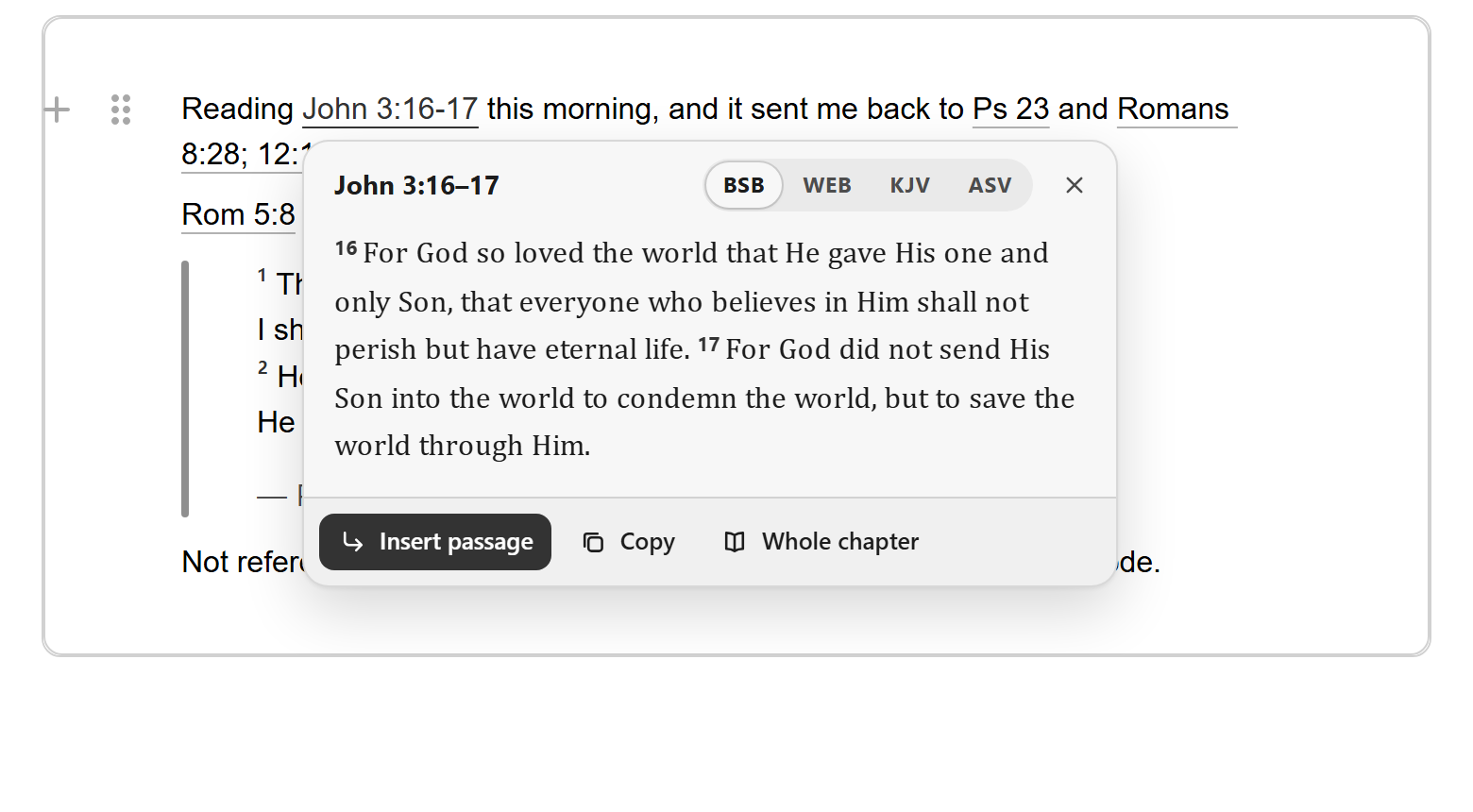
It stores nothing of its own in the document. References stay the text you typed, and an inserted passage is an ordinary Markdown block quote, so the file reads the same in any other editor.
This morning I read John 3:16–17.

> ¹⁶ For God so loved the world that He gave His one and only Son, that everyone who believes in Him shall not perish but have eternal life. ¹⁷ For God did not send His Son into the world to condemn the world, but to save the world through Him.
>
> — John 3:16–17 (BSB)
What it does
- Finds references as you type. Full names and common abbreviations (
Gen 1:1,1 Cor 13:4-7,Ps 23,II Tim 3:16,Jude 5), verse lists and ranges (John 3:16, 18-20,Rom 8:28; 12:1-2,Gen 1:1-2:3), with or without a translation after them (John 3:16 (KJV)). Every reference is checked against the real chapter and verse counts, soJohn 45:3andmark 2 as doneare left alone. Text inside code and links is skipped. - Shows the passage. Hover a reference, click or tap it, or press
Mod-Enterwith the cursor in it. The popover switches translation, expands to the whole chapter with the cited verses marked, and copies the text. - Inserts the passage. From the popover; by pressing
Tabafter a reference that has a line to itself; or from a search box you can open from a slash menu, which suggests books as you type and takes loose input such asjn 3 16. - Keeps poetry in lines. Psalms and other verse are inserted line by line.
- Works offline for what you have read. Chapters are cached in memory, and in any storage you give it.
Install
npm install milkdown-plugin-bible @milkdown/kitIt needs @milkdown/kit 7.22 or later, which is what it is tested against, and ships as an ES module with type declarations.
Use it
import { Editor } from '@milkdown/kit/core';
import { commonmark } from '@milkdown/kit/preset/commonmark';
import { bible } from 'milkdown-plugin-bible';
import 'milkdown-plugin-bible/style.css';

await Editor.make().use(commonmark).use(bible).create();
With Crepe, add it to the underlying editor, and optionally to the slash menu:
import { Crepe } from '@milkdown/crepe';
import { bible, bibleMenuItem } from 'milkdown-plugin-bible';
import 'milkdown-plugin-bible/style.css';

const crepe = new Crepe({
  root,
  featureConfigs: {
    [Crepe.Feature.BlockEdit]: {
      buildMenu: (builder) => builder.addGroup('bible', 'Bible').addItem('passage', bibleMenuItem),
    },
  },
});
crepe.editor.use(bible);
await crepe.create();
Passages are inserted as block quotes, so the editor needs the blockquote, paragraph and (for poetry) hardbreak nodes from the commonmark preset. Without blockquote the paragraphs are inserted on their own.
Configure
import { bibleConfig } from 'milkdown-plugin-bible';

editor.config((ctx) => {
  ctx.update(bibleConfig.key, (config) => ({
    ...config,
    translation: 'KJV',
    onTranslationChange: (translation) => localStorage.setItem('bible', translation.id),
  }));
});
| Option | Default | |
| --- | --- | --- |
| provider | helloaoProvider() | Where passage text comes from. See below. |
| translation | 'BSB' | Translation id or label. Pass a function to read it from somewhere shared, so several editors follow one setting. |
| onTranslationChange | | Called when the reader picks a translation in the popover. |
| hoverDelay | 350 | Milliseconds the pointer rests on a reference before the popover opens. |
| maxChapters | 3 | Most chapters one passage may span. |
| verseNumbers | true | Number the verses of inserted passages that have more than one. |
| citation | — John 3:16 (BSB) | (reference, translation) => string for the last line of an inserted passage. A quote is recognised as a passage by this line: a dash, a reference, and optionally a translation in parentheses. |
| keys | { preview: 'Mod-Enter', insert: 'Tab' } | Key bindings in ProseMirror syntax. Set one to null to turn it off. |
| root | the editor's parent | Element the popover is added to. If the editor sits inside something that clips its overflow, use document.body. |
| labels | English | Every piece of text the plugin shows; see defaultLabels. |
Commands
import { callCommand } from '@milkdown/kit/utils';
import { insertBiblePassageCommand, openBiblePickerCommand, showBiblePassageCommand } from 'milkdown-plugin-bible';

editor.action(callCommand(openBiblePickerCommand.key)); // search box at the cursor
editor.action(callCommand(showBiblePassageCommand.key)); // popover for the reference at the cursor
editor.action(callCommand(insertBiblePassageCommand.key, 'Romans 8:28-30'));
editor.action(callCommand(insertBiblePassageCommand.key, { reference: 'Ps 23', translation: 'KJV' }));
Where the text comes from
By default the plugin reads from the Free Use Bible API, which needs no key, has no rate limit and allows requests from browsers. Four public-domain English translations are offered: the Berean Standard Bible, the World English Bible, the King James Version and the American Standard Version. Each lookup fetches one chapter; the only thing sent is which chapter.
The API serves over a thousand translations. To offer others, list them:
import { helloaoProvider } from 'milkdown-plugin-bible';

const provider = helloaoProvider({
  translations: [
    { id: 'BSB', label: 'BSB', name: 'Berean Standard Bible' },
    { id: 'spa_r09', label: 'RV1909', name: 'Reina Valera 1909' },
  ],
});
Check the licence of any translation you add; many modern ones (ESV, NIV, NLT) are not available there and need a provider of their own.
Your own provider
A provider returns one chapter at a time:
import type { BibleProvider } from 'milkdown-plugin-bible';

const provider: BibleProvider = {
  translations: [{ id: 'esv', label: 'ESV', name: 'English Standard Version' }],
  async getChapter({ book, chapter, translation, signal }) {
    const response = await fetch(`/api/bible/${translation}/${book}/${chapter}`, { signal });
    return response.json(); // { book, chapter, translation, verses: [{ number, text, paragraph?, lines? }] }
  },
};
book is a USFM code such as JHN or 1CO. Give poetry verses lines: [{ text, indent }] to keep their line breaks, and set paragraph: true on a verse that starts a new paragraph.
Keeping chapters between visits
import { cachedProvider, helloaoProvider } from 'milkdown-plugin-bible';
import { get, set } from 'idb-keyval';

const provider = cachedProvider(helloaoProvider(), {
  storage: { get: (key) => get(`bible:${key}`), set: (key, chapter) => set(`bible:${key}`, chapter) },
});
Styling
style.css takes its colours from Crepe's theme variables when they exist and from the browser's own colours otherwise, so it follows light and dark themes without setup. To restyle it, set any of these on an ancestor of the editor:
.milkdown {
  --bible-accent: #2a7628; /* a reference when pointed at, verse numbers, primary button */
  --bible-on-accent: #fff;
  --bible-surface: #fff; /* popover background */
  --bible-text: #15281a;
  --bible-muted: #647363;
  --bible-border: #e1e7d9;
  --bible-shadow: 0 8px 24px rgb(0 0 0 / 12%);
  --bible-radius: 14px;
  --bible-font-ui: 'Open Sans', sans-serif;
  --bible-font-text: 'Source Serif 4', serif; /* passage text */
  --bible-z-index: 60;
}
A reference at rest has a thin underline in the colour of the text around it. Classes in the document: .bible-ref on each reference, .bible-passage on a quoted passage, .bible-passage-cite on its citation line, .bible-verse-number on its verse numbers.
Without the editor
The reference parser and the providers don't need Milkdown:
import { findReferences, formatReference, helloaoProvider, loadPassage, parseReference } from 'milkdown-plugin-bible';

findReferences('See Rom 8:28; 12:1-2 and Ps 23.').map((match) => formatReference(match.reference));
// ['Romans 8:28; 12:1–2', 'Psalm 23']

parseReference('jn 3 16'); // { book: 'JHN', ranges: [{ chapter: 3, verse: 16, endChapter: 3, endVerse: 16 }] }

const passage = await loadPassage(helloaoProvider(), parseReference('John 3:16')!, 'BSB');
For another ProseMirror editor, createBiblePlugin({ getConfig, setTranslation }) returns the plain ProseMirror plugin.
Limits
- References are recognised by their English book names only, whatever the translation, and only the 66 books of the Protestant canon.
- Chapter and verse counts follow the common English numbering. A translation that numbers a passage differently may show a neighbouring verse.
- In running text, short forms that are also ordinary words need a verse to count:
Dan 3:16is a reference,Dan 3is not.Is,AmandSoare never read as books. - The default provider sends each chapter request from the reader's browser to
bible.helloao.org. Use your own provider, or itsbaseUrloption, if that doesn't suit your app.
Develop
npm install
npm run dev             # demo pages: Crepe with each of its themes, and a bare Milkdown editor
npm test                # unit tests, against a real Milkdown editor in jsdom
npm run check           # types, tests, build, and a lint of the package's exports
npm run test:consumer   # installs the packed tarball into a fresh project and builds it
npm run generate:versification   # rebuild the verse-count table
Releasing is described in RELEASING.md.
Licence
MIT. The verse counts in src/data were derived from four public-domain translations served by the Free Use Bible API; the passages in the test fixtures are from the Berean Standard Bible and the King James Version, both public domain.