
mimetic-cli
v0.11.0
Published
Open-source-safe CLI for persona simulation, observer review, and public-safe feedback drafts.

Maintainers
 danielgwilson
Readme
mimetic-cli
Open-source-safe persona simulation for apps, CLIs, and agent-facing product flows.
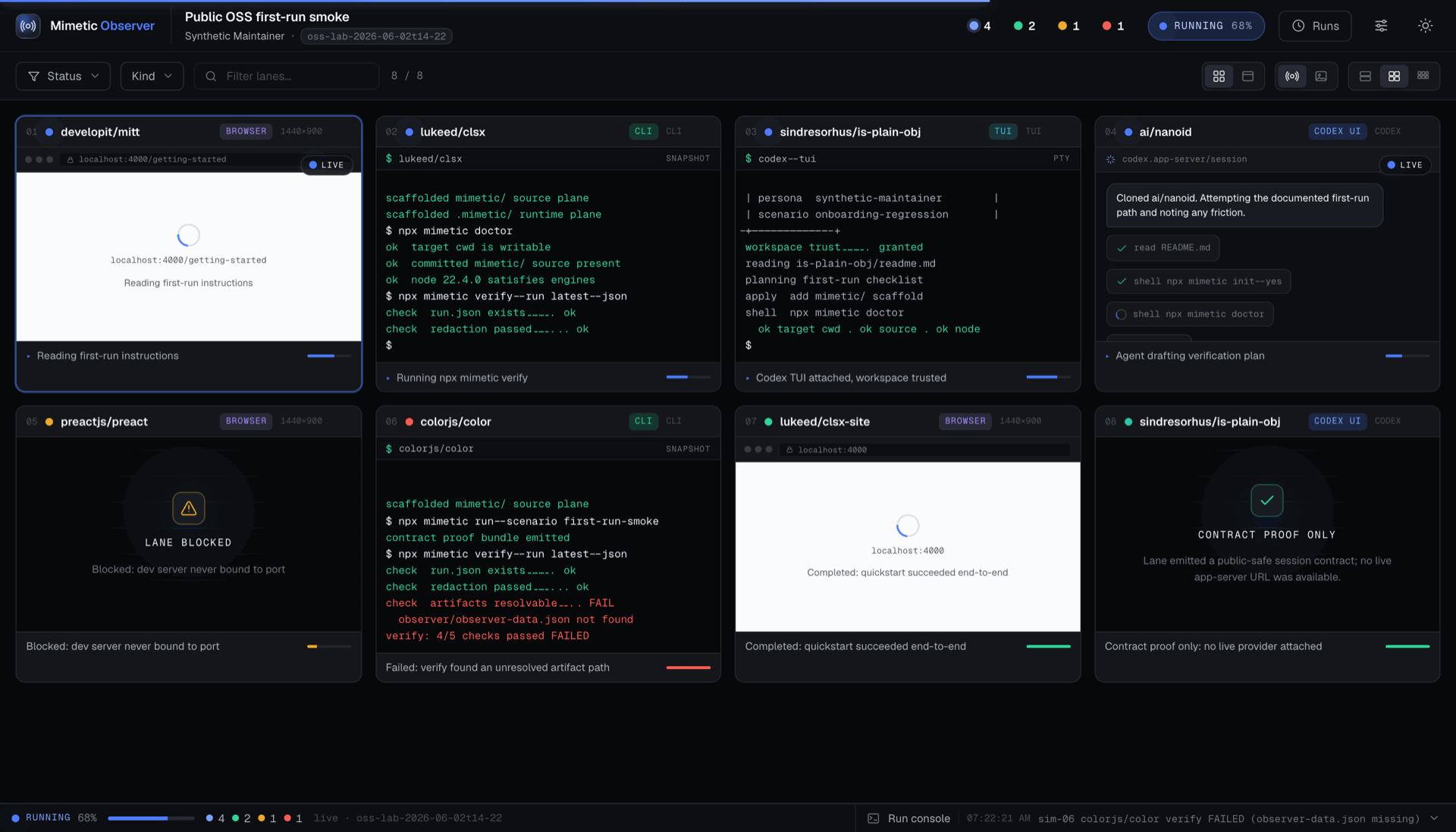
Mimetic gives a project a repeatable way to ask: what happens when realistic
synthetic users, with different goals and tolerances, try to use this thing?
It creates committed simulation source under mimetic/, ignored run evidence
under .mimetic/, a watchable Observer UI, verification gates, and public-safe
feedback drafts.
Install
npm i -D mimetic-cli
npx mimetic init --yes
npx mimetic watch
The package is mimetic-cli; the installed binary is mimetic. For a one-shot
command before installation, use npx --package mimetic-cli mimetic ... so npm
does not resolve an unrelated package named mimetic.
For coding agents, install the repo skill first:
npx skills add danielgwilson/mimetic-cli --skill mimetic-cliThe skill lives at skills/mimetic-cli/SKILL.md
for skills.sh discovery.
Public-Safety Boundary
Mimetic is designed for public repositories and public issue queues. The boundary is three planks, each enforced where it actually holds:
1. This repo and the published package are kept public-safe by CI. Every push runs a public-surface scan (secret/key/path shapes, a sha256 binary-asset allowlist, over both tracked files and the packed npm payload) plus a full-history gitleaks scan. That protects what we ship — it does not scan your repo.
2. The harness never persists secret values into run artifacts. On every route, values it provisioned are scrubbed by literal match (they have no shape for patterns to catch) and secret-shaped content is pattern-redacted before any log tail, harness error, or model narration lands on disk. Env var names are evidence; values never are. Pixels are the exception: a raw screenshot shows whatever was on screen, which is why plank 3 exists.
3. Run bundles are local by default. Evidence lands under gitignored
.mimetic/, and no command publishes it for you. Sharing evidence — committing
screenshots, pasting transcripts, attaching bundles to issues — is a deliberate
act, and reviewing what you share is on you. Use synthetic personas and
synthetic data so there is nothing sensitive to capture in the first place.
What the automated gate enforces. mimetic verify scans public-bound
artifacts and fails closed on secret, key, and token shapes and on known local
path shapes. It does not yet detect free-form PII or PHI such as names, emails,
phone numbers, dates of birth, or medical identifiers. Keeping those out depends
on using synthetic data and on review, so redaction: passed means the
automated secret and path scan found no matches, not that the artifact was
certified free of PII or PHI. A first-class PII/PHI detector is on the roadmap
(#108).
How It Works
mimetic/      committed source plane: labs, personas, scenarios, policy, adapters
.mimetic/    ignored runtime plane: runs, Observer output, reviews, local state
The first-run path does not require credentials:
npx mimetic doctor
npx mimetic watch
npx mimetic verify --run latest --json
npx mimetic feedback issue --run latest --repo owner/repo --format markdown
mimetic watch starts a fresh four-lane synthetic run, renders the Observer,
opens it in the browser, serves it over localhost, and keeps the shell attached.
After mimetic init, named lab manifests can be run the same way:
npx mimetic watch first-run
npx mimetic lab list
npx mimetic lab inspect first-run
The CI-safe equivalent is:
npx mimetic watch --json --no-openCommands
| Command | Purpose |
| --- | --- |
| mimetic init | Scaffold committed mimetic/ source and ignored .mimetic/ runtime state. |
| mimetic doctor | Explain readiness and missing setup. |
| mimetic run --dry-run | Generate a synthetic run bundle without browser, keys, or provider spend. |
| mimetic run --app-url http://127.0.0.1:<port> | Capture live desktop/mobile browser evidence against a running local app. |
| mimetic watch [lab] | Run sims or a named lab, open Observer, and keep watching. |
| mimetic lab list | List committed and ignored lab manifests. |
| mimetic lab inspect <lab> | Show the source manifest for a lab without running it. |
| mimetic lab run <lab> | Run a lab manifest in human or JSON mode. |
| mimetic verify | Validate a run bundle and public-safety gates. |
| mimetic review | Read review evidence for a run. |
| mimetic runs | List local runs and latest pointers. |
| mimetic feedback issue | Print a public-safe GitHub issue draft without API mutation. |
| mimetic lab run oss | Repo-maintainer dogfood example: Observer-of-Observers for headed authorized-repo app setup attempts. |
| mimetic lab run oss-smoke | Repo-maintainer dogfood example: disposable clone smoke test against public OSS repos. |
Lab Manifests
Labs are authored as .yaml source:
mimetic/labs/*.yaml          committed public-safe labs
.mimetic/labs/*.yaml         ignored local labs
.mimetic/local/labs/*.yaml   ignored private or machine-specific labs
Committed labs should be useful to anyone who clones the project. Private repo
targets, token-backed provider settings, and local-only dogfood variants belong
in ignored .mimetic/ lab manifests and can be run explicitly:
npx mimetic watch .mimetic/labs/local-dogfood.yaml --env-file .mimetic/local/provider.env
npx mimetic lab run .mimetic/labs/local-dogfood.yaml --json --no-open
--env-file loads values for the current process only. Mimetic reports loaded
env var names, never values, and does not persist those values into run bundles
or Observer data.
Computer-Use Labs
A computer-use lab dispatches a registered computer-use actor (actors[0].type,
resolved against the actor registry — e.g. openai-computer-use) to drive an app in
a hosted E2B desktop browser and emit an evidence bundle under gitignored
.mimetic/ (full-fidelity screenshots by default — see below; length-only typed
text; provider-neutral mimetic.actor-trace.v1 on the stream). Two subjects route
here:
subject.source: clone(+execution.target: e2b-desktop+ a computer-use actor): the lab clones your repo INTO the sandbox, runs your declaredserve.install/serve.build/serve.startcommands (detached, with readiness probing), and drives the served app atserve.url. Subject env var NAMES declared insubject.envare provisioned from--env-file(names land in evidence; values never do). The bundle records provenance: repo, cloned commit, env names.subject.source: app-url: you (a library caller) provision the app yourself via theprepareDesktophook (runLab(config, { cuaHooks: { prepareDesktop } })) and the actor drives the URL you declared.
subject:
  source: clone
  repos: [example-org/example-app]
  serve:
    install: pnpm install --frozen-lockfile
    build: pnpm build
    start: pnpm start
    url: http://127.0.0.1:3000/
actors:
  - type: openai-computer-use
    mission: Explore the app as a first-time visitor and complete its primary flow.
execution: { target: e2b-desktop }
scenario: { mode: live }
npx mimetic lab run cua-browser # dry-run contract bundle (no spend)Live runs (scenario.mode: live) need OPENAI_API_KEY + E2B_API_KEY (pass via
--env-file) and the optional peer dependency: npm i -D @e2b/desktop. A cloned
subject is served inside the sandbox on loopback; to instead drive a deployment
you own (a Vercel preview, staging), use an app-url subject with
policies.allowPublicTargets: true. The actor's API key never enters the sandbox;
only declared subject env names do. mimetic init scaffolds an example at
mimetic/labs/cua-browser.yaml.
Screenshots are full-fidelity by default. Run bundles live in gitignored
.mimetic/, so the Observer shows exactly what the persona saw — the point of
simming your own app. Set policies.redactScreenshots: true to persist blurred
thumbnails at capture instead (for unowned subjects, or bundles you intend to share
as-is). Raw bundles stay local in gitignored .mimetic/; nothing scans the pixels,
so review them before sharing anywhere — a redact-on-export step is planned. The
frame sent to the model is always full-resolution regardless. (Doctrine:
docs/principles/invariants-and-defaults.md — redaction binds the publish boundary,
not capture.)
Device presets. execution.desktop.device picks the viewport the run renders at —
mobile (414×896), small-mobile (360×740), narrow-mobile (320×700), tablet
(820×1180), desktop (1440×950, default), or wide (1920×1080). The values are copied
from the mature in-house sims, not invented. Honest fidelity: on the computer-use /
E2B-desktop route only width/height physically render — so a site's width-based responsive
CSS fires (real mobile layout), and the model is told its device in the prompt, matching
how those sims run organic mobile lanes. There is no touch input, the device-pixel-ratio
isn't rendered, and the user-agent stays desktop on this route; true touch/DPR/UA emulation
arrives with the deterministic CDP actor. Device is run-wide today; per-persona device
(N personas × devices) lands with fan-out. execution.desktop.resolution is a raw escape
hatch that overrides the preset.
Trust note: serve commands run inside the disposable sandbox with the declared
subject env provisioned — the same trust class as a repo's package.json scripts.
Only run lab configs you trust, and declare only the env names that the subject
genuinely needs. (Since 0.5.0, a clone × e2b-desktop lab whose actor is a
registered computer-use actor routes here and requires serve; on earlier
versions that shape routed to the meta lab.)
Adapters: drive a local app via its JS state contract (no E2B, no vision)
The computer-use loop is provider- and substrate-agnostic. You can point a lab at an
already-running local dev server (subject.source: local-app) and drive it
through its in-process JS contract (window.app.getState() etc.) with a custom
CuaExecutor (screenshot optional, appState as the progress signal) paired with a
non-vision CuaProvider (requiresFrame falsey) — keeping personas, the
Observer, the evidence bundle, redaction, and the friction loop, with NO E2B
desktop and NO clone. Supply cuaHooks.buildExecutor + buildProvider to
runLab (a config-only run with no hooks fails closed with a structured error). See
State-driven executor.
Browser Scenario Manifests
mimetic run --app-url http://127.0.0.1:<port> looks for executable browser
steps in committed mimetic/scenarios/*.yaml. If none are present, Mimetic
falls back to the built-in two-step browser persona proof. Browser steps are
public-safe source, so use synthetic fixture values and committed relative app
paths only.
schema: mimetic.scenario.v1
id: todo-onboarding
title: Todo onboarding
persona: synthetic-new-user
goal: Create the first synthetic todo and verify the list updates.
mode: browser
browser:
  startPath: /
  steps:
    - id: open-home
      label: Open the todo app
      action: goto
      path: /
      expect:
        text: Add todo
    - id: enter-todo
      label: Enter synthetic todo text
      action: fill
      selector: input[name="todo"]
      value: Synthetic onboarding task
    - id: create-todo
      label: Create the todo
      action: click
      selector: button[type="submit"]
      expect:
        text: Synthetic onboarding task
        stateChanged: true
Supported actions are goto, fill, click, assertText, waitForText,
and waitForSelector. Supported expectations are text, selectorVisible,
urlIncludes, and stateChanged. Generated traces are stored as JSON under
.mimetic/runs/<run>/traces/ and summarized in the Observer.
Maintainer OSS Meta-Lab Example
This repository includes an experimental authorized-repo dogfood lab:
pnpm mimetic -- watch oss
pnpm mimetic -- lab run oss --repos CorentinTh/it-tools,drawdb-io/drawdb,maciekt07/TodoApp,lissy93/dashy
Default lab targets are intentionally app/tool-like repos with visible, locally runnable user surfaces. Avoid libraries and frameworks for public dogfood unless the scenario is explicitly testing developer experience.
With E2B_API_KEY and OPENAI_API_KEY present, Mimetic launches headed E2B
desktop lanes, uploads the local package tarball, clones each assigned
repository inside the sandbox, initializes Mimetic, runs nested proof commands,
starts the target app when a runnable script is present, opens desktop/mobile
app windows plus the nested Observer in the sandbox browser, and starts a
nonblocking Codex actor attempt.
Install the optional desktop substrate first:
npm i -D @e2b/desktopThe contract-safe path for agents and CI is:
pnpm mimetic -- lab run oss --dry-run --json --no-openThe oss lab accepts GitHub owner/repo slugs. Private repositories are
maintainer-only and should be supplied from ignored local lab manifests with an
authorized GH_TOKEN or GITHUB_TOKEN loaded via --env-file. When a GitHub
token is present, durable run artifacts redact repo labels by default; pass
--no-redact-repos only for public-safe repo selections. Live E2B stream URLs
are runtime-only for the attached Observer server and are not persisted to
run.json or observer-data.json. Local bundles remain ignored under
.mimetic/; do not publish private screenshots, logs, or upstream details.
Development
pnpm install
pnpm check
pnpm public-surface:scan
pnpm pack:dry-run
Local dogfood:
pnpm mimetic:watch
pnpm mimetic:verify
pnpm mimetic:feedback
pnpm mimetic:lab:list
Docs
- Ramp for future contributors and agents
- Current goals
- Project layout
- Observer architecture
- Actor contract (pluggable harnesses)
- State-driven executor (drive a local app, no E2B/vision)
- OSS lab POC
- Feedback contract
- Open-source install experience
- Self-driving harness principles
- World-class open-source v0 roadmap
- Open-source release readiness
- Public readiness standard
Release Status
This package is prepared for public npm packaging, but publication is still a
human release action. Do not run npm publish unless the maintainer explicitly
approves it in the current context.