
mimic-reels-mcp
v0.4.0
Published
MCP server that recreates the style of a reference reel with your footage and script, using Remotion

Maintainers
 pouya_shahrdami
Readme


An MCP server that turns "here's my footage, here's my script, make it look like that reel" into an actual rendered video.
claude mcp add mimic-mcp -- npx -y mimic-reels-mcp(That's Claude Code — Codex, Cursor, Gemini CLI, and everything else below. You'll also want ffmpeg.)
Your agent can already see — this gives it hands for making reels. It studies a reel you like frame by frame, clones the style onto your footage, renders it with Remotion, then critiques its own render against the reference and fixes what's off.
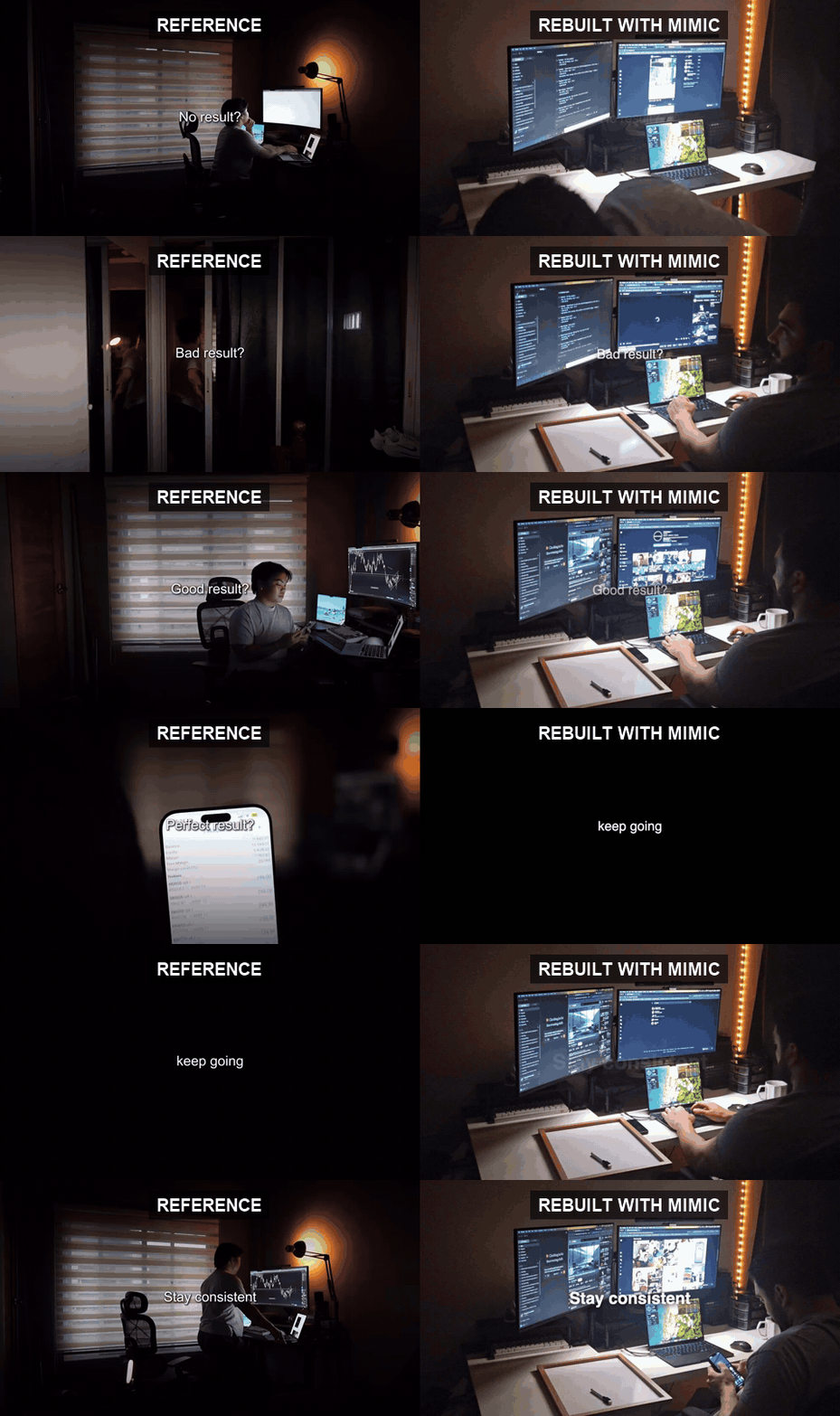
Left: a reel the user liked (someone else's, about API resources). Right: what the agent generated from the user's own footage and a one-line script about AI models — same pacing, same layout, same music.
You give your AI agent (Claude Code, Codex, or anything that speaks MCP) three things:
- Your footage — screen recording, b-roll, talking head, whatever you shot.
- Your script — the text you want the reel to say (captions, tips, hooks).
- A reference reel — a video whose style you want to copy: pacing, transitions, caption rhythm, music vibe.
The server gives the agent the tools to pull that off:
Study the reference
| Tool | What it does |
|------|--------------|
| analyze_reference | MEASURES the reference instead of guessing at it, and writes the result to a machine-readable style spec: scene cuts, each transition fingerprinted from its frames (hard cut, dissolve, dip-to-black/white, directional wipe — with on-screen duration), in-shot motion (punch-in/pan magnitude with fitted easing, via global gradient-flow estimation), on-screen graphic swaps on held shots, an OCR'd caption track (macOS Vision: every text's timing, position, size, case — plus a full-quality crop for font matching), and musical beats (with BPM). Also extracts a filmstrip contact sheet per shot and a native-fps burst strip per transition, so even 2-3 frame flashes are visible to the agent's eyes. |
| analyze_creator | Learns a style from a body of work instead of from one reel. A single reference can't tell you which of its choices were the style and which were that video's subject; across several reels by the same creator, what recurs is the style and what varies is the range they work in. Returns distributions — shot length p25..p75, how often each transition shows up, caption band and case, tempo — plus a consistency score saying whether these reels agree at all, because averaging several different styles produces one the creator never made. Optionally saves a preset built from the middle of the measurements. |
| transcribe_reference | Transcribes the reference's spoken audio with word-level timings, so the agent sees its script structure (hook → build → payoff), not just its visuals. Word timings drop straight into karaoke captions. Needs a local whisper CLI. |
| extract_music | Rips the audio track out of the reference so the new reel can use the same music. |
Prep your footage
| Tool | What it does |
|------|--------------|
| index_footage | Turns a folder of clips into a ranked shot library, so the agent picks from what you shot instead of being handed the right file already trimmed. Splits every clip into shots and measures each one: exposure, flatness, surviving edge detail and camera shake graded into a 0–1 score with named flaws, whether the shot is locked off / moving / shaky (from the direction its frames travelled, not just how much changed), where its subject sits, and a filmstrip to look at. Pass your segment durations as needs and it assigns a shot to each segment — longest need first, never reusing one, and it says so out loud when nothing is long enough. |
| trim_silence | Cuts the silent gaps out of talking-head footage, concatenating the spoken parts into a tighter jump-cut clip — the tedious pass, automated. |
| edit_by_transcript | Cuts footage by what was said, which trim_silence can't see: the "um" that isn't a gap, and the flubbed sentence you remove by quoting it instead of hunting its timecode. Crutch words (like, basically, you know) are opt-in — they're real words and cutting them changes the sentence. Returns every cut with what was said there, plus captions from the actual take, re-timed onto the edited clip with word timings ready for karaoke. dry_run plans the cuts without encoding. Needs a local whisper CLI. |
| suggest_framing | Measures where the subject is, per span, so cover-cropping a wide clip into a vertical frame keeps it — and a punch-in zooms toward it. backgroundPosition and zoom.focusX/focusY otherwise default to the middle, which discards the subject on any off-centre shot. Uses motion where the shot has any, edge detail when it's locked off, and returns null rather than a guess when no subject is clear. |
| track_subject | Follows a subject that moves, instead of aiming at where it was. suggest_framing gives one fixed point per span — right for a locked-off shot, and it loses anyone who walks, since cropping 16:9 to 9:16 throws away two thirds of the width. This measures per window and returns keyframes for the segment's backgroundTrack. The series is smoothed and speed-limited so a measurement glitch can't become a whip pan, and a subject that barely moved comes back as a single position rather than a track that would only jitter. |
| generate_voiceover | Turns a script into a spoken voiceover track using the built-in macOS voice (no API key). Goes in the recipe's voiceover field, where it plays over the music and the music ducks underneath it automatically. Transcribe it for word-synced karaoke captions. macOS only. |
Build & render
| Tool | What it does |
|------|--------------|
| draft_recipe | Projects the measured style spec into a first-pass recipe so the agent never hand-authors timing: one segment per measured shot, transition kinds and durations copied verbatim from the fingerprints, in-shot zoom with its fitted easing, caption band/size/style from the OCR track, and segment boundaries snapped onto the beat grid. Returns the recipe plus notes — the judgment calls it deliberately left to the agent (captionless shots, pans the recipe can't express, leftover script lines). It also measures your footage per segment (see suggest_framing) so crops and punch-ins arrive aimed at the subject rather than the middle. The agent then edits content and look, not arithmetic. |
| scaffold_reel | Generates a ready-to-edit Remotion project from a style recipe — a JSON description of the reel (segments, captions, animations, transitions, zoom, sound, music) that the agent writes after studying the reference. |
| render_reel | Renders the Remotion project to an mp4. Pass quality: "draft" for a fast half-resolution preview while iterating, "final" for the deliverable. Pass segments: [3, 4] to render only those segments — a fix costs one segment, not the whole reel, and lands in its own file so it can't overwrite the deliverable. Final renders are mixed to −14 LUFS (two-pass loudnorm, video stream copied) — the loudness every platform re-gains to, so the reel doesn't land quiet. |
| render_still | Renders one frame to a PNG — the cheapest look at a layout change (caption size, wrapping, a scene's composition). No encode at all. |
| review_render | The measured QA loop: runs the render through the same analyzer as the reference and diffs the two style specs — cut timing, transition kinds, motion, caption timing/position/size — into a 0-100 fidelity score with actionable issues, each naming the recipe field to fix. Plus side-by-side frames per segment for the visual pass. Pass platform (tiktok/instagram/youtube-shorts) and it also reports captions the app's own UI would cover — the caption bar, action rail and tab bar that no fidelity score knows about. |
| critique_reel | Scores the reel against itself — the feedback a from-scratch reel never gets, since review_render can only say how closely you matched a reference. Measures what makes any reel unreadable regardless of style: captions going past faster than anyone reads them, an opening that says nothing in the first 1.5s, text with no outline or pill to separate it from the footage, every segment the same length, dead air, shots held too long, a landscape output. Returns a 0–100 score with each issue naming the recipe field to change — and the measurements behind it, so you can overrule a heuristic you can see is wrong for this reel. |
| open_in_studio | Launches Remotion Studio for the project and returns the URL — the human handoff. Preview the reel, tweak every recipe field in Studio's props panel (the composition is zod-schema'd), and export the final video interactively. |
| hook_variants | Writes one recipe per alternative opening, changing nothing else — the first 1.5s is what creators actually A/B. Rebuilding a whole reel per hook both wastes a render on byte-identical frames and lets the variants differ in more than the thing under test, so each variant reports which segments changed: pass those to render_reel's segments and a variant costs one segment instead of a reel. Each is re-scored for reading speed, because a stronger hook that's too long to read in the time available is not a better hook. |
| export_variants | Re-frames the finished reel into other aspect ratios (9:16, 1:1, 4:5, 16:9) for cross-posting — center-crop or blur-padded. |
| localize_reel | Puts the reel out in another language: swaps the captions for a translation you supply, and writes a renderable recipe plus .srt/.vtt for that language. It owns what goes silently wrong if you just swap the strings — wordTimings are offsets into a specific sentence, so a translated line would karaoke the wrong words (dropped unless you supply new ones); stale emphasisWords are cleared; and because languages aren't the same length, the translated reel is re-scored for reading speed, since a line that read fine in English can flash past in German at the same segment timing. |
| pick_cover_frame | Chooses the cover/thumbnail by measuring every candidate frame on exposure, contrast and edge detail — what survives being shrunk to a thumbnail. Platforms otherwise default to frame 0, which on a reel that opens with a dip-to-black is a black square. Writes the winner full-resolution and returns every candidate ranked, so you can pick another by eye. |
| export_captions | Writes the reel's captions as .srt / .vtt sidecars. Burned-in captions are invisible to platforms — no accessibility, no search, no auto-translate — and the recipe already knows every line and its timing. Long captions are split into readable cues, on real word boundaries (and never across a pause) when wordTimings are present. |
Reusable styles
| Tool | What it does |
|------|--------------|
| list_presets / get_preset | Browse and fetch style presets — shipped built-ins plus your own — a reusable look (caption styles, animations, transitions, zoom, timing) with no content. |
| save_brand_kit / list_brand_kits / apply_brand_kit | The marks that make a reel yours, kept across every reel: logo bug, handle, progress bar, caption type and colors. A preset carries the look of one reference; a brand kit carries what shouldn't change when you copy a new reference at all — so the two compose, and you can take anyone's pacing while keeping your face on it. Merging is additive and idempotent (applying twice leaves one logo, not two) and never overrules a choice the recipe made on purpose unless you ask. Overlays draw above everything, including transitions, so a dip can't cover your watermark. |
| save_preset | Capture the style of a recipe you nailed (dropping footage, text and music) as a named preset to reapply to future reels. |
Plus two prompts that show up as slash commands in Claude Code: mimic-mcp (/mcp__mimic-mcp__mimic-mcp) walks the agent through the style-copying workflow, and generate-scratch (/mcp__mimic-mcp__generate-scratch) through the from-scratch one below.
Making a reel from scratch — no footage
Copying a style is one workflow; the other is having nothing shot at all — a graphical product demo, a launch teaser, motion graphics. Footage is optional: a segment's background can be any one of
backgroundFill— a CSS color or gradient canvas ("linear-gradient(160deg, #0f0c29, #302b63)"), the cheap designed look under big type;backgroundImage— a full-bleed still (product screenshot, designed frame) that rides the samezoom/videoTransitionInmachinery as footage — Ken-Burns over screenshots is most of a product demo already;scene— the powerful one: a path to a Remotion component the agent writes itself (a.tsxdefault-exporting a component that takesSceneProps).scaffold_reelcopies it into the project'ssrc/scenes/and the reel mounts it as that segment's whole background layer — animated UI mockups, charts drawing themselves, device frames, anything React can draw. Captions, sounds, zooms and transitions still apply on top.
The three mix freely with footage segments in one recipe, so "screen recording, then a designed stats page, then a gradient outro" is just three segments. review_render works without a reference — you still get one frame per segment to critique against your own design intent.
/mcp__mimic-mcp__generate-scratch script.txt ./assets [reference.mp4] [style hint]How the workflow feels
/mimic-mcp my-screen-recording.mov script.txt reference-reel.mp4The agent then:
- Calls
analyze_referenceon the reel you like — gets scene cuts + per-shot frames. - Looks at the frames, figures out what's actually going on: "guy coding in the background, big center captions, hard cuts every ~1.8s, tips appearing one by one".
- Calls
extract_musicto grab the soundtrack. - Calls
draft_recipe— the measurement becomes a style recipe mechanically: your footage as the background, the reference's cut timing, transitions and zooms copied verbatim. The agent then edits it for content and look instead of retyping timing from memory. - Calls
scaffold_reelto generate the Remotion project, thenrender_reel. - Calls
review_renderand looks at its own output next to the reference: "the reference opens with a text-only hook before the cards — mine doesn't." Fixes the recipe, re-renders. (This catch actually happened in testing.) - Hands you an mp4.
Install
What you need
| Dependency | Used for | Required? |
|------------|----------|-----------|
| Node 18+ (with npm) | the server itself, plus scaffolding and rendering Remotion projects | required |
| ffmpeg + ffprobe on PATH | every media tool — analysis, trimming, music extraction, exports | required |
| a whisper CLI (whisper-ctranslate2 or openai-whisper) | transcribe_reference (word-level timings for karaoke captions) | optional |
| aubio | real beat tracking in analyze_reference (without it: an energy-rise heuristic that still works) | optional |
| Swift toolchain (Xcode Command Line Tools) | the OCR'd caption track in analyze_reference, via Apple Vision | optional, macOS only |
| macOS say | generate_voiceover (built-in TTS, no API key) | built-in, macOS only |
Two things to know: the first render is slow because Remotion downloads a headless Chromium (once, automatically), and every missing optional dependency degrades cleanly — the affected tool errors with an actionable message or omits that part of the analysis, it never silently produces wrong output.
macOS
brew install ffmpegOptional extras (better beats, transcription, OCR captions):
brew install aubio && uv tool install whisper-ctranslate2 && xcode-select --installWindows
winget install Gyan.FFmpegOptional transcription (aubio has no good Windows build — beat detection falls back to the heuristic):
uv tool install whisper-ctranslate2generate_voiceover and the OCR caption track are macOS-only; everything else works. Generate voiceovers with any TTS you like and pass the audio in as footage.
Linux
sudo apt install ffmpeg aubio-tools # Debian/Ubuntu — dnf/pacman: ffmpeg + aubioOptional transcription:
uv tool install whisper-ctranslate2If the first render fails to launch Chromium, install its shared libraries — Remotion lists the exact packages per distro: remotion.dev/docs/miscellaneous/linux-dependencies. Same macOS-only caveats as Windows: no generate_voiceover, no OCR caption track.
Hook it up to your agent
The fastest path is to point your agent at the published package via npx — no clone, no build.
Claude Code
claude mcp add mimic-mcp -- npx -y mimic-reels-mcpCodex
Add to ~/.codex/config.toml:
[mcp_servers.mimic-mcp]
command = "npx"
args = ["-y", "mimic-reels-mcp"]
Cursor
Add to .cursor/mcp.json (per-project) or ~/.cursor/mcp.json (global):
{
  "mcpServers": {
    "mimic-mcp": {
      "command": "npx",
      "args": ["-y", "mimic-reels-mcp"]
    }
  }
}
Gemini CLI
gemini mcp add mimic-mcp npx -y mimic-reels-mcpAnything else
It's a standard stdio MCP server: npx -y mimic-reels-mcp (or node dist/index.js from a checkout). Any client that takes a command + args config uses npx / ["-y", "mimic-reels-mcp"] like the Cursor snippet above.
From source
To hack on it (see CONTRIBUTING.md):
git clone https://github.com/pouyashahrdami/mimic-mcp
cd mimic-mcp
npm install
npm run build
Then use node /absolute/path/to/mimic-mcp/dist/index.js as the command instead of npx -y mimic-reels-mcp.
The style recipe
The recipe is the contract between "agent understands the reference" and "code renders the video". It's plain JSON:
{
  "output": { "width": 1080, "height": 1920, "fps": 30, "durationSeconds": 24 },
  "background": { "video": "/path/to/my-footage.mov", "fit": "cover" },
  "music": {
    "file": "/path/to/extracted-music.m4a", "volume": 0.8,
    "startSeconds": 12,              // open on the drop, not the intro
    "fadeOutSeconds": 1.5,           // ramp out instead of cutting off mid-bar
    "duckTo": 0.25                   // gain while the voiceover speaks
  },
  "voiceover": {                     // plays WITH the music, which ducks under it
    "file": "/path/to/vo.m4a", "durationSeconds": 18
  },
  "googleFonts": ["Bebas Neue"],     // loaded into the render; use as a captionFont
  "segments": [
    {
      "start": 0, "end": 2.1,
      "caption": "3 tools that changed how I code",
      "captionStyle": "hook",          // hook | tip | plain
      "captionPosition": "top",        // top | center | bottom (match the reference's band)
      "transitionIn": "cut",           // cut | fade | slide
      "captionAnimation": "karaoke",   // none | karaoke | typewriter
      "highlightColor": "#ffe000",     // active-word color for karaoke
      "captionInset": 0.2,             // distance from the top/bottom edge, as a fraction of height
      "captionOutline": { "color": "#000", "widthPx": 8 }, // hard stroke, readable over anything
      "captionBackground": "rgba(0,0,0,0.7)",  // rounded pill behind the text
      "emphasisWords": [4],            // pop these words (0-based) in emphasisColor
      "emphasisColor": "#ffe000",
      "wordTimings": [0, 0.4, 0.7],    // optional per-word times (from transcribe_reference)
      "sound": "whoosh",               // pop | click | whoosh | riser, or a path
      "zoom": { "from": 1, "to": 1.3, "focusX": 0.5, "focusY": 0.4 }, // Ken-Burns punch-in
      "backgroundVideo": "/path/to/clip-2.mov",  // optional: this segment's own clip (montage)
      "backgroundStart": 4.0,          // optional: seconds into the clip to start
      "image": "/path/to/screenshot.png"  // optional: floating card above the caption
    },
    {
      "start": 2.1, "end": 4.0,
      "caption": "or no footage at all",
      // from-scratch backgrounds (one per segment, footage optional reel-wide):
      "backgroundFill": "linear-gradient(160deg, #0f0c29, #302b63)", // CSS canvas
      // "backgroundImage": "/path/to/product-shot.png",  // full-bleed still + zoom
      // "scene": "/path/to/StatsScene.tsx"               // your own Remotion component
    }
    // ... one segment per shot, timed like the reference
  ]
}
Every field past caption/captionStyle is optional — a minimal segment is just start/end/caption. scaffold_reel validates the recipe and generates a Remotion project you (or the agent) can still tweak by hand before rendering.
Troubleshooting
Most issues are a missing external binary. The tools fail loud with an actionable message; here's what each one means.
| Symptom | Cause & fix |
|---------|-------------|
| ffmpeg not found on PATH / ffprobe not found on PATH | The core render/analysis dependency is missing. brew install ffmpeg (installs both). Required by every media tool. |
| No whisper CLI found on PATH | Only affects transcribe_reference. Install one: uv tool install whisper-ctranslate2 (light, no torch) or pip install openai-whisper. |
| macOS say not found | generate_voiceover uses the built-in macOS say, so it's macOS-only. On other platforms, generate the voiceover elsewhere and pass it as your footage's audio. |
| Beat detection looks coarse | Without aubio, analyze_reference falls back to an energy-rise heuristic — it still works. For real beat tracking: brew install aubio (or uv tool install aubio). |
| No caption track in the analysis | The OCR pass uses Apple's Vision framework via a Swift helper, so it's macOS-only. Everything else in analyze_reference still runs; the caption track is simply omitted on other platforms. |
Everything except generate_voiceover (macOS say) and the OCR caption track (macOS
Vision) is cross-platform. When an optional dependency is missing, the affected tool
degrades or errors clearly rather than producing a silently wrong result.
Status
The core loop works end to end: analyze → draft → scaffold → render → self-review.
What the measurement now drives, rather than the agent guessing at it: segment timing, transitions and zoom easing (draft_recipe), where the subject sits so crops and punch-ins aim at it (suggest_framing), caption band and size from the OCR track, and cut boundaries snapped to detected beats.
Style coverage is broad — karaoke/typewriter caption animations, caption outlines, background pills and per-word emphasis, real Google Fonts, Ken-Burns punch-ins, multi-clip montages, transition sound effects, reusable style presets, silence trimming, transcription — plus fully generated from-scratch reels (fills, image backgrounds, agent-authored Remotion scenes) with no footage at all.
Delivery is finished, not just rendered: a voiceover track with the music ducking under it, a −14 LUFS final mix, .srt/.vtt sidecars, aspect-ratio variants, and a safe-area check against TikTok/Instagram/Shorts UI. Iterating is cheap — single frames via render_still, single segments via render_reel's segments.
Growing as real reference reels hit it. Issues and PRs welcome — the presets/ folder is an easy first contribution.
Documentation
- CONTRIBUTING.md — dev setup, code style, and how to open a PR.
- CODE_OF_CONDUCT.md — expectations for participation.
- ARCHITECTURE.md — the analyze → recipe → render → review data flow and what each module owns.
- presets/README.md — the preset format and how to add one.
- CHANGELOG.md — notable changes per version.
- SECURITY.md — reporting vulnerabilities and the trust model.
- AGENTS.md — rules for AI agents working on this repo.
License
MIT