
minecraft-font-renderer
v1.1.0
Published
Render Minecraft formatted text with colors, shadows, bold, italic, and HD font textures

Maintainers
 imfaasty
Readme
Minecraft Font Renderer
Minecraft-style text renderer for Node.js using skia-canvas.
It supports Minecraft color codes, shadows, bold, italic, Unicode glyphs, HD ASCII font textures, and cached glyph rendering.
Features
- Minecraft color codes from
&0to&fand§0to§f - Formatting codes: bold
&l, italic&o, reset&r - Automatic Minecraft-style shadow colors
- ASCII and Unicode font textures
- Optional HD ASCII font with
ascii_hd.png - Cached glyph rendering
- Built for
skia-canvas
Installation
npm install minecraft-font-rendererBasic Usage
import { Canvas } from "skia-canvas";
import { writeFile } from "node:fs/promises";
import { FontRender, defaultFontPath } from "minecraft-font-renderer";

const renderer = new FontRender();

await renderer.loadImages(defaultFontPath);

const canvas = new Canvas(560, 250);
const ctx = canvas.getContext("2d");

ctx.imageSmoothingEnabled = false;
ctx.fillStyle = "#000000";
ctx.fillRect(0, 0, canvas.width, canvas.height);

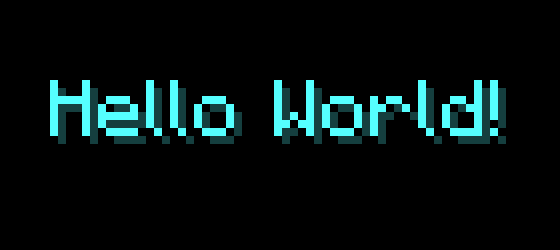
const text = "&bHello World!";

renderer.fillText(ctx, text, 50, 80, {
  shadow: true,
  size: 8,
  hdFont: false,
});

const buffer = await canvas.toBuffer("png");
await writeFile("basic.png", buffer);
Run the Example
Run the local example after cloning this repository:
npm install
npx tsx examples/basic.ts
Formatting Codes
Both & and § prefixes are supported.
| Code | Description |
| --- | --- |
| &0 - &f | Minecraft colors |
| &l | Bold |
| &o | Italic |
| &r | Reset formatting |
Example:
renderer.fillText(ctx, "&d&lHello &cWorld&a!", 50, 80, {
  size: 8,
  shadow: true,
});

renderer.fillText(ctx, "§d§lHello §cWorld§a!", 50, 80, {
  size: 8,
  shadow: true,
});
HD Font
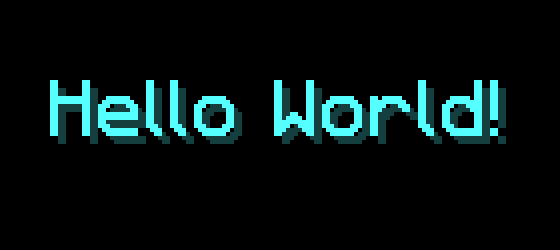
The included font assets provide ascii_hd.png. Enable HD ASCII glyphs with:
renderer.fillText(ctx, "&bHello World!", 50, 80, {
  shadow: true,
  size: 8,
  hdFont: true,
});
hdFont: true uses ascii_hd.png for ASCII characters.
Text Alignment
fillText supports left, center, and right alignment:
renderer.fillText(ctx, "&f&lHello World!", 900, 80, {
  size: 8,
  shadow: true,
  align: "center",
});

renderer.fillText(ctx, "&eHello World!", 900, 80, {
  size: 8,
  shadow: true,
  align: "right",
});
Alignment is based on the rendered text width, including formatting such as bold and HD glyphs.
Font Assets
Before rendering, load the included font textures:
import { FontRender, defaultFontPath } from "minecraft-font-renderer";

const renderer = new FontRender();

await renderer.loadImages(defaultFontPath);
The included assets contain:
ascii.png
ascii_hd.png
unicode_page_00.png
unicode_page_01.png
...
ASCII glyphs are mapped from the included atlas layout, so extended characters such as Ω, Ç, ü, and box-drawing symbols can render from ascii.png when available.
Font Metrics
Glyph metrics are generated from the font textures by scanning visible pixels in each glyph cell.
If you change the font assets, regenerate the metrics with:
npm run gen:metricsThis is only needed when changing or replacing the font assets.
Leaderboard Example
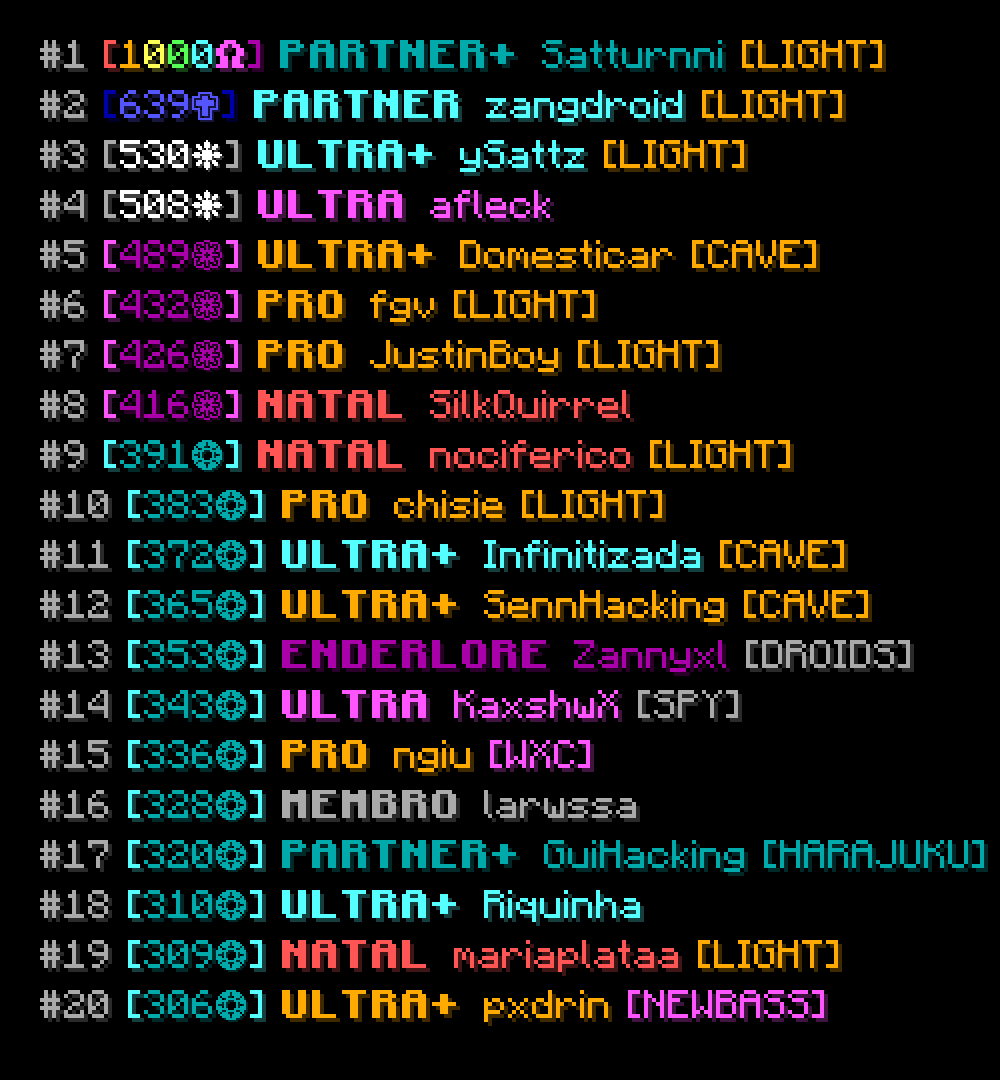
This repository also includes a Mush leaderboard example that fetches public leaderboard data and renders it as an image.
npx tsx examples/mushLeaderboard.tsThe Mush example is only a usage demo. The renderer itself does not depend on the Mush API.
Performance
Glyphs are cached after first use. The renderer stores the visible pixels for each glyph, so repeated characters can be drawn without reading the font texture again.
This helps when rendering repeated text, leaderboards, and stat cards.
Preview
Normal Font
HD Font
Leaderboard Example
Disclaimer
Minecraft is a trademark of Mojang Studios/Microsoft. This project is not affiliated with or endorsed by Mojang Studios or Microsoft.
License
This project is licensed under the ISC License.