
minify-font
v2.1.0
Published
A lightweight font subsetting and conversion tool | 轻量级字体裁剪和转换工具

Maintainers
 linkary
Readme
minify-font
English | 简体中文




简单易用的字体裁剪工具
一个轻量级的字体裁剪和转换工具,支持多种字体格式,可以显著减小字体文件体积。
⚠️ 警告: 未在 windows 电脑上充分测试。
特性
- 字体裁剪: 只保留需要的字符,大幅减小文件体积
- 格式转换: 支持 TTF, OTF, WOFF, WOFF2, EOT, SVG 格式互转
- 批量生成: 一次性生成多种 Web 字体格式
- CLI 工具: 方便集成到构建流程
- 可编程: 提供 JavaScript API 供程序调用
- 预定义字符集: 内置常用汉字字符集
安装
npm install minify-font全局安装 CLI 工具:
npm install -g minify-font作为 CLI 使用
你可以通过 CLI 方便的集成到项目 scripts 中, 支持预定义字符集 (具体查看: top-used-chars)
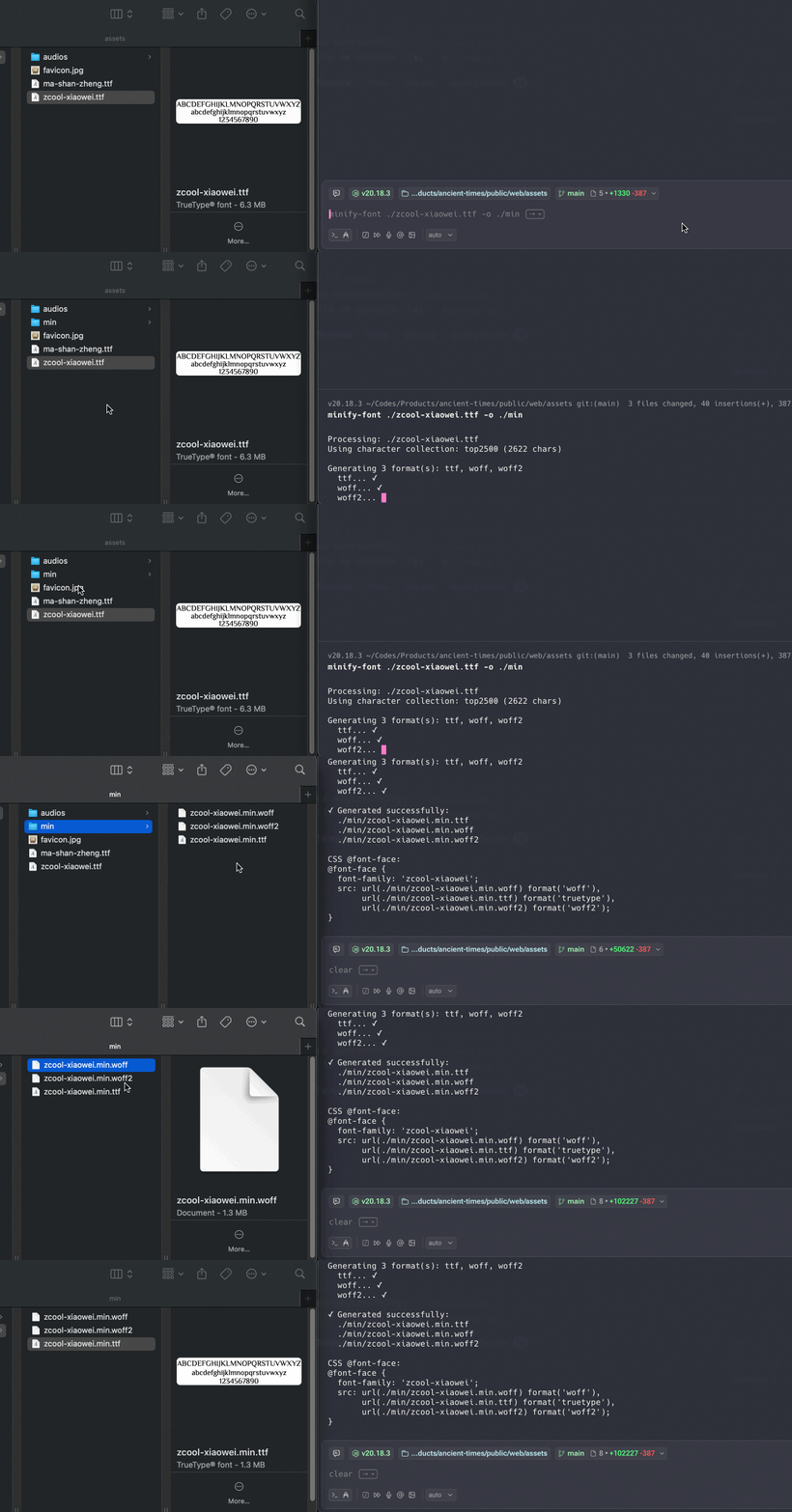
minify-font <input-font-path> [options]

选项:
  -c, --collection <name>   使用预定义字符集:
                            top500, top2500 (默认), commonlyUsed
  -w, --words <words>       自定义字符:
                            - 单独使用: 仅包含指定字符
                            - 配合 -c 使用: 追加到字符集
  -o, --output <output>     输出文件或目录 (默认: 输入文件名 + .min 后缀)
  -f, --formats <formats>   生成的格式 (逗号分隔, 默认: ttf,woff,woff2)
  --input-options <json>    输入字体选项 (JSON 字符串)
  --output-options <json>   输出字体选项 (JSON 字符串)

示例:
  minify-font font.ttf                              # 使用默认字符集 (top2500, 2500个最常用汉字)
  minify-font font.ttf -c top500                    # 使用 top500 字符集 (500个最常用汉字)
  minify-font font.ttf -w "Hello World"             # 仅包含 "Hello World" 字符 (不使用字符集)
  minify-font font.ttf -c top500 -w "额外字符"       # 组合模式: top500 + "额外字符"
  minify-font font.ttf -w "ABC" -o output/          # 指定字符输出到目录
  minify-font font.ttf -f woff2                     # 仅生成 woff2 格式
  minify-font font.ttf -f ttf,woff -o dist/         # 生成多种格式到目录
作为模块使用
minifyFont(options: MinifyFontOptions): Promise
转换和取字体子集, 依赖 fonteditor-core
interface MinifyFontOptions {
  input: string // 输入字体文件路径
  output: string // 输出字体文件路径
  text: string // 要包含的文字内容
  inputOptions?: FontReadOptions // 输入选项 (详见下方)
  outputOptions?: FontWriteOptions // 输出选项 (详见下方)
}

// 输入选项 (FontReadOptions)
interface FontReadOptions {
  hinting?: boolean // 是否保留 hinting 表 (默认: false)
  kerning?: boolean // 是否保留 kerning 表 (字距调整, 默认: false)
  compound2simple?: boolean // 是否将复合字形转换为简单字形 (默认: true)
  combinePath?: boolean // 是否合并 SVG 路径 (默认: true, 仅用于 SVG)
  inflate?: (data: number[]) => number[] // 自定义解压函数 (用于 WOFF)
}

// 输出选项 (FontWriteOptions)
interface FontWriteOptions {
  hinting?: boolean // 是否保留 hinting (默认: false)
  kerning?: boolean // 是否保留 kerning (默认: false)
  writeZeroContoursGlyfData?: boolean // 是否写入空轮廓的字形数据 (默认: false)
  metadata?: string // SVG 元数据 (仅用于 SVG 输出)
  deflate?: (data: number[]) => number[] // 自定义压缩函数 (用于 WOFF)
  support?: {
    // 覆盖 head 表数据
    head?: { xMin?: number; yMin?: number; xMax?: number; yMax?: number }
    // 覆盖 hhea 表数据
    hhea?: { advanceWidthMax?: number; xMaxExtent?: number }
  }
}
使用示例:
import { minifyFont } from 'minify-font'

// 基本用法: TTF 转 WOFF2 并裁剪字符
await minifyFont({
  input: './fonts/source.ttf',
  output: './fonts/output.woff2',
  text: 'Hello, World! 你好世界',
})

// 转换字体格式 (TTF -> WOFF)
await minifyFont({
  input: './fonts/source.ttf',
  output: './fonts/output.woff',
  text: 'ABCDEFGHIJKLMNOPQRSTUVWXYZ',
})

// 保留 hinting 和 kerning 信息 (更高质量,但文件更大)
await minifyFont({
  input: './fonts/source.ttf',
  output: './fonts/output.woff2',
  text: '常用汉字文本内容',
  inputOptions: {
    hinting: true, // 保留字体微调信息
    kerning: true, // 保留字距调整信息
  },
  outputOptions: {
    hinting: true, // 输出时保留 hinting
    kerning: true, // 输出时保留 kerning
  },
})

// 转换复合字形为简单字形
await minifyFont({
  input: './fonts/complex.otf',
  output: './fonts/simple.ttf',
  text: 'ABC',
  inputOptions: {
    compound2simple: true, // 将复合字形转为简单字形
  },
})
createWebFonts(options: CreateWebFontsOptions): Promise
一次性创建 ttf, woff2, woff 字体文件
interface CreateWebFontsOptions {
  input: string // 输入字体文件路径
  outputDir?: string // 输出目录 (默认为输入文件同级目录下的 output 文件夹)
  text: string // 要包含的文字内容
  resolveFileName?: (info: { basename: string; ext: string }) => string // 自定义文件名
  formats?: string[] // 要生成的字体格式 (默认: ['woff2', 'woff', 'ttf'])
}

interface CreateWebFontsResult {
  outputDir: string // 输出目录路径
  fonts: Array<{
    format: string // 字体格式 (如 'woff2', 'woff', 'ttf')
    path: string // 字体文件的完整路径
    success: boolean // 是否成功生成
    error?: Error // 如果失败,包含错误信息
  }>
}
使用示例:
const result = await createWebFonts({
  input: './input/font.ttf',
  outputDir: './output',
  text: 'Hello, World!',
  formats: ['woff2', 'woff', 'ttf'], // 可选,默认生成 woff2, woff, ttf
  resolveFileName: ({ basename, ext }) => `${basename}.${ext}`,
})

// 检查生成结果
console.log('输出目录:', result.outputDir)
result.fonts.forEach(font => {
  if (font.success) {
    console.log(`✓ ${font.format}: ${font.path}`)
  } else {
    console.error(`✗ ${font.format} 失败:`, font.error)
  }
})
高级选项说明
inputOptions (输入选项)
hinting (boolean, 默认: false)
Hinting 是字体中的微调指令,用于在小尺寸下提高显示质量。
- ✅ 启用: 更好的小字号渲染质量,但文件更大
- ❌ 禁用: 文件更小,Web 字体通常不需要
inputOptions: {
  hinting: true // 推荐用于需要支持小字号的桌面应用
}
kerning (boolean, 默认: false)
Kerning 是字距调整表,控制特定字符对之间的间距(如 "AV")。
- ✅ 启用: 更好的排版质量
- ❌ 禁用: 文件更小
inputOptions: {
  kerning: true // 推荐用于高质量排版需求
}
compound2simple (boolean, 默认: true)
将复合字形(引用其他字形的字形)转换为简单字形。
- ✅ 启用: 兼容性更好,某些工具不支持复合字形
- ❌ 禁用: 保持原始字形结构
inputOptions: {
  compound2simple: true // 推荐保持默认值
}
combinePath (boolean, 默认: true)
仅用于 SVG 字体,将多个路径合并为一个字形。
inputOptions: {
  combinePath: true // 仅处理 SVG 时相关
}
outputOptions (输出选项)
hinting / kerning (boolean, 默认: false)
与 inputOptions 相同,控制输出时是否保留这些信息。
writeZeroContoursGlyfData (boolean, 默认: false)
是否为空轮廓字形写入数据。通常保持默认值即可。
metadata (string)
仅用于 SVG 输出,添加元数据信息。
outputOptions: {
  metadata: '<?xml version="1.0" standalone="no"?>'
}
support (object)
用于手动覆盖字体度量值,高级用法。
outputOptions: {
  support: {
    head: {
      xMin: 0,
      yMin: -200,
      xMax: 1000,
      yMax: 800
    }
  }
}
选项使用建议
| 场景 | hinting | kerning | compound2simple | 文件大小 | 质量 | | ------------------- | -------- | -------- | --------------- | -------- | ---- | | Web 字体 (推荐) | ❌ false | ❌ false | ✅ true | 最小 | 良好 | | 高质量 Web 字体 | ❌ false | ✅ true | ✅ true | 中等 | 优秀 | | 桌面应用字体 | ✅ true | ✅ true | ❌ false | 最大 | 最佳 | | 极致压缩 | ❌ false | ❌ false | ✅ true | 最小 | 基本 |
Web 字体最佳实践:
// 大多数 Web 场景的推荐配置
await minifyFont({
  input: 'font.ttf',
  output: 'font.woff2',
  text: '你的网站文字',
  // 不需要设置 inputOptions 和 outputOptions
  // 默认值已经是 Web 字体的最优配置
})
支持的字体格式
| 格式 | 输入 | 输出 | 说明 | | ----- | ---- | ---- | --------------------------------------- | | TTF | ✅ | ✅ | TrueType Font | | OTF | ✅ | ✅ | OpenType Font | | WOFF | ✅ | ✅ | Web Open Font Format | | WOFF2 | ✅ | ✅ | Web Open Font Format 2.0 (推荐用于 Web) | | EOT | ✅ | ✅ | Embedded OpenType | | SVG | ✅ | ✅ | SVG Font |
使用场景
1. 减小中文字体体积
中文字体通常包含数千个字符,完整字体文件可达数 MB。通过裁剪只保留网页实际使用的文字,可以将体积减小到几十 KB。
# 只保留网站标题使用的文字
minify-font my-font.ttf -w "欢迎来到我的网站" -o dist/
2. Web 字体优化
一次生成所有 Web 字体格式,提供最佳浏览器兼容性:
minify-font font.ttf -c top2500 -f ttf,woff,woff2 -o dist/fonts/3. 构建流程集成
在 package.json 中添加字体处理脚本:
{
  "scripts": {
    "build:fonts": "minify-font src/fonts/*.ttf -c commonlyUsed -o dist/fonts/"
  }
}
4. 动态字体生成
在 Node.js 程序中动态生成优化后的字体:
import { createWebFonts } from 'minify-font'
import { readFileSync } from 'fs'

// 从数据库或 CMS 获取网站实际使用的文字
const contentText = await fetchAllPageContent()

// 生成优化后的字体
const result = await createWebFonts({
  input: './fonts/source.ttf',
  outputDir: './public/fonts',
  text: contentText,
  formats: ['woff2', 'woff'],
})
常见问题
如何确定需要包含哪些字符?
使用预定义字符集: 适合大多数中文网站
minify-font font.ttf -c top2500 # 2500 个最常用汉字提取网站实际文字: 更精确,体积更小
# 提取 HTML 中的所有文字 cat *.html | grep -o . | sort -u | tr -d '\n' > chars.txt minify-font font.ttf -w "$(cat chars.txt)" -o output.woff2组合使用: 字符集 + 额外字符
minify-font font.ttf -c top1000 -w "特殊字符©®™"
为什么需要多种字体格式?
不同浏览器支持的字体格式不同,建议提供多种格式以确保兼容性:
- WOFF2: 最新格式,压缩率最高,优先使用(Chrome 36+, Firefox 39+, Safari 12+)
- WOFF: 广泛支持的 Web 字体格式(IE9+, 所有现代浏览器)
- TTF: 备用格式,兼容老旧浏览器
在 CSS 中使用:
@font-face {
  font-family: 'MyFont';
  src: url('font.woff2') format('woff2'), url('font.woff') format('woff'), url('font.ttf') format('truetype');
}
依赖
- fonteditor-core - 字体处理核心库
- top-used-chars - 预定义中文字符集
License
MIT