
minitype-plugin-rubinate
v0.1.1
Published
Automatic Japanese ruby for minitype using Lindera IPADIC/UniDic WASM and furigana dictionaries


Readme
minitype-plugin-rubinate
Rubinate is a minitype plugin for automatic Japanese ruby, using Lindera and reading correspondence dictionaries.
The generated ruby uses standard minitype inlines, with typography, line breaking and page layout handled by minitype.
Installation
Install the plugin and minitype in your document project:
npm install minitype-plugin-rubinate @minitype/minitypeQuick start
Save as index.ts:
import { minitype, p } from "@minitype/minitype";
import { autoRuby } from "minitype-plugin-rubinate";

const paragraph = p([
  await autoRuby("東京スカイツリーの最寄り駅はとうきょうスカイツリー駅です。"),
]);

const document = [{ body: [paragraph] }];
await minitype(document).save("output.pdf");
Run:
npx tsx index.tsUse "type": "module" in package.json and install tsx with npm install --save-dev tsx if needed.
Await autoRuby() before passing its result to minitype. p() expects an array of lines, so wrap the returned inline array: p([await autoRuby(text)]). The tagged form p`${await autoRuby(text)}` is also supported.
Use createRubinate(config) when you want to share settings across calls or supply a custom tokenizer. It is not required for the example above.
See the documentation for executable examples, their rendered results and the complete public API.
TSX
With @minitype/tsx 0.1.1, use <AutoRuby> for automatic ruby inside JSX. Install the JSX runtime in your document project:
npm install @minitype/tsxAdd these settings to tsconfig.json:
{
  "compilerOptions": {
    "jsx": "react-jsx",
    "jsxImportSource": "@minitype/tsx"
  }
}
Save as index.tsx:
import { Document, Group, P, minitypeJSX } from "@minitype/tsx";
import { AutoRuby } from "minitype-plugin-rubinate/tsx";

const document = (
  <Document>
    <Group>
      <P>
        <AutoRuby>東京スカイツリーの最寄り駅はとうきょうスカイツリー駅です。</AutoRuby>
      </P>
    </Group>
  </Document>
);

await minitypeJSX(document).save("output.pdf");
Run with npx tsx index.tsx. AutoRuby performs its analysis synchronously while JSX is evaluated, so no resolver or document traversal step is required before minitypeJSX.
Pass dictionary, kana, granularity, readings, correspondence, userDictionary or userDictionaryPath as props. For shared defaults, import createAutoRuby and create a component such as const UnidicRuby = createAutoRuby({ dictionary: "unidic" }); element props override those defaults. Synchronous custom tokenizers are also supported by createAutoRuby. The normal createRubinate/autoRuby API remains asynchronous and continues to accept async custom tokenizers. AutoRuby accepts text, interpolated numbers, arrays of text and conditional empty values. Place styled elements around it and manual ruby elements beside it. Nested JSX elements inside AutoRuby are rejected.
A complete example is in examples/tsx.tsx; run it from this checkout with npm run example:tsx.
API
| Method | Result | Purpose |
| --- | --- | --- |
| createRubinate(config?) | Rubinate | Create an instance with shared defaults |
| r.autoRuby(text, options?) | Promise<(string \| Ruby)[]> | Produce minitype ruby inlines |
| r.analyze(text, options?) | Promise<AnalyzedToken[]> | Inspect tokens, readings and dictionary correspondence |
| r.segments(text, options?) | Promise<Segment[]> | Get { text, reading? } parts for other renderers |
| alignReading(surface, reading) | Segment[] | Align kana without loading a dictionary |
autoRuby, analyze and segments are also top-level imports using a shared default instance. To use a shorter local name, import autoRuby as ruby from minitype-plugin-rubinate; keep it distinct from minitype's manual ruby helper. See the public types and manual.
Readings
For a reading specified directly in your document, use minitype's ruby(). Leave text unannotated by writing it as a plain string, and use Rubinate for the parts that need automatic readings:
import { minitype, p, ruby } from "@minitype/minitype";
import { createRubinate } from "minitype-plugin-rubinate";

const r = createRubinate();

const sample = "東京タワーの最寄駅は赤羽橋駅です。";
const paragraph = p([
  [...await r.autoRuby(sample)],
  ["東京タワー", ...await r.autoRuby("の最寄駅は"),
    ruby("赤羽橋駅", "あかばねばしえき"), "です。"],
]);

const document = [{ body: [paragraph] }];
await minitype(document).save("output.pdf");
Use readings when processing an existing text string or applying the same reading to matching surfaces throughout the input. null suppresses ruby for that surface:
import { minitype, p } from "@minitype/minitype";
import { createRubinate } from "minitype-plugin-rubinate";

const r = createRubinate();
const sample = "東京タワーの最寄駅は赤羽橋駅です。";
const annotated = await r.autoRuby(sample, {
  readings: { "赤羽橋駅": "あかばねばしえき", "東京タワー": null },
});
const paragraph = p([
  [...await r.autoRuby(sample)],
  [...annotated],
]);

const document = [{ body: [paragraph] }];
await minitype(document).save("output.pdf");
Both examples above show the original result first and the edited result below:
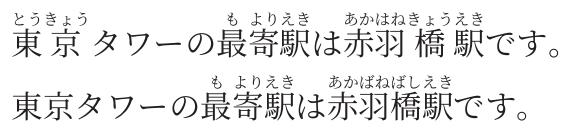
Overrides choose the longest match and bypass dictionary correspondence. They divide the surrounding text into separately analyzed chunks.
User dictionaries
Use a user dictionary when the existing dictionary gives an incorrect reading or word boundary. Each CSV row is surface,part-of-speech,reading. Here, the default analyzer reads 赤羽橋駅 as あかはねきょうえき; the user entry corrects it to あかばねばしえき.
import { minitype, p } from "@minitype/minitype";
import { createRubinate } from "minitype-plugin-rubinate";
const r = createRubinate({
  userDictionary: "赤羽橋駅,カスタム名詞,アカバネバシエキ",
});
const sample = "東京タワーの最寄駅は赤羽橋駅です。";
const paragraph = p([
  [...await r.autoRuby(sample, { userDictionary: "" })],
  [...await r.autoRuby(sample)],
]);

const document = [{ body: [paragraph] }];
await minitype(document).save("output.pdf");
For an external UTF-8 file, save the following as dictionary.csv (no header):
赤羽橋駅,カスタム名詞,アカバネバシエキimport { minitype, p } from "@minitype/minitype";
import { createRubinate } from "minitype-plugin-rubinate";
const r = createRubinate({ userDictionaryPath: "./dictionary.csv" });
const sample = "東京タワーの最寄駅は赤羽橋駅です。";
const paragraph = p([
[...await r.autoRuby(sample, { userDictionary: "" })],
[...await r.autoRuby(sample)],
]);
const document = [{ body: [paragraph] }];
await minitype(document).save("output.pdf");Both CSV methods produce the same comparison: before applying the user dictionary on top, and after applying it below:
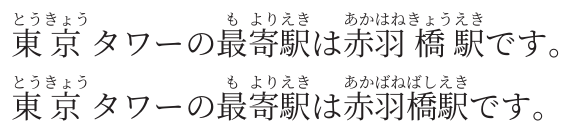
userDictionaryPath accepts a filesystem path or a file: URL, including new URL("./dictionary.csv", import.meta.url) for a path relative to your script. String paths are relative to the working directory. The file is read on each call; UTF-8 BOM is accepted. File access and CSV validation errors reject the call. Specify either userDictionary or userDictionaryPath in the same configuration, not both. A call-level source replaces either instance source; userDictionary: "" disables the instance dictionary for that call.
Quoted fields and CRLF are supported. Invalid rows reject before entering WASM.
Choosing a dictionary
IPADIC remains the default. In the bundled dictionaries, IPADIC leaves 淹 in お茶を淹れる。 unannotated, while UniDic supplies the reading い. The first line below uses IPADIC; the second uses UniDic.
import { minitype, p } from "@minitype/minitype";
import { createRubinate } from "minitype-plugin-rubinate";
const r = createRubinate({ dictionary: "unidic" });
const sample = "お茶を淹れる。";
const paragraph = p([
  [...await r.autoRuby(sample, { dictionary: "ipadic" })],
  [...await r.autoRuby(sample)],
]);

const document = [{ body: [paragraph] }];
await minitype(document).save("output.pdf");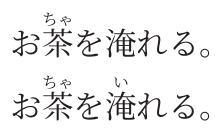
The dictionaries differ in vocabulary and tokenization; UniDic is not necessarily more accurate for every sentence. Both support user dictionaries, explicit readings and kana options. See the manual for analysis fields and reading reconstruction.
Analysis table
Use analyze() to inspect token boundaries, readings and parts of speech, then pass the rows to minitype's table(). The range column uses UTF-16 offsets with an exclusive end; — indicates a missing reading or part of speech.
import { minitype, p, table } from "@minitype/minitype";
import { createRubinate } from "minitype-plugin-rubinate";

const r = createRubinate({ dictionary: "unidic" });
const tokens = await r.analyze("お茶を淹れる。");
const rows = [
  ["Surface", "Reading", "Part of speech", "Range"],
  ...tokens.map(t => [
    t.surface, t.reading || "—",
    t.partOfSpeech?.filter(s => s !== "*").join(" / ") || "—",
    `[${t.start}, ${t.end})`,
  ]),
];
const analysisTable = table(rows.map(row => row.map(cell => ({
  type: "tableCell",
  block: p(cell, { size: 3.2, lineHeight: 5, align: "left", indent: 0, firstIndent: 0 })
}))), {
  columnWidths: [24, 30, 65, 30],
  cellPadding: { type: "physical", top: 2, bottom: 2, left: 2, right: 2 },
});

const document = [{ body: [analysisTable] }];
await minitype(document).save("output.pdf");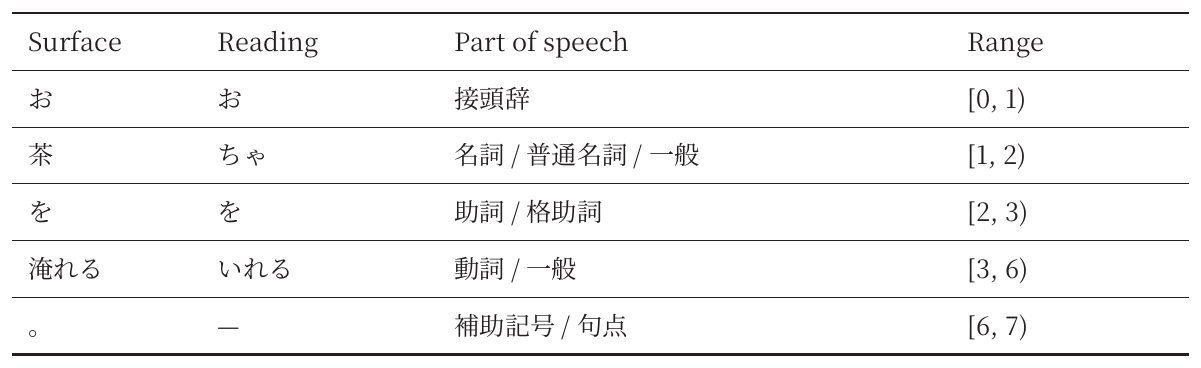
Pass analysisTable as a block in your document's body.
Ruby options and styling
| Option | Default | Behavior |
| --- | --- | --- |
| dictionary | "ipadic" | "ipadic" or "unidic"; shared defaults and per-call selection |
| kana | "hiragana" | Hiragana or "katakana" readings |
| granularity | "kanji" | Correspondence with okurigana separated; "word" annotates whole tokens |
| correspondence | true | Look up JmdictFurigana and JmnedictFurigana |
| readings | {} | Exact reading overrides or exclusions |
| userDictionary | omitted | Additional entries in three-column CSV |
| userDictionaryPath | omitted | UTF-8 CSV file path or file: URL |
In the examples above, 東京 receives per-character ruby as 東(とう)京(きょう), while the user dictionary annotates 赤羽橋駅 as a whole with あかばねばしえき. With UniDic, 淹れる becomes 淹(い)れる, leaving the okurigana unannotated. Characters without a reading remain unchanged, as with 淹 in the IPADIC example. The original text, including whitespace, is preserved.
Set rubySize, rubyOffset, rubyFont, rubyAlign and lineHeight with minitype's paragraph styles. The manual compares hiragana and katakana and explains style settings and token inspection.
Scope and runtime
Rubinate uses IPADIC and UniDic analyzers, okurigana alignment and furigana correspondence modules with a direct JavaScript–WASM buffer ABI. Each annotated segment becomes a native minitype ruby inline. rubyKind is informational classification returned by analysis; it does not control grouping or layout.
The WASM assets are about 11 MiB for IPADIC, 44 MiB for UniDic and 5.4 MiB for correspondence. All are packaged, but only the selected analyzer loads. They load lazily and are shared per process. Processing is synchronous inside the async API; a worker is appropriate when event-loop latency matters. config.tokenizer can replace the analyzer; see the manual's custom tokenizer example and contract.
Development
npm test                 # Build, type-check and run regression tests
npm run example          # Generate output/pdf/rubinate-example.pdf
npm run documentation    # Execute examples and build docs/documentation.pdf
npm run documentation:images # Regenerate standalone README images
npm pack                 # Package binaries, sources and documentation
Exact binary hashes and source provenance are in assets/manifest.json. The package maintains the corresponding Rust sources and dictionary data under wasm-plugins. Optional WASM rebuild instructions are in the manual.
License
Rubinate is licensed under MIT. Correspondence data is CC BY-SA 4.0. UniDic uses its BSD-3-Clause option; IPADIC and Lindera retain their respective notices. minitype 0.1.6 uses a separate PolyForm Noncommercial license.
See THIRD_PARTY_NOTICES.md for attribution and the host dependency audit status.
Rubinate provides automatic Japanese ruby functionality equivalent to auto-jrubby, with ruby layout handled by minitype.