
mk-movies
v1.0.9
Published
momo vue static module
Downloads
51


Readme
陌陌VUE组件库
Movies组件库文档
DEMO目录结构
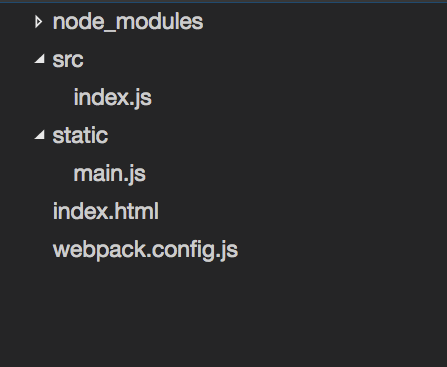
上图为使用Movies组件最基本的目录结构,可以根据需求有所差异。
在上述文件基础上,我们最先要做的是安装依赖包。详情可以参考 Webpack官方配置参考
具体步骤如下
- 安装依赖
$npm install --save webpack vue vue-loader vue-html-loader vue-style-loader css-loader sass-loader node-sass babel-loader babel-core babel-preset-es2015 mk-movies依赖很多,我稍微解释一下
- 首先是webpack主体
- 其次是vue主体+loader,比如负责控件template部分的vue-html-loader,负责样式表的vue-style-loader,sass预编译,css-loader,
- 然后是ES6的babel,用于解析ES6语法。
- 最后当然还有我们自己的movies库
到这里,准备工作就结束了,我们来看下基础的demo文件的代码: 首先是VueJS模板代码
src/index.js
import { Mask } from 'mk-movies';
import { Vue } from 'Vue';

new Vue({
  el: '#app',
  data: {
    message: 'Hello Vue.js!',
    show:""
  },
  components:{
  	'mask':Mask
  },
  ready:function(){
  	this.show = true;
  }
})- 通过
import { Mask } from 'mk-movies'引入依赖。 - 由于使用了require这个es6特性,所以这里需要上webpack。 如果是简单的项目,觉得没有必要上webpack这套东西,那么请回避使用Component,而是直接用老的static
webpack.config.js
var path = require('path');
var webpack = require('webpack');

module.exports = {
  entry:'./src/index.js',
  resolve: {
    root: [
      path.resolve(__dirname, './components'),
    ],
    extensions: ['', '.js', '.vue']
  },
  output: {
    path: path.resolve(__dirname, './static'),
    filename: '[name].js',
  },
  babel: {
      presets: ['es2015'],
  },
  module: {
    loaders: [
      {
        test: /\.vue$/,
        loader: 'vue'
      },
      {
        test: /\.js$/,
        loader: 'babel',
        exclude: /node_modules/
      },
      {
        test: /mk-movies\/.*?js$/,
        loader: 'babel' },
    ]
  }
}- 这个webpack文件没用插件,
- 这里需要额外加入一个用于编译mk-movies的规则。
{
    test: /mk-movies\/.*?js$/,
    loader: 'babel'
}
完成上述规则后,在webpack.config.js同级目录运行
webpack得到
Hash: 36f5de65097bafa3eaba
Version: webpack 1.13.2
Time: 2975ms
  Asset    Size  Chunks             Chunk Names
main.js  375 kB       0  [emitted]  main
    + 54 hidden modules
完成文件编译
顺便给出demo html的源代码
<!DOCTYPE html>
<html lang="en">
<head>
	<meta charset="UTF-8">
    <title>Demo</title>
</head>
<body>
	<div id="app">
	<mask :show.sync="show"></mask>
	</div>
</body>
<script src="static/main.js"></script>
</html>
组件开发
环境搭建
在这里找到gitclone地址,先拉代码 npm主页 Movies的GitLab地址
根目录 npm install 安装依赖
根目录执行
npm run dev- 打开浏览器,即可访问http://127.0.0.1:8080/index.html 查看demo页面,现在热部署已经上线。
新增组件步骤
- 首先阅读理解mk-movies文件夹下的index.js文件夹。
- 其次在components目录下建立组件,请附带文档。
- 在local/main.js文件中增加路由。
- 如果需要,在routers/index.vue下增加菜单项
- 在routers下增加组件demo模板
- 全部测试开发结束,push git
- 执行npm更新代码
npm version patch
npm publish
计划
- 第一版计划组件
| 序号 |文件夹层级| 名称 | 作用 | 备注 | | :-------- | :---|:--------: | :--------:| :------: | | 1 | base | mask.vue | 简单的遮罩层 | 自带一个点击事件 | | 2 | base | icon.vue | 作为一些常用库的基础支持 | 后续要看有没有可能进一步做成可配置型 | | 1 | normal | button.vue | 常规按钮 | | | 2 | normal | list-item.vue | 一个符合陌陌设计风格的列表项| | | 1 | popup | loading.vue | 正在Loading的状态 | 可配置遮罩 | | 2 | popup | show-tip.vue | 弹出框组件 | 需要适配mk | | 3 | popup | alert.vue | 带有一个确定按钮的警告框 | 可以设定标题 | | 4 | popup | confirm.vue | 带有确定和取消按钮的提示框 | |
- 第二版计划
| 序号 |文件夹层级| 名称 | 作用 | 备注 | | :-------- | :---|:--------: | :--------:| :------: | | 1 | base | status.vue | 各类状态 | | | 2 | popup | bottomSelect.vue | 底部List选择弹框 | | | 1 | popup | options.vue | 中央List选择弹框 | | | 2 | form | switch.vue | 符合陌陌设计的switch控件 | | | 1 | normal | tab.vue | 切换标签 | | | 2 | normal | autoLoad.vue | 自动加载 | | | 3 | normal | bottom.vue | 底部常规fixed框 | | | 4 | normal | column.vue | 分栏 |
- 为item增加一个user类
第一次优化:
webpack配置文件优化
周边资料链接
可参照组件库 vux组件库 iview GitHub iview知乎介绍 iview官网
顺手学到的一些黑科技 关于屏幕适配的一些解决方案 今后恐怕要用于解决屏幕适配方案的PostCSS underscore
关于项目的说明 npm主页 Movies的GitLab地址
请积极踊跃地查看webpack在Github上的主页上的Examples文件夹
关于require,require.ensure,chunkFilename
chunkFilename是用来设置编译过程中由于存在require而产生的中间代码块的文件名格式而存在的。可以用[name] [hase] 等,若用name,一般会以递增数字作为编译结果,除非在require.ensure的第三个参数设定了chunkname