
mmarch
v7.0.0
Published
Command line tool to handle Heroes of Might and Magic 3 and Might and Magic 6, 7, 8 resource archive files (e.g. lod files) for Windows, Linux and macOS

Maintainers
 tomchenorg
Readme
mmarch: CLI Tool Handling MM678 & HoMM3 Archive Files Cross-platform
Command line tool to handle (extract, replace, compare resources and more) Heroes of Might and Magic 3 and Might and Magic 6, 7, 8 resource archive files (e.g. lod files) for Windows, Linux and macOS.
Download mmarch v7.0.0 for Windows (32 or 64 bit)
Other platforms: Linux x64, arm64, ia32 | macOS x64, arm64 | or npm i -g mmarch with Node.js | or cargo install mmarch with Rust
All of the above are the Rust port of GrayFace's MMArchive's RSPak library (repo). If you need a graphical user interface tool, use MMArchive. The Delphi Windows version 5.0.0 (download) will not be updated.
Summary & Table of Contents
<>: required; []: optional; {a|b|c}: required, choose one of them
For the first argument, use k for compare, s for checksum, df2n for diff-files-to-nsis, df2b for diff-files-to-batch, dak for diff-add-keep, otherwise, use the initial letter as a shortcut.
Leading dashes on the first argument are accepted and ignored, so help can also be written as --help or -h, and version as --version or -v.
- Usage Notes: |
FOLDER|FILE_TO_XXXX_?| Batch archive extraction | Palette arguments |--ecexit code mode | Other notes - For developer: | Work with batch, NSIS scripts (to produce game patch or MOD installation files) | Development | Change Log
Real-world example and tutorial: How to make a .exe MMMerge Update Patch
extract
mmarch extract <ARCHIVE_FILE> <FOLDER> [FILE_TO_EXTRACT_1] [FILE_TO_EXTRACT_2] [...]Extract (i.e. unpack) file(s) from the archive file (i.e. resource package file, typically .lod files).
Read "§ Batch archive extraction" section to learn how to use wildcard for <ARCHIVE_FILE> in mmarch extract command to extract all archives in specified folder(s) with just one command.
If no [FILE_TO_EXTRACT_?] is specified, it will extract all files in the archive file.
Read "§ Notes on FILE_TO_XXXX_?" section for more important notes about [FILE_TO_EXTRACT_?].
<FOLDER> is the path of the folder where the extracted file(s) will be placed.
Read "§ Notes on FOLDER" section for more important notes about <FOLDER>.
Examples:
mmarch extract events.lod .
mmarch extract events.lod myfolder
mmarch extract events.lod "my folder/my subfolder"
mmarch extract events.lod myfolder items.txt OUT04.EVT
Batch archive extraction examples see: "§ Batch archive extraction" section.
list
mmarch list <ARCHIVE_FILE> ["SEPARATOR"]List all file names in the archive file.
["SEPARATOR"] is a string that separates the file names, use double quotes ("") to enclose the separator. By default (when ["SEPARATOR"] is not specified), windows newline (CRLF) will be used as the separator, which means it will output one file name per line.
Examples:
mmarch list events.lod
mmarch list events.lod "|"
add
mmarch add <ARCHIVE_FILE> <FILE_TO_ADD_1> [FILE_TO_ADD_2] [...]Add file(s) into the archive file.
If a file with the same name (case-insensitive) exists in the archive file, it will be replaced.
Read "§ Notes on FILE_TO_XXXX_?" section for more important notes about FILE_TO_ADD_?.
If you need to force using a palette for a .bmp file in a mmspriteslod or mmbitmapslod archive, read "§ Add file with palette" section for details.
Example:
mmarch add events.lod items.txt OUT04.EVT new.txtdelete
mmarch delete <ARCHIVE_FILE> <FILE_TO_DELETE_1> [FILE_TO_DELETE_2] [...]Delete file(s) from the archive file.
Read "§ Notes on FILE_TO_XXXX_?" section for more important notes about FILE_TO_DELETE_?.
Example:
mmarch delete events.lod items.txt OUT04.EVTrename
mmarch rename <ARCHIVE_FILE> <OLD_FILE_NAME> <NEW_FILE_NAME>Rename a file in the archive file.
Example:
mmarch rename events.lod items.txt items_new.txtcreate
mmarch create <ARCHIVE_FILE> <ARCHIVE_FILE_TYPE> <FOLDER> [FILE_TO_ADD_1] [FILE_TO_ADD_2] [...]Create a new archive file from scratch. It will be empty if no [FILE_TO_ADD_?] is specified.
Read "§ Notes on FILE_TO_XXXX_?" section for more important notes about [FILE_TO_ADD_?].
<FOLDER> is the path of the folder where the new archive file will be placed.
Read "§ Notes on FOLDER" section for more important notes about <FOLDER>.
ARCHIVE_FILE_TYPE can be one of the following:
h3lod: Heroes 3 LOD archive (*.lod; *.pac)h3snd: Heroes 3 sound archive (*.snd)mmsnd: MM sound archive (*.snd)h3mm78vid: Heroes 3 or MM 7-8 video archive (*.vid)mm6vid: MM 6 video archive (*.vid)mmbitmapslod: MM bitmaps archive ([*.]bitmaps.lod; *.lod; *.lwd)mmiconslod: MM icons archive ([*.]icons.lod; *.lod)mmspriteslod: MM sprites archive ([*.]sprites.lod; *.lod)mm8loclod: MM 8 localization archive (*.T.lod; *.lod)mm78gameslod: MM 7-8 games archive ([*.]games.lod; *.lod)mm6gameslod: MM 6 games archive ([*.]games.lod; *.lod)mm78save: MM 7-8 saved game archive (*.lod; *.mm7; *.dod)mm6save: MM 6 saved game archive (*.mm6; *.lod)
Use correct file extension for your <ARCHIVE_FILE>, wrong extension will cause wrong file format even if <ARCHIVE_FILE_TYPE> is correct.
If you need to force using a palette for a .bmp file in a mmspriteslod or mmbitmapslod archive, read "§ Add file with palette" section for details.
Example:
mmarch create events_new.lod mmiconslod . items.txt OUT04.EVT new.txtmerge
mmarch merge <ARCHIVE_FILE> <ARCHIVE_FILE_2>Merge two archive files.
The first archive will change and the second will not. Resource files in the second archive, will be added into the first archive if they do not exist in the first archive, and will replace those in the first archive if files with same names exist in the first archive.
Example:
mmarch merge events.lod events2.lodcompare
Compare two archive files, or two folders containing archive files and/or files of any other type.
mmarch compare and all related commands and features (incl. NSIS/batch script generation) work totally even if your folders do not contain any MM archive files at all. Therefore, you can use mmarch as a general file comparison and diff generation tool.
(k is short for compare)
The fourth parameter, [OPTION], can be:
not specified
mmarch compare <ARCHIVE_FILE_OR_FOLDER> <ARCHIVE_FILE_OR_FOLDER_2>Print a comparison report. Legend:
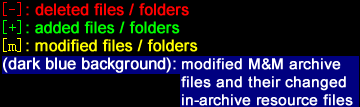
Example:
mmarch compare events.lod new.events.lod
mmarch compare game_folder_old game_folder_new
nsis
mmarch compare <ARCHIVE_FILE_OR_FOLDER> <ARCHIVE_FILE_OR_FOLDER_2> nsis <SCRIPT_FILE> <DIFF_FOLDER_NAME>Generate a .nsi script file SCRIPT_FILE which can be compiled to a .exe patch installation file using NSIS. Diff files (same as with filesonly option) will be copied to a subfolder of SCRIPT_FILE's folder, and the subfolder will be named with DIFF_FOLDER_NAME (it's a name, not a path). Read § NSIS-compiled patch installer for the following steps.
Example:
mmarch compare game_folder_old game_folder_new nsis nsis_folder/script.nsi filesbatch
mmarch compare <ARCHIVE_FILE_OR_FOLDER> <ARCHIVE_FILE_OR_FOLDER_2> batch <SCRIPT_FILE> <DIFF_FOLDER_NAME>Generate a .bat (Window Batch) file SCRIPT_FILE which can work along with your DIFF_FOLDER and mmarch.exe. Diff files (same as with filesonly option) will be copied to a subfolder of SCRIPT_FILE's folder, and the subfolder will be named with DIFF_FOLDER_NAME (it's a name, not a path). Read § Batch patch installer for the following steps.
filesonly
mmarch compare <ARCHIVE_FILE_OR_FOLDER> <ARCHIVE_FILE_OR_FOLDER_2> filesonly <DIFF_FOLDER>Copy all diff files (i.e. non-resource file and extract in-archive resource files that are different, including added, modified or deleted. read § Details if needed) in the two ARCHIVE_FILE_OR_FOLDERs, to DIFF_FOLDER.
Note that if DIFF_FOLDER exsits, it will perform a merger of old diff files and new diff files by cleaning up old diff files. Therefore, you can do: mmarch compare VERSION_1 VERSION_2 filesonly diff_folder and then mmarch compare VERSION_2 VERSION_3 filesonly diff_folder. It's OK to do VER1 -> VER2 then VER2 -> VER3, or VER1 -> VER3 then VER2 -> VER3. But VER1 -> VER2 then VER1 -> VER3 will cause problem (image demo). This merger (cleanup) is only performed in filesonly command, and not in nsis or batch.
diff-*
There are also 3 special arguments related to compare, all predeced by diff-*:
diff-files-to-nsis/-batch
mmarch diff-files-to-nsis <OLD_DIFF_FOLDER> <SCRIPT_FILE> <DIFF_FOLDER_NAME>
OR
mmarch diff-files-to-batch <OLD_DIFF_FOLDER> <SCRIPT_FILE> <DIFF_FOLDER_NAME>(df2n is short for diff-files-to-nsis; df2b is short for diff-files-to-batch)
The former command generates a .nsi script file, while the later command generates a .bat (Window Batch) file SCRIPT_FILE, according to the files in [OLD_DIFF_FOLDER] that you get using filesonly option of mmarch compare. [OLD_DIFF_FOLDER] will then be moved to SCRIPT_FILE's folder (becoming its subfolder) and renamed with DIFF_FOLDER_NAME.
Examples:
If diff_folder_temp/ is empty, the aforementioned
mmarch compare game_folder_old game_folder_new nsis nsis_folder/script.nsi fileshas the same effect as the two following commands combined
mmarch compare game_folder_old game_folder_new filesonly diff_folder_temp
mmarch diff-files-to-nsis diff_folder_temp nsis_folder/script.nsi files
diff-add-keep
mmarch diff-add-keep <DIFF_FOLDER>(dak is short for diff-add-keep)
This is for developers using Git. It will add an empty file .mmarchkeep to every empty folder in DIFF_FOLDER, so that Git can keep the empty folders tracked. diff-files-to-nsis/-batch ignore .mmarchkeep files.
checksum
Generate or verify CRC32 checksums for archive files and their resources.
(s is short for checksum)
Generate CRC32
mmarch checksum <ARCHIVE_FILE>Generate CRC32 hash of the archive file (or any file) itself.
mmarch checksum <ARCHIVE_FILE> [FILE_1] [FILE_2] [...]Generate CRC32 of resource files inside the archive. Use * or *.* for all resources, *.EXT for extension filter. Read "§ Notes on FILE_TO_XXXX_?" for wildcard details.
Output format:
A1B2C3D4  items.txt
E5F6A7B8  OUT04.EVT
(Uppercase hex CRC32, two spaces, filename. CRLF line endings)
Examples:
mmarch checksum events.lod
mmarch checksum events.lod *
mmarch checksum events.lod items.txt OUT04.EVT
mmarch checksum events.lod *.txt
mmarch checksum events.lod * > events.lod.crc32
Verify CRC32
mmarch checksum <ARCHIVE_FILE> --v <CRC32_FILE>Verify CRC32 of resource files listed in CRC32_FILE. Only the files listed in the checksum file are verified.
mmarch checksum <ARCHIVE_FILE> --vall <CRC32_FILE>Verify CRC32 of ALL resource files. Not only must every file listed in CRC32_FILE match, but the listed files must also be ALL the files in the archive (no unlisted files allowed).
mmarch checksum <ARCHIVE_FILE> --v <name1:HASH1> [name2:HASH2] [...]
mmarch checksum <ARCHIVE_FILE> --vall <name1:HASH1> [name2:HASH2] [...]
Inline verify mode (if the first argument after --v or --vall contains :). Instead of reading checksums from a file, specify them directly as filename:CRC32HASH pairs.
Verify output:
items.txt: OK
OUT04.EVT: FAILED
WARNING: 1 computed checksums did NOT match
The exit code is non-zero if any verification fails.
Examples:
mmarch checksum events.lod --v events.lod.crc32
mmarch checksum events.lod --vall wholefile.crc32
mmarch checksum events.lod --v items.txt:A1B2C3D4 OUT04.EVT:E5F6A7B8
mmarch checksum events.lod --vall items.txt:A1B2C3D4 OUT04.EVT:E5F6A7B8
optimize
mmarch optimize <ARCHIVE_FILE>Optimize an archive file.
Note that when mmarch outputs an archive file (with mmarch {add|delete|rename|create|merge} commands), it has already been optimized and you don't need to do it again.
Example:
mmarch optimize events.lodhelp
mmarch helpDisplay help information.
mmarch --help, mmarch -h, mmarch h and mmarch with no argument at all do the same thing.
version
Since 6.0.1
mmarch versionPrint the version number of mmarch and nothing else - no program name, no leading v, no trailing text:
7.0.0mmarch --version, mmarch -v and mmarch v do the same thing. The bare output is meant to be consumed by scripts, e.g.:
if [ "$(mmarch version)" != "7.0.0" ]; then echo "unexpected mmarch version"; fiNotes on FOLDER
The "Notes on FOLDER" applys to the argument representing a folder path in mmarch extract and mmarch create.
- Folder path cannot be empty when it is required
- If folder path contains space (
"") to enclose the folder path - Path without a leading slash, or with a leading
./: relative path.: current directory..: parent directory of the current directory (use with CAUTION!, not expected to work forcompare)
- A leading slash
/: absolute path (the root beingC:\orD:\or ...) (use with CAUTION!) - A trailing slash is optional. Same effect with or without it.
- Slash (
/) and backslash (\) have the same effect.
Notes on FILE_TO_XXXX_?
The "Notes on FILE_TO_XXXX_?" applys to the argument representing a file path in mmarch extract, mmarch add, mmarch delete and mmarch create.
*or*.*: all the files*.EXT(e.g.*.txt): all the files with the specified extension*.: all the files without extension- You can add directory path before the aforementioned wildcard character. Similar rules for folder path apply to the file path (incl. the double quotes, relative and absolute path, slash usage)
Batch archive extraction
You can use wildcard for <ARCHIVE_FILE> in mmarch extract command to extract all archives in specified folder(s) with just one command.
- File path in
<ARCHIVE_FILE>:**: zero or more directories (i.e. the current directory and all its non-hidden subdirectories, recursively)*: any ONE directory- Read the section "§ Notes on
FOLDER" above for relative path and absolute path (absolute path is NOT recommended at all!)
- File name at the end of
<ARCHIVE_FILE>:*or*.*: all the supported archive files (.lod,.pac,.snd,.vid,.lwd,.mm7,.dod&.mm6)*.EXT(e.g.*.lod): all the supported archive files with the specified extension (a.bitmaps.lod's extension is.lod, not.bitmaps.lod)"*.EXT1|EXT2|EXT3..."(e.g."*.lod|lwd|vid"): all the supported archive files with any of the specified extensions, note that it has to be enclosed by double quotes
You might need to wait a few minutes if you are trying to extract all the archive files from a whole game.
Examples:
mmarch extract **/* resource_folderThe command above can extract all the resource files in all the supported archive files in current directory and its subdirectories. The resources will be placed in an auto-named (e.g. icons.lod.mmarchive for icons.lod) subdirectory (or sub-subdirectory depending on whether the archive is in a subdirectory) in resource_folder/.
mmarch extract data/*.lod . *.txtThe command above can extract all .txt resource files in all .lod archive files in data/ directory. The resources will be placed in an auto-named subdirectory in current directory (current directory = .).
mmarch extract "*/*.lod|lwd" ../resource_folderThe command above can extract all the resource files in all .lod and .lwd archive files in any first level subdirectories of the current directory. The resources will be placed in an auto-named subdirectory in resource_folder/ that belongs to the parent directory of the current directory.
Add file with palette
mmarch add <ARCHIVE_FILE> <FILE_TO_ADD_1> [/p PALETTE_INDEX_1] [FILE_TO_ADD_2] [/p PALETTE_INDEX_2] [...]mmarch create <ARCHIVE_FILE> <ARCHIVE_FILE_TYPE> <FOLDER> [FILE_TO_ADD_1] [/p PALETTE_INDEX_1] [FILE_TO_ADD_2] [/p PALETTE_INDEX_2] [...]If you are adding a .bmp file into a MM sprites archive (mmspriteslod) or MM bitmaps archive (mmbitmapslod) file, then you can optionally add /p PALETTE_INDEX right after the .bmp file in your command, in order to specify a palette stored in any [*.]bitmaps.lod archive file (including your target archive file itself if it is a [*.]bitmaps.lod) in the same directory. A palette can be extracted as a pal<three_digit_palette_index>.act file (e.g. pal023.act).
If there is no /p PALETTE_INDEX after the .bmp file in your command, then the program will try to, from every [*.]bitmaps.lod archive file, automatically find a palette that matches your .bmp file's color table (palette). If you do specify a palette index, the program will not check if your palette exists in the [*.]bitmaps.lod.
If no palette matches and you gave no /p, the file is not added and mmarch says so: under the wrong palette it would come out in the wrong colours. Pass /p, or put the palette in the archive first; the same command works, as long as the palette comes before the picture:
mmarch create my.bitmaps.lod mmbitmapslod . pal994.act mypicture.bmpReplacing a .bmp already in the archive keeps its palette index and flags, so updating a picture in place needs no /p.
/p only applies to mmspriteslod and mmbitmapslod; mmiconslod and mm8loclod keep each picture's palette inside the resource, so there is nothing to specify.
Do not pad 0 to palette index. pal023.act's palette index is 23.
Examples:
mmarch add sprites.lod mymonster01.bmp /p 23 mymonster02.bmp /p 558
mmarch create myfiles.sprites.lod mmspriteslod . mymonster01.bmp /p 23 mymonster02.bmp /p 558
Other tips and notes
Less important tips and notes include:
Use initial letter for the first argument
For the first argument, the initial letter of extract, list, add, delete, rename, create, merge, optimize, help can be used instead (e.g. mmarch e events.lod myfolder); use k for compare, s for checksum, df2n for diff-files-to-nsis, df2b for diff-files-to-batch, dak for diff-add-keep; they can be optionally preceded by a leading - or -- which will do the same job.
Paths are case-insensitive
File names and paths are case-insensitive.
Backup please
The tool changes or overrides original archive or unpacked resource files permanently, you should consider copying them to other directory or with other names to make backups (e.g. copy a.lod a.backup.lod).
File will be skipped if it fails
If the program encounters an error when extracting, adding or deleting a resource file from archive file(s), this resource file will be skipped and the rest will still be processed.
Exit code mode (--ec)
You can control exit code behavior with the --ec flag, placed anywhere in the command:
mmarch --ec {strict|normal|loose} <COMMAND> [ARGS...]| Scenario | strict | normal (default) | loose |
|----------|:--------:|:------------------:|:-------:|
| Unknown command | 1 | 1 | 0 |
| Missing parameters | 1 | 1 | 0 |
| Rename: file not found | 1 | 1 | 0 |
| Open non-existent archive | 1 | 1 | 0 |
| Delete: per-item not found | 1 | 0 | 0 |
| Extract: per-item not found | 1 | 0 | 0 |
| Checksum verify failure | 1 | 1 | 1 |
strict: all errors cause a non-zero exit codenormal(default): per-item not-found indelete/extractis non-fatal (only prints a warning), other errors cause non-zero exit codeloose: only checksum verification failure causes a non-zero exit code
Examples:
mmarch --ec strict delete events.lod nonexistent.txt
mmarch --ec loose rename events.lod old.txt new.txt
Note: Windows versions up to and including 4.0.0 always use the loose setting. Starting with later versions, the default is normal.
In-archive and extracted extension difference
For some archive format, some files have different file extensions in the archive and as extracted files out of the archive. Don't wrong, you can use either extension to refer to the file. Below is the list (same extension is used if not listed).
The bmp rows are real Windows bitmaps: the game's own image format, decoded on the way out and rebuilt on the way in. act is a 768-byte palette.
| Archive Format | In-Archive Ext | Extracted Ext |
|----------------|----------------|---------------|
| h3lod | pcx | bmp |
| h3snd | No Extension | wav |
| mmsnd | No Extension | wav |
| mm6vid | No Extension | smk |
| mmbitmapslod | No Extension | bmp |
| mmbitmapslod | No Extension | act |
| mmiconslod | No Extension | bmp |
| mmiconslod | No Extension | act |
| mmspriteslod | No Extension | bmp |
| mm8loclod | No Extension | bmp |
Sprites with incorrect palette
Official Might and Magic VI and VII has some sprites with incorrect palette:
- MM6's bat (yes, the monster that allegedly caused the coronavirus pandemic) images, stored in data/SPRITES.LOD as
BAT****files, have incorrect palette: their palette should be 156 instead of 422 (pal422 exists in BITMAPS.LOD but is unrelated). However, it seems neither 422 nor 156 is correct for some of the bat bitmaps, both mmarch and MMArchive can't retrieve their correct palette. - MM7's "swptree" images, stored in data/SPRITES.LOD as
swptree*files, have incorrect palette: their palette should be 120 instead of 940 (pal940 doesn't exist in BITMAPS.LOD at all).
mmarch corrects both, the same way GrayFace's MMArchive does: it carries the same table of known-wrong palettes, keyed by the sprite's name and the bytes of its header, so a sprite you have modified yourself is left alone. The extracted .bmp files are byte-for-byte identical to the ones MMArchive produces.
Sprites are coloured with a palette that lives in a bitmaps.lod next to the archive (bitmaps.lod itself, or any *.bitmaps.lod), so extract them from the game's data folder. Without one there is nothing to colour them with, and mmarch writes the stored bytes instead.
Details of DIFF_FOLDER of compare
DIFF_FOLDERofmmarch compare <ARCHIVE_FILE_OR_FOLDER> <ARCHIVE_FILE_OR_FOLDER_2> {filesonly|nsis|batch}:- if a file is not present in old ARCHIVE_FILE_OR_FOLDER and is added in the new ARCHIVE_FILE_OR_FOLDER, then it will be copied to
DIFF_FOLDER - if a file is present in old ARCHIVE_FILE_OR_FOLDER and is deleted in the new ARCHIVE_FILE_OR_FOLDER, then an empty file named
FILENAME.todeletewill be put intoDIFF_FOLDER - if a non-MM Archive file is present in old ARCHIVE_FILE_OR_FOLDER and is modified in the new ARCHIVE_FILE_OR_FOLDER, then it will be copied to
DIFF_FOLDER - if an MM Archive file is present in old ARCHIVE_FILE_OR_FOLDER and is modified in the new ARCHIVE_FILE_OR_FOLDER, then a folder named
FILENAME.mmarchivewill be created and:- if a resource file is not present in old ARCHIVE_FILE and is added in the new ARCHIVE_FILE, then it will be copied into
FILENAME.mmarchivefolder - if a resource file is present in old ARCHIVE_FILE and is deleted in the new ARCHIVE_FILE, then an empty file named
FILENAME.todeletewill be put intoFILENAME.mmarchivefolder - if a resource file is present in old ARCHIVE_FILE and is modified in the new ARCHIVE_FILE, then it will be copied to
FILENAME.mmarchivefolder
- if a resource file is not present in old ARCHIVE_FILE and is added in the new ARCHIVE_FILE, then it will be copied into
- if a file is not present in old ARCHIVE_FILE_OR_FOLDER and is added in the new ARCHIVE_FILE_OR_FOLDER, then it will be copied to
Work with batch, NSIS and other scripts
mmarch can be used with batch file (.bat) or NSIS script to produce game patch or MOD installation files. Also, with Python, JavaScript, batch files, PowerShell script, etc., mmarch can automatize the workflow of the development of Heroes of Might and Magic 3 and Might and Magic 6, 7, 8 MODs and patches.
In case you need it, Smacker (.smk) and Bink (.bik) video file formats' original developer's official The RAD Video Tools can be used to extract and replace sound from .bik and .smk videos. This is essential for game video localization.
No matter you have a Might and Magic project (with MM archive files) or non MM projects (without MM archive files), you can read the following sections and learn how to use mmarch to easily compare old and new folders, in order to make a patch.
NSIS-compiled patch installer
mmarch compare <ARCHIVE_FILE_OR_FOLDER> <ARCHIVE_FILE_OR_FOLDER_2> nsis <SCRIPT_FILE> <DIFF_FOLDER_NAME> will compare the two folders, copy all different files (including in-archive resource files) to DIFF_FOLDER_NAME (which is a subfolder of SCRIPT_FILE's folder) and generate a .nsi script file SCRIPT_FILE. You may then:
- Modify the .nsi file if needed
- Put mmarch.exe in the folder of the .nsi file
- Compile the .nsi file to a .exe patch setup file with the latest NSIS 3
Batch patch installer
mmarch compare <ARCHIVE_FILE_OR_FOLDER> <ARCHIVE_FILE_OR_FOLDER_2> batch <SCRIPT_FILE> <DIFF_FOLDER_NAME> will compare the two folders, copy all different files (including in-archive resource files) to DIFF_FOLDER_NAME (which is a subfolder of SCRIPT_FILE's folder) and generate a .bat (Window Batch) file SCRIPT_FILE. You may then:
- Modify the .bat file if needed
- Put mmarch.exe in the folder of the .bat file
- Compress them into a .zip
- Distribute the .zip to users
A user may:
- Unzip it
- Put everything in the game folder
- Double click .bat file to patch the game
The batch file will not perform a self-deletion, users have to delete .bat, mmarch.exe and DIFF_FOLDER manually.
Development
mmarch has two implementations in this repository:
mmarch-rust/: the current implementation. Every released binary (Windows, Linux, macOS) and everything npm and crates.io install is built from it.mmarch-delphi/: the original implementation, built on GrayFace's RSPak/RSLod. Frozen at v5.0.0: kept in the repo for reference, no longer developed or released.
Rust (all released binaries)
cd mmarch-rust
cargo build --release
The binary will be at mmarch-rust/target/release/mmarch (or mmarch.exe on Windows). It is also published to crates.io, so cargo install mmarch builds and installs the same thing from source.
The Rust version has the same CLI interface and behavior as the Delphi version (outputs use CRLF line ending as well); see § Known differences between Rust and Delphi versions for the remaining minor gaps. Since v6.0.0 it compresses and extracts archive entries in parallel on all CPU cores (each entry is an independent zlib stream), which makes creating large archives (e.g. a sound .snd with thousands of wavs) several times faster; the produced archives are byte-identical to a serial run.
Delphi (frozen at v5.0.0)
Windows only, and no longer part of a release. To build it anyway:
git cloneor download mmarch's sourcegit cloneor download GrayFace/Misc- Copy or move
RSPak/folder from GrayFace/Misc project into mmarch'smmarch-delphi/folder. Do not overwrite the patchedRSPak/Extra/RSLod.pasalready in the repo, it contains a bug fix for file data corruption when adding multiple files to an archive. - Open "mmarch.bdsproj" file with Borland Developer Studio 2006 or Delphi 10 (it may or may not work with newer version Borland, see GrayFace's note)
- Compile
Differences from the Delphi version
The Rust implementation covers the same CLI interface as the Delphi 5.0.0 version, and since v6.0.0 the archive headers it writes are byte-identical to the Delphi version and to the real game files.
The places where the two still behave differently are listed in DEVNOTES.md § Deliberate differences from the Delphi version.
Running tests
The Rust integration tests run against both the Rust binary and (on Windows, if present) the Delphi binary. Test data is included in mmarch-rust/tests/.
cd mmarch-rust
cargo test --test integration --release
GitHub CI
The workflow triggers on:
- Push to
masterbranch (Test) - Pull requests targeting
master(Test) - Tags matching
v*(Test-Build-Release: builds the Rust binaries for every platform (Windows 32-bit, Linux x64/arm64/ia32, macOS x64/arm64), creates the GitHub Release, then publishes to npm and crates.io)
Releasing a new version means bumping mmarch-rust/Cargo.toml, mmarch-npm/package.json and MMARCH_VERSION in mmarch-rust/src/main.rs to the same number, then pushing a matching v* tag. MMARCHVERSION in mmarch-delphi/mmarch.dpr is not part of that and stays at 5.0.0.
Change Log
- [2020-03-11] v1.0: initial release
- [2020-03-18] v2.0: support palette; support
*.EXTand batch archive extraction; deal with in-archive & extracted file extension differences and the "cannot find the path specified" problem caused by it - [2020-03-31] v3.0: add
comparemethod that can compare two dir and generate NSIS/Batch installer; tutorial - [2020-04-02] v3.1: diff-files-to-* instead of compare-files-to-*; diff-add-keep; fix problem moving to subfolder
- [2020-04-22] v3.2: minor fix: diff-files-to-* do not work when old and new diff folders are the same
- [2026-03-16] v4.0.0: fix batch archive optimization when adding or deleting multiple files; fix missing begin/end block in add procedure for non-BMP files; add
checksumcommand for CRC32 generation and verification; Rust port for Linux and macOS; npm release - [2026-03-17] v5.0.0: more Rust version fixes and comprehensive tests; replace ambiguous
/v[all]with--v[all]flag; improve exit code handling instead of returning 0 in nearly all cases; fix some minor bugs of Delphi version - [2026-08-17] v6.0.0: Rust version compresses and extracts archive entries in parallel on all CPU cores (creating big archives is ~7× faster, byte-identical output); fix Rust-written
mm78gameslod/mm8loclodheaders that MMEditor/MMArchive rejected with "Unknown LOD version" (#2); all binaries including Windowsmmarch.exe(32-bit) are now the Rust build; the Delphi build is still released asmmarch-delphi.exe - [2026-08-17] v6.0.1: add
versioncommand (mmarch version,--versionor-v, printing the bare version number);helpalso accepts--helpand-h; publish the Rust version to crates.io (cargo install mmarch); stop attachingmmarch-delphi.exeto releases: the Delphi version is frozen at v5.0.0 - [2026-09-02] v7.0.0: Rust version decodes textures, icons, sprites and Heroes 3 PCX resources into real
.bmpfiles and converts them back when added (palette matched by content,/p PALETTE_INDEXhonoured, mipmaps regenerated), correcting MM6's and MM7's known-wrong sprite palettes the way MMArchive does: where earlier versions wrote the undecoded bytes under a.bmpname,extractnow writes a real picture, andchecksumhashes exactly whatextractwrites, so both change for the picture resources ofbitmaps.lod,icons.lod,sprites.lodand MM8'sEnglish*.lod; many correctness fixes found by differentially testing seven Heroes 3 distributions and 37 MM6/7/8 installs against a model of RSPak's own rules, above all resource sizes now read from the entry instead of the gap to the next address and MM8 localisation archives handled with a 64-byte name field instead of 16; faster despite doing more
License
Note: Although most files in GrayFace's Misc repo are under GPLv2, RSPak is separately licensed under MIT as stated in RSSysUtils.pas. mmarch-Delphi is based on RSPak, and mmarch-Rust is a port of RSPak and mmarch-Delphi, both mmarch versions are licensed under MIT.