
mms-forced-align
v0.2.1
Published
Forced alignment for JavaScript, TypeScript and Node.js: word-level timestamps from audio + transcript for captions, subtitles and karaoke. Meta MMS (wav2vec2) via ONNX Runtime with a CTC Viterbi decoder. Hindi, Hinglish and 20 Indic languages. No Python.

Maintainers
 arhamsayyed
Readme
mms-forced-align




Word-level timestamps in Node.js/TypeScript with Meta's MMS forced-aligner model and a TypeScript CTC Viterbi decoder. No Python needed.
Built by Arham Sayyed.
Give it audio and the transcript you already know was spoken in it, and it returns the start and end time of every word. This is not speech-to-text: you already know the words, and this package only works out when each one was said. That's what you need for karaoke-style highlighting, word-by-word captions, subtitle sync and read-along audio.
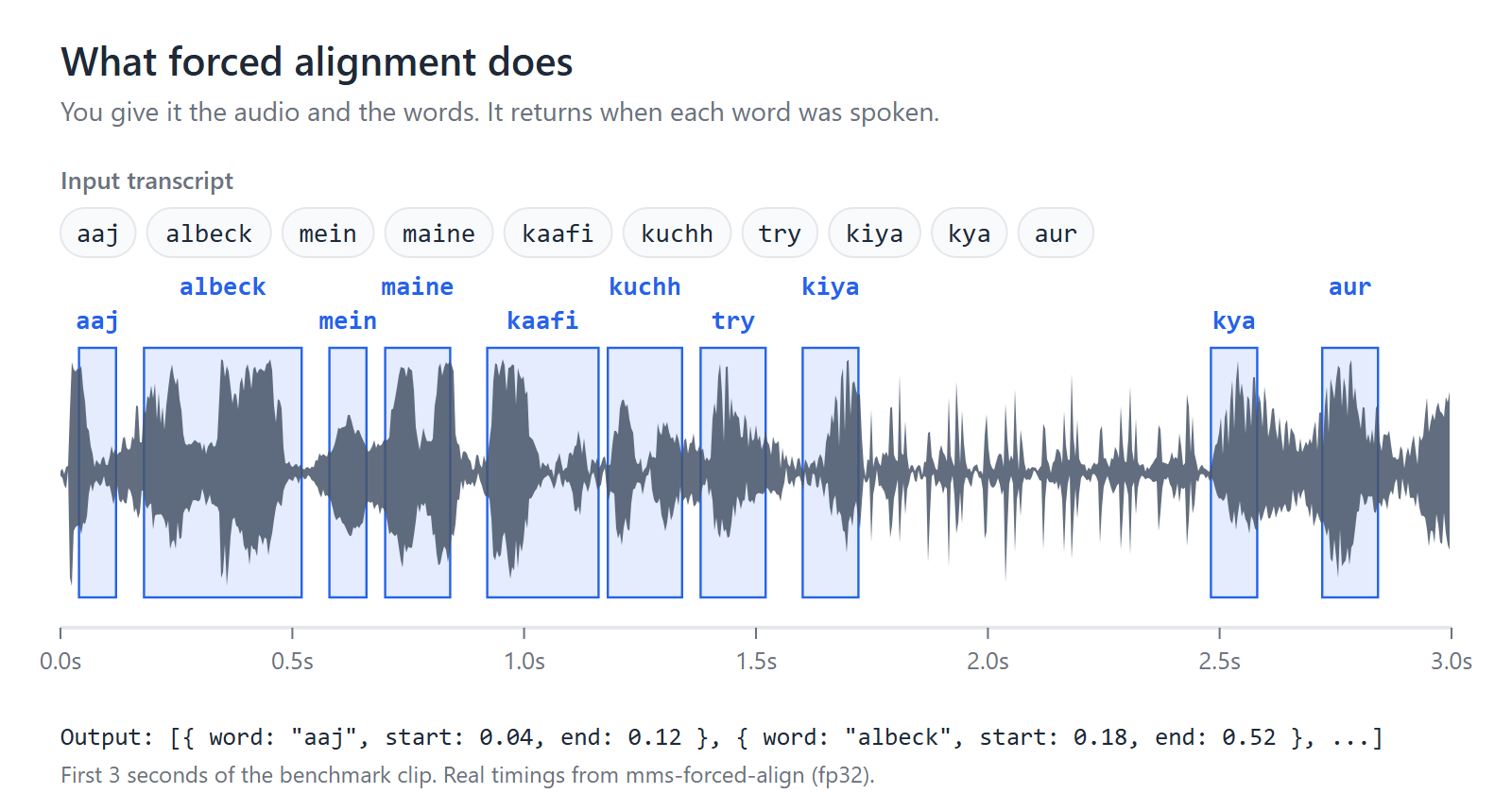
The neural forward pass runs Meta's MMS (Massively Multilingual Speech)
forced-aligner model through an ONNX export and onnxruntime-node. The
alignment itself is a from-scratch TypeScript CTC Viterbi decoder. As far as I
could find, this is the first npm package to do MMS forced alignment with a
proper CTC Viterbi decoder in Node.js. See Prior art for related
projects.
Install
npm install mms-forced-alignQuick start
import { createAligner } from "mms-forced-align";

// Downloads and caches the model on first use. See "Options" for why
// quantized: false is recommended.
const aligner = await createAligner({ quantized: false });
const timings = await aligner.align(
  waveform,       // Float32Array, mono PCM, values in [-1, 1]
  16000,          // sampleRate — must be exactly 16000
  ["hello", "world"] // transcript words, in order
);
// [{ word: "hello", start: 0.12, end: 0.48, score: 0.93 }, { word: "world", start: 0.52, end: 0.91, score: 0.95 }]

await aligner.dispose();
Reuse one aligner across many align() calls — loading the ONNX session is
the expensive part.
score is a rough confidence value in [0, 1]: the mean per-frame probability
of the aligned token across the word's frames. Blank frames count toward it,
so scores skew high. Use it to compare words, not as a calibrated probability.
Transcript words must be pre-cleaned before calling align(): the model's
vocabulary is 26 lowercase Latin letters plus apostrophe only — no digits, no
punctuation. Naively splitting a real sentence (transcript.split(" ")) will
include tokens like "kiya." or "2024" that throw VocabError — align()
throws rather than guessing what you meant. Strip everything except letters and
apostrophes, then drop tokens that end up empty:
const words = transcript
  .split(/\s+/)
  .map((w) => w.replace(/[^a-zA-Z']/g, ""))
  .filter(Boolean);
This drops tokens with no letters ("2024", "—"), so they get no timing.
If you need numbers timed, spell them out first ("twenty twenty four").
Options
createAligner(options) accepts:
cacheDir?: string— override where the model is downloaded/cached (default~/.cache/mms-forced-align/).quantized?: boolean— defaults totrue, which uses the int8-quantized ONNX model (317 MB download, lower memory, faster to load).quantized: falseuses the full-precision fp32 model (1.2 GB download).
Recommended: pass quantized: false for any long-running process that
loads the aligner once and reuses it (the pattern this package is designed
for). In the benchmark below, fp32 was both faster to align than int8
(21.33 s vs 26.97 s) and more accurate:
- fp32 reproduced
torchaudio.pipelines.MMS_FA's word timings to 0.0 ms on 37/37 golden-fixture words. - int8 missed the 20 ms tolerance on 8/37 of those words (up to 60.3 ms off), mostly at pauses and silence.
int8 being slower was measured on one CPU and may not hold on yours, so measure on
your own hardware. The int8 model still makes sense when download size and
load time matter more than per-file speed, e.g. a serverless function that
aligns one short clip per cold start. The default stays true in 0.2.x so
existing users don't suddenly download 1.2 GB.
Benchmarks
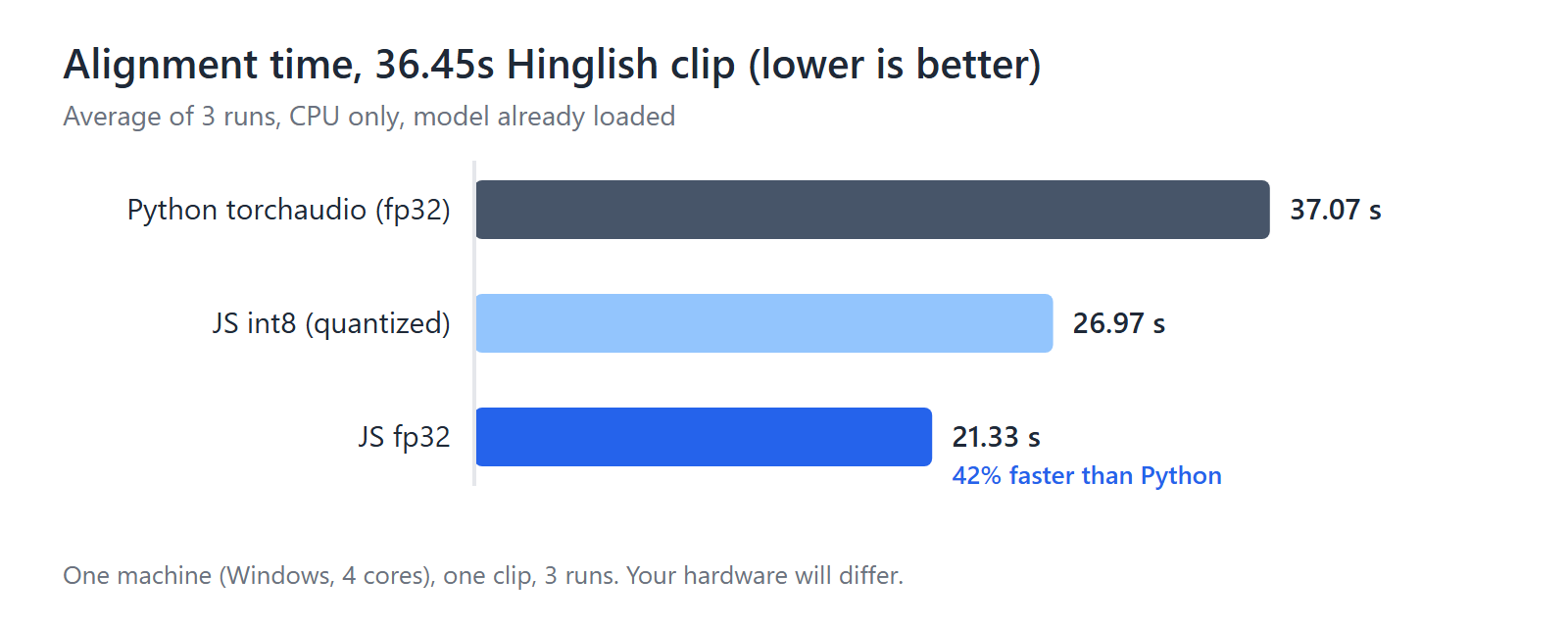
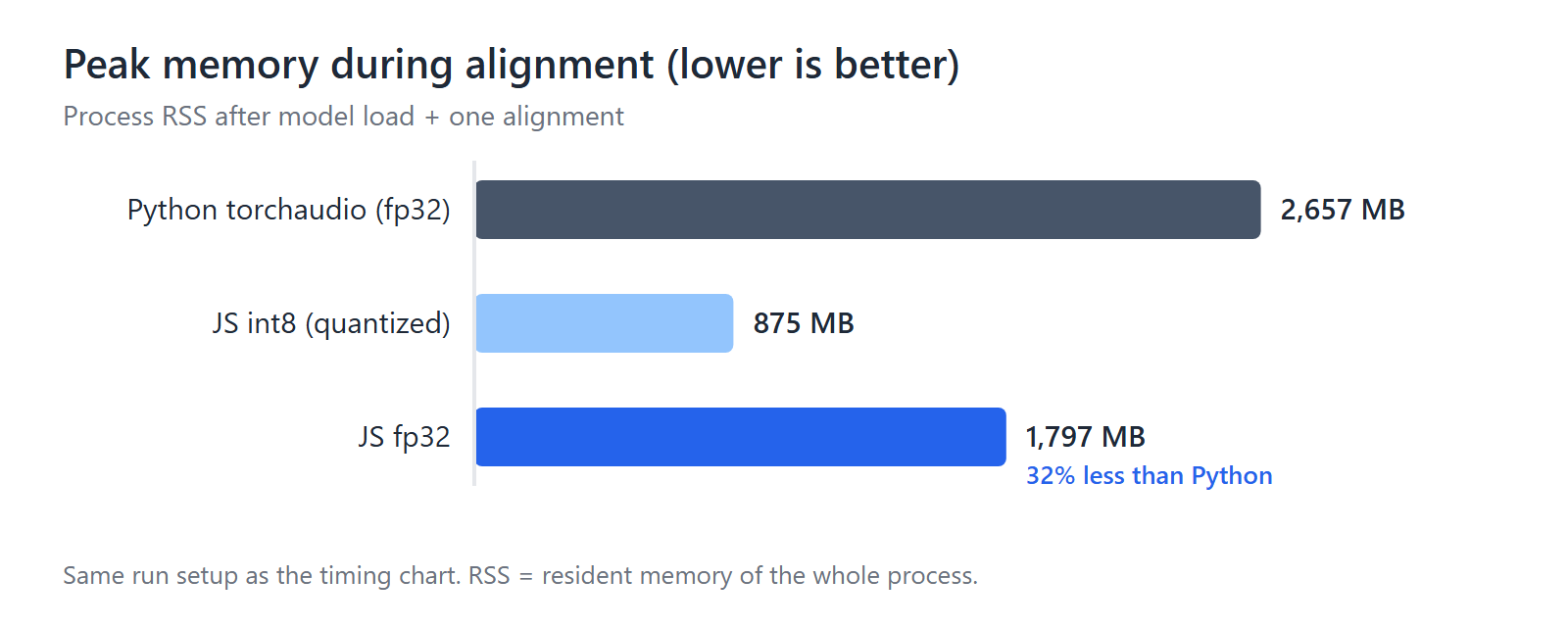
mms-forced-align vs Python torchaudio.pipelines.MMS_FA, aligning a 36.45 s
Hinglish clip (116 words).
| Config | Avg align time | Peak memory (RSS) |
| --- | --- | --- |
| Python torchaudio MMS_FA (fp32) | 37.07 s | 2,657 MB |
| JS quantized: true (int8) | 26.97 s | 875 MB |
| JS quantized: false (fp32) | 21.33 s | 1,797 MB |
JS fp32 aligned ~42% faster than Python at the same precision, with ~32% less peak memory.
Caveat: one machine (Windows, 4 CPU cores), one 36 s clip, 3 runs, CPU only on both sides. The benchmark script and audio aren't part of this repo. Treat these numbers as a signal, not a guarantee.
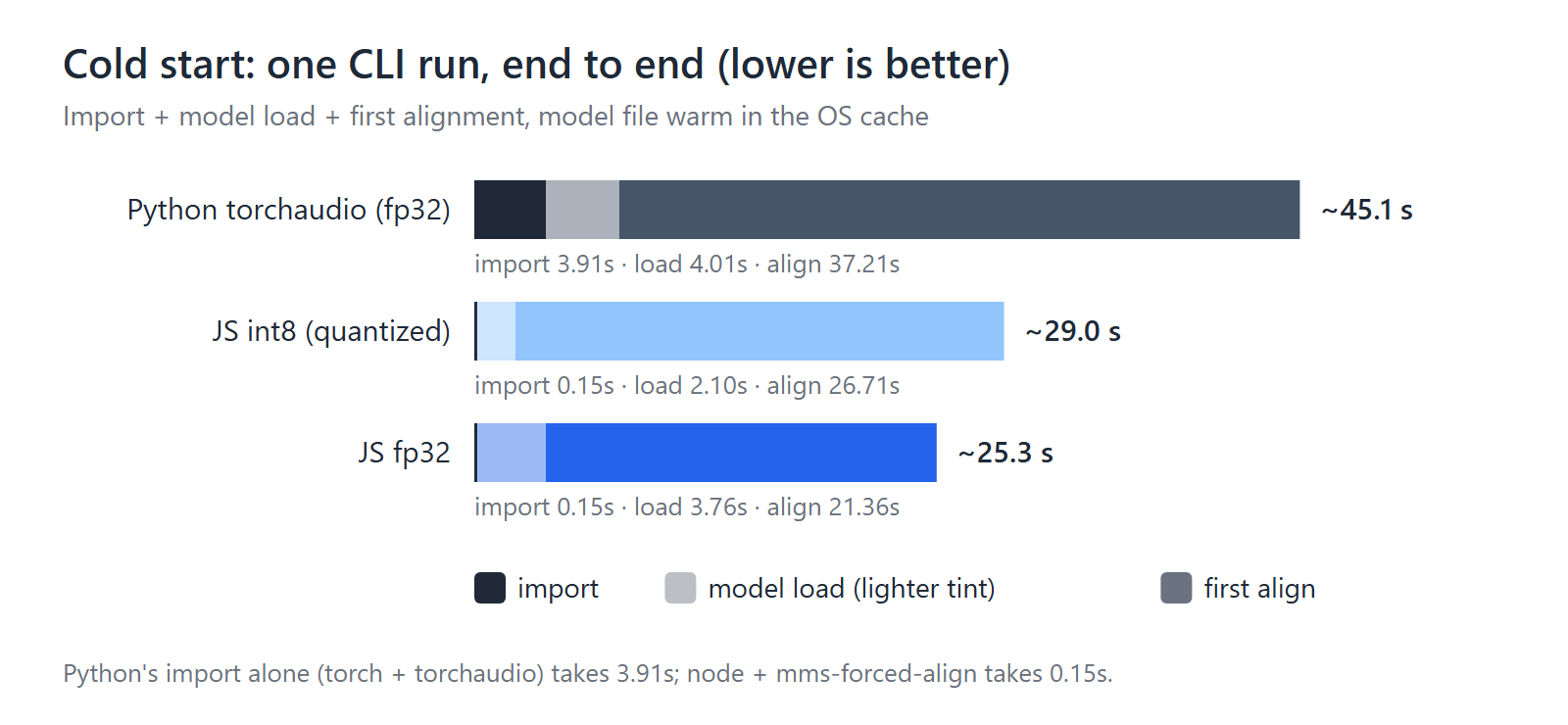
For a one-off CLI run, import time matters too: node plus
import("mms-forced-align") took 0.15 s, while import torch, torchaudio
took 3.91 s.
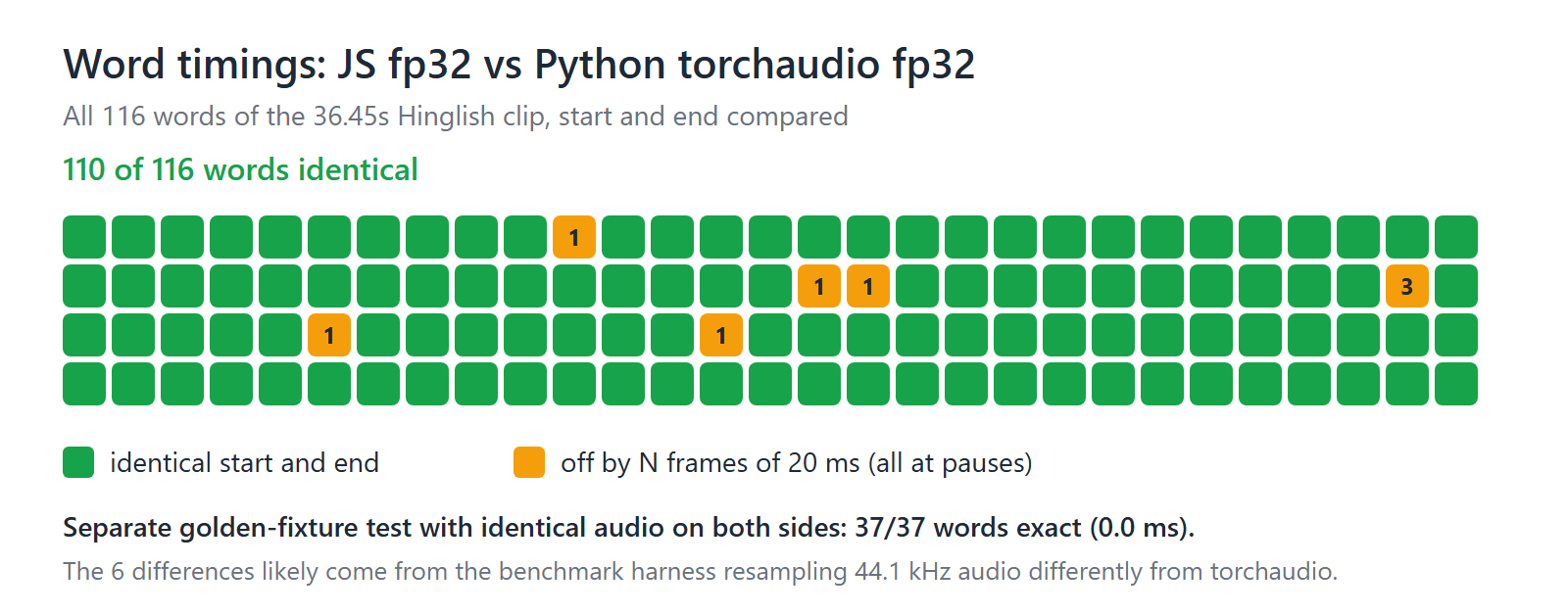
On the full clip, 110 of 116 words had identical start and end times to Python. The other 6 were off by one 20 ms frame (one word by 60 ms), all at pauses. That is likely because the benchmark harness resampled the 44.1 kHz audio with a simpler resampler than torchaudio's, so the two models didn't receive identical input. The golden-fixture tests, which feed both sides identical audio, match exactly.
How it works
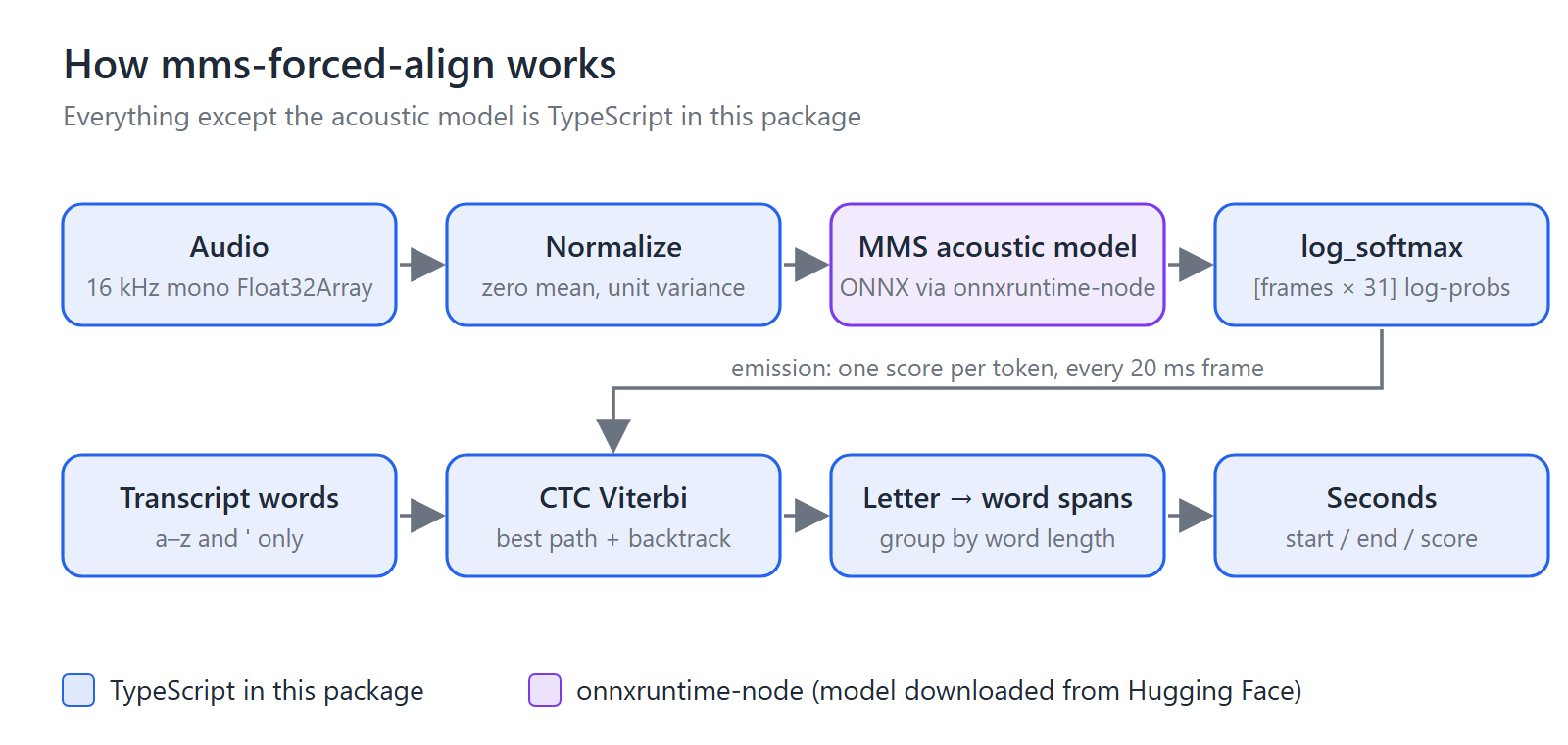
- The waveform is normalized to zero mean and unit variance, matching
Wav2Vec2FeatureExtractor. - The ONNX acoustic model returns a score for each of 31 tokens (blank,
a–z, apostrophe, and a few special tokens) for every 20 ms frame. Alog_softmaxturns those scores into log-probabilities. - The transcript becomes a CTC "extended sequence": a blank around every
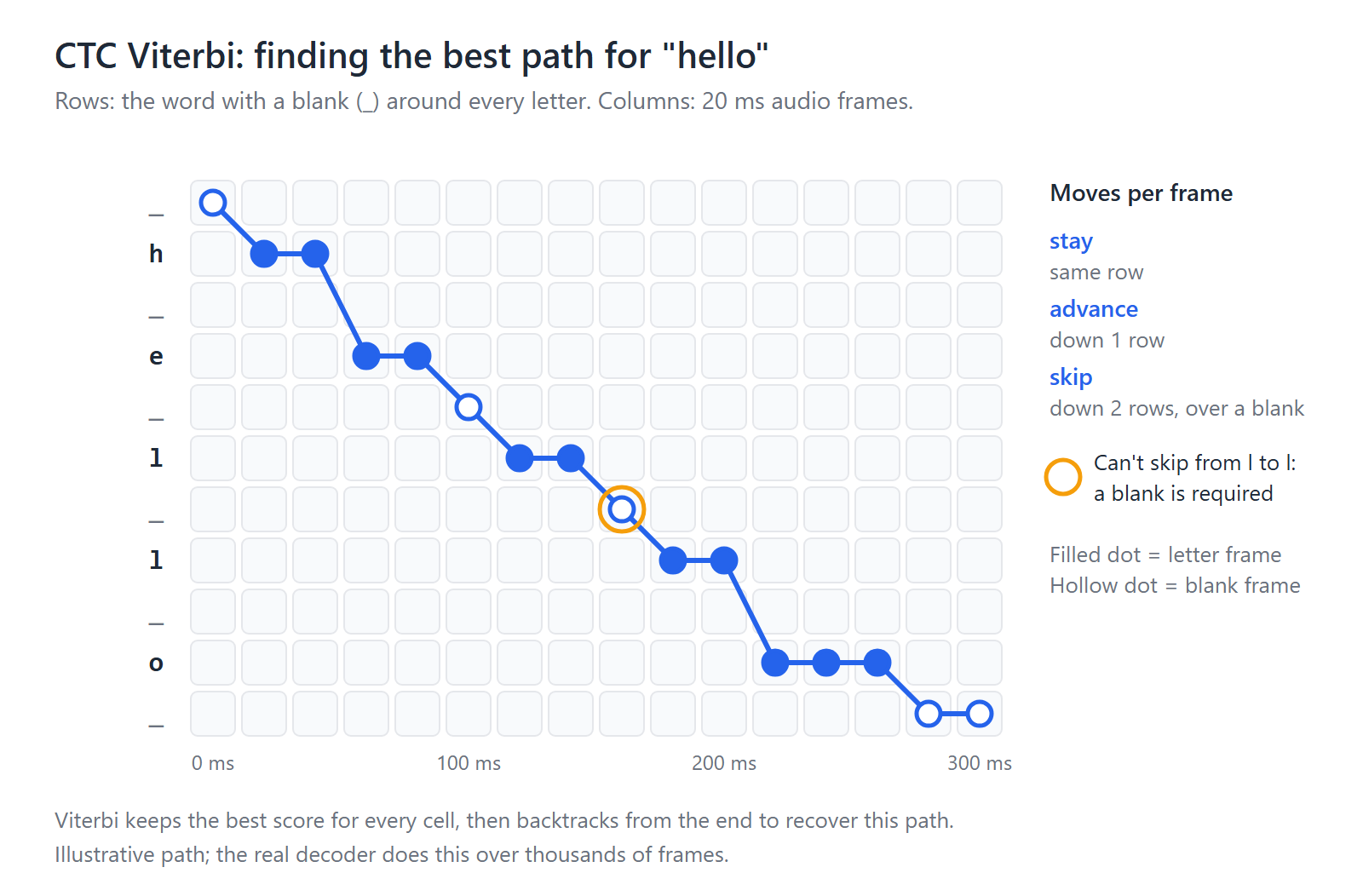
letter, so
hellobecomes_ h _ e _ l _ l _ o _. - Viterbi finds the single best path through a grid of frames × sequence states. At each frame the path can stay, advance one state, or skip a blank (but never between two identical letters), then it's traced back from the end.
- Frames on letter states merge into letter spans, letters group into words, and frame indices convert to seconds using this clip's measured samples-per-frame ratio.
Scope and limitations
- Single model:
mms-300m-1130-forced-aligner. - Plain Latin-script/romanized transcript text for
align()(e.g. English, or transliterated text like Hinglish) — this is what the model's base vocabulary (26 letters + apostrophe) handles. For native Indic scripts, see Indic native-script romanization. - CPU inference only (
onnxruntime-node), no GPU. Node.js only, not the browser. - Input must already be decoded mono PCM
Float32Arrayat 16000 Hz — decode and resample your audio yourself (e.g. viaffmpeg) before callingalign(). Passing a different sample rate throws rather than silently resampling.
Not yet supported:
- The
<star>token for out-of-vocabulary/deleted words. - Batch alignment of multiple clips in one call.
- GPU execution.
- Chunking of long audio — split long files yourself before aligning.
Validating against a Python reference
The decoder is checked against torchaudio.pipelines.MMS_FA with golden
fixtures. No audio is checked into this repo, so generate fixtures from your
own clip with scripts/generate_fixtures.py (needs torch, torchaudio,
soundfile; see test/fixtures/README.md), then
run:
npx vitest run test/align.golden.test.tsThe test uses quantized: false and fails if any word's start or end is more
than 20ms from the Python reference. It skips itself when no fixtures exist.
Indic native-script romanization
The model's vocabulary is Latin-only, but align() still requires words in
that vocabulary. For text in an Indic script, this package can romanize the
transcript internally and align against the romanized form, while handing
you back timings keyed to your original native-script words. Three exports
cover this:
romanizeWord(word, langCode)/romanizeWords(words, langCode)— transliterate one word or a list of words from a supported native script to the Latin form the model expects. ThrowsRomanizeErrorrather than silently dropping or mangling a word: on a script mismatch (e.g. Tamil text passed withlangCode: "hi-IN") or on content that can't be romanized. Already-Latin words (e.g. an English brand name code-switched into an Indic sentence) pass through unchanged, case preserved, instead of erroring.alignNative(aligner, waveform, sampleRate, nativeWords, langCode)— romanizesnativeWordsinternally, aligns the romanized form, then remaps the resulting timings back onto your original native-script words by index. Word count is guaranteed to match on both sides — it throws rather than ever returning a mis-indexed or word-dropped result.
import { createAligner, alignNative } from "mms-forced-align";

const aligner = await createAligner({ quantized: false });
const timings = await alignNative(
  aligner,
  waveform,       // Float32Array, mono PCM, values in [-1, 1]
  16000,          // sampleRate — must be exactly 16000
  ["आज", "मैंने", "काफी", "कुछ", "किया"],
  "hi-IN"
);
// [{ word: "आज", start: ..., end: ... }, ...] -- native-script words, real timings

await aligner.dispose();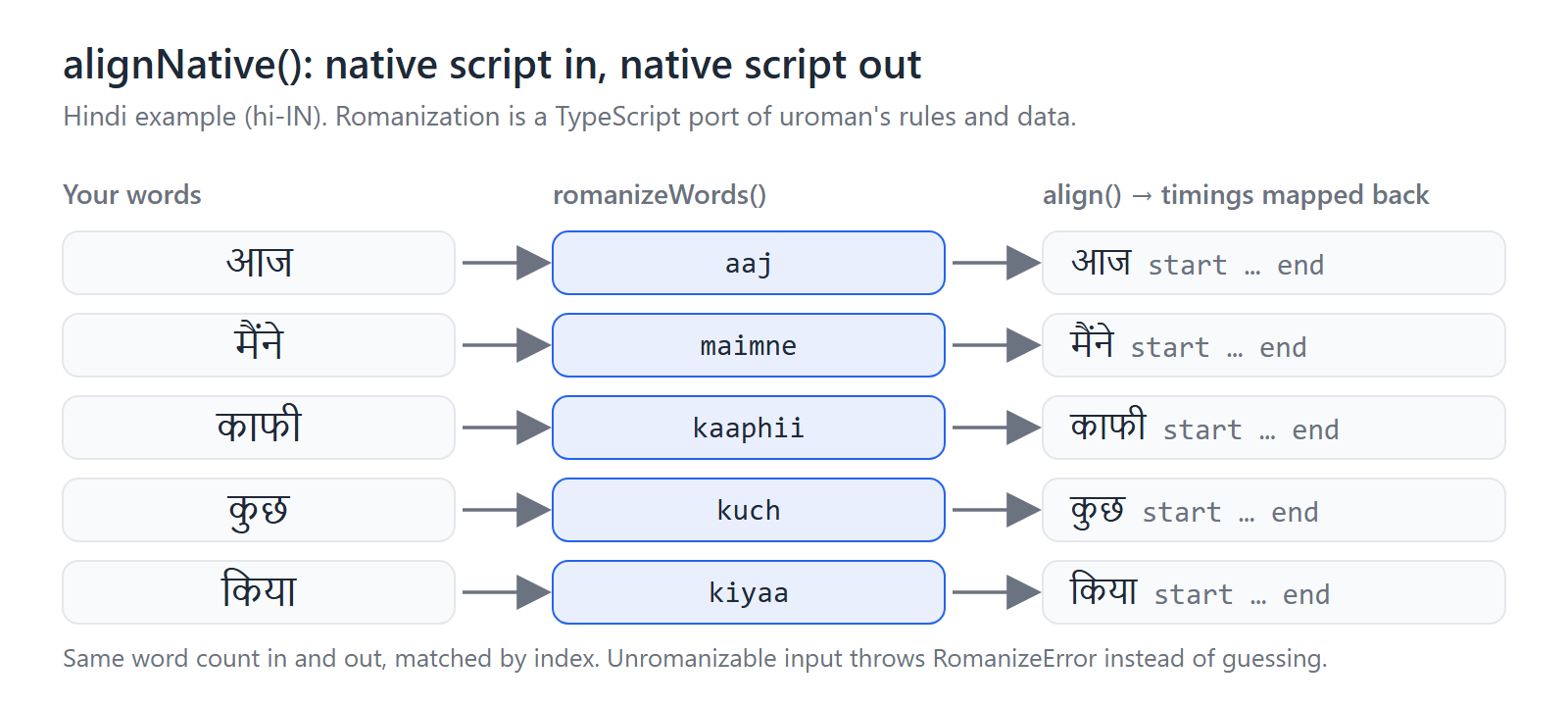
SUPPORTED_LANGUAGE_CODES (and the LanguageCode type) list every value
accepted as langCode. As of this release there are 21 entries — 20 Indic
languages plus en-IN as a Latin passthrough (for already-romanized/English
text mixed into an otherwise-Indic pipeline):
| LanguageCode | Language | Script |
| --- | --- | --- |
| hi-IN | Hindi | Devanagari |
| mr-IN | Marathi | Devanagari |
| ne-IN | Nepali | Devanagari |
| sa-IN | Sanskrit | Devanagari |
| mai-IN | Maithili | Devanagari |
| doi-IN | Dogri | Devanagari |
| kok-IN | Konkani | Devanagari |
| brx-IN | Bodo | Devanagari |
| bn-IN | Bengali | Bengali |
| as-IN | Assamese | Bengali |
| pa-IN | Punjabi | Gurmukhi |
| gu-IN | Gujarati | Gujarati |
| od-IN | Odia | Oriya |
| ta-IN | Tamil | Tamil |
| te-IN | Telugu | Telugu |
| kn-IN | Kannada | Kannada |
| ml-IN | Malayalam | Malayalam |
| ur-IN | Urdu | Perso-Arabic |
| ks-IN | Kashmiri | Perso-Arabic |
| sd-IN | Sindhi | Perso-Arabic |
| en-IN | English | Latin (passthrough) |
Not supported (explicit product decision): sat-IN (Santali/Ol Chiki) and
mni-IN (Manipuri/Meitei Mayek). uroman's own data for these two scripts is
incomplete/unreliable, so porting it into this package wouldn't produce
accurate romanization either — these may be revisited if/when upstream data
improves.
Known limitation — a handful of Perso-Arabic characters (ur-IN/ks-IN/sd-IN)
have no vocab-safe romanization. A small number of Arabic Supplement/Extended
letters romanize (matching real uroman) to output outside [a-z'] — notably
Sindhi ۽ ("and"), which real uroman itself renders as &. Rather than hand
the aligner text it can't consume, romanizeWord/romanizeWords/alignNative
throw RomanizeError for these words, naming the exact character responsible,
instead of inventing a non-uroman-matching substitute or failing silently
further downstream.
The character-level romanization data this package uses is extracted
directly from uroman (see
src/romanize/data/README.md for
provenance and regeneration instructions); the romanization algorithm is
this package's own from-scratch TypeScript implementation of the relevant
subset of uroman's approach, built against that data. Practically, this
means romanizeWord/romanizeWords/alignNative's accuracy for a given
language tracks uroman's own accuracy for that language — it is not a
separate, hand-built approximation with its own error profile.
Model download & licensing — read before using commercially
On first use, createAligner() downloads the ONNX model weights from Hugging
Face (onnx-community/mms-300m-1130-forced-aligner-ONNX) and caches them
under ~/.cache/mms-forced-align/ (override with cacheDir). Weights are
never bundled in this npm package.
The model weights themselves are licensed CC-BY-NC-4.0 (non-commercial), per both the ONNX export and the source model on Hugging Face. This package's own code is MIT-licensed, but if you plan to use this in a commercial product, review that license yourself — it may restrict your use case even though this package doesn't redistribute the weights.
Prior art
These projects solve related problems and are worth knowing about:
torchaudio.pipelines.MMS_FAandctc-forced-aligner— the Python originals for MMS forced alignment. This package's output is validated against torchaudio.- Web AI Showcase MMS demo — runs the same MMS model in the browser with Transformers.js, using greedy matching rather than Viterbi. A demo, not a package.
- charsiu-js — a JavaScript CTC Viterbi aligner for a Japanese HuBERT phoneme model.
- Echogarden — a TypeScript speech toolkit whose alignment is based on dynamic time warping (DTW).
- Storyteller's
@storyteller-platform/align— added its own MMS CTC Viterbi aligner for audiobooks in September 2026.
Credits
onnx-community/mms-300m-1130-forced-aligner-ONNX— the ONNX model this package loads.MahmoudAshraf/mms-300m-1130-forced-aligner— source model.torchaudio.pipelines.MMS_FA— the Python reference this package's alignment output is validated against (seescripts/generate_fixtures.py).MahmoudAshraf/ctc-forced-aligner— Python CTC forced-alignment tool built around the same model.- Meta AI — MMS (Massively Multilingual Speech), the underlying acoustic model family (paper).
- uroman — source of the bundled romanization data. This project uses the universal romanizer software 'uroman' written by Ulf Hermjakob, USC Information Sciences Institute (2015-2020). See
THIRD_PARTY_NOTICES.md.
The README figures are generated by
scripts/make-readme-figures.py.
Author
Arham Sayyed — GitHub · LinkedIn · Dev.to
Issues and pull requests are welcome.