
mobilewright
v0.0.68
Published
Mobile device automation framework inspired by Playwright


Readme
Mobilewright



Framework for mobile device automation, inspired by Playwright's architecture and developer experience.
Mobilewright targets iOS and Android devices, simulators, and emulators through a clean, auto-waiting API built on top of mobilecli.
Get Started · API Docs · Roadmap · Mobile Next Cloud
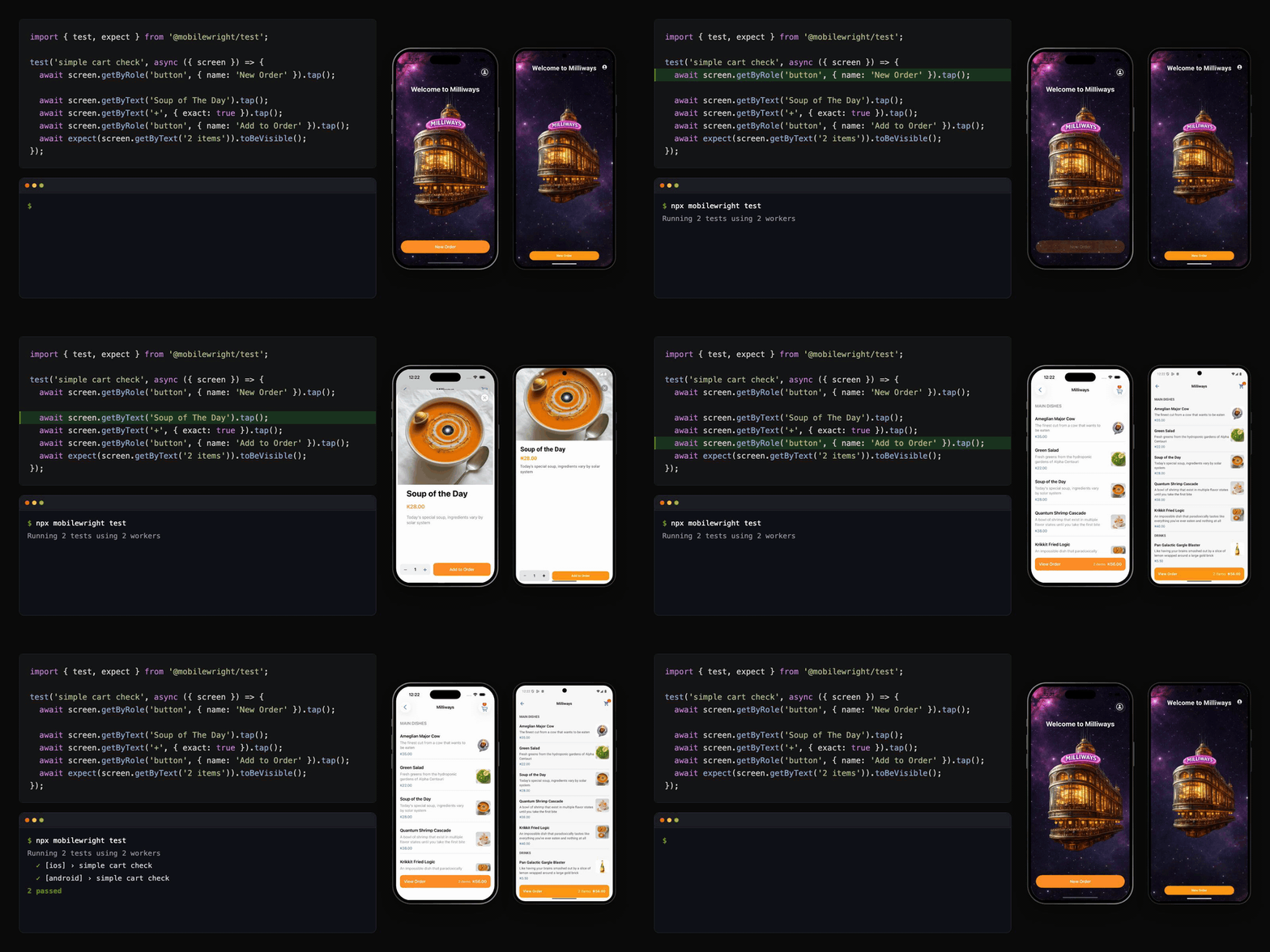
Quick Start
npm install mobilewright @mobilewright/test
npx mobilewright init
import { test, expect } from '@mobilewright/test';
test('can sign in', async ({ screen }) => {
await screen.getByLabel('Email').fill('[email protected]');
await screen.getByLabel('Password').fill('password123');
await screen.getByRole('button', { name: 'Sign In' }).tap();
await expect(screen.getByText('Welcome back')).toBeVisible();
});npx mobilewright testFeatures
- Playwright-style API —
screen.getByRole('button').tap(), just likepage.getByRole('button').click() - Zero config — auto-discovers booted simulators
- Cross-platform — unified interface for iOS and Android
- Auto-waiting — actions wait for elements to be visible, enabled, and stable before interacting
- Chainable locators —
screen.getByType('Cell').getByLabel('Item 1') - Retry assertions —
expect(locator).toBeVisible()polls until satisfied or timeout - Remote support — connect to mobilecli on another machine for device lab setups
- Test fixtures —
@mobilewright/testextends Playwright Test withscreenanddevicefixtures
Why Mobilewright?
If you've used Playwright, you already know Mobilewright.
| | Mobilewright | Appium | Detox | XCTest/Espresso |
|---|---|---|---|---|
| API style | Playwright (getByRole, expect) | Selenium (WebDriver) | Custom | Native framework |
| Auto-wait | Built-in, every action | Manual waits | Partial | Manual |
| Setup | npm install mobilewright | Server + drivers + caps | React Native only | Xcode/AS only |
| Cross-platform | iOS + Android, one API | Yes, verbose | React Native only | Single platform |
| AI agent support | First-class (accessibility tree) | Limited | No | No |
| Real devices in the cloud | Mobile Next Cloud, BrowserStack, Sauce Labs, TestMu AI, TestingBot | Yes (complex) | Simulators only | Yes |
| Locators | Semantic roles + labels | XPath, CSS, ID | Test IDs | Native queries |
Built for AI agents
Your agent needs a phone, not a screenshot.
Mobilewright exposes the device's accessibility tree — deterministic, token-efficient, no vision model needed. Use it with mobile-mcp, Claude, Cursor, or any coding agent.
// An AI agent can control a real phone with readable, semantic actions
await screen.getByRole('button', { name: 'Sign In' }).tap();
await screen.getByLabel('Email').fill('[email protected]');
await expect(screen.getByText('Welcome')).toBeVisible();
No XPath. No coordinates. No vision model. The agent reads the accessibility tree and acts on it directly.
Prerequisites
- Node.js >= 22.12
- A booted iOS simulator, Android emulator, or connected real device
Run mobilewright doctor to verify your environment is ready:
npx mobilewright doctorIt checks Xcode, Android SDK, simulators, ADB, and other dependencies — and tells you exactly what's missing and how to fix it. Add --json for machine-readable output.
Packages
| Package | Description |
|---|---|
| mobilewright | Main entry point — ios, android launchers, expect, config, CLI |
| @mobilewright/test | Test fixtures |
| @mobilewright/protocol | TypeScript interfaces (MobilewrightDriver, ViewNode) |
| @mobilewright/driver-mobilecli | WebSocket JSON-RPC client for mobilecli |
| @mobilewright/driver-mobilenext | WebSocket JSON-RPC client for Mobile Next Cloud cloud devices |
| @mobilewright/core | Device, Screen, Locator, expect — the user-facing API |
Most users only need mobilewright (or @mobilewright/test for Playwright Test integration).
API Reference
Launchers — ios and android
The top-level entry points. Like Playwright's chromium / firefox / webkit.
import { ios, android } from 'mobilewright';

// Launch with auto-discovery (finds first booted simulator)
const device = await ios.launch();

// Launch a specific app
const device = await ios.launch({ bundleId: 'com.example.app' });

// Target a specific simulator by name
const device = await ios.launch({ deviceName: /My.*iPhone/ });

// Explicit device UDID (skips discovery)
const device = await ios.launch({ deviceId: '5A5FCFCA-...' });

// List available devices
const devices = await ios.devices();
const devices = await android.devices();
launch() handles the full lifecycle:
- Checks if mobilecli is reachable (auto-starts it for local URLs if not running)
- Discovers booted devices (picks the first device that matches your criteria)
- Connects and optionally launches the app
- On
device.close(), kills the auto-started server
Screen
Entry point for finding and interacting with elements. Access via device.screen.
Locator factories:
screen.getByLabel('Email')                          // accessibility label
screen.getByTestId('login-button')                  // accessibility identifier
screen.getByText('Welcome')                         // visible text (exact match)
screen.getByText(/welcome/i)                        // RegExp match
screen.getByText('welcome', { exact: false })       // substring match
screen.getByType('TextField')                       // element type
screen.getByRole('button', { name: 'Sign In' })     // semantic role + name filter
screen.getByPlaceholder('Search...')                // placeholder text
Direct actions:
await screen.screenshot()                            // capture PNG
await screen.screenshot({ format: 'jpeg', quality: 80 })
await screen.swipe('up')
await screen.swipe('down', { distance: 300, duration: 500 })
await screen.pressButton('HOME')
await screen.tap(195, 400)                           // raw coordinate tap
await screen.doubleTap(195, 400)                     // raw coordinate double-tap
await screen.longPress(195, 400, 1000)               // raw coordinate long-press (optional duration in ms)
const tree = await screen.viewTree()                 // raw accessibility tree (ViewNode[])
Locator
Lazy, chainable element reference. No queries execute until you call an action or assertion.
Actions (all auto-wait for the element to be visible, enabled, and have stable bounds):
await locator.tap()
await locator.doubleTap()
await locator.longPress({ duration: 1000 })
await locator.fill('[email protected]')              // tap to focus, clear, then type text
await locator.clear()                                // tap to focus + clear the field
await locator.check()                                // checkbox / radio / switch: tap only if not already checked
await locator.uncheck()                              // tap only if currently checked
await locator.setChecked(true)                       // check() or uncheck() by value
await locator.swipe({ direction: 'left' })           // swipe on a specific element
await locator.scrollIntoViewIfNeeded()               // scroll until element is visible
await locator.screenshot()                           // capture just this element (cropped PNG)
Narrowing & combining — refine a locator that matches multiple elements:
locator.filter({ hasText: 'In stock' })              // keep matches whose subtree contains text
locator.filter({ hasNotText: /sold out/i })          // keep matches whose subtree does NOT contain text
locator.filter({ has: screen.getByRole('button') })  // keep matches containing a child locator
locator.filter({ hasNot: screen.getByText('Ad') })   // keep matches NOT containing a child locator
locator.and(screen.getByRole('button'))              // match both this and another locator
locator.or(screen.getByText('Retry'))                // match either this or another locator
Multiple matches — work with locators that resolve to more than one element:
locator.first()                                      // first match
locator.last()                                       // last match
locator.nth(2)                                       // match at index (negative counts from the end)
await locator.count()                                // number of matching elements
await locator.all()                                  // array of Locators, one per match
Queries:
await locator.exists()                               // boolean — present in the hierarchy (no wait)
await locator.isVisible()                            // boolean
await locator.isEnabled()                            // boolean
await locator.isSelected()                           // boolean
await locator.isFocused()                            // boolean
await locator.isChecked()                            // boolean
await locator.getText()                              // waits for visibility first
await locator.getValue()                             // raw value (e.g. text field content)
await locator.boundingBox()                          // { x, y, width, height }
Explicit waiting:
await locator.waitFor({ state: 'visible' })
await locator.waitFor({ state: 'hidden' })
await locator.waitFor({ state: 'enabled' })
await locator.waitFor({ state: 'disabled', timeout: 10_000 })
Chaining — scope queries within a parent element's bounds:
// Tap the delete button inside the first row
const row = screen.getByType('Cell');
await row.getByRole('button', { name: 'Delete' }).tap();

// Get text from a navigation bar
const title = await screen.getByType('NavigationBar').getByType('StaticText').getText();
When chaining, child lookups use bounds-based containment: any element whose bounds fit within the parent's bounds is considered a child. This works correctly with mobilecli's flat element lists.
WebView (hybrid apps)
Apps that embed web content — Cordova, Capacitor, Ionic, or a raw WKWebView / Android WebView — expose a real DOM behind the native view. screen.getByWebView() bridges into that DOM and hands you a Playwright-compatible Page, so web content is driven with the exact Playwright API you already know.
// Find the web view and resolve its page (Playwright-style)
const webview = screen.getByWebView();               // optionally { testId: 'checkout-web' }
const page = await webview.page();

// From here it's the standard Playwright Page / Locator API
await page.goto('https://example.com/login');
await page.getByLabel('Email').fill('[email protected]');
await page.getByRole('button', { name: 'Sign In' }).click();

await expect(page).toHaveURL(/dashboard/);
await expect(page.getByText('Welcome')).toBeVisible();
Page — navigation and lifecycle: goto, reload, goBack, goForward, url, title, content, waitForURL, waitForLoadState, close. Locator factories: locator, getByRole, getByText, getByLabel, getByPlaceholder, getByTestId, getByAltText, getByTitle.
Web Locator — actions: click, fill, type, press, focus, hover, scrollIntoViewIfNeeded. Queries: getText, getValue, textContent, innerText, innerHTML, inputValue, getAttribute, boundingBox, isVisible, isHidden, isEnabled, isDisabled, isChecked. Plus waitFor, first/last/nth, count, and all. Assertions (expect) work the same as on native locators.
MobileWebViewPage and MobileWebViewLocator are exported from mobilewright for advanced use (Page / WebLocator remain as back-compat aliases).
Device
Manages the connection lifecycle and exposes device/app-level controls.
console.log(device.id);

// Orientation
await device.setOrientation('landscape');
const orientation = await device.getOrientation();

// Geolocation — override the GPS location the device reports
await device.setGeolocation({ latitude: -17.833, longitude: 177.947 });
await device.setGeolocation(null); // clear the override

// Foldables — set the hinge on foldable iOS simulators and Android emulators
await device.setFoldState('half-open'); // 'folded' | 'half-open' | 'open' | 0–180

// Screen dimensions and pixel density: { width, height, scale }
const size = await device.screenSize();

// URLs / deep links (goto is a Playwright-style alias for openUrl)
await device.goto('myapp://settings');
await device.openUrl('https://example.com');

// App lifecycle
await device.launchApp('com.example.app', { locales: ['fr-FR'] }); // waits until app is in foreground
await device.launchApp('com.example.app', { noWaitAfter: true }); // skip foreground wait
await device.terminateApp('com.example.app');
const apps = await device.listApps();
const foreground = await device.getForegroundApp();
await device.installApp('/path/to/app.ipa');
await device.uninstallApp('com.example.app');

// Cleanup (disconnects + stops auto-started mobilecli)
await device.close();
Assertions — expect
All assertions poll repeatedly until satisfied or timeout (default 5s). Supports .not for negation.
import { expect } from 'mobilewright';

await expect(locator).toBeVisible();
await expect(locator).not.toBeVisible();
await expect(locator).toBeHidden();

await expect(locator).toBeEnabled();
await expect(locator).toBeDisabled();

await expect(locator).toBeSelected();
await expect(locator).toBeFocused();
await expect(locator).toBeChecked();

await expect(locator).toHaveText('Welcome back!');
await expect(locator).toHaveText(/welcome/i);
await expect(locator).toContainText('back');
await expect(locator).toContainText(/welcome/i);
await expect(locator).toHaveText('welcome back!', { ignoreCase: true }); // whitespace is normalized like Playwright
await expect(locator).toBeEmpty();                   // element has no text

await expect(locator).toHaveValue('[email protected]'); // text field / input value
await expect(locator).toHaveValue(/@example\.com$/);

await expect(locator).toHaveCount(3);                // number of matching elements

await expect(locator).toBeVisible({ timeout: 10_000 });

// Soft assertions record the failure but let the test keep running (Playwright semantics)
await expect.soft(locator).toHaveText('Success');
await expect.soft(locator, 'eta should be shown').not.toBeEmpty();

// Retry any value matcher until it passes, and match promise rejections (Playwright semantics)
await expect.poll(() => device.getOrientation()).toBe('landscape');
await expect(locator.tap({ timeout: 1000 })).rejects.toThrow('timed out');
Role Mapping
getByRole maps semantic roles to platform-specific element types:
| Role | iOS | Android |
|---|---|---|
| button | Button, ImageButton | Button, ImageButton, ReactViewGroup* |
| textfield | TextField, SecureTextField, SearchField | EditText, ReactEditText |
| text | StaticText | TextView, Text, ReactTextView |
| image | Image | ImageView, ReactImageView |
| switch | Switch | Switch, Toggle |
| checkbox | -- | Checkbox |
| slider | Slider | SeekBar |
| list | Table, CollectionView, ScrollView | ListView, RecyclerView, ReactScrollView |
| header | NavigationBar | Toolbar, Header |
| link | Link | Link |
| listitem | Cell | LinearLayout, RelativeLayout, Other |
| tab | Tab, TabBar | Tab, TabBar |
* ReactViewGroup matches button only when the element has clickable="true" or accessible="true" in its raw attributes, to avoid false positives since React Native uses ReactViewGroup for all container views.
Falls back to direct type matching if no mapping exists.
Configuration
Create a mobilewright.config.ts in your project root:
import { defineConfig } from 'mobilewright';

export default defineConfig({
  platform: 'ios',
  bundleId: 'com.example.myapp',
  deviceName: 'iPhone 16',
  timeout: 10_000,
});
All options:
| Option | Type | Description |
|---|---|---|
| platform | 'ios' \| 'android' | Device platform (optional) |
| bundleId | string | App bundle ID (optional) |
| deviceId | string | Explicit device UDID (optional) |
| deviceName | RegExp | RegExp to match device name (optional) |
| installApps | string \| string[] | App paths (APK/IPA) to install before launching; relative paths resolve against the config file's directory (optional) |
| autoAppLaunch | boolean | Terminate and launch the app (bundleId) before each test. Default: true |
| viewTree | 'on-failure' \| 'off' | Attach the accessibility tree as JSON to the report on failure. Default: 'off' |
| timeout | number | Per-test timeout in ms (optional) |
| globalTimeout | number | Hard cap on the entire test suite run in ms (optional) |
| testDir | string | Directory to search for test files (optional) |
| testMatch | string \| RegExp \| Array | Glob patterns for test files (optional) |
| testIgnore | string \| RegExp \| Array | Glob patterns for files to skip during discovery (optional) |
| outputDir | string | Output directory for test artifacts. Default: test-results |
| reporter | 'list' \| 'html' \| 'json' \| 'junit' \| Array | Reporter to use (optional) |
| retries | number | Maximum retry count for flaky tests (optional) |
| workers | number \| string | Number of concurrent workers (optional) |
| fullyParallel | boolean | Run all tests in parallel. Default: false |
| use | MobilewrightUseOptions | Per-action defaults applied to all tests (optional) |
| expect | MobilewrightExpectConfig | Default options for expect() assertions (optional) |
| globalSetup | string \| string[] | Setup file(s) run once before all tests (optional) |
| globalTeardown | string \| string[] | Teardown file(s) run once after all tests (optional) |
| projects | MobilewrightProjectConfig[] | Multi-device / multi-platform project matrix (optional) |
The use object holds per-action defaults shared by every test:
| use option | Type | Description |
|---|---|---|
| platform | 'ios' \| 'android' | Platform for the run (optional) |
| deviceId | string | Specific device identifier (local drivers only) — overrides the top-level deviceId for this project (optional) |
| deviceName | RegExp | RegExp to match device name (optional) |
| bundleId | string | App bundle ID (optional) |
| installApps | string \| string[] | App paths to install — overrides top-level installApps (optional) |
| animations | 'on' \| 'off' | Toggle system animations on the device; left unchanged if omitted |
| actionTimeout | number | Default timeout for locator actions (tap, fill, …) in ms. Default: 5000 |
| appLaunchTimeout | number | Timeout waiting for the app to reach foreground after launch, in ms. Default: 20000 |
| installTimeout | number | Timeout for app installation in ms. Default: 60000 |
| allocationTimeout | number | Timeout waiting for a device (queue + cloud provisioning), on its own clock. Default: 900000 (15 min) |
The expect object sets assertion defaults:
| expect option | Type | Description |
|---|---|---|
| timeout | number | Default timeout for assertions (toBeVisible, toHaveText, …) in ms. Default: 5000 |
Config values are used as defaults — LaunchOptions passed to ios.launch() always take precedence.
Mobilewright will use the first device that matches your configured criteria.
Test Fixtures
@mobilewright/test extends Playwright Test with mobile-specific fixtures:
import { test, expect } from '@mobilewright/test';

// Configure the app bundle and video recording for all tests in this file
test.use({ bundleId: 'com.example.myapp', video: 'on' });

test('can sign in', async ({ device, screen, bundleId }) => {
  // Fresh-launch the app before the test
  await device.terminateApp(bundleId).catch(() => {});
  await device.launchApp(bundleId);

  await screen.getByLabel('Email').fill('[email protected]');
  await screen.getByLabel('Password').fill('password123');
  await screen.getByRole('button', { name: 'Sign In' }).tap();

  await expect(screen.getByText('Welcome back')).toBeVisible();
});
The device fixture connects once per worker (reading from mobilewright.config.ts) and calls device.close() after all tests complete. The screen fixture provides device.screen to each test, with automatic screenshot-on-failure and optional video recording.
test.use() options — override config per file (or per test.describe block):
| Option | Type | Description |
|---|---|---|
| bundleId | string | App bundle ID for these tests |
| platform | 'ios' \| 'android' | Target platform |
| deviceId | string | Specific device identifier (local drivers only) |
| deviceName | RegExp | RegExp to match the device name |
| installApps | string \| string[] | App paths (APK/IPA) to install before the tests run |
| autoAppLaunch | boolean | Terminate and launch the app (bundleId) before each test. Default: true |
| viewTree | 'on-failure' \| 'off' | Attach the accessibility tree as JSON when a test fails. Default: 'off' |
| video | 'on' \| 'retain-on-failure' \| 'off' | Record video — always, only on failure, or never. Default: 'off' |
test.use({
  bundleId: 'com.example.myapp',
  video: 'retain-on-failure',
  viewTree: 'on-failure',
});
CLI
mobilewright init
Scaffold a mobilewright.config.ts and example.test.ts in the current directory. Skips files that already exist.
npx mobilewright initcreated mobilewright.config.ts
created example.test.tsmobilewright devices
List all connected devices, simulators, and emulators.
npx mobilewright devicesID Name Platform Type State
-------------------------------------------------------------------------------------------------
00008110-0011281A112A801E VPhone ios real-device booted
5A5FCFCA-27EC-4D1B-B412-BAE629154EE0 iPhone 17 Pro ios simulator bootedmobilewright inspect
Open the Mobilewright Inspector — a browser-based UI showing a live screenshot of your connected device alongside every element and its best locator.
npx mobilewright inspect
npx mobilewright inspect --port 4621   # use a specific port (default: 4621)
The Inspector opens automatically in your browser. Select a device from the picker at the top, then click Refresh or enable Auto refresh. Click any row in the element list to highlight its bounding box on the screenshot. Elements that share a locator with another element get a dup badge.
Locator priority matches what mobilewright uses: getByTestId > getByRole > getByLabel > getByText.

mobilewright codegen
Record a test by using the device from your browser. Codegen shows a live screenshot of the connected device next to the test it is writing: every tap, device button and assertion you make is sent to the device and added as a line of code, using the same locators as the Inspector.
npx mobilewright codegen
npx mobilewright codegen --port 8080   # use a specific port (default: a random free port)
Codegen opens in your browser automatically; its URL is also printed in the terminal in case the browser does not open.
See the Codegen guide for recording assertions, gestures and locations.
mobilewright screenshot
Capture a screenshot of a connected device. Auto-starts mobilecli if it isn't running.
npx mobilewright screenshot                          # saves screenshot.png
npx mobilewright screenshot -o home.png              # custom output path
npx mobilewright screenshot -d <device-id>           # target a specific device
npx mobilewright screenshot --url ws://host:12000    # remote mobilecli server
mobilewright install
Install the mobilecli agent on a connected device.
npx mobilewright install                             # install on the first device
npx mobilewright install -d <device-id>              # target a specific device
npx mobilewright install --force                     # force reinstall
npx mobilewright install --provisioning-profile <p>  # iOS provisioning profile
mobilewright test
Run your tests. Auto-discovers mobilewright.config.ts in the current directory.
npx mobilewright test
npx mobilewright test login.test.ts         # run a specific file
npx mobilewright test --grep "sign in"      # filter by test name
npx mobilewright test --reporter html       # generate HTML report
npx mobilewright test --retries 2           # retry flaky tests
npx mobilewright test --workers 4           # parallel workers
npx mobilewright test --list                # list tests without running
mobilewright show-report
Open the HTML report generated by --reporter html.
npx mobilewright show-report
npx mobilewright show-report mobilewright-report/
mobilewright merge-reports
Merge blob reports from sharded/parallel CI runs into a single report.
npx mobilewright merge-reports ./blob-reports        # merge into an HTML report (default)
npx mobilewright merge-reports ./blob-reports --reporter json
Run on real devices in the cloud
The same tests that run on a local device run on real devices in the cloud. Only the driver in mobilewright.config.ts changes. Mobilewright supports these device clouds:
- Mobile Next Cloud, built by the Mobilewright team. API access to hundreds of real Android and iOS devices, with test results uploaded to your dashboard automatically. Setup guide
- BrowserStack, App Automate sessions via the
@browserstack/mobilewrightdriver - Sauce Labs, real Android and iOS devices via the
@saucelabs/mobilewright-driverpackage - TestMu AI, real Android and iOS devices via the
@testmuai/mobilewrightdriver - TestingBot, real devices, emulators and simulators via the
@testingbot/mobilewright-driverpackage
Telemetry
Mobilewright collects anonymous usage telemetry via PostHog and Scarf. To disable it, set either the MOBILEWRIGHT_DISABLE_TELEMETRY environment variable or the standard DO_NOT_TRACK variable:
MOBILEWRIGHT_DISABLE_TELEMETRY=1 npx mobilewright test
DO_NOT_TRACK=1 npx mobilewright test
To opt out permanently, export one of them in your shell profile (for example ~/.zshrc or ~/.bashrc) or in your CI environment.
When telemetry is enabled, a random identifier is generated and stored in ~/.config/mobilenext/mobilewright/config.json. Mobilewright never sends personal information or test data. The Scarf pixel is a plain HTTP request, so Scarf receives the usual request metadata (source IP, user agent); Scarf states it does not retain raw IP addresses. Setting MOBILEWRIGHT_DISABLE_TELEMETRY (any value) or DO_NOT_TRACK (any value except 0 or false) opts out of both.
Contributing
# Run the repository's own unit tests
npm test
Framework Support
| Framework | iOS | Android | Notes |
|---|---|---|---|
| UIKit / Storyboards | ✅ | — | Full native element types, all locators work |
| SwiftUI | ✅ | — | Maps to standard XCUIElementType accessibility tree |
| Jetpack Compose | — | ✅ | Renders to native Android accessibility nodes |
| Android Views (XML layouts) | — | ✅ | Full native element types, all locators work |
| React Native | ✅ | ✅ | Uses real native components; RN-specific types mapped to roles |
| Expo | ✅ | ✅ | Same as React Native (Expo builds to RN) |
| Flutter | ✅ | ✅ | Must be a debug build for full support |
| .NET MAUI | ✅ | ✅ | Compiles to native controls on both platforms |
| Kotlin Multiplatform (shared UI) | ⏳ | ✅ | Android native works; iOS Compose Multiplatform support in progress |
| Cordova / Capacitor | ✅ | ✅ | WebView content accessible via native accessibility tree |
| NativeScript | ✅ | ✅ | Renders to native views on both platforms |
License
This project is licensed under the Apache License 2.0 — see the LICENSE file for details.