
mochamix-app
v0.1.0
Published
MochaMix — an open-source, stem-native DJ application. Run it: npx mochamix-app.


Readme
MochaMix
A modern, open-source, stem-native DJ application built entirely in web tech: Electron + Web Audio + WASM + WebGPU. The performance workflow of apps like VirtualDJ (live stem mashups, stems-on-pads, beat sync) with the freedom of open source, and free.
Proof you can build just about anything with web tech.
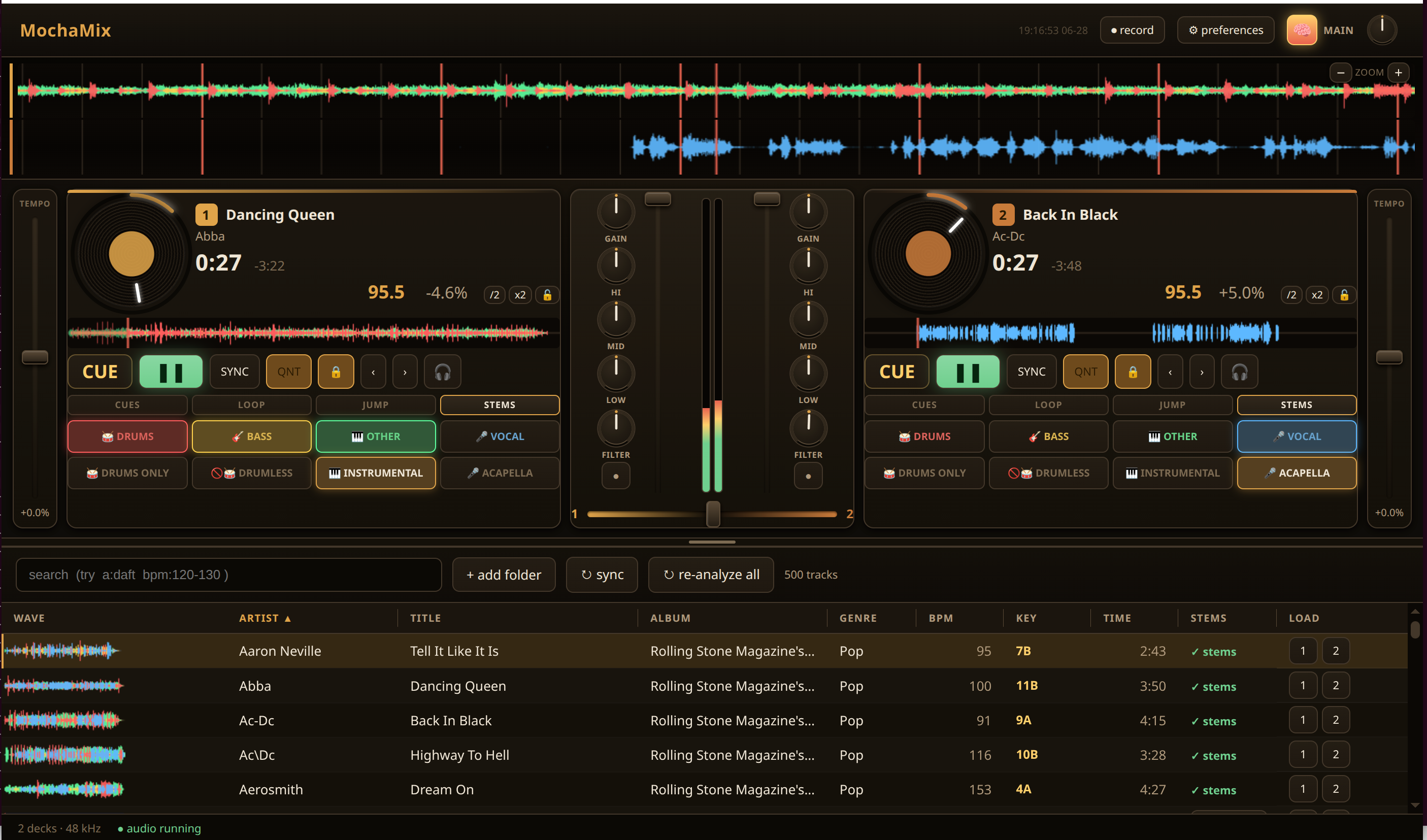
Try it
npx mochamix-appThat's it — npx fetches the package and launches the app (it pulls the Electron runtime on
first run, ~majority of the download). To build from source instead, see Develop.
Status: pre-1.0, under active development. Things move fast and may break between versions.
Features
Decks & mixing
- Two decks with scrolling waveforms (frequency-colored, grid-aligned beat + measure markers)
- Play / cue (CDJ-style), tempo fader + pitch bend, keylock (independent tempo/pitch)
- 3-band EQ + per-deck QuickEffect filter, crossfader, VU meters
- BPM / beatgrid analysis; editable BPM (double / halve / lock)
- Beat sync + Smart Fader — the crossfader blends the two decks' tempo, not just volume, so a track pitches from its BPM toward the other deck's as you fade across
Stems (the headline)
- In-browser WebGPU stem separation — generate a 4-stem (
drums / bass / other / vocals).stem.mp4on the GPU, then mix each stem independently per deck for live mashups - Stems on performance pads — a switchable pad grid (Hot Cue / Beat Loop / Beat Jump / Stems). Stems mode puts the 4 stems on colored pads (tap = mute, shift = solo) plus one-press combos: drums-only, drumless, instrumental, acapella. Mixxx itself doesn't do this.
Library
- SQLite library: scan folders, search, browse, double-click / drag to load a deck
- Resizable + persisted columns; per-track waveform thumbnails
Controllers
- Mixxx-compatible controller host — implements the Mixxx
engine/midiscripting API and parses.midi.xmlmappings, so stock Mixxx controller mappings run nearly unchanged. Hundreds of mappings ship in the box (Pioneer DDJ, Numark, Traktor, Hercules, Reloop, …)
Effects
- Filter, echo, reverb, distortion, bitcrusher
Look & feel
- Selectable color themes (Mocha / Nightclub / Graphite / Daylight) in Preferences → Appearance; fluid UI that scales to the window
How it works
- Zero heavy lifting in JavaScript. The real-time resampler and the BPM/beat detector run in WASM + SIMD; stem separation runs in WebGPU. No per-sample JS in the audio path.
- The control bus is the spine. Everything binds to
[group], keycontrols using Mixxx-compatible names, which is what lets the Mixxx controller-mapping ecosystem work here. - Mixxx is the reference, not the implementation. A React + canvas UI, not a port of its skins.
The stem-separation model (htdemucs, ~80 MB) and its WebGPU runtime are not bundled — they
download once on first use and are cached locally (~/.cache/mochamix/, or the platform
equivalent), so the install stays small and only people who use stems pay for the model.
First stem generation needs an internet connection.
Develop
Prerequisites
- Node ≥ 22 (npm workspaces; tested on Node 22–24).
- No native build toolchain. SQLite is pure WASM (
node-sqlite3-wasm) — nonode-gypcompile, noelectron-rebuild; the same.wasmruns on every OS and Electron/Node ABI. No C++ compiler, Python, or Visual Studio Build Tools required. - No emcc needed to run — the DSP WASM (resampler, beat detector) is committed pre-built.
You only need Emscripten if you change the C sources in
packages/dsp-wasm/csrc/.
Clone and run
git clone [email protected]:monteslu/mochamix.git
cd mochamix
npm install      # installs all workspaces (+ self-heals the Electron binary)
npm run dev      # build renderer/worklet/main → launch
The renderer + its workspace packages are bundled from source by Vite/esbuild, so there's no
separate build:packages step before dev — npm run dev is the whole flow.
npm test         # vitest across all packages (no native rebuild needed)
npm run typecheck   # tsc --build across the monorepo
npm run lint
Linux/Wayland: handled automatically (ELECTRON_OZONE_PLATFORM_HINT=auto in
scripts/run-electron.mjs); no flags needed on X11 or Wayland.
The
dev/startscripts pass--no-sandbox(needed in some sandboxed/CI environments). On a normal desktop it's harmless; remove it fromapps/desktop/package.jsonto keep the Chromium sandbox on.
Layout (npm-workspaces monorepo)
apps/desktop/          the Electron app (main + renderer + shared)
packages/
  control-bus/         the spine: a (group,key)->number store + SAB mirror + useControl hook
  audio-engine/        AudioWorklet mixer, decks, scalers (linear + keylock),
                       cue/loop controls, sync engine, Smart Fader, effects
  dsp-wasm/            WASM+SIMD DSP (resampler, beat detector) — emcc from csrc/
  analysis/            beatgrid model + BPM detection (Worker)
  codec/               decode (decodeAudioData -> planar SAB)
  waveform/            peak precompute + canvas render + canonical stem palette
  stems/               in-browser WebGPU stem separation (htdemucs) + asset server
  stem-mp4/            4-stem .stem.mp4 mux/demux (NI-Stems layout)
  controller-host/     the Mixxx engine/midi API + .midi.xml parser + MIDI router
  db/                  SQLite library (node-sqlite3-wasm): schema, repos, search parser
  output-bus/          pluggable data-emission bus (audio + metadata -> external displays)
Contributing
Issues and PRs welcome. Run npm test, npm run typecheck, and npm run lint before opening
a PR. The project is pre-1.0, so the architecture is still moving in places — open an issue to
discuss bigger changes first.
License
MIT.