
modscape
v3.10.0
Published
Modscape: A YAML-driven data modeling visualizer CLI
Downloads
126


Readme
Modscape




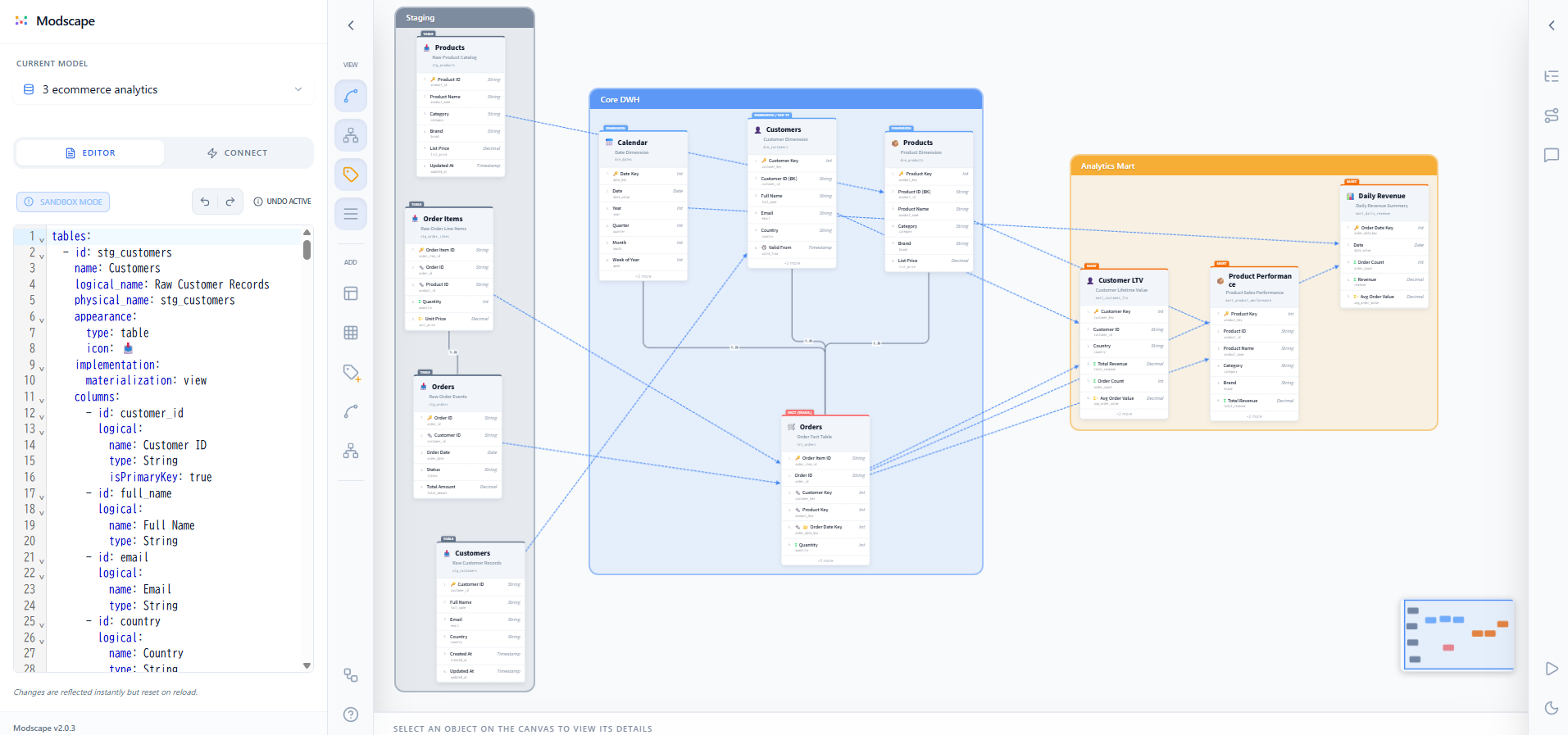
Modscape is a YAML-driven data modeling visualizer specialized for Modern Data Stack architectures. It bridges the gap between raw physical schemas and high-level business logic, empowering data teams to design, document, and share their data stories.
🌐 Live Demo: https://yujikawa.github.io/modscape/
Why Modscape?
In modern data analysis platforms, data modeling is no longer just about drawing boxes. It's about maintaining a Single Source of Truth (SSOT) that is version-controllable, AI-friendly, and understandable by both engineers and stakeholders.
- For Data Engineers: Maintain clear mappings between physical tables and logical entities. Visualize complex Data Vault or Star Schema structures.
- For Analytics Engineers: Design modular dbt-ready models. Document table grains, primary keys, and relationships before writing a single line of SQL.
- For Data Scientists: Discover data through Sample Stories. Understand the purpose and content of a table through integrated sample data previews without running a single query.
Key Features
- YAML-as-Code: Define your entire data architecture in a single, human-readable YAML file. Track changes via Git.
- Tri-Layer Naming System: Document entities across three levels of abstraction: Conceptual (Visual name), Logical (Formal business name), and Physical (Actual database table name).
- Auto-Format Layout: Automatically arrange tables and domains based on their relationships using an intelligent hierarchical layout engine (Note: manual adjustment may be required for complex models).
- Redesigned Modeling Nodes: Protruding "Index Tabs" for entity types (FACT, DIM, HUB, LINK, etc.) and auto-truncating physical names for a professional look.
- Interactive Visual Canvas:
- Drag-to-Connect: Create relationships between columns intuitively with "Magnetic Snapping".
- Semantic Edge Badges: Visually identify cardinality with
( 1 )and[ N ]badges at the connection points. - Data Lineage Mode: Visualize data flow with animated dashed arrows.
- Domain-Grouped Navigation: Organize tables into visual business domains and navigate them via a structured sidebar.
- Unified Undo/Redo & Auto-save:
- Graph-level Undo/Redo (
Ctrl+Z/Ctrl+Shift+Z) for visual operations on the canvas. - Optional Auto-save ensures your local YAML is always up-to-date.
- Graph-level Undo/Redo (
- YAML Sidebar: Read-only YAML viewer with a Diff toggle to highlight changes since the last disk load, and a Download button to export the current model as a YAML file. To edit the YAML directly, open the file in your external editor (VS Code, etc.) — changes are synced automatically.
- Rich Detail Panel: Edit table and column metadata directly from the UI — including ID rename (with full cross-reference update), appearance icon & color, and column role toggles (
isPrimaryKey,isForeignKey,isPartitionKey). - Dark/Light Mode Support: Switch between themes seamlessly for better eye comfort or documentation exports.
- Specialized Modeling Types: Native support for entity types like
fact,dimension,mart,hub,link,satellite, and generictable. - AI-Agent Ready: Built-in scaffolding for Gemini CLI, Claude Code, and Codex — both for modeling (
/modscape:modeling) and implementation code generation (/modscape:codegen).
Installation
Install Modscape globally via npm:
npm install -g modscapeGetting Started
Path A: AI-Driven Modeling (Recommended)
Leverage AI coding assistants (Gemini CLI, Claude Code, or Codex) to build your models.
Initialize: Scaffold modeling rules and commands for your preferred agent.
modscape init --gemini   # Gemini CLI
modscape init --claude   # Claude Code
modscape init --codex    # Codex
modscape init --all      # all three
This creates
.modscape/rules.md(YAML schema rules) and.modscape/codegen-rules.md(code generation rules), plus agent-specific command files.Updating skills: After upgrading Modscape, run
modscape updateto sync all installed skill/rule files to the latest bundled version. Unlike re-runninginit,updateauto-detects installed agents, requires no prompts, and never touches your data in.modscape/specs/.Start Dev: Launch the visualizer.
modscape dev model.yamlModel with AI — use
/modscape:modelingto design your data model:"Use the rules in .modscape/rules.md to add a new 'Marketing' domain with a 'campaign_performance' fact table."
Generate implementation code — use
/modscape:codegento turn your YAML into dbt / SQLMesh / Spark SQL:"Follow .modscape/codegen-rules.md and generate dbt models from model.yaml."
The agent generates models in the correct dependency order and adds
-- TODO:comments wherever the YAML doesn't fully specify the logic.
Path B: Manual Modeling
Best for direct architectural control.
- Create YAML: Create a file named
model.yaml(see YAML Reference). - Start Dev: Launch the visualizer.
modscape dev model.yaml
Defining Your Model (YAML)
Modscape uses a schema designed for data analysis contexts. The full YAML structure is:
version      – model format version (optional string, e.g. "1.0.0")
imports      – cross-file table references (resolved at dev/build time)
domains      – visual containers grouping related tables
tables       – entity definitions with tri-layer metadata
relationships – ER cardinality between tables
lineage      – data flow / transformation paths
annotations  – sticky notes / callouts on the canvas
layout       – ALL coordinate data (never put x/y inside tables or domains)
consumers    – downstream consumers (BI dashboards, ML models, applications)
Domains
domains:
  - id: core_sales
    name: "Core Sales"
    description: "Transactional data for the sales team."  # optional
    display:
      color: "rgba(59, 130, 246, 0.1)"  # background fill
    members: [orders, dim_customers]   # logical membership
Tables
The table schema uses a 3-layer ontology plus a visual axis:
tables:
  - id: orders
    conceptual:  # Business layer — AI-facing
      name: Orders             # Display name (large, required)
      kind: fact               # fact | dimension | mart | hub | link | satellite | table
      description: "One row per order line item."  # AI-readable context
      tags: [WHO, WHAT, WHEN]  # BEAM* tags: WHO|WHAT|WHEN|WHERE|HOW|COUNT|HOW_MUCH

    logical:  # Analytic layer — optional
      name: "Customer Purchase Record"  # Formal business name (medium)
      grain: [month_key]        # GROUP BY columns (mart only)
      scd:                      # SCD config for dimensions only
        type: type2             # type0–type6
        business_key: [customer_id]  # natural key column id(s)
        valid_from: valid_from       # column id for start date
        valid_to: valid_to           # column id for end date
        current_flag: is_current     # optional – column id for current record flag

    physical:  # Build/storage layer — optional
      name: "fct_retail_sales"        # Warehouse table name (small)
      strategy: incremental           # table | view | incremental | ephemeral
      update_mode: merge              # merge | append | delete_insert
      merge_key: order_id
      partition:
        field: order_date             # use a DATE/TIMESTAMP column
        granularity: day              # day | month | year | hour
      cluster: [customer_id]
      filter_key: updated_at          # optional – column id for WHERE filter (incremental only)
      lookback: "3 days"              # optional – safety margin for incremental filter
      measures:                       # aggregation definitions (mart only)
        - column: total_revenue
          agg: sum                    # sum | count | count_distinct | avg | min | max
          source_column: fct_sales.amount

    display:  # Visual layer — optional
      icon: "💰"
      color: "#e0f2fe"  # optional custom header color

    columns:
      - id: order_id
        name: "Order ID"              # flat structure (no logical: wrapper)
        type: Int                     # Int | String | Decimal | Date | Timestamp | Boolean | ...
        description: "Surrogate key."
        isPrimaryKey: true
        isForeignKey: false
        isPartitionKey: false
        additivity: fully             # fully | semi | non
        expression: "CAST(raw_amount AS DECIMAL(18,2))"  # optional – SQL expression for SELECT clause
        physical:  # optional warehouse overrides
          name: order_id
          type: "BIGINT"
          constraints: [NOT NULL]

    metadata:  # optional – user-defined key-value pairs (any string key)
      owner: data-platform
      sla: "daily 6AM JST"
      sql_path: "models/marts/fct_orders.sql"

    sampleData:  # 2D array of realistic values
      - [1001, 50.0, "COMPLETED"]
      - [1002, 120.5, "PENDING"]
Data Lineage
Top-level lineage section declares data flow between tables (which source tables feed which derived tables). This is rendered as dashed arrows in Lineage Mode.
lineage:
  - id: lin_orders_revenue   # optional; auto-generated as lin-{from}-{to} if omitted
    from: fct_orders         # source table ID
    to: mart_revenue         # derived table ID
    join_type: left          # optional – inner | left | cross | none
    description: "Aggregated daily amounts into monthly buckets."  # optional
  - id: lin_dates_revenue
    from: dim_dates
    to: mart_revenue
    join_type: inner
Relationships
relationships:
  - id: rel_cust_orders
    from:
      table: dim_customers   # table ID
      column: [customer_id]  # column ID(s)
    to:
      table: fct_orders
      column: [customer_id]
    type: one-to-many  # one-to-one | one-to-many | many-to-one | many-to-many
    description: "Optional description of the relationship"  # optional
ER Relationships vs Lineage: Use
relationshipsfor structural joins (FKs) andlineagefor data flow (transformations). Do not duplicate them.
Imports
Reference table definitions from another YAML file without copying them. Useful for conformed dimensions shared across multiple models.
imports:
  - from: ./shared/conformed-dims.yaml   # relative path from this file
    ids: [dim_dates, dim_customers]      # optional: omit to import all tables
Imported tables are resolved automatically when running modscape dev or modscape build. They appear on the canvas as read-only nodes. To edit them, update the source file directly.
Imported table IDs work in domains.members, relationships, and lineage entries just like local tables.
Consumers
Consumers represent the downstream users of your data model — BI dashboards, ML models, applications, or any other system that consumes the data. They appear as distinct nodes on the canvas and can receive lineage edges.
consumers:
  - id: revenue_dashboard       # unique ID — used in lineage and layout
    name: "Revenue Dashboard"   # display name
    description: "Monthly KPI dashboard for the finance team."  # optional
    display:
      icon: "📊"                # optional (defaults to 📊)
      color: "#e0f2fe"          # optional accent color
    url: "https://bi.example.com/revenue"  # optional link
Connect a consumer with lineage by using its id as the to field:
lineage:
  - from: mart_monthly_revenue
    to: revenue_dashboard   # consumer ID
Consumers can also be added to domain members lists just like tables.
Annotations
annotations:
  - id: note_001
    text: "Grain: one row per invoice line item."
    target:                  # optional – attachment target
      id: fct_orders         # ID of the attached object
      type: table            # table | domain | relationship | lineage | column
    display:
      color: "#fef9c3"       # optional background color
    offset:
      x: 100    # offset from target's top-left (or absolute if no target)
      y: -80
Layout
All coordinate data lives in layout, keyed by object ID. Never place x/y inside tables or domains.
All coordinate data lives in layout, keyed by object ID. Domain membership is declared in domains.members — not via parentId in layout.
layout:
  # Domain – requires width and height
  core_sales:
    x: 0
    y: 0
    width: 880
    height: 480

  # Table inside a domain – coordinates are relative to domain origin
  # (membership declared in domains.members, not here)
  orders:
    x: 280
    y: 200

  # Standalone table – absolute canvas coordinates
  mart_summary:
    x: 1060
    y: 200
Usage
Development Mode (Interactive)
modscape dev ./models- Persistence: Layout and metadata changes are saved directly to your files (supports Auto-save).
Create New Model
modscape new models/sales/customer.yaml- Recursive Scaffolding: Automatically creates parent directories if they don't exist.
- Boilerplate: Generates a valid YAML model with examples of domains, tri-layer naming, relationships, and lineage.
Build Mode (Static Site)
modscape build ./models -o docs-siteExport Mode (Markdown)
modscape export ./models -o docs/ARCHITECTURE.md

# Include SDD context (decisions, Q&A, glossary, per-table specs) in the output
modscape export ./models --with-context
modscape export ./models --with-context ./path/to/specs
Export to OSI (Open Semantic Interchange)
Export your Modscape model to OSI format, a vendor-neutral semantic model standard for BI and AI platforms.
modscape export --format osi model.yaml

# Specify output path
modscape export --format osi model.yaml --output model.osi.yaml
OSI output can then be converted to platform-specific formats using the OSI converters (Tableau, Databricks, GoodData, Salesforce, etc.).
Modscape YAML
     ↓  modscape export --format osi
   OSI YAML
     ↓  OSI converters
  Tableau / Databricks / GoodData / ...
What is converted:
tables→datasets(physical name as source, conceptual name as description)columns→fields(expression set toANSI_SQLdialect)relationships→relationshipsmetrics→metrics(expression set toANSI_SQLdialect)domainsand entitykind→ preserved incustom_extensions.modscapeimportsare resolved and merged before conversion
dbt Integration
Modscape can import your existing dbt project directly from its compiled manifest.json.
Prerequisites
Run dbt parse (or any dbt command that produces target/manifest.json) in your dbt project before using these commands.
Import dbt Project
modscape dbt import [project-dir] [options]| Option | Description |
|--------|-------------|
| -o, --output <dir> | Output directory (default: modscape-<project-name>) |
| --split-by <key> | Split output files by schema, tag, or folder |
Examples:
# Import from current directory, output to modscape-my_project/
modscape dbt import

# Import from a specific dbt project path
modscape dbt import ./my_dbt_project

# Split into separate YAML files by schema
modscape dbt import --split-by schema

# Split by dbt tag, with custom output directory
modscape dbt import --split-by tag -o ./modscape-models
After import, visualize with:
modscape dev modscape-my_projectWhat gets imported: All
model,seed,snapshot, andsourcenodes frommanifest.json, including columns, descriptions, and lineage (depends_on). Split mode: When--split-byis used, each group is written to a separate YAML file. A self-containment score is shown — files below 80% have cross-file lineage edges that won't render in isolation.
Sync dbt Changes
After modifying your dbt project, sync the changes into existing Modscape YAML files without losing any manual edits (layout, appearance, annotations, relationships):
modscape dbt sync [project-dir] [options]| Option | Description |
|--------|-------------|
| -o, --output <dir> | Target directory containing existing Modscape YAML files (default: modscape-<project-name>) |
# Sync changes from current dbt project
modscape dbt sync

# Sync from a specific path
modscape dbt sync ./my_dbt_project -o ./modscape-models
sync vs import:
importcreates YAML files from scratch;syncupdates existing files, preserving your manual enrichments (table types, business definitions, sample data, etc.).
Model File Operations
Merge YAML Files
Combine multiple YAML models into one. Duplicate table/domain IDs are resolved with first-wins semantics.
modscape merge model-a.yaml model-b.yaml -o merged.yaml

# Merge all YAMLs in a directory
modscape merge ./models -o merged.yaml
Extract Tables
Extract a subset of tables (and their relationships/lineage) into a new YAML file.
modscape extract model.yaml --tables orders,dim_customers -o subset.yaml

# Extract from multiple files
modscape extract ./models --tables fct_sales,dim_dates -o extracted.yaml
Auto-Layout
Automatically calculate and write layout coordinates based on table relationships.
modscape layout model.yaml

# Write to a separate output file
modscape layout model.yaml -o model-with-layout.yaml
Validate
Check a model.yaml file for structural errors (missing references, coordinate placement, duplicate IDs, etc.).
modscape validate model.yaml

# Machine-readable output for AI agents
modscape validate model.yaml --json
Coverage
Show model statistics and documentation coverage for a YAML model file. Works on any model YAML (main model or SDD spec-model).
modscape coverage model.yaml

# Exit 1 if overall coverage is below threshold (useful in CI/CD)
modscape coverage model.yaml --min-coverage 70

# Machine-readable output
modscape coverage model.yaml --json
Lint
Check documentation quality and modeling best-practice compliance. Accepts a single file, multiple files, or a directory. Rules are configured in .modscape/lint-rules.yaml (ESLint-style error / warn / off). Runs with a default rule set when no config file is present.
modscape lint model.yaml

# Lint multiple files or an entire directory
modscape lint models/
modscape lint sales.yaml inventory.yaml conformed.yaml

# Use a custom rules file
modscape lint model.yaml --rules .modscape/lint-rules.yaml

# Machine-readable output for CI/CD (exits 1 on any error)
modscape lint models/ --json
Rules are defined using actual model.yaml field paths under a require: section. Default fields checked (all at warn): conceptual.description, physical.name, conceptual.tags, columns[].type, columns[].isPrimaryKey.
When linting multiple files, the no-duplicate-table-ids cross-file rule also runs: it warns when the same table ID is defined in more than one file without an explicit imports: relationship. The correct pattern is for one file to own the table, and consumers to reference it via imports:.
Example .modscape/lint-rules.yaml:
require:
  conceptual.description: error
  physical.name:
    severity: warn
    kinds: [fact, mart, dimension]   # filter by conceptual.kind
  conceptual.tags:
    severity: warn
    kinds: [fact, mart]
  columns[].type: warn
  columns[].isPrimaryKey: error

# Cross-file rules
no-duplicate-table-ids:
  severity: warn   # set to off to suppress
Prune
Detect and optionally remove orphaned entries (dangling references, stale layout keys, etc.). Defaults to dry-run — pass --write to actually modify the file.
modscape prune model.yaml

# Actually remove orphaned entries
modscape prune model.yaml --write

# Also surface tables with no relationship or lineage connections
modscape prune model.yaml --include-isolated

# Machine-readable output
modscape prune model.yaml --json
Detects: relationships / lineage referencing non-existent tables, layout keys for non-existent IDs, and domains[].members entries for non-existent tables.
Atomic Model Mutation Commands
These commands let AI agents (or scripts) make precise, targeted changes to a YAML model file. All commands support --json for machine-readable output.
Table Commands
modscape table list <file>               # List all table IDs
modscape table list <file> --type fact   # Filter by type
modscape table list <file> --domain <id> # Filter by domain
modscape table list <file> --orphan      # Tables with no domain
modscape table get <file> --id <id>      # Get a single table as JSON
modscape table add <file> --data <json>  # Add a new table
modscape table update <file> --id <id> --data <json>  # Update a table
modscape table remove <file> --id <id>  # Remove a table
Column Commands
modscape column list <file> --table <id>
modscape column add <file> --table <id> --data <json>
modscape column update <file> --table <id> --id <col-id> --data <json>
modscape column remove <file> --table <id> --id <col-id>
Relationship Commands
modscape relationship list <file>
modscape relationship get <file> --id <id>
modscape relationship add <file> --from <ref> --to <ref> --type <type> [--id <id>] [--description <text>]
modscape relationship update <file> --id <id> [--type <type>] [--description <text>]
modscape relationship remove <file> --id <id>
Lineage Commands
modscape lineage list <file> [--from <table-id>] [--recursive] [--depth <n>] [--json]
modscape lineage get <file> --id <id>
modscape lineage add <file> --from <table-id> --to <table-id> [--id <id>] [--description <text>]
modscape lineage update <file> --from <table-id> --to <table-id> [--description <text>]
modscape lineage remove <file> --id <id>
Domain Commands
modscape domain list <file>
modscape domain get <file> --id <id>
modscape domain add <file> --data <json>
modscape domain update <file> --id <id> --data <json>
modscape domain remove <file> --id <id>
modscape domain member add <file> --domain <id> --id <member-id>
modscape domain member remove <file> --domain <id> --id <member-id>
Consumer Commands
modscape consumer list <file>
modscape consumer get <file> --id <id>
modscape consumer add <file> --id <id> --name <name> [--description <text>] [--icon <icon>] [--color <color>] [--url <url>]
modscape consumer update <file> --id <id> [--name <name>] [--description <text>] [--icon <icon>] [--color <color>] [--url <url>]
modscape consumer remove <file> --id <id>
Annotation Commands
modscape annotation list <file>
modscape annotation add <file> --text <text> [--id <id>] [--type sticky|callout] [--color <color>] [--target-id <id>] [--target-type table|domain|relationship|lineage|column] [--offset-x <x>] [--offset-y <y>]
modscape annotation update <file> --id <id> [--text <text>] [--color <color>]
modscape annotation remove <file> --id <id>
Summary Command
modscape summary <file>        # Human-readable model overview
modscape summary <file> --json # Machine-readable JSON
Spec-Driven Data Engineering (SDD)
SDD adds a structured workflow on top of Path A, guiding you from business requirements through implementation to permanent, per-table documentation. Each pipeline is managed in its own named work folder and archived as table-level business specs when complete.
Initialize with SDD:
modscape init --claude --sdd   # Claude Code
modscape init --codex --sdd    # Codex
modscape init --gemini --sdd   # Gemini CLI
modscape init --all --sdd      # all agents
Installs skills and a customization template. Creates
.modscape/changes/and.modscape/specs/directories.Define requirements — run
/modscape:spec:requirementsto interactively capture the pipeline spec (or/modscape:spec:requirements-litefor minor changes — see below):- AI scaffolds the work folder:
modscape spec new <name>(createsspec-config.yaml,spec-model.yaml,design.md,tasks.md,questions.md) - Collects goal, stakeholders, data sources, acceptance criteria, and target tool
- Acceptance Criteria are automatically assigned sequential IDs (
AC-001,AC-002, ...) for traceability - Resolves main-model.yaml path from
modscape-spec.custom.mdor prompts the user - Business Context Elicitation: explicitly probes for data-related knowledge that AI cannot derive from schemas — data occurrence conditions (what business event creates a row?), business process flows (end-to-end process before/after this data is recorded), and domain rules & edge cases (magic values, common mistakes, special cases)
- Proactive Tacit Knowledge Detection: auto-flags signals that could cause analysts to draw wrong conclusions (ambiguous metric names, cross-system ID equivalence, undocumented status codes, date semantics, etc.) — writes
ai-detectedquestions toquestions.mdwith a ready-to-run PII-safe investigation query - Unresolved items are recorded as
Q-NNNentries inquestions.md - Output:
.modscape/changes/<name>/spec.md
- AI scaffolds the work folder:
Design the model — run
/modscape:spec:design <name>(one table per invocation):- Reads
spec.mdand existingspecs/<table-id>/spec.mdto auto-identify affected tables - Surfaces unresolved
Q-NNNquestions fromspecs/<table-id>/questions.mdrelated to Direct Impact tables - Searches past archives for related designs via
modscape spec search - Runs
modscape extractto pull relevant tables from main-model.yaml intochanges/<name>/spec-model.yaml - On first run, generates stub
design/<table-id>.mdfiles for all affected tables at once, then designs the first Direct Impact table in detail - Re-run to design each subsequent table;
## Design Progressindesign.mdtracks per-table status (⏳ Pending/✅ Designed) - Re-runnable: add findings under
### Requires Model Changeindesign.md, re-run to apply model mutations inline - Proactive Tacit Knowledge Detection: flags model-level signals (undocumented status/flag columns, cross-system JOIN key equivalence, assumed grain, date semantics) and auto-writes
ai-detectedquestions with PII-safe investigation queries toquestions.md - Output:
design.md,design/<table-id>.md(one file per affected table)
- Reads
Generate task list — run
/modscape:spec:tasks <name>:- Reads
spec-model.yamland builds a dependency graph from lineage entries - Groups tables into named phases (upstream first) and writes
tasks.md - Output:
.modscape/changes/<name>/tasks.md
- Reads
Implement — run
/modscape:spec:implement <name>(one task per invocation) to generate dbt / SQLMesh code and update checkboxes; flags analyst-misleading signals discovered during code generation (unexpected row counts, unknown status codes, mixed-format IDs) asai-detectedquestions with investigation queries; inline spec fixes (wrong column name, broken JOIN key, etc.) are handled without leaving the implement sessionArchive — run
/modscape:spec:archive <name>to sync permanent table specs:- Dry-run preview first: displays tables to add / update (with changed fields) / unchanged, and asks for confirmation before merging
- Merges
changes/<name>/spec-model.yamlinto the correct main-model.yaml perspec-config.yaml - Generates / updates
.modscape/specs/<model-slug>/<table-id>.mdfor each affected table (Overview, Business Context, Business Rules, Known Issues, Usage Guide, Changelog) - Upstream tables (Context Only) receive a Changelog entry only
- Merges
questions.mdentries into.modscape/specs/_questions.yaml - Merges
glossary.mdterms into.modscape/specs/_glossary.yaml - Appends key cross-project decisions to
.modscape/specs/_context.yaml - Archive summary includes AC coverage: test-covered, manual verification, and uncovered AC counts
- Work folder is automatically moved to
.modscape/archives/YYYY-MM-DD-<name>/
Permanent specs accumulate under
.modscape/specs:.modscape/specs/ ├── <model-slug>/ │ └── <table-id>.md ← business context, rules, usage guide & changelog per table ├── _questions.yaml ← Q&A history across all changes ├── _glossary.yaml ← business term definitions └── _context.yaml ← cross-project architectural decisions
Investigation queries: AI-detected questions in
questions.mdautomatically include aninvestigation:block containing a PII-safe SQL query (aggregation only, no raw rows, no PII columns). Always review the generated query before running it — AI cannot know which columns contain PII in your specific environment. After confirming it is safe, run the query, paste the result intoresult:, then use/modscape:spec:answer— the AI interprets the data and writesfinding:, updating the question toansweredautomatically.- id: Q-007 question: "Does the status column contain MANUAL_ADJ values?" status: open source: ai-detected investigation: query: | -- PII-safe: aggregation only SELECT status, COUNT(*) AS cnt FROM orders GROUP BY status result: null # human fills in after running the query finding: null # AI fills in via /modscape:spec:answer
Tip: Run
/modscape:spec:status <name>at any time to check the current phase, task progress, and the next recommended command. Adddetailfor a narrative view suitable for handoff:/modscape:spec:status <name> detail.
Save your session: Run
/modscape:spec:save <name>before ending a work session. The saved state (decisions made, open questions, next action) is shown the next time you run/modscape:spec:status <name>.
Pre-implement quality check: Run
/modscape:spec:check <name>before implementing. Validates cross-artifact consistency (spec-model.yaml as the source of truth) and evaluates go/no-go readiness — open questions, assumptions, and AC coverage. Does not block implementation.
Fix issues mid-implementation: Stay in the
/modscape:spec:implement <name>session and describe the problem. The inline fix flow updatesdesign.md→spec-model.yaml→tasks.mdin one pass without leaving the session. Completed tasks are always preserved.
Investigate a topic: Run
/modscape:spec:investigate <name>to perform a static analysis of repo files (SQL, dbt models, spec artifacts). Findings are recorded indesign.md → ## Findingsand can trigger the inline fix flow in/modscape:spec:implement.
Search past work: Run
/modscape:spec:search <keyword>(ormodscape spec search <keyword>) to search past archives and permanent specs for similar designs and patterns. Use--limit <n>to control result count (default: 5). Add--jsonfor machine-readable output.
Onboarding an existing project: Run
/modscape:spec:generate [files...]to bulk-create permanent specs from existing model.yaml, SQL files, or Python models — before starting the regular SDD flow. Existing spec files are never overwritten. Omit arguments to specify files interactively.
Customization: Rename
.modscape/changes/modscape-spec.custom.md.exampletomodscape-spec.custom.mdto override default tool targets, required fields, and output conventions per project.
Spec Browser Commands
After archiving changes, Markdown specs accumulate in .modscape/specs/<model-slug>/. Use these commands to browse them:
# List all active spec folders with status (name, phase, task progress)
modscape spec list
modscape spec list --json

# Get current status of a spec as JSON (phase, task progress, open questions, files)
modscape spec get <name>
modscape spec get <name> --json

# Advance the phase of a spec (requirements | design | tasks | implement | done)
modscape spec set-phase <name> <phase>

# Start an interactive spec viewer for a change in progress (dev server)
modscape spec dev <name>

# Browse all permanent specs in .modscape/specs/ (live-reloading dev server on port 5174)
modscape spec open

# Build a static spec browser (no server required, defaults to dist/specs/)
modscape spec build
modscape spec build ./public/specs

# Retrieve knowledge-base context for specific entity IDs
modscape spec context --ids <id1>,<id2>,...
modscape spec context --ids <id1>,<id2>,... --json
spec list— lists active specs under.modscape/changes/with phase and task progress (e.g.• monthly-sales [design] [3/8 tasks]).spec get <name>— returns the current phase, task progress, open question count, and file inventory for a spec as JSON.spec set-phase <name> <phase>— writes thephasefield tospec-config.yaml. Each SDD skill calls this at the end of its session; human override is also supported.spec dev <name>— launches the SDD viewer for.modscape/changes/<name>/, equivalent to the formermodscape dev --specflag.spec open— starts a dedicated browser for.modscape/specs/. Left pane shows model-slug groups; right pane renders.mdspecs as styled HTML.spec build— generatesdist/specs/index.htmland copies all spec files. Works without a server.spec context— retrieves relevant entries from_context.yaml,_glossary.yaml, and_questions.yamlfor the given entity IDs in a single call. Used byimplementandcodegenskills to load only needed context.
SDD Workflow
requirements ──┐
               ├──→ design (×N) → tasks → implement (×N) → archive
requirements-lite ──┘   ↑↓                   ↑
                    (re-run)           (inline fix)
               → check (optional) ↗
requirements-lite compresses requirements → design → tasks into a single invocation. Use it for small, well-understood changes (column add, table rename, type change) where the full interview workflow would be disproportionate. After running requirements-lite, proceed directly to implement.
| Skill | Command | What it does | Main output |
|-------|---------|-------------|-------------|
| Generate | /modscape:spec:generate [files...] | Bootstrap permanent specs for all tables from existing model.yaml, SQL, or Python files | <model-slug>/<id>.md |
| Requirements | /modscape:spec:requirements | Collect goal, stakeholders, ACs, Q&As interactively; elicit business context (data occurrence conditions, process flows, domain rules); auto-detect tacit knowledge gaps | spec.md |
| Requirements Lite | /modscape:spec:requirements-lite | Lightweight entry point for minor schema changes (column add, table rename, type change): compresses requirements → design → tasks into a single invocation. Produces the same folder and file structure as full SDD with thinner content. Proceed to implement immediately after. | spec.md, design.md, design/<id>.md, tasks.md |
| Design | /modscape:spec:design <name> | One table per invocation: identify affected tables, generate per-table design/<id>.md stubs on first run, then design each table in detail; track progress via ## Design Progress; auto-detect analyst-misleading signals | design.md, design/<id>.md |
| Tasks | /modscape:spec:tasks <name> | Build dependency graph from spec-model.yaml lineage, group tables into named phases, generate tasks.md | tasks.md |
| Implement | /modscape:spec:implement <name> | One task per invocation: generate dbt / SQLMesh code, update checkboxes; inline spec fixes without leaving the session; flag analyst-misleading signals found during code generation | tasks.md (updated) |
| Archive | /modscape:spec:archive <name> | Dry-run preview first; merge to main model; persist permanent specs; move work folder to archives | <model-slug>/<id>.md, _questions.yaml, _glossary.yaml, _context.yaml |
| Check | /modscape:spec:check <name> | SSOT-driven consistency check (spec-model.yaml as default truth) + go/no-go readiness: open questions, assumptions, AC coverage (optional) | — |
| Investigate | /modscape:spec:investigate <name> | User-initiated static investigation: reads repo files and records findings in design.md → ## Findings (optional) | — |
| Search | /modscape:spec:search <keyword> | Search past archives for similar designs (optional) | — |
| Answer | /modscape:spec:answer <name> <id> | Answer a Q-NNN question; when investigation.result is filled in, analyzes the query results and writes finding (optional) | — |
| Note | /modscape:spec:note [table-id] | Append free-form knowledge (from a conversation, Slack, or meeting) to a permanent table spec — finds the file by table ID, no path knowledge needed. Maps input to the right section (Business Rules, Known Issues, Usage Guide, etc.). No active workflow required (optional) | — |
| Status | /modscape:spec:status <name> | Show current phase, task progress, and next recommended command. Add detail for a narrative view suitable for handoff (optional) | — |
| Save | /modscape:spec:save <name> | Save the current session state (decisions, open questions, next action) to session.md for later resumption (optional) | session.md |
Example: designing a monthly sales summary pipeline
You:  /modscape:spec:requirements
AI:   What are you building?
You:  A monthly sales summary. Sources: fct_orders and dim_customers.
AI:   Capturing acceptance criteria: AC-001: monthly aggregation, AC-002: customer segment breakdown...
      → changes/monthly-sales-summary/spec.md created

You:  /modscape:spec:design monthly-sales-summary
AI:   Reviewed existing specs and past archives.
      Direct Impact:  fct_orders (update), dim_customers (update), mart_monthly_sales (new)
      Downstream:     mart_revenue (Context Only)
      → design.md and tasks.md created

You:  /modscape:spec:implement monthly-sales-summary
AI:   Task 1/6: generating dbt model for mart_monthly_sales...
      ...
      ✓ 6/6 tasks complete

You:  /modscape:spec:archive monthly-sales-summary
AI:   Dry-run:
        Add:      mart_monthly_sales
        Update:   fct_orders (column: amount), dim_customers (column: segment)
        Ref only: mart_revenue (Changelog only)
      Proceed?
You:  y
AI:   Merge complete. Files generated / updated:

      specs/
      ├── _context.yaml                       ← last_change, decisions updated
      ├── fct_orders/
      │   ├── spec.md                         ← Business Rules updated
      │   └── questions.md                    ← Q-001, Q-002 synced
      ├── dim_customers/
      │   ├── spec.md                         ← Business Rules updated
      │   └── questions.md                    ← Q-003 synced
      ├── mart_monthly_sales/
      │   ├── spec.md                         ← created
      │   └── questions.md                    ← created
      └── mart_revenue/
          └── spec.md                         ← Changelog entry added
Credits
Modscape is made possible by these incredible open-source projects:
- CodeMirror 6 - Next-generation code editor for the web.
- Dagre - Directed graph layout engine.
- Lucide React - Beautifully simple pixel-perfect icons.
- Zustand - Bear necessities for state management.
- js-yaml - JavaScript YAML parser and dumper.
License
MIT