
motion-mania
v0.3.0
Published
An agent skill and review toolkit for HyperFrames motion videos
Downloads
441

Maintainers
 shiftynick
Readme
Motion Mania
Turn a product repository into a short film—with an agent, a skill, and a CLI.


Motion Mania gives coding agents a repeatable workflow for product films, launch reels, and motion graphics. The agent develops the idea, writes the animation, and critiques rendered evidence. The CLI handles project setup, storyboard checks, contact sheets, transition strips, frozen-frame detection, audio loudness checks, captions, verification, and MP4 exports using HyperFrames.
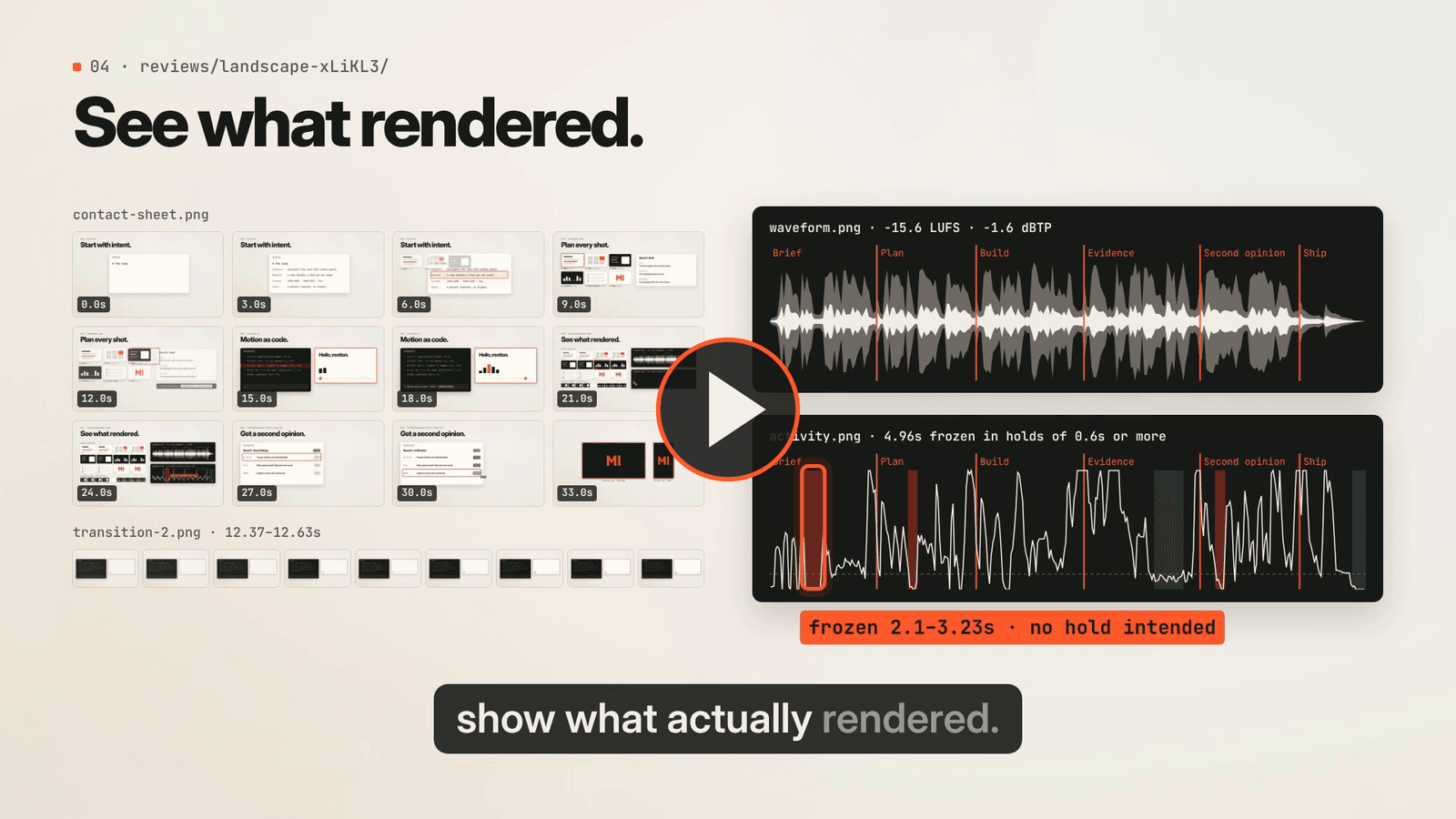
▶ Watch The loop (36 s, with sound) · Vertical cut · How it was made · Agent skill · Contributing
Quick start
Requires Node.js 22+, FFmpeg/FFprobe, and a supported Chrome/Chromium. Linux is tested in CI; other platforms depend on HyperFrames and the external tools. No separate model API key is needed—the agent you use supplies creative judgment.
npx motion-mania@latest doctor --json
# If Chrome is missing (explicit download):
npx motion-mania@latest browser

npx motion-mania@latest init ./videos/launch
npx motion-mania@latest plan --project ./videos/launch --json
npx motion-mania@latest review --project ./videos/launch --json
npx motion-mania@latest render --project ./videos/launch --format all --json
npx motion-mania@latest audio --project ./videos/launch --format all --json
npx motion-mania@latest picture --project ./videos/launch --format all --json
The starter is a working 15-second Motion Mania demo. It does not invent a film about your product. Ask your agent to replace the brief, identity, storyboard, source, and audio, inspect the review images, and revise before export. Final videos land in videos/launch/out/.
npx installs the package and its dependencies when needed. Install FFmpeg separately through your OS package manager. browser delegates browser setup to the pinned HyperFrames version; HYPERFRAMES_BROWSER_PATH can select an existing binary. If Sharp tries to compile against an incompatible system libvips, set SHARP_IGNORE_GLOBAL_LIBVIPS=1 when installing or running through npx.
For reproducible work, use npx [email protected] …, or add it to your project with npm install --save-dev --save-exact [email protected]. A global install with npm install -g motion-mania is also supported.
Give your agent the skill
Copy the complete skill to a directory your agent discovers. The command refuses to replace an existing nonempty directory.
# Example: a personal Codex skill directory
npx motion-mania@latest skill ~/.codex/skills/motion-mania

# Or choose a host-supported project/personal location explicitly
npx motion-mania@latest skill ./my-agent-skills/motion-mania
Skill discovery depends on the agent host. Installing the CLI does not automatically register a skill. The installed skill explains how to invoke the CLI via npx or a global installation; it includes creative direction, the authoring contract, and review guidance.
Example prompt:
Use Motion Mania to make an 18-second launch film for this product. Study its actual UI and brand, plan the story, create landscape and portrait versions, inspect the renders, and deliver the MP4s with editable source. Use illustrative content where a real recording is unavailable, and identify anything you could not inspect.
Production loop
- Brief and plan: identify the audience, observable product benefit, brand assets, shot intent, sound direction, and any narration.
planchecks timing, narration pace, unsourced figures, and asset provenance, and surfaces missing decisions. - Author: edit local HTML/CSS and a paused GSAP timeline. HyperFrames renders the composition.
- Review and revise: inspect exact frames, whole-film sheets, phone-size previews, adjacent-frame strips, a waveform, and a frame-activity chart, both marked with the cuts. Record specific changes by timestamp. Ideally, a fresh critic agent that didn't build the film reviews each round, and each new critique carries the previous round's revisions forward for verification (independent review).
- Verify and export: check runtime/layout behavior, sampled seek stability, encoded media metadata, frozen or near-black stretches, and loudness (default -14 LUFS, -1 dBTP). Technical success is separate from creative approval.
For a voiceover, write each shot's line in the storyboard, produce the voice with any tool you choose, then import a word-timed transcript with captions. Motion Mania renders it as animated captions and compares what was said with the script. See narration and captions.
Commands
| Command | Purpose |
| --- | --- |
| init <directory> | Create an editable starter with local fonts, GSAP, and original audio |
| skill <directory> | Install the full agent skill and references |
| browser | Download or locate the pinned backend's browser |
| doctor | Check Node.js, FFmpeg, FFprobe, and browser availability |
| plan | Validate storyboard timing; surface missing goals, focal points, transitions, and sound intent |
| frame --at 4.2 | Capture one exact timestamp |
| review [--around 3,6.5] [--draft] | Generate contact sheets, shot keyframes, transition strips, critique notes that carry forward the previous round's revisions, and an optional measured draft MP4 |
| verify | Run HyperFrames checks and compare three sampled forward/reverse seeks |
| render [--quality draft\|looks\|delivery] | Encode and validate an MP4 before replacing the previous export |
| audio [--input file] | Measure loudness and true peak against the target; report silences, cut accents, and abrupt endings; draw a waveform |
| picture [--input file] | Find frozen holds and near-black frames per shot; draw a frame-activity chart |
| captions --input transcript.json | Import a JSON, SRT, or VTT transcript as burned-in, word-highlighted captions |
| prepare | Create a prepared composition snapshot for HyperFrames Studio |
| --version | Print the installed version |
Project commands accept --project (default: current directory). Render-related commands also accept --format <name|all> (default: first manifest format). Results are JSON on stdout; progress goes to stderr. --json also requests structured errors. Failures return a nonzero exit status.
review uses storyboard keyframes and automatic cut strips. --around replaces the automatic cut selection. A successful review command means evidence was generated—not that anyone inspected it.
Editable, portable projects
videos/launch/
  motion.json          # Duration, fps, dimensions, backend version
  brief.md
  brand.json
  storyboard.json
  captions.json        # Optional imported captions
  src/                 # Editable HTML, CSS, and animation timeline
  assets/              # Local media, fonts, libraries, and provenance
  reviews/             # Generated evidence and critique notes
  out/                 # MP4s, posters, and individual frames
  .motion/             # Disposable prepared copies
The starter exports 1280×720 and 720×1280 at 30 fps. Set dimensions to 1920×1080 and 1080×1920 for Full HD, then inspect both layouts. Changing duration does not automatically retime animation or sound.
Read the authoring contract, storyboard guide, and command details. prepare creates a snapshot, not a live-watched source tree; transfer any wanted Studio edits back into src/.
Examples and development
Clone the repository for complete production examples; examples and videos are not included in the npm tarball.
- Original launch demo: simple workflow introduction.
- Connected motion study: a graphic surface becomes code, motion, review frames, and multiple formats. Review notes.
- Lull: a 28-second film for a fictional notification app, with a local TTS voiceover, word-highlighted captions from a transcript, an original score timed to the animation, and a loudness-checked mix. Review notes.
- The loop: a 36-second film about Motion Mania that uses every part of the toolkit. One frame carries through brief, storyboard, code, the draft's own review evidence, and a critic's findings to both exports. It was revised over four measured and critic-reviewed rounds. Review notes.
git clone https://github.com/shiftynick/motion-mania.git
cd motion-mania
npm ci
node src/cli.js browser
npm run check
Checks cover unit behavior, a real cross-repository review/render cycle, export recovery, and an isolated install of the npm tarball. See CONTRIBUTING.md and release instructions.
Scope and limitations
This is an early release with one backend. It does not orchestrate models, generate voices or media, transcribe speech, master audio, judge creative quality automatically, offer a separate editing UI, or render in the cloud. Bring generated or external media with its provenance recorded. Three sampled seek comparisons are not exhaustive or a cross-machine reproducibility guarantee. Loudness, waveform, and metadata checks do not replace listening. A screenshot does not establish smooth playback, and frozen-frame detection does not judge pacing.
Projects contain executable HTML/JavaScript. Treat unfamiliar projects as code and use isolation when appropriate; see SECURITY.md. The CLI disables HyperFrames usage telemetry and automatic snapshot model analysis. Authored project code may still make network requests.
License and credits
Motion Mania's own code and original materials are MIT licensed. Dependencies and bundled fonts retain separate licenses; GSAP uses its own Standard License, not MIT. See third-party notices.
Built on HyperFrames, GSAP, and Sharp. Inspired by Movez's article on an agent-powered motion studio.