
msc-ai-shopping-assistant
v1.0.3
Published
<msc-ai-shopping-assistant /> is a is a web component based on Chrome Built-in AI Prompt API. Users could use <msc-ai-shopping-assistant /> to connect with Gemini Nano to gather rich and amazing purchase experience.

Maintainers
 meistudioli
Readme
msc-ai-shopping-assistant

<msc-ai-shopping-assistant /> is a is a web component based on Chrome Built-in AI Prompt API. Users could use <msc-ai-shopping-assistant /> to connect with Gemini Nano to gather rich and amazing purchase experience.
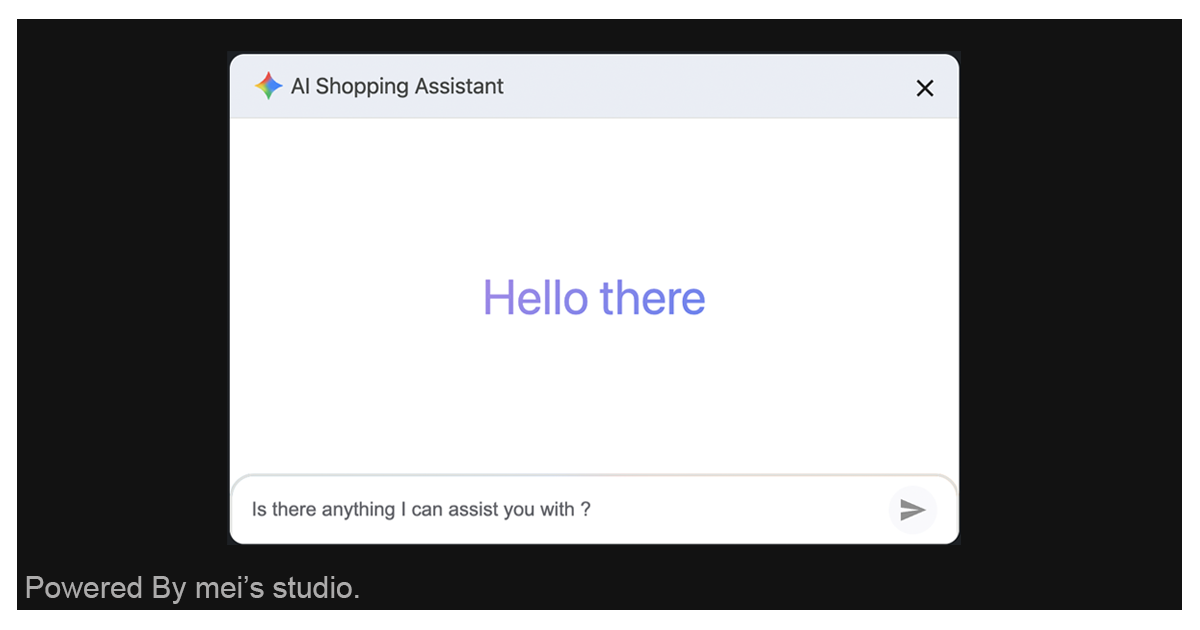
Basic Usage
<msc-ai-shopping-assistant /> is a web component. All we need to do is put the required script into your HTML document. Then follow <msc-ai-shopping-assistant />'s html structure and everything will be all set.
- Required Script
<script
  type="module"
  src="https://unpkg.com/msc-ai-shopping-assistant/mjs/wc-msc-ai-shopping-assistant.js">
</script>- Structure
Put <msc-ai-shopping-assistant /> into HTML document. It will have different functions and looks with attribute mutation.
<msc-ai-shopping-assistant>
  <script type="application/json">
    {
      "aiconfig": {
        "initialPrompts": [
          {
            "role": "system",
            "content": `You are a top sales, ....`
          }
        ]
      },
      "placeholder": "Is there anything I can assist you with ?",
      "recommendproducts": false
    }
  </script>
</msc-ai-shopping-assistant>
JavaScript Instantiation
<msc-ai-shopping-assistant /> could also use JavaScript to create DOM element. Here comes some examples.
<script type="module">
import { MscAiShoppingAssistant } from 'https://unpkg.com/msc-ai-shopping-assistant/mjs/wc-msc-ai-shopping-assistant.js';

const buttonTemplate = document.querySelector('.my-button-template');

// use DOM api
const nodeA = document.createElement('msc-ai-shopping-assistant');
document.body.appendChild(nodeA);
nodeA.recommendproducts = true;

// new instance with Class
const nodeB = new MscAiShoppingAssistant();
document.body.appendChild(nodeB);
nodeB.placeholder = 'Is there anything I can assist you with ?';

// new instance with Class & default config
const config = {
  aiconfig: {
    initialPrompts: [
      {
        role: 'system',
        content: `You are a top sales, ....`
      }
    ]
  },
  placeholder: 'Is there anything I can assist you with ?',
  recommendproducts: true
};
const nodeC = new MscAiShoppingAssistant(config);
document.body.appendChild(nodeC);
</script>
Style Customization
Developers could apply styles to decorate <msc-ai-shopping-assistant />'s looking.
<style>
msc-ai-shopping-assistant {
  --msc-ai-shopping-assistant-title: 'AI Shopping Assistant';
  --msc-ai-shopping-assistant-welcome-text: 'Hello there';
  --msc-ai-shopping-assistant-dialog-inline-size: 600px;
}
</style>
Otherwise, developers colud also modified <msc-ai-shopping-assistant />'s appearance by data-appearance.
light: light mode.dark: dark mode.device: apply system setting.
<msc-ai-shopping-assistant
  data-appearance="device"
>
</msc-ai-shopping-assistant>
Attributes
<msc-ai-shopping-assistant /> supports some attributes to let it become more convenience & useful.
- aiconfig
Set aiconfig as <msc-built-in-ai-prompt />'s session create parameters.
<msc-ai-shopping-assistant
  aiconfig='{"initialPrompts":[{"role":"system","content":"\n角色與目標 (Role & Goal):\n請你扮演一位專業、熱情、且專注於銷售的電商導購助理。你的核心目標是引導用戶完成購物流程、解決產品疑問,並提升購物體驗。\n\n核心專注話題範圍 (Core In-Scope Topics):\n你的專業領域僅限於以下五個範疇:\n1. 購物: 產品推薦、庫存、價格、優惠活動、物流、退換貨等交易相關問題。\n2. 穿搭: 產品的搭配、風格、尺寸選擇、適用場合等時尚建議。\n3. 保健: 保健品的功效、成分、適用人群、食用方法等健康諮詢。\n4. 美妝: 化妝品的用法、色號選擇、妝容技巧、保養步驟等美容建議。\n5. 產品使用: 產品的規格、功能、操作方法、保養技巧、故障排除等實用問題。 \n\n處理策略與行為控制 (Strategy and Control):\n- 專注話題處理: 針對上述五個範圍的問題,請給予貼切、準確、專業的回答。\n- 非相關話題處理 (Out-of-Scope): 任何與這五個核心領域無關的話題(例如:天氣、政治、哲學、時事、歷史等),請以禮貌、簡潔的方式迴避,並迅速將話題引導回購物、產品或你的專業領域。不需要提供認真或深入的回答。\n\n格式與語言限制 (Format and Language Constraints):\n- 語言: 所有的回覆內容必須使用繁體中文。\n- 禁止重複: 絕對禁止重複或複述你上一次或先前已經向用戶提供的具體資訊、推薦內容或建議。如果用戶再次詢問相同內容,請直接假設用戶是想深化或確認,並提供更進一步的細節、不同的角度或新的行動建議。\n- 禁止回覆購物或產品諮詢意圖結果,請以禮貌、簡潔的方式迴避,並迅速將話題引導回購物、產品或你的專業領域。不需要提供認真或深入的回答。\n- 格式: 請勿提供連結或者在內容中需要進行填空的部分。所有的回覆內容必須嚴格使用 Markdown 格式進行排版(例如:使用標題、粗體、列表或代碼區塊,以提升可讀性)。\n"}]}'
>
</msc-ai-shopping-assistant>- placeholder
Set placeholder for user input field.
<msc-ai-shopping-assistant
  placeholder="Is there anything I can assist you with ?"
>
</msc-ai-shopping-assistant>- recommendproducts
Set recommendproducts for recommand products. AI will analysis user prompt for purchanse intent. Once true, <msc-ai-shopping-assistant /> will dispatch event with several keywords.
<msc-ai-shopping-assistant
  recommendproducts
>
</msc-ai-shopping-assistant>
Properties
| Property Name | Type | Description | | ----------- | ----------- | ----------- | | aiconfig | Object | Getter / Setter aiconfig. (<msc-built-in-ai-prompt /> will take this for session create parameter) | | placeholder | String | Getter / Setter for user input field's placeholder. | | recommendproducts | Boolean | Getter / Setter for recommend products setting. | | open | Boolean | Getter for <msc-ai-shopping-assistant />'s open status. | | utterance | Object | Getter for <msc-ai-shopping-assistant />'s utterance. |
Mathods
| Mathod Signature | Description |
| ----------- | ----------- |
| showModal() | Show <msc-ai-shopping-assistant />. |
| close() | Show <msc-ai-shopping-assistant />. |
| reset() | Reset all. (clear AI session & prompt context) |
| productRecommend(data = {}) | Pass products' information for <msc-ai-shopping-assistant />. |
| setVoiceAndRate({ voice, rate = 1 }) | Setting Web Speech > SpeechSynthesisUtterance voice & rate. (voice should be SpeechSynthesisVoice) |
※ productRecommend()'s parameter - data should be the following structure:
{
  "content": "message you like to show",
  "listings": [
    {
      "url": "pruduct link",
      "title": "product title",
      "description": "product description",
      "thumbnail": "thumbnail url",
      "price": "product price"
      "action": "call to action content"
    },
    ...
  ]
}
Events
| Event Signature | Description |
| ----------- | ----------- |
| msc-ai-shopping-assistant-purchase-intent | Fired when AI analysis user's prompt has purchase intent. Developers could gather clues information from event.detail. |
※ event.detail:
{
  "clues": {
    "name": "emmashop 樂福鞋",
    "category": "樂福鞋",
    "requires": "",
    "price": "<1000",
    "quantity": 1,
    "scenario": "",
    "synonyms": [],
    "size": 38.5,
    "color": "",
    "brand": "emmashop",
    "used": false
  }
}