
msc-yoyo-menu
v1.0.0
Published
<msc-yoyo-menu /> is a 「Path」 menu like effect. Menu will spray out when user press trigger. Developer could collect some feature triggers or shortcuts through <msc-yoyo-menu />.

Maintainers
 meistudioli
Readme
msc-yoyo-menu


<msc-yoyo-menu /> is a 「Path」 menu like effect. Menu will spray out when user press trigger. Developer could collect some feature triggers or shortcuts through <msc-yoyo-menu />.
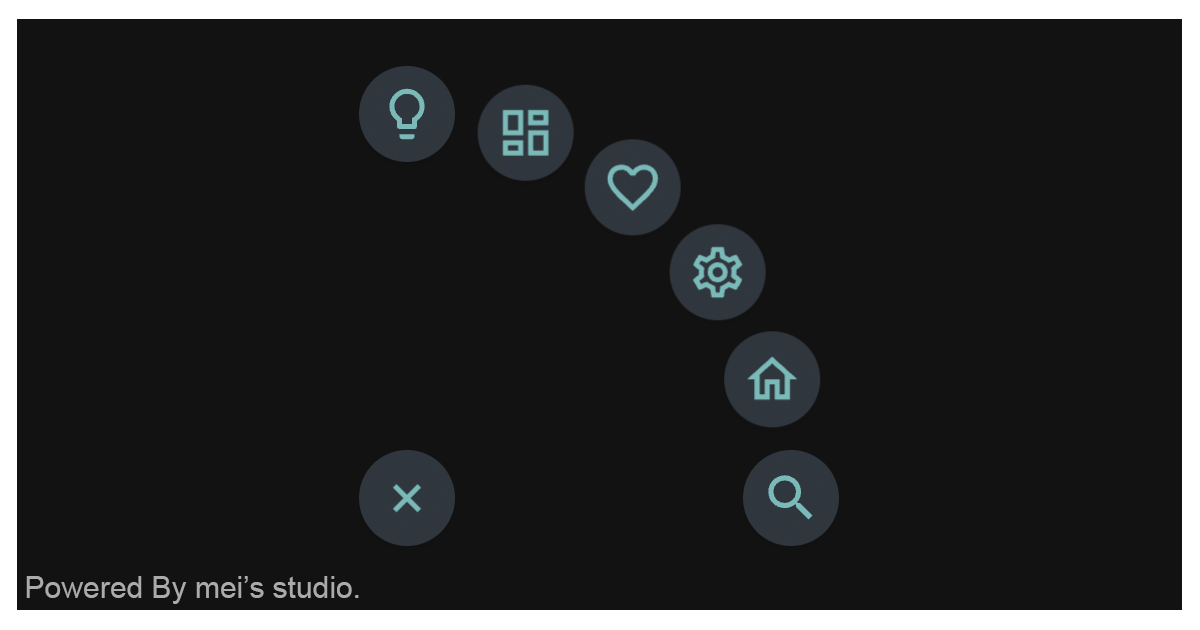
Basic Usage
<msc-yoyo-menu /> is a web component. All we need to do is put the required script into your HTML document. Then follow <msc-yoyo-menu />'s html structure and everything will be all set.
- Required Script
<script
  type="module"
  src="https://unpkg.com/msc-yoyo-menu/mjs/wc-msc-yoyo-menu.js">
</script>- Structure
Put <msc-yoyo-menu /> into HTML document.
<msc-yoyo-menu>
  <script type="application/json">
    {
      "menu": [
        {
          "key": "search",
          "title": "title - search"
        },
        {
          "key": "home",
          "title": "title - home"
        },
        {
          "key": "setting",
          "title": "title - setting"
        },
        {
          "key": "heart",
          "title": "title - heart"
        },
        {
          "key": "dashboard",
          "title": "title - dashboard"
        },
        {
          "key": "lightbulb",
          "title": "title - lightbulb"
        },
        {
          "key": "explore",
          "title": "title - explore"
        },
        {
          "key": "download",
          "title": "title - download"
        }
      ]
    }
  </script>
</msc-yoyo-menu>
JavaScript Instantiation
<msc-yoyo-menu /> could also use JavaScript to create DOM element. Here comes some examples.
<script type="module">
import { MscYoyoMenu } from 'https://unpkg.com/msc-yoyo-menu/mjs/wc-msc-yoyo-menu.js';

const template = document.querySelector('.my-template');

//use DOM api
const nodeA = document.createElement('msc-yoyo-menu');
document.body.appendChild(nodeA);
nodeA.menu = [
  {
    key: 'search',
    title: 'title - search'
  },
  {
    key: 'home',
    title: 'title - home'
  },
  {
    key: 'setting',
    title: 'title - setting'
  }
];

// new instance with Class
const nodeB = new MscYoyoMenu();
document.body.appendChild(nodeB);
nodeB.menu = [
  {
    key: 'search',
    title: 'title - search'
  },
  {
    key: 'home',
    title: 'title - home'
  },
  {
    key: 'setting',
    title: 'title - setting'
  }
];

// new instance with Class & default config
const config = {
  menu: [
    {
      key: 'search',
      title: 'title - search'
    },
    {
      key: 'home',
      title: 'title - home'
    },
    {
      key: 'setting',
      title: 'title - setting'
    }
  ]
};
const nodeC = new MscYoyoMenu(config);
document.body.appendChild(nodeC);
</script>
Style Customization
<msc-yoyo-menu /> uses CSS custom properties to hook its interface. That means developer could easy change it into the looks you like.
<style>
msc-yoyo-menu {
  --msc-yoyo-menu-button-size: 44;
  --msc-yoyo-menu-expand-distance-ratio: 5;
  --msc-yoyo-menu-transition-duration: .35s;

  --msc-yoyo-menu-button-trigger-background: rgba(255 255 255);
  --msc-yoyo-menu-button-trigger-border: 0px solid transparent;
  --msc-yoyo-menu-button-trigger-box-shadow: 0 0 1px rgba(0 0 0/.3), 0 2px 4px rgba(0 0 0/.2);
  --msc-yoyo-menu-button-trigger-icon-color: rgba(35 42 49);
  --msc-yoyo-menu-button-trigger-overlay: rgba(29 34 40/.2);

  --msc-yoyo-menu-button-unit-background: rgba(255 255 255);
  --msc-yoyo-menu-button-unit-border: 0px solid transparent;
  --msc-yoyo-menu-button-unit-box-shadow: 0 0 1px rgba(0 0 0/.3), 0 2px 4px rgba(0 0 0/.2);
  --msc-yoyo-menu-button-unit-icon-color: rgba(35 42 49);
  --msc-yoyo-menu-button-unit-overlay: rgba(29 34 40/.2);

  /* customize button-unit */
  --msc-yoyo-menu-button1-icon: path('M15.5 14h-.79l-.28-.27C15.41 12.59 16 11.11 16 9.5 16 5.91 13.09 3 9.5 3S3 5.91 3 9.5 5.91 16 9.5 16c1.61 0 3.09-.59 4.23-1.57l.27.28v.79l5 4.99L20.49 19l-4.99-5zm-6 0C7.01 14 5 11.99 5 9.5S7.01 5 9.5 5 14 7.01 14 9.5 11.99 14 9.5 14z');
  --msc-yoyo-menu-button1-icon-color: rgba(35 42 49);
  --msc-yoyo-menu-button1-background: rgba(255 255 255);
  --msc-yoyo-menu-button1-border: 0px solid transparent;
  --msc-yoyo-menu-button1-box-shadow: 0 0 1px rgba(0 0 0/.3), 0 2px 4px rgba(0 0 0/.2);
  --msc-yoyo-menu-button1-overlay: rgba(29 34 40/.2);

  --msc-yoyo-menu-button2-icon: path('M12 5.69l5 4.5V18h-2v-6H9v6H7v-7.81l5-4.5M12 3L2 12h3v8h6v-6h2v6h6v-8h3L12 3z');
  --msc-yoyo-menu-button3-icon: path('M19.43 12.98c.04-.32.07-.64.07-.98 0-.34-.03-.66-.07-.98l2.11-1.65c.19-.15.24-.42.12-.64l-2-3.46c-.09-.16-.26-.25-.44-.25-.06 0-.12.01-.17.03l-2.49 1c-.52-.4-1.08-.73-1.69-.98l-.38-2.65C14.46 2.18 14.25 2 14 2h-4c-.25 0-.46.18-.49.42l-.38 2.65c-.61.25-1.17.59-1.69.98l-2.49-1c-.06-.02-.12-.03-.18-.03-.17 0-.34.09-.43.25l-2 3.46c-.13.22-.07.49.12.64l2.11 1.65c-.04.32-.07.65-.07.98 0 .33.03.66.07.98l-2.11 1.65c-.19.15-.24.42-.12.64l2 3.46c.09.16.26.25.44.25.06 0 .12-.01.17-.03l2.49-1c.52.4 1.08.73 1.69.98l.38 2.65c.03.24.24.42.49.42h4c.25 0 .46-.18.49-.42l.38-2.65c.61-.25 1.17-.59 1.69-.98l2.49 1c.06.02.12.03.18.03.17 0 .34-.09.43-.25l2-3.46c.12-.22.07-.49-.12-.64l-2.11-1.65zm-1.98-1.71c.04.31.05.52.05.73 0 .21-.02.43-.05.73l-.14 1.13.89.7 1.08.84-.7 1.21-1.27-.51-1.04-.42-.9.68c-.43.32-.84.56-1.25.73l-1.06.43-.16 1.13-.2 1.35h-1.4l-.19-1.35-.16-1.13-1.06-.43c-.43-.18-.83-.41-1.23-.71l-.91-.7-1.06.43-1.27.51-.7-1.21 1.08-.84.89-.7-.14-1.13c-.03-.31-.05-.54-.05-.74s.02-.43.05-.73l.14-1.13-.89-.7-1.08-.84.7-1.21 1.27.51 1.04.42.9-.68c.43-.32.84-.56 1.25-.73l1.06-.43.16-1.13.2-1.35h1.39l.19 1.35.16 1.13 1.06.43c.43.18.83.41 1.23.71l.91.7 1.06-.43 1.27-.51.7 1.21-1.07.85-.89.7.14 1.13zM12 8c-2.21 0-4 1.79-4 4s1.79 4 4 4 4-1.79 4-4-1.79-4-4-4zm0 6c-1.1 0-2-.9-2-2s.9-2 2-2 2 .9 2 2-.9 2-2 2z');
  --msc-yoyo-menu-button4-icon: path('M16.5 3c-1.74 0-3.41.81-4.5 2.09C10.91 3.81 9.24 3 7.5 3 4.42 3 2 5.42 2 8.5c0 3.78 3.4 6.86 8.55 11.54L12 21.35l1.45-1.32C18.6 15.36 22 12.28 22 8.5 22 5.42 19.58 3 16.5 3zm-4.4 15.55l-.1.1-.1-.1C7.14 14.24 4 11.39 4 8.5 4 6.5 5.5 5 7.5 5c1.54 0 3.04.99 3.57 2.36h1.87C13.46 5.99 14.96 5 16.5 5c2 0 3.5 1.5 3.5 3.5 0 2.89-3.14 5.74-7.9 10.05z');
  --msc-yoyo-menu-button5-icon: path('M19 5v2h-4V5h4M9 5v6H5V5h4m10 8v6h-4v-6h4M9 17v2H5v-2h4M21 3h-8v6h8V3zM11 3H3v10h8V3zm10 8h-8v10h8V11zm-10 4H3v6h8v-6z');
  --msc-yoyo-menu-button6-icon: path('M9 21c0 .55.45 1 1 1h4c.55 0 1-.45 1-1v-1H9v1zm3-19C8.14 2 5 5.14 5 9c0 2.38 1.19 4.47 3 5.74V17c0 .55.45 1 1 1h6c.55 0 1-.45 1-1v-2.26c1.81-1.27 3-3.36 3-5.74 0-3.86-3.14-7-7-7zm2.85 11.1l-.85.6V16h-4v-2.3l-.85-.6C7.8 12.16 7 10.63 7 9c0-2.76 2.24-5 5-5s5 2.24 5 5c0 1.63-.8 3.16-2.15 4.1z');
  --msc-yoyo-menu-button7-icon: path('M12 2C6.48 2 2 6.48 2 12s4.48 10 10 10 10-4.48 10-10S17.52 2 12 2zm0 18c-4.41 0-8-3.59-8-8s3.59-8 8-8 8 3.59 8 8-3.59 8-8 8zm-5.5-2.5l7.51-3.49L17.5 6.5 9.99 9.99 6.5 17.5zm5.5-6.6c.61 0 1.1.49 1.1 1.1s-.49 1.1-1.1 1.1-1.1-.49-1.1-1.1.49-1.1 1.1-1.1z');
  --msc-yoyo-menu-button8-icon: path('M18,15v3H6v-3H4v3c0,1.1,0.9,2,2,2h12c1.1,0,2-0.9,2-2v-3H18z M17,11l-1.41-1.41L13,12.17V4h-2v8.17L8.41,9.59L7,11l5,5 L17,11z');

  ...
}
</style>
Otherwise delevelopers could also add attribute - data-quadrant (1 ~ 4) to change menu spray out axis. Default is "1".
<msc-yoyo-menu data-quadrant="2">
  ...
</msc-yoyo-menu>
Attributes
<msc-yoyo-menu /> supports some attributes to let it become more convenience & useful.
- menu
Set menu config. This should be array string. Each unit needs to contain "key" & "title".
<msc-yoyo-menu menu="[{"key":"search","title":"title-search"},{"key":"home","title":"title-home"}]">
  ...
</msc-yoyo-menu>
Property
| Property Name | Type | Description |
| ----------- | ----------- | ----------- |
| open | Boolean | Getter <msc-yoyo-menu />'s open state. |
| menu | Array | Setter / Getter <msc-yoyo-menu />'s menu config. Each unit needs to contain "key" & "title". |
Events
| Event Signature | Description |
| ----------- | ----------- |
| msc-yoyo-memu-click | Fired when <msc-yoyo-menu /> clicked. Developers could gather menu information through event.detail. |
| msc-yoyo-memu-toggle | Fired before <msc-yoyo-menu /> is open or closed. Developers could gather state information through event.detail. |
Mathods
| Mathod Signature | Description | | ----------- | ----------- | | click() | Simulate <msc-yoyo-menu /> click action. | | toggle(force) | Toggle <msc-yoyo-menu /> open or close. (force is optional, developers could set boolean to force open or close. |