
mt-ai-assistant-panel
v0.1.21
Published
Vue 3 AI safety risk assistant panel component.


Readme
mt-ai-assistant-panel
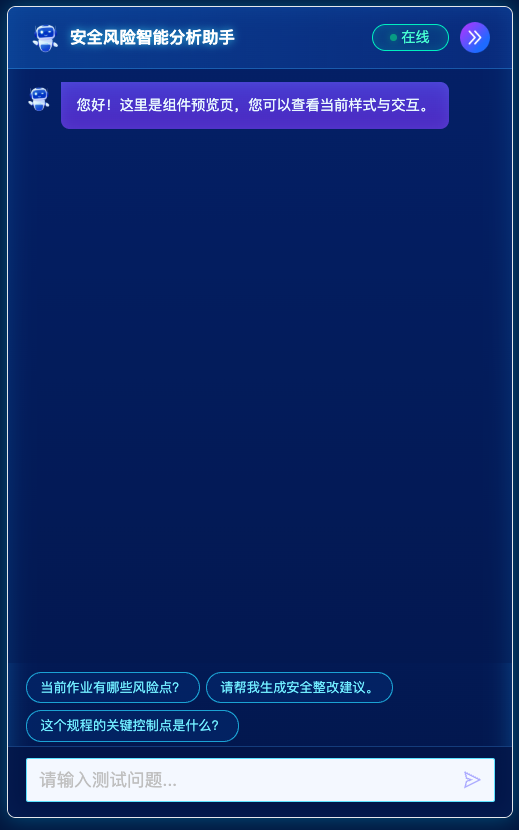
Vue 3 大模型智能助手面板,内置暗色/浅色面板、SSE 问答流、Markdown/公式渲染、进度步骤展示、回答语音播报、页面/视频/语音工具动作、工具数据回调、MQTT 消息接入和可折叠入口。
效果图
安装
pnpm add mt-ai-assistant-panel组件依赖 Vue 3 和 ant-design-vue。Markdown 里的公式使用 KaTeX,建议业务侧同时引入 KaTeX 样式。
import { createApp } from "vue";
import Antd from "ant-design-vue";
import "ant-design-vue/dist/antd.css";
import "katex/dist/katex.min.css";
import MtAiAssistantPanel from "mt-ai-assistant-panel";
import "mt-ai-assistant-panel/style.css";

import App from "./App.vue";

createApp(App).use(Antd).use(MtAiAssistantPanel).mount("#app");
插件会全局注册 MtAiAssistantPanel,也会注册兼容旧用法的 AIAssistantPanel。也可以按需导入:
import { MtAiAssistantPanel, AIAssistantPanel } from "mt-ai-assistant-panel";基础使用
<template>
  <MtAiAssistantPanel
    v-model:collapsed="collapsed"
    :regulations="regulations"
    :suggestions="suggestions"
    width="560px"
    wrapper-class="my-ai-assistant"
    chat-endpoint="/mt_cpp_gpt/mt_intention_chat"
    :request-exts="{ vqa: true }"
    :merge-knowledge-toggle="false"
    :voice-commands="['打开摄像头', '关闭摄像头']"
    :on-tool-data="onToolData"
    @send="onSend"
    @response="onResponse"
    @progress="onProgress"
  >
    <!-- 插槽部分默认不需要配置 -->
    <!-- <template #regulations>
      <div class="custom-regulations" v-if="regulations.length">
        <div v-for="reg in regulations" :key="reg.id">
          {{ reg.typeLabel }}:{{ reg.name }}
        </div>
      </div>
    </template>

    <template #collapsed-button="{ statusText, collapseIconSrc }">
      <button class="custom-collapse-button" type="button">
        <span>{{ statusText }}</span>
        <img :src="collapseIconSrc" alt="" />
      </button>
    </template>

    <template #input-bottom>
      <div class="custom-input-bottom"></div>
    </template> -->
  </MtAiAssistantPanel>
</template>

<script setup lang="ts">
import { ref } from "vue";

const collapsed = ref(false);

const regulations = [
  {
    id: 1,
    type: "safety",
    typeLabel: "安全",
    name: "煤矿安全规程",
    snippet: "涉及现场巡检、隐患处置和风险分级管控。",
  },
];

const suggestions = ["当前区域有哪些高风险点?", "生成本班安全巡检建议"];

function onSend(question: string) {
  console.log(question);
}

function onResponse(answer: string, detail: unknown) {
  console.log(answer, detail);
}

function onProgress(text: string, detail: unknown) {
  console.log(text, detail);
}

function onToolData(toolData: unknown, detail: unknown) {
  console.log(toolData, detail);
}
</script>
请求协议
组件通过 fetchEventSource 向 chatEndpoint 发起 POST SSE 请求。默认请求体如下:
{
  "query": "用户问题",
  "stream": true,
  "enable_search": false,
  "merge_knowledge_toggle": false,
  "exts": {}
}
请求头默认包含 Content-Type: application/json。组件会从 sessionStorage.Authorization 或 sessionStorage.token 读取 token,并写入 Authorization 和 token 请求头;如果 withSessionUserHeaders 为 true,还会读取 sessionStorage.userinfo,并把其中的 userId、userName 写入请求头。可以通过 requestHeaders 追加请求头,也可以通过 requestPayload 完全接管请求体。
<MtAiAssistantPanel
  :request-headers="createHeaders"
  :request-payload="createPayload"
/>
function createHeaders(question: string) {
return {
Authorization: "Bearer token",
"X-Question": question,
};
}
function createPayload(payload: Record<string, unknown>, question: string) {
return {
...payload,
query: question,
ext_params: { source: "dashboard" },
};
}SSE 返回值会先经过内部格式化,并通过 stream-data 事件抛出。当前内置识别:
- 进度:
tools.tools_name === "progress",读取tools.tools_output.progress_name作为当前步骤文本,读取progress_dict计算总步骤和百分比。 - 工具:
close_all、open_something-menu、open_something-camera、play_voice、things_charts、fromdoc、fromimg、mt_smart_bi、mt_smart_kg等会写入当前助手消息的toolData,并调用onToolData。其中打开页面、打开视频、播放工具语音和关闭弹窗动作会由组件自动执行。 - 最终回答:
final_answer会替换当前回答内容。 - 流式文本:普通
text会追加到当前回答内容。
进度示例:
{
  "intent": "progress",
  "tools": {
    "tools_name": "progress",
    "tools_status": "2",
    "tools_output": "{\"progress\":\"2\",\"progress_name\":\"检索问题\",\"progress_dict\":{\"1\":\"理解问题\",\"2\":\"检索问题\",\"4\":\"整理答案\",\"5\":\"开始回答\"}}"
  }
}
如果第一条进度包含 progress_dict,组件会按阶段数量计算百分比。上例会识别为 4 个阶段,对应 25% / 50% / 75% / 100%,不会把 key 4、5 当成 4%、5%。
页面和视频工具动作
组件默认处理以下工具消息:
open_something-menu:读取tools_output.url,在 iframe 弹窗中打开页面。普通页面会从sessionStorage读取token和userinfo.userId,并在 hash 路由后追加token、userId、onlyPage=1;URL 包含appType=third时不追加。open_something-camera:读取tools_output.code打开实时视频;同时存在可转换为数字的start_time和end_time时,使用录像回放。close_all:关闭当前页面和视频弹窗。
页面只允许 http、https 和基于当前站点解析的相对 URL。可以关闭内置动作或指定 ant-design-vue 弹窗的挂载容器:
<MtAiAssistantPanel
  :tool-actions-enabled="true"
  :append-tool-page-session-params="true"
  tool-modal-container=".app-llm-warpper-main"
/>
不传 toolModalContainer 时弹窗挂载到 document.body。onToolData 仍会收到相同的标准化工具数据,不受内置动作影响。
语音播报与工具播放
完整的助手回答默认显示语音播报按钮。组件使用浏览器 SpeechSynthesis 朗读回答正文,优先选择与 voiceReadingLang 同语言的声音;再次点击同一按钮会停止播报。发送新问题、清空或替换消息、新建会话及组件卸载时也会自动停止当前播报。
play_voice 工具使用 MQTT 播放服务端语音。组件获取到 MAC 地址后,向 ${toolVoicePlaybackTopic}/${mac} 发布 { "data": tools_output },并在单次回答内按 tools_id 去重。MAC 或 MQTT 尚未就绪时会暂存 60 秒,连接恢复后按顺序补发;发布失败最多重试 3 次。是否启用按以下优先级判断:
tools_output.text 是设备实际播报的文本,tools_output.manual_text 是页面展示文本。组件会原样发布完整的 tools_output,但 play_voice 在聊天消息中优先展示 manual_text。
- 显式传入
toolVoicePlaybackEnabled时使用该值。 - 未传时读取
localStorage[toolVoicePlaybackStorageKey] === "true",默认键名为needplay。
<MtAiAssistantPanel
  :with-voice-reading="true"
  voice-reading-lang="zh-CN"
  :voice-reading-rate="1"
  :tool-voice-playback-enabled="true"
  tool-voice-playback-topic="/mt-llm/playvoice"
  :tool-voice-playback-qos="1"
/>
MQTT
传入 mqttConfig 后组件会启用 MQTT,并在头部显示连接状态。默认 mqttAutoConnect 为 true,组件进入页面可见区域后会自动连接;当整个组件离开可见区域或页面隐藏时会主动断开。暗色模式收起后的展开按钮仍视为可见。
页面从系统休眠、浏览器往返缓存或网络中断中恢复时,组件会重新校验 MQTT 客户端状态;失活或长时间卡在重连状态的连接会被重建,并自动恢复 topic 订阅。
<MtAiAssistantPanel
  :mqtt-config="mqttConfig"
  @mqtt-message="onMqttMessage"
  @mqtt-message-parsed="onMqttMessageParsed"
/>
const mqttConfig = {
enabled: true,
protocol: "ws",
host: "127.0.0.1",
port: 8083,
path: "/mqtt",
username: "user",
password: "password",
reconnectPeriod: 1000,
connectTimeout: 30_000,
};组件会用 protocol、host/ip、port、path 拼接连接地址;ssl: true 时默认协议为 wss,否则为 ws。
在建立 MQTT 连接前,组件会先通过 http://localhost:6090/getmac 获取 MAC 地址;如果拿不到 MAC,就不会建立 MQTT 连接,同时隐藏收音按钮。语音订阅 topic 会拼成 /mt-llm/voice2text/${mac},麦克风开始/结束录音会发布到 /mt-llm/voice2text4server/${mac}。
如果不传 mqttConfig,组件会默认请求 systemConfig 接口:
/api/llm/system/v1/dict/queryBiDict?type=systemConfig
接口返回的 data 如果是 JSON 字符串,组件会自动读取这些字段:
mqttIp->ipmqttPort->portmqttUserName->usernamemqttPassword->password
如果传入 mqttConfig,会优先使用传入值并覆盖默认配置。
系统配置请求默认会从 sessionStorage.token / sessionStorage.Authorization 和 sessionStorage.userinfo 读取 token、appId、corpId、userId、userName,其中 token 头会保持原值,Authorization 头会自动补 Bearer 前缀。
收到消息时会触发 mqtt-message,控制台会打印 [AIAssistantPanel][MQTT Message];语音消息处理后还会打印 [AIAssistantPanel][MQTT Voice]。组件会默认尝试 JSON.parse(payloadText),解析结果通过 mqtt-message-parsed 抛出;需要自定义解析时传入 mqttMessageParser。
function mqttMessageParser(payloadText: string, topic: string) {
  return {
    topic,
    payload: payloadText.split(","),
  };
}
组件会默认处理语音消息;如果业务侧通过 mqttConfig.topics 自行订阅视频 topic,也会处理视频消息:
- 麦克风按钮发布 topic:
mqttVoicePublishTopic,默认/mt-llm/voice2text4server,实际发送到/mt-llm/voice2text4server/${mac} - 语音 topic 前缀:
mqttVoiceTopicPrefix,默认/mt-llm/voice2text - 语音消息订阅 topic:
/mt-llm/voice2text/${mac} - 视频 topic:
mqttVoiceVideoTopic,默认vlm/sihe_exhibition,组件不再默认订阅
语音消息的 payload 约定如下:
{
  "data": {
    "ops": "wakeup",
    "key": "1",
    "text": "你好"
  }
}
内置处理规则:
voiceCommands 仅作用于语音识别自动发送:识别文本与任一指令去除空白字符和末尾常见标点后完全一致时,组件不会请求大模型,会追加“已为您处理”的助手回复,并按工具语音配置向 MQTT 发布对应播报消息。
wakeup会清空当前语音文本,并把wakeupByAudio置为truewakeup还会中止当前大模型回答、自动展开侧边栏,并触发mqtt-voice-sidebar-open- 点击麦克风会触发
mqtt-voice-mic-toggle,并向/mt-llm/voice2text4server/${mac}发布wakeup/stop asr2text会按data.key累积data.text,同步到messageOfMqtt和输入框end会触发mqtt-voice-end和onVoiceRecognized(text, voiceAction, messageInfo);mqttVoiceAutoSend为true时会自动调用sendQuestion()- 收到
vlm/sihe_exhibition会触发mqtt-voice-video,但该 topic 需要业务侧自行订阅
如果只想复用这套状态机,也可以直接从包根导入 createMqttVoiceMessageProcessor()。
如果需要手动连接,设置 :mqtt-auto-connect="false",再通过组件 ref 调用 connectMqtt()、subscribeMqtt()、publishMqtt()。connectMqtt() 仍会遵守组件可见性条件:组件不可见时不会建立连接。
Props
| Prop | 说明 | 默认值 |
| ------------------------- | ----------------------------------------------------------------- | -------------------------------------------------------------------------- |
| title | 面板标题 | 安全风险智能分析助手 |
| width | 面板展开态宽度;数字会按 px 处理,字符串保留 CSS 原值 | 560px |
| wrapperClass | 最外层包裹自定义 class,支持字符串、数组或对象 | "" |
| assistantName | 助手名称,用于头像 alt 和暴露状态 | 小美同学 |
| regulations | 业务规程数据;组件默认不渲染,供插槽或业务侧使用 | [] |
| suggestions | 推荐问题列表 | [] |
| greeting | 默认欢迎语 | 您好!我可以帮您分析安全风险、查询规程、生成建议。请问有什么需要了解的? |
| placeholder | 输入框占位文本 | 输入您的问题... |
| chatEndpoint | SSE 问答接口 | /mt_cpp_gpt/mt_intention_chat |
| mergeKnowledgeToggle | 默认请求体里的 merge_knowledge_toggle | false |
| requestExts | 默认请求体里的 exts | {} |
| theme | 主题,内置 light / dark | dark |
| avatar | 自定义助手头像 URL | "",使用包内默认头像 |
| sendIcon | 自定义发送图标 URL | "",使用 Ant Design 图标 |
| collapseIcon | 自定义折叠图标 URL | "",使用包内默认图标 |
| regulationTagImages | 自定义规程标签图片映射,供 getRegTagImage 使用 | {} |
| requestHeaders | 追加请求头对象或函数 (question) => headers | {} |
| requestPayload | 自定义请求体函数 (payload, question) => object | null |
| withSessionUserHeaders | 是否从 sessionStorage.userinfo 写入 userId、userName 请求头 | true |
| showErrorMessage | 请求失败时是否显示 ant-design-vue 错误提示 | true |
| showProgress | 是否展示回答思考进度 | true |
| progressTitle | 进度面板标题 | 思考进度 |
| keepProgressAfterAnswer | 最终回答完成后是否保留进度面板 | false |
| showToolData | 是否展示基础工具数据提示 | false |
| progressMaxItems | 单条回答最多保留的进度条数 | 12 |
| mqttConfig | MQTT 连接配置;不传时自动读取 systemConfig,传入值优先覆盖默认值 | null |
| mqttAutoConnect | 是否在组件可见时自动连接 MQTT | true |
| mqttMessageParser | MQTT 消息自定义解析函数 | null |
| mqttVoicePublishTopic | 麦克风按钮发布 topic | /mt-llm/voice2text4server |
| mqttVoiceTopicPrefix | 语音转写消息 topic 前缀;空字符串表示不处理语音消息 | /mt-llm/voice2text |
| mqttVoiceVideoTopic | 视频/机器人消息 topic | vlm/sihe_exhibition |
| mqttVoiceAutoSend | 语音结束后是否自动调用 sendQuestion() | true |
| voiceCommands | 语音指令字符串数组;匹配时忽略空白和末尾常见标点,命中后直接回复“已为您处理” | [] |
| withVoiceReading | 是否显示回答语音播报按钮 | true |
| voiceReadingLang | 浏览器语音播报语言及声音匹配依据 | zh-CN |
| voiceReadingVolume | 浏览器语音播报音量,范围 0-1 | 1 |
| voiceReadingRate | 浏览器语音播报语速,范围 0.1-10 | 1 |
| voiceReadingPitch | 浏览器语音播报音调,范围 0-2 | 1 |
| toolVoicePlaybackEnabled | 是否执行 play_voice;未传时读取本地存储开关 | undefined |
| toolVoicePlaybackTopic | play_voice 工具发布的 MQTT topic | /mt-llm/playvoice |
| toolVoicePlaybackQos | play_voice 发布 QoS;旧环境可显式设为 0 | 1 |
| toolVoicePlaybackStorageKey | 未显式配置工具语音开关时读取的 localStorage 键 | needplay |
| onToolData | 收到带 tools 的流消息时调用 (toolData, detail) => void | null |
| toolActionsEnabled | 是否自动执行打开页面、打开视频、播放语音和关闭弹窗工具动作 | true |
| appendToolPageSessionParams | 打开普通页面时是否追加 token、userId、onlyPage | true |
| toolModalContainer | 工具弹窗挂载容器,可传选择器、元素或返回元素的函数 | null,挂载到 document.body |
| customReportHandling | 使用者自定义处理报告开关;当前为后续功能预留,暂不生效 | false |
| onVoiceRecognized | 语音识别完成回调 (text, voiceAction, messageInfo) => void | null |
| collapsed | 暗色模式下的受控折叠状态,支持 v-model:collapsed | undefined |
插槽
| 插槽 | 说明 | 参数 |
| ------------------ | ------------------------------------------------------------ | ------ |
| regulations | 位于面板头部和聊天区之间,用于自定义规程、业务提示或筛选区域 | 无 |
| greeting | 覆盖默认欢迎消息 | 无 |
| input-bottom | 位于输入框正下方,用于自定义输入区底部内容 | 无 |
| collapsed-button | 覆盖暗色模式下收起后的展开按钮;不传时使用内置按钮 | 见下表 |
组件默认不再渲染内置规程列表。如需要展示规程内容,请在业务侧通过 #regulations 自行渲染。
collapsed-button 插槽参数:
| 参数 | 说明 |
| ----------------- | ---------------------------------------------- |
| collapsed | 当前折叠状态 |
| theme | 当前主题 |
| statusText | 状态文本,例如 在线 / 思考中 |
| statusColor | 状态颜色标识,例如 green / orange |
| collapseIconSrc | 内置或传入的折叠图标 URL |
| mqttConnected | MQTT 是否已连接 |
| mqttConnecting | MQTT 是否正在连接 |
| expand | 手动展开面板方法;普通点击已由组件内部处理 |
| toggle | 手动切换折叠状态方法;普通点击已由组件内部处理 |
传入 collapsed-button 后,组件会在插槽外层接管普通点击并展开面板,业务侧不需要额外绑定 @click。
事件
| 事件 | 参数 |
| --------------------- | ------------------------------------------------------------------- |
| update:collapsed | value: boolean |
| send | question: string |
| abort | 无 |
| new-conversation | 无 |
| progress | text: string, detail: AIAssistantExtractedAnswer |
| response | answer: string, detail: AIAssistantExtractedAnswer |
| stream-data | data: AIAssistantToolData |
| error | error: unknown |
| mqtt-connect | packet: unknown |
| mqtt-reconnect | 无 |
| mqtt-close | 无 |
| mqtt-error | error: unknown |
| mqtt-message | { topic, payload, payloadText, packet, receivedAt } |
| mqtt-message-parsed | parsed: unknown, messageInfo: object |
| mqtt-voice-message | voiceAction: AIAssistantMqttVoiceMessageAction, messageInfo |
| mqtt-voice-wakeup | voiceAction: AIAssistantMqttVoiceMessageAction, messageInfo |
| mqtt-voice-sidebar-open | voiceAction: AIAssistantMqttVoiceMessageAction, messageInfo |
| mqtt-voice-mic-toggle | payload: { active, topic } |
| mqtt-voice-transcript | text: string, messageInfo, voiceAction |
| mqtt-voice-end | text: string, messageInfo, voiceAction |
| mqtt-voice-video | videoMessage: unknown, messageInfo, voiceAction |
| voice-reading-start | message: AIAssistantChatMessage, text: string |
| voice-reading-end | { messageId, reason } |
| voice-reading-error | error: unknown, { messageId, reason } |
| tool-voice-play | toolData: AIAssistantToolData, payload: { data } |
| mqtt-subscribe | topics: Array<{ topic, qos }> |
| mqtt-unsubscribe | topics: Array<{ topic, qos }> |
Ref API
组件已通过 defineExpose 暴露内部状态和方法,业务侧可以用 ref 读取状态或触发动作。
<template>
  <MtAiAssistantPanel ref="assistantRef" />
</template>

<script setup lang="ts">
import { ref } from "vue";
import type { AIAssistantPanelExpose } from "mt-ai-assistant-panel";

const assistantRef = ref<AIAssistantPanelExpose | null>(null);

function openAssistant() {
  assistantRef.value?.expandPanel();
}

async function askQuestion() {
  await assistantRef.value?.sendQuestion("当前区域有哪些高风险点?");
}

function resetChat() {
  assistantRef.value?.clearChatMessages();
  assistantRef.value?.setPanelCollapsed(true);
}
</script>
常用状态:
| 名称 | 说明 |
| ---------------------------------- | ------------------------------ |
| props | 当前传入组件的 props,建议只读 |
| chatInput | 当前输入框内容 |
| chatMessages | 当前消息列表 |
| panelCollapsed | 当前折叠状态 |
| answerRequestActive | 当前是否存在未结束的回答请求 |
| isAnswering | 是否存在加载中的回答 |
| assistantStatusText | 助手状态文本 |
| mqttConnected / mqttConnecting | MQTT 连接状态 |
| mqttSubscribedTopics | 已订阅 topic |
| mqttLastMessage | 最近一条 MQTT 原始消息 |
| mqttError | 最近一次 MQTT 错误 |
| messageOfMqtt | 当前语音转写累计文本 |
| wakeupByAudio | 当前是否处于语音唤醒态 |
| mqttVoiceMessageMap | 当前语音分片缓存 |
| mqttVoiceLastAction | 最近一次语音 MQTT 动作 |
| speechSynthesisSupported | 当前浏览器是否支持语音播报 |
| readingMessageId | 当前正在播报的回答消息 ID |
常用方法:
| 方法 | 说明 |
| --------------------------------------------------------------------- | ---------------------------------------- |
| setChatInput(value) | 设置输入框内容 |
| sendQuestion(question?) | 写入问题并发送;不传则发送当前输入框内容 |
| handleSend(event?) | 发送当前输入框内容 |
| stopAnswer() | 中止当前大模型回答并保留已有内容 |
| startNewConversation() | 中止当前回答、清空消息并开启新对话 |
| clearChatMessages() | 中断当前请求并清空消息 |
| appendChatMessage(message) | 手动追加消息 |
| setChatMessages(messages) | 中断当前请求并覆盖消息列表 |
| focusInput() | 聚焦输入框 |
| abortRequest() | 中断当前 SSE 请求 |
| expandPanel() / collapsePanel() / togglePanelCollapsed() | 展开、收起、切换面板 |
| scrollToBottom() | 聊天区域滚动到底部 |
| requestAssistantAnswer(question, targetMessageId) | 对指定助手消息发起请求 |
| connectMqtt(config?) / disconnectMqtt(force?) / reconnectMqtt() | MQTT 连接控制 |
| subscribeMqtt(topics?) / unsubscribeMqtt(topics) | MQTT 订阅控制 |
| publishMqtt(topic, message, options?) | 发布 MQTT 消息 |
| resetVoiceState() | 清空语音转写缓存和唤醒状态 |
| handleVoiceMicToggle() | 手动切换麦克风的打开/停止状态 |
| startMessageSpeech(message) / toggleMessageSpeech(message) | 播放或切换指定回答的浏览器语音播报 |
| cancelSpeechReading(reason?) | 停止当前浏览器语音播报 |
| playToolVoice(toolData) / resetToolVoicePlayback() | 发布工具语音或清空工具语音去重记录 |
还暴露了 createChatMessage、updateChatMessage、setAssistantAnswer、appendAssistantAnswer、setAssistantProgress、appendAssistantToolData、renderMarkdown、extractAnswerText、formatStreamDataString、getMqttConnectUrl、getMqttConnectOptions、normalizeMqttTopics、parseMqttMessage、createMqttVoiceMessageProcessor 等内部工具方法,适合业务侧需要深度接管消息、渲染或请求流程时使用。
样式和资源
组件默认会在最外层渲染 .mt-ai-assistant-panel 作为样式命名空间,包内样式都收敛在这个 class 下。业务侧如需覆盖局部样式,建议通过 wrapperClass 传入自定义 class 后编写更具体的选择器。
包内默认图片可单独导入:
import sendIcon from "mt-ai-assistant-panel/assets/send.png";
import collapseIcon from "mt-ai-assistant-panel/assets/to-right.png";
构建与发布
pnpm install
pnpm build
pnpm publish
发布前按实际 npm 组织调整 package.json 里的 name、version 和 license。