
mtg-crucible
v0.4.17
Published
Render custom Magic: The Gathering card images from plain text or structured data — planeswalkers, sagas, transform, split, and more. Runs in Node and the browser.

Maintainers
 domainellipticlanguage
Readme
MTG Crucible



A TypeScript library for rendering custom Magic: The Gathering card images. Runs in both Node and the browser from a single package — the right build is selected automatically via conditional exports.
Includes a react component for rendering resulting card images, complete with card rotations for double-faced cards, etc.
▶ Try it in your browser: the MTG Crucible Playground renders cards live — edit via a structured UI, the plaintext format, or raw JSON.
Installation
npm install mtg-crucibleQuick Start
From text
import { renderCard } from 'mtg-crucible';
import { writeFileSync } from 'fs';

const result = await renderCard(`
Crucible of Legends {3}
Legendary Artifact
Whenever a legendary creature you control dies, return it to your hand at the beginning of your next upkeep.
Flavor Text: Every great story begins with fire.
Rarity: Mythic Rare
Art URL: https://raw.githubusercontent.com/domainellipticlanguage/mtg-crucible/refs/heads/main/examples/crucible-art.png
`);

writeFileSync('crucible-of-legends.png', result.frontFace);
From structured data
import { renderCard } from 'mtg-crucible';
import { writeFileSync } from 'fs';

const result = await renderCard({
  name: 'Crucible of Legends',
  manaCost: '{3}',
  typeLine: 'Legendary Artifact',
  abilities: 'Whenever a legendary creature you control dies, return it to your hand at the beginning of your next upkeep.',
  flavorText: 'Every great story begins with fire.',
  rarity: 'mythic',
  artUrl: 'https://raw.githubusercontent.com/domainellipticlanguage/mtg-crucible/refs/heads/main/examples/crucible-art.png',
});

writeFileSync('crucible-of-legends.png', result.frontFace);
Supported Templates
- Standard (including colorless/Eldrazi full-bleed art)
- Planeswalker (3 and 4 ability variants)
- Saga
- Class
- Battle
- Adventure
- Transform (front and back)
- MDFC / Modal DFC (front and back)
- Split
- Fuse
- Flip (Kamigawa-style)
- Aftermath
- Mutate
- Prototype
- Leveler
Also supports Snow, Devoid, and Nyx borders, although currently only for Standard cards.
API
renderCard(input: CardData | string, options?: RenderOptions): Promise<RenderedCard>
Parse and render a card. Accepts either a text-format string or a CardData object. Returns a RenderedCard with frontFace (raw image bytes as a Uint8Array), optional backFace (also a Uint8Array), format (the image type), orientation info, and rotation data for multi-face cards. The same call works in Node and the browser.
Options:
quality—'high'(2010x2814, default),'medium'(745x1040), or'low'(350x490)format—'png'(default, lossless with transparency),'jpeg'(smaller, no transparency, white corners), or'webp'(smallest, with transparency)allowUnsafeArtUrls— defaults tofalse. See Security below.suppressAttribution— defaults tofalse. Whentrue, omits the small "Powered by mtg-crucible" credit from the footer.
toBlob(data: Uint8Array, format?: RenderFormat): Blob
Convenience for the browser: wrap render bytes in a Blob with the right MIME type (e.g. for URL.createObjectURL or a fetch upload body). format defaults to 'png'; pass result.format to match the render.
Output sizes
Front-face image size for the Crucible of Legends card above (regenerate with
npx tsx scripts/measure-sizes.ts):
| quality | png | jpeg | webp | |---------|-----|------|------| | low (350×490) | 285 KB | 30 KB | 23 KB | | medium (745×1040) | 1007 KB | 115 KB | 71 KB | | high (2010×2814) | 4224 KB | 592 KB | 301 KB |
JPEG and WebP both use lossy quality 60/70/80 for low/medium/high — a medium
JPEG and a medium WebP are compressed alike, they just differ in how much
quality each format buys at that setting. PNG is lossless and ignores it.
parseCard(text: string): CardData
Parse a text-format card definition into a CardData object.
formatCard(card: CardData): string
Convert a CardData object back to text format (round-trips with parseCard).
normalizeCard(card: CardData): NormalizedCardData
Normalize a CardData into NormalizedCardData with all fields resolved (frame colors derived, abilities parsed, defaults filled in).
getArtDimensions(card: CardData): { primaryArtDimensions: { width, height }; secondaryArtDimensions?: { width, height } }
Get the expected art image dimensions for a card. Returns primary dimensions, and secondary dimensions if the card has a linked card (e.g. transform, split, aftermath).
Text Format
For convenience, cards can be defined in a plain text format, which is a superset of Scryfall's copy-pasteable text format.
Additional metadata fields can appear on any line (order doesn't matter):
Rarity: Mythic RareFlavor Text: Every great story begins with fire.Art URL: https://example.com/art.pngArt Description: A fiery landscapeArtist: Chris RahnSet: MH3Language: ENCollector Number: 205Designer: Mark RosewaterFrame Color: Red and BlueFrame Effect: NyxAccent Color: GreenName Line Color: Blue and RedType Line Color: WhitePT Box Color: Black
These fields can be used to create flavorful card styles. For example:
Combine Snow and Nyx borders
Conduit of Fire and Ice {2}{U/R}
Artifact
Whenever you cast an instant or sorcery spell, choose one —
- Fire — Conduit of Fire and Ice deals 1 damage to each opponent.
- Ice — Scry 1.
Art URL: https://raw.githubusercontent.com/domainellipticlanguage/mtg-crucible/refs/heads/main/examples/conduit-art.png
Frame Effect: Nyx, Snow
Frame Color: Red, Blue
Accent Color: Red, Blue
Multi-color border
The Candy Striper {2}{R}{W}
Legendary Creature — Nightmare Spirit
Haste, lifelink
Whenever the Candy Striper attacks, each opponent loses 1 life and you gain 1 life for each enchantment you control.
3/3
Art URL: https://raw.githubusercontent.com/domainellipticlanguage/mtg-crucible/refs/heads/main/examples/candy-striper-art.png
Frame Color: Red, White, Red, White, Red, White, Red, and White
Accent: Red, White, Red, White, Red, White, Red, and White
Name Line Color: Red, White, Red, White, Red, White, Red, and White
Type Line Color: Red, White, Red, White, Red, White, Red, and White
PT Box Color: Red, White, Red, White, Red, White, Red, and White
Composite cards
To define a composite card (split, modal double-faced, etc.) use the ---- separator between card parts.
Wine {1}{G}
Instant
Put a +1/+1 counter on each of up to two target creatures.
Art URL: https://raw.githubusercontent.com/domainellipticlanguage/mtg-crucible/refs/heads/main/examples/wine-art.png
Rarity: Uncommon
----
Dine {3}{B}
Instant
Destroy target creature. Create a Food token. (It's an artifact with "{2}, {T}, Sacrifice this token: You gain 3 life.")
Art URL: https://raw.githubusercontent.com/domainellipticlanguage/mtg-crucible/refs/heads/main/examples/dine-art.png
Crucible will infer the link type from the card parts, but if you want to be explicit, you can use the link type in the card definition:
Instead of ----, you can use one of --transform--, --mdfc--, --split--, --fuse--, --flip--, --adventure--, or --aftermath--.
React Component
Crucible provides a React component for rendering cards.
import { renderCard, toDisplayCard } from 'mtg-crucible';
import { MtgCard } from 'mtg-crucible/react';

const result = await renderCard(...);
const renderedCardDisplay = toDisplayCard(result);

<MtgCard
  card={renderedCardDisplay}
  cardText={renderedCardDisplay.scryfallText}   // invisible overlay, searchable with Ctrl+F
/>
The component supports:
- Rotations for non-standard cards (battles, flip, aftermath, etc.)
- Right-click context menu: download, copy image, copy text formats
(
hideMenuItemshides built-ins,extraMenuItemsappends your own; the menu closes itself after any item runs, and copy items only appear when their text field is present in the display data) - Invisible searchable text overlay for Ctrl+F
Hosts that drive display data from their own sources (instead of
toDisplayCard) can build MtgCardDisplayData by hand — the text fields are
optional — and use rotationShowsBackFace(rotation) (exported from every
entry point) to know which face a pinned rotation state presents.
Styling hooks — set CSS custom properties on any ancestor instead of fighting the inline styles:
.my-small-cards { --mtg-card-radius: 6px; --mtg-card-face-shadow: none; }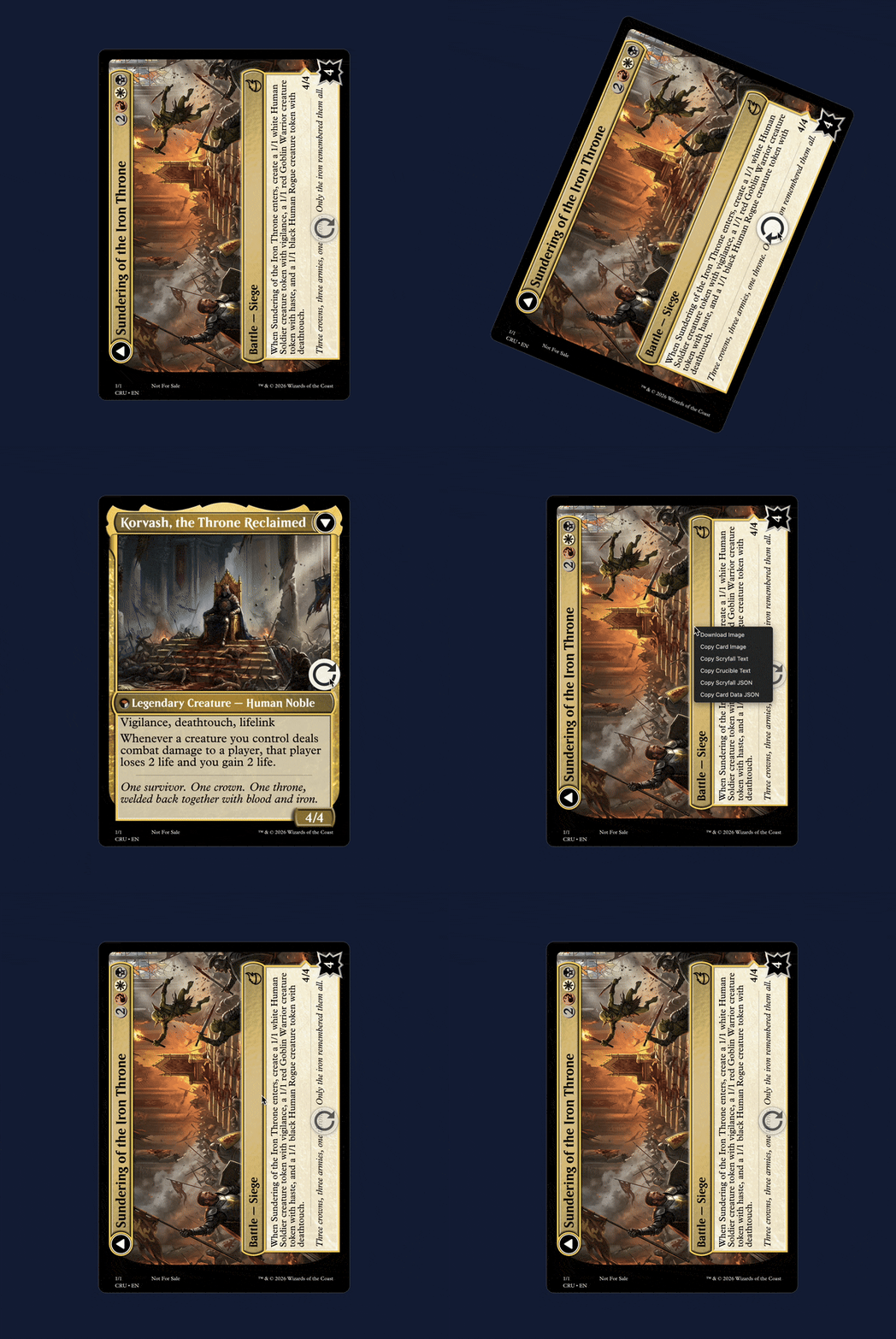
In the Wild
Projects built with Crucible:
- This Magic Card Does Not Exist — A website for creating custom cards with AI.
- Playmat — a shared virtual table for paper-style Magic; every card face is
MtgCard, custom tokens are crucible-rendered in each player's browser, andcomputeRotationsdrives flip/transform/battle orientation. - Obsidian Custom MTG — an Obsidian plugin for creating custom cards in plaintext in your vault.
- Command Tower MCP — an MCP server for vibe-brewing Magic: The Gathering decks on Archidekt, with support for custom card creation.
- mtg-export — a CLI that turns a deck list into a printable PDF proxy sheet; its
--modernizeflag uses Crucible to redraw pre-M15 cards in modern frames with current oracle text.
Built something with Crucible? Open a PR to add it here.
Browser usage
Install
Same package, same install — there's nothing browser-specific to add:
npm install mtg-crucibleBundlers (Vite, webpack, esbuild, Rollup, Parcel, Next.js, …) automatically pick the browser build via the package's "browser" export condition. If you'd rather not run a bundler at all, you can load it straight from an ESM CDN in a plain <script type="module">:
<script type="module">
  import { renderCard, toDisplayCard } from 'https://esm.sh/mtg-crucible';
  // …
</script>
Render
import { renderCard, toDisplayCard } from 'mtg-crucible';

const result = await renderCard({...});

// To display a card, use toDisplayCard — a ready-to-render data URL (also works with <MtgCard>):
document.querySelector('img')!.src = toDisplayCard(result).frontFaceImageUrl;
result.frontFace is the raw bytes (Uint8Array). Reach for those when an API wants binary rather than a string — uploading (fetch(url, { body }), FormData), downloading (<a download>), or the clipboard. Wrap them in a Blob with toBlob:
import { toBlob } from 'mtg-crucible';

const blob = toBlob(result.frontFace, result.format);
await fetch('/upload', { method: 'POST', body: blob });
Assets (assetBaseUrl)
The browser build does not bundle the ~14 MB of frame assets. Frames, masks, symbols, and fonts are fetched on demand — only the ones a given card needs — and cached by the browser's HTTP cache. By default they come from a Cloudflare Pages CDN, versioned by asset major version (decoupled from the package version, so consumers across package versions share one warm cache):
https://mtg-crucible-assets-v<N>.pages.dev/Assets are served with permissive CORS and a one-year immutable cache, so each file is fetched at most once and reused across renders, sessions, and every site on the CDN.
To self-host the assets (the assets/ folder is included in the npm package), override the base URL before your first renderCard:
import { setAssetBaseUrl } from 'mtg-crucible';

setAssetBaseUrl('https://your-cdn.example.com/mtg-crucible/assets/');
Notes:
- On the first render, the symbols a card uses are fetched on demand (a card-specific set, not the whole symbol manifest) and cached for subsequent renders.
- Fonts are loaded with
FontFaceand awaited before any text is drawn. - Non-Chromium browsers may rasterize text slightly differently than the Node (
@napi-rs/canvas) output; this is expected and acceptable.
Individual assets are also importable straight from the package (the
./assets/* subpath is exported), so a bundler can fingerprint and serve
them like any local asset — no CDN, no hand-vendoring:
import wUrl from 'mtg-crucible/assets/symbols/mana/w.svg?url'; // viteDevelopment
npm test          # run tests (vitest)
npm run build     # compile TypeScript
npm run dev       # start local dev server with hot reload
Security
When rendering card data from untrusted users (e.g. on a public web server), leave allowUnsafeArtUrls off (the default). This blocks art URLs that point to:
- Local files (
/path,./path,file://) - Loopback addresses (
127.0.0.1,localhost) - Private network ranges (
10.0.0.0/8,172.16.0.0/12,192.168.0.0/16) - Link-local addresses (
169.254.0.0/16, including cloud metadata services like169.254.169.254)
Safe to enable in single-user, CLI, or build-script contexts where the card data comes from you, not from untrusted users.
Public URLs like https://i.imgur.com/abc.png always work fine — only "local" or "internal" URLs are affected by allowUnsafeArtUrls. This prevents SSRF and local file disclosure attacks.
Note: protection is best-effort. There is a small DNS-rebinding race window between hostname resolution and connection. For stronger guarantees, enforce egress rules at the network level.
Acknowledgements
Card frame assets are derived from Card Conjurer, an open-source MTG card creation tool.
Magic: The Gathering is a trademark of Wizards of the Coast, LLC. This project is not affiliated with, endorsed by, or sponsored by Wizards of the Coast or Hasbro.