
mtg-emojionearea
v3.1.11
Published
WYSIWYG-like EmojiOne Converter / Picker Plugin for jQuery

Maintainers
 timenz
Readme
notes: just slim version of emojionearea.
EmojiOne Area
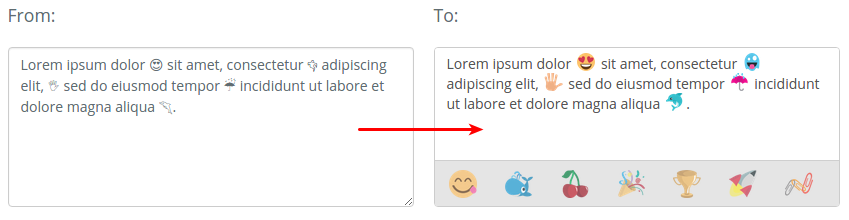
EmojiOne Area is a small jQuery plugin that allows you to transform any html element into simple WYSIWYG editor with ability to use Emojione icons. The end result is a secure text/plain in which the image icons will be replaced with their Unicode analogues.
Version 2.1
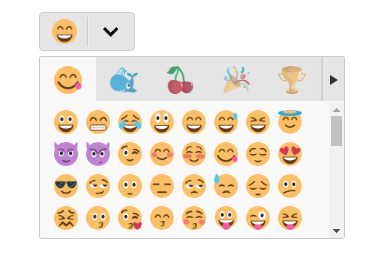
Version 2.1 Standalone mode
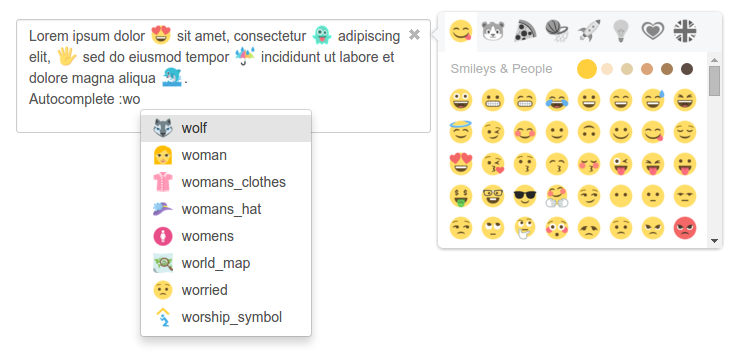
Version 3.0
Installation
The preferred way to install is via Bower, npm or Composer.
Install v2.1
bower install emojionearea#^2.1.0
# or
npm install emojionearea@^2.1.0
# or
composer require mervick/emojionearea ^2.1.0
Install v3.0
bower install emojionearea#^3.0.0
# or
npm install emojionearea@^3.0.0
# or
composer require mervick/emojionearea ^3.0.0
Usage
Add the following lines to head:
<link rel="stylesheet" href="file/to/path/css/emojionearea.min.css">
<script type="text/javascript" src="file/to/path/js/emojionearea.min.js"></script>
Simple usage:
<textarea id="example1"></textarea>
<script type="text/javascript">
  $(document).ready(function() {
    $("#example1").emojioneArea();
  });
</script>
Options v2.1
Customize emojione version
// version by default is 1.5.2
window.emojioneVersion = "2.1.1";
Default options
  var default_options = {
      template          : "<editor/><filters/><tabs/>", // plugin template

      dir               : "ltr", // direction http://www.w3schools.com/tags/att_global_dir.asp
      spellcheck        : false, // spellcheck http://www.w3schools.com/tags/att_global_spellcheck.asp
      autocomplete      : "off", // autocomplete http://www.w3schools.com/tags/att_input_autocomplete.asp
      autocorrect       : "off", // autocorrect https://davidwalsh.name/disable-autocorrect
      autocapitalize    : "off", // autocapitalize http://www.w3schools.com/tags/att_input_autocomplete.asp

      placeholder       : null, // placeholder
      container         : null, // by default, emojionearea container created directly under source,
                                // in this option you can specify custom {jQuery|selector} container

      hideSource        : true, // hide source element after binding
      autoHideFilters   : false, // auto hide filters panel

      useSprite         : true, // use sprite instead of images, is awesome, but not works in old browsers
      shortnames        : false, // if true - will converts emojis to short names,
                                 // by default converts emojis to unicode characters

      filters: {
        // customize filters & emoji buttons
        // see in source file href="https://raw.githubusercontent.com/mervick/emojionearea/master/src/var/default_options.js
      },

      events: {
        // events handlers
        // see below
      }
  };
Api v2.1
  .on(events, handler);
  // - events
  //   Type: String
  //   One or more space-separated event types and optional namespaces
  // - handler
  //   Type: Function(jQuery Element, Event eventObject [, Anything extraParameter ] [, ... ] )
  //   A function to execute when the event is triggered.

  .off(events[, handler]);
  // - events
  //   Type: String
  //   One or more space-separated event types and optional namespaces
  // - handler
  //   Type: Function(jQuery Element, Event eventObject [, Anything extraParameter ] [, ... ] )
  //   A handler function previously attached for the event(s)

  // built-in events:
  //   "mousedown", "mouseup", "click", "keyup", "keydown", "keypress"
  //   "filter.click", "emojibtn.click", "arrowLeft.click", "arrowRight.click",
  //   "focus", "blur", "paste", "resize", "change"

  .setText(str);
  // - str
  //   Type: String
  //   Set text

  .getText();
  //   Get text

  // Usage methods, example:
  var el = $("selector").emojioneArea();
  el[0].emojioneArea.on("emojibtn.click", function(btn, event) {
    console.log(btn.html());
  });
Events v2.1
Two ways to set events, in options:
$("selector").emojioneArea({
  events: {
    /**
     * @param {jQuery} editor EmojioneArea input
     * @param {Event} event jQuery Event object
     */
    focus: function (editor, event) {
      console.log('event:focus');
    },
    /**
     * @param {jQuery} editor EmojioneArea input
     * @param {Event} event jQuery Event object
     */
    blur: function (editor, event) {
      console.log('event:blur');
    },
    /**
     * @param {jQuery} editor EmojioneArea input
     * @param {Event} event jQuery Event object
     */
    mousedown: function (editor, event) {
      console.log('event:mousedown');
    },
    /**
     * @param {jQuery} editor EmojioneArea input
     * @param {Event} event jQuery Event object
     */
    mouseup: function (editor, event) {
      console.log('event:mouseup');
    },
    /**
     * @param {jQuery} editor EmojioneArea input
     * @param {Event} event jQuery Event object
     */
    click: function (editor, event) {
      console.log('event:click');
    },
    /**
     * @param {jQuery} editor EmojioneArea input
     * @param {Event} event jQuery Event object
     */
    keyup: function (editor, event) {
      console.log('event:keyup');
    },
    /**
     * @param {jQuery} editor EmojioneArea input
     * @param {Event} event jQuery Event object
     */
    keydown: function (editor, event) {
      console.log('event:keydown');
    },
    /**
     * @param {jQuery} editor EmojioneArea input
     * @param {Event} event jQuery Event object
     */
    keypress: function (editor, event) {
      console.log('event:keypress');
    },
    /**
     * @param {jQuery} editor EmojioneArea input
     * @param {Event} event jQuery Event object
     */
    paste: function (editor, event) {
      console.log('event:paste');
    },
    /**
     * @param {jQuery} editor EmojioneArea input
     * @param {Event} event jQuery Event object
     */
    change: function (editor, event) {
      console.log('event:change');
    },
    /**
     * @param {jQuery} filter EmojioneArea filter
     * @param {Event} event jQuery Event object
     */
    filter_click: function (filter, event) {
      console.log('event:filter.click, filter=' + filter.data("filter"));
    },
    /**
     * @param {jQuery} button EmojioneArea emoji button
     * @param {Event} event jQuery Event object
     */
    emojibtn_click: function (button, event) {
      console.log('event:emojibtn.click, emoji=' + button.children().data("name"));
    },
    /**
     * @param {jQuery} button EmojioneArea left arrow button
     * @param {Event} event jQuery Event object
     */
    arrowLeft_click: function (button, event) {
      console.log('event:arrowLeft.click');
    },
    /**
     * @param {jQuery} button EmojioneArea right arrow button
     * @param {Event} event jQuery Event object
     */
    arrowRight_click: function (button, event) {
      console.log('event:arrowRight.click');
    }
  }
});
or by .on() & .off() methods:
  var el = $("selector").emojioneArea();

  // attach event handler
  el[0].emojioneArea.on("emojibtn.click", function(button, event) {
    console.log('event:emojibtn.click, emoji=' + button.children().data("name"));
  });
  // unset all handlers attached to event
  el[0].emojioneArea.off("emojibtn.click");

  // like in jQuery you can specify few events separated by space
  el[0].emojioneArea.off("focus blur");

  // set & unset custom handler
  var eventHandler1 = function(button, event) {
    console.log('event1');
  };
  var eventHandler2 = function(button, event) {
    console.log('event2');
  };
  // attach event handlers
  el[0].emojioneArea.on("click", eventHandler1);
  el[0].emojioneArea.on("click", eventHandler2);
  // unset eventHandler1
  el[0].emojioneArea.off("click", eventHandler1);
Requirements
- jQuery >= 1.8.2
License
EmojiOneArea is released under the MIT license.