
mu-player
v0.8.0
Published
Play music from vk.com and soundcloud.com via Music Player Daemon

Maintainers
 minkolazer
Readme
mu-player
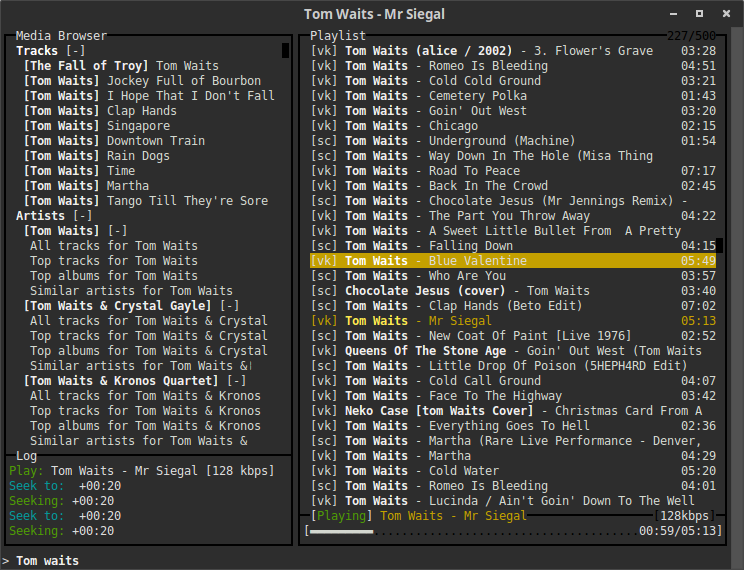
Top Features
- Play any music for free from vk.com and soundcloud.com using Music Player Daemon.
- Explore new music with last.fm top tracks, similar artists and top albums search.
- Bookmarks via Last.FM
- Smart searching:
- bitrate detection for the highest bitrate music.
- parallel queries, retries and timeouts to speed up searching. The only limitation now is the public API throttling.
- Low system requirements: mu-player will pump smooth even on your grandpa's notebook.
- Mu-player will save your laptop battery. CPU load of in-browser playback comparing to MPD is HUGE.
- It works on both MAC OS and Linux.
Why use mu-player instead of Google Music (or any other music service)?
- You will get any music for FREE.
- Mu-player always try to find music with highest bitrate quality.
- Largest music databases in the Internet.
You could use mu-player standalone or with any other full-featured MPD clients. See http://mpd.wikia.com/wiki/Clients for some greatness. For Ubuntu and Linux Mint mpDris2 is recommended. It will add native popups, multimedia keys support and playback control in Unity/Cinnamon.
[New] You could search by tags with # at the begining of your query. For the example type #Disco in search input.
This player is powered by amazing blessed library and forked from tasty badtaste player.
Install
- First install MPD. I recommend to use versions
0.19and higher foraddtagidfunctionality. Follow the http://mpd.wikia.com/wiki/Install for the instructions. - Start MPD daemon if it is not started on system boot. You could test if it is running by typing
telnet localhost 6600. You should seeOK MPDresponse. - You need nodejs and npm to install mu-player.
- Install mu-player:
- MAC OS X:
npm -g install mu-player. - Ubuntu (Debian) Linux:
sudo npm -g install mu-player.
- MAC OS X:
- Now you could run
muand setup your credentials for lastfm.com, soundcloud.com and vk.com. We have tons of free music there but you need to register accounts first. - Run
muagain and enjoy the music.
For the last.fm audio scrobbling you could use mpdas. Tested on OS X Yosemite, El Capitan; Ubuntu: 14.04, 15.10; Linux Mint 17.
Setup
- Run
mu --setupto edit your credentials.
Config
- Config file is located at
~/.murc. - You should tweak timeouts there for the best searching results with your Internet provider.
Log
- Log is located at
/tmp/mu.log.
Help
- Press
?for in-app help.
Alternatives
- https://github.com/ewnd9/badtaste