
muds-editor
v1.6.0
Published
The lightest WYSIWYG Editor on the internet
Downloads
122


Readme
MUDS Editor
Getting started with MUDS
Simply paste the following snippet in your code where you want MUDS editor to appear.
<!-- Include stylesheet -->
<link rel="stylesheet" href="/assets/css/muds.min.css">

<!-- Create the editor container -->
<textarea id="editor"></textarea>

<!-- Include the muds library -->
<script src="/assets/js/muds.min.js"></script>

<!-- Initialize muds editor -->
<script>
var muds = new muds({
    selector: 'editor'
});
</script>
Example
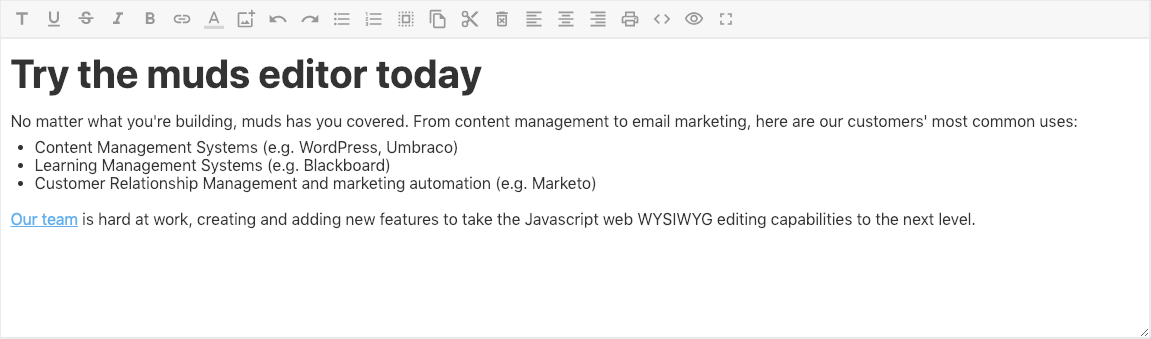
Custom menu items
var editor = new muds({
    selector: 'editor',
    menuStyle: 'custom',
    menuCustom: [
        'separator',
        'header',
        'fonts',
        'underline',
        'strikeThrough',
        'bold',
        'italic',
        'link',
        'changeColor',
        'image',
        'undo',
        'redo',
        'unorderedList',
        'orderedList',
        'selectAll',
        'copy',
        'cut',
        'delete',
        'justification',
        'justifyLeft',
        'justifyCenter',
        'justifyRight',
        'indent',
        'outdent',
        'print',
        'showHTML',
        'showText',
        'fullScreen'
    ]
});