mulle-environment-editor
v0.0.11
Published
🏕️ GUI Editor for the mulle-sde environment

Maintainers
 mulle_nat
Readme
Mulle Environment Editor
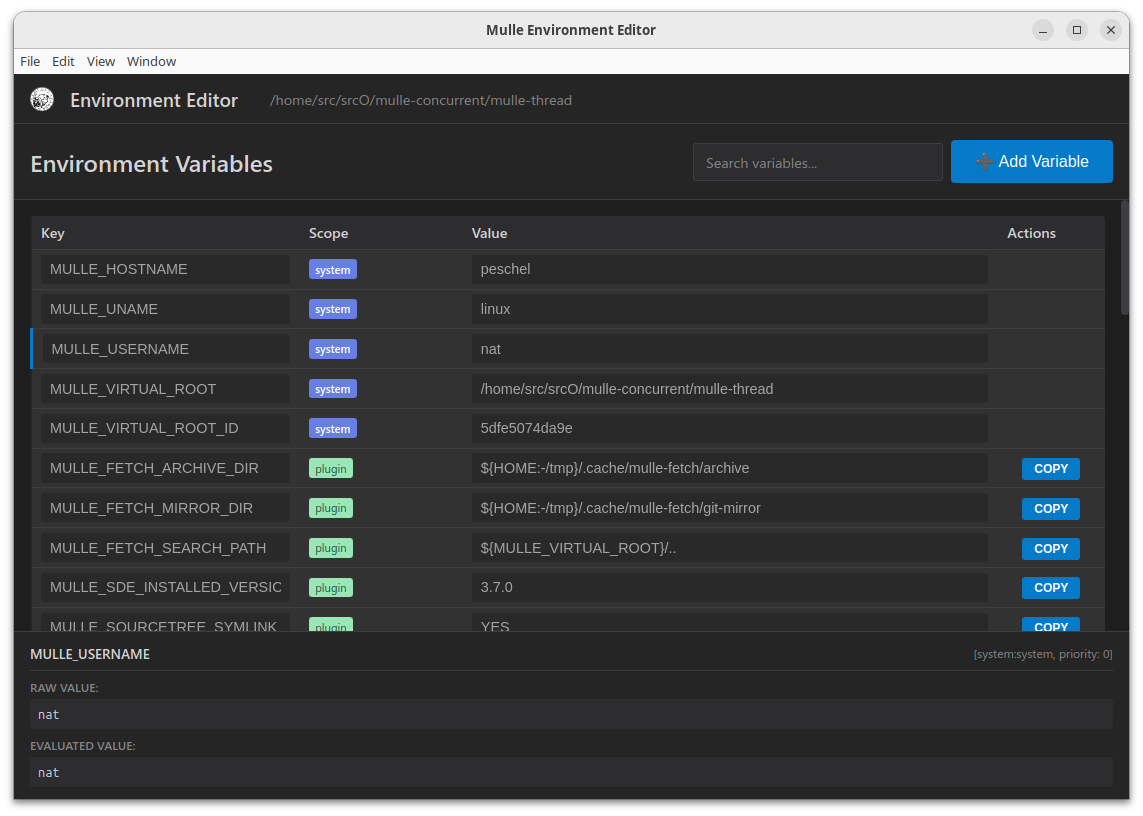
A visual editor for mulle-sde environment files.
Features
- Visual Environment Editing: Edit environment variables in a clean, modern interface
- Scope Management: Manage different environment scopes (project, global, host-specific, user-specific, etc.)
- Loading Order: Drag-and-drop interface to reorder environment loading priority
- Real-time Preview: See how your environment variables will be applied
- Recent Projects: Quick access to recently opened projects
- Cross-platform: Works on Linux, macOS, and Windows
Installation
From Source
# Clone the repository
git clone https://github.com/mulle-sde/mulle-environment-editor.git
cd mulle-environment-editor

# Install dependencies
npm install

# Run the application
npm start
Local Installation
To install the CLI globally for local development:
# From the project directory
npm link

# Now you can run from anywhere
mulle-environment-editor
To uninstall:
npm unlink -g mulle-environment-editorPre-built Binaries
Download the latest release for your platform from the releases page.
Usage
- Open a Project: Launch the application and click "Open Project" to select a directory containing a
.mullefolder - Select Environment Scope: Choose from available scopes in the sidebar (project, global, host-specific, etc.)
- Edit Variables:
- Add new variables with the "Add Variable" button
- Edit variable names, values, and comments inline
- Toggle variable enablement with checkboxes
- Remove variables with the delete button
- Reorder Loading Priority: Drag and drop scopes in the loading order section
- Save Changes: Click "Save" to write changes back to the environment files
Loading the Environment into Your Shell
This is the job mulle-sde and mulle-env do for you automatically. But
you can do this also manually.
After editing environment files, you need to source them to apply the changes to your shell:
# Source the environment into your current shell
cd /path/to/your/project
. .mulle/share/env/environment.sh
This will load all environment variables according to their priority and scope applicability.
Testing Environment Without Affecting Your Shell
To preview what environment variables will be set without modifying your current shell:
# Run in a clean environment and display all variables
env -i bash -c '. .mulle/share/env/environment.sh && env | sort'

# Or export from the editor and test the exported script
env -i bash -c '. environment-export.sh && env | sort'
The env -i command starts with an empty environment, so you can see exactly what the environment files set up.
Environment File Structure
The editor works with mulle-env environment file structure:
.mulle/etc/env/           # Local environment files
├── environment-project.sh
├── environment-global.sh
├── environment-host-*.sh
├── environment-user-*.sh
├── environment-os-*.sh
└── auxscope              # Loading order configuration

.mulle/share/env/         # Shared environment files
├── environment-extension.sh
├── environment-plugin.sh
└── environment.sh
License
MIT License - see LICENSE file for details.