mulmoterminal
v0.8.0
Published
MulmoTerminal — browser terminal + GUI panel for Claude Code. One command to start.
Maintainers
Readme
mulmoterminal
A browser-based terminal + GUI workspace for coding agents — Claude Code and OpenAI's Codex — with a sidebar that lists the current project's chat sessions and shows live, hook-driven activity for each one.
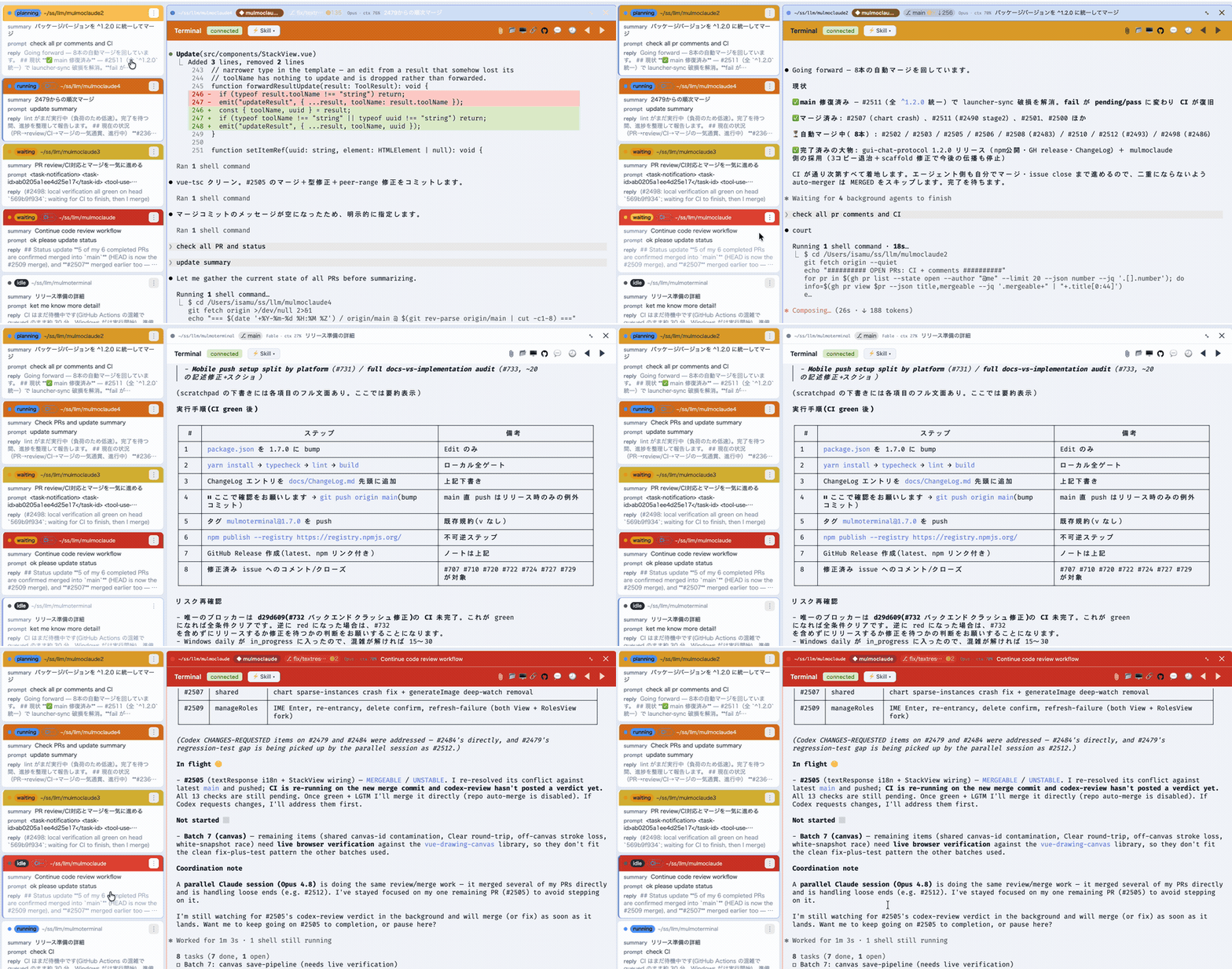
Each session runs as a real PTY on the server (the agent CLI in a pseudo-terminal) and is streamed to an xterm.js terminal in the browser over a WebSocket. A sidebar lists every session for the project and reflects, in real time, which sessions are working (the agent is thinking) and which need attention (waiting for input, or finished with output you haven't seen).
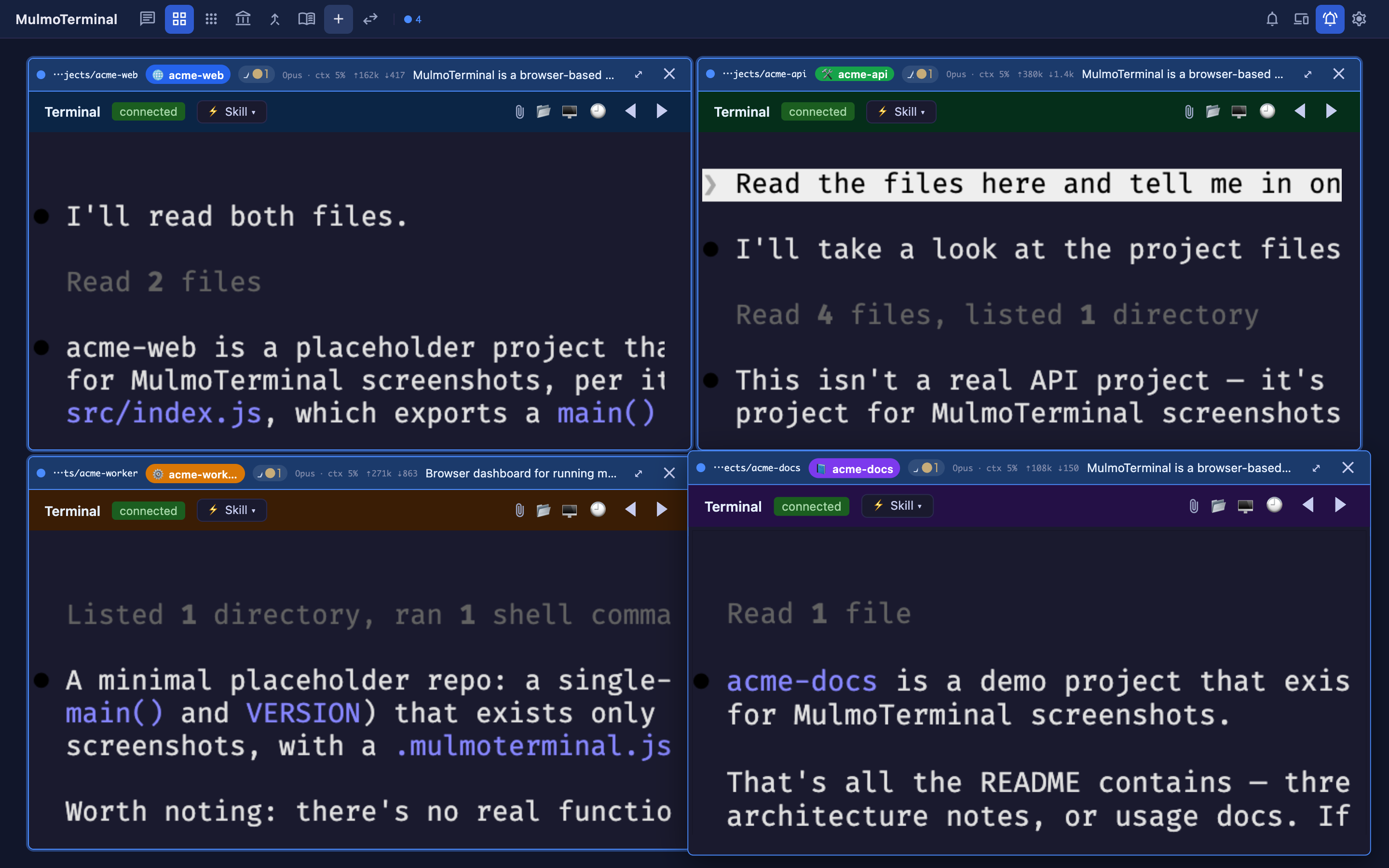
Around the terminal sit the things a coding session needs: a grid of parallel sessions, an optional GUI panel for rich tool output (documents, forms, images, charts), git worktree isolation with one-click push / open PR, a full-screen file browser + editor, per-session cost & token readouts, a cross-repo PRs & Issues view, and read-only Wiki and Collections browsers over the shared workspace.
Inserting a file path — like a native terminal, you can put a file's absolute
path into the prompt: drag a file onto the terminal (works where the browser
exposes the path via file:// — Firefox/Safari), or click the 📎 file button
in the terminal header, which asks the local server to open the OS file dialog and
inserts the chosen path (works in every browser, including Chrome). The path is
inserted at the cursor — it is not submitted, so you can review it first.
Install & run
Requires the claude CLI on your PATH and
Node ≥ 22.9. Optional but recommended: tmux so terminals survive a server
restart (see Session persistence (tmux)), the gh CLI
logged in for the PRs/Issues view and one-click PR creation, and — for Codex sessions —
the codex CLI on your PATH.
npx mulmoterminal # start on http://localhost:34567 and open the browser
# or install globally:
npm install -g mulmoterminal
mulmoterminalA global install isn't auto-updated, so on startup MulmoTerminal checks npm and
prints a one-line notice when a newer version is available (npm i -g mulmoterminal
to update). Disable with MULMOTERMINAL_NO_UPDATE_CHECK=1 (or NO_UPDATE_NOTIFIER=1).
Options: --cwd <dir> (working directory — relative paths allowed; defaults to the
directory you run the command from), --port <n> (default 34567), --no-open,
--version, --help.
npx mulmoterminal --cwd ./my-project # work in a specific directoryThe published package ships the server (run via tsx) plus the pre-built web UI;
npx mulmoterminal checks for the claude CLI, picks a free port, starts the
server, and opens the browser. For local development from a clone, see
Running.
Contents
- Architecture
- Why a PTY?
- Agents: Claude & Codex
- Session persistence (tmux)
- Docker sandbox (experimental, single view)
- Tech stack
- Configuration
- Running
- Scripts (Run menu)
- Files view (browse & edit)
- Git worktrees & pull requests
- Cost & token usage
- Wiki, Collections & the GUI panel
- More features
- Server API specification
- Session model
- Session lifecycle
- Claude hook injection
- Session discovery & titles
- Project structure
- Testing
Architecture
┌──────────────────────────────────────┐ ┌─────────────────────────────────────────────┐
│ Browser (Vue 3 + xterm.js) │ │ Server (Express + Node) │
│ │ │ │
│ Sidebar.vue ──subscribe("sessions")──┼──SIO───►│ socket.io /ws/pubsub ── publish ──┐ │
│ ▲ refetch on any push │ │ │ │
│ └──── GET /api/sessions ─────────┼──HTTP──►│ Express /api/sessions │ │
│ │ │ /api/hook ◄──curl── hooks │ │
│ Terminal.vue ── ws JSON msgs ────────┼──WS────►│ ws /ws ──► node-pty ─► `claude`──hooks┘
│ (input / resize / output) │ │ (one PTY per session) │
└──────────────────────────────────────┘ └─────────────────────────────────────────────┘- Terminal I/O flows over a raw WebSocket (
/ws), one PTY per session. - Session list is fetched over HTTP (
/api/sessions). - Live activity is pushed over a Socket.IO pub/sub channel (
/ws/pubsub); the server learns of activity from Claude hooks that POST to/api/hook. - Other terminals run on their own raw WebSockets: Codex sessions on
/ws/codex, persistent launch commands on/ws/launch, and one-off script commands (yarn dev, tests, …) on/ws/run. Only Claude/Codex are agent sessions with hooks; see Agents: Claude & Codex and Scripts (Run menu). - In dev (
yarn dev) the Vite dev server runs on its own port (CLIENT_PORT, default6856) and proxies/ws(a prefix covering/ws/codex,/ws/launch, and/ws/run),/ws/pubsub,/api, and/artifactsto the backend (PORT, default34567) — so you open the Vite port (e.g.http://localhost:6856). In production the backend serves the built client fromdist/onPORT, and you open that.
Why a PTY?
Claude Code's interactive mode renders its UI with Ink
(a React-based TUI framework), which requires a real TTY to be attached. A
plain child_process.spawn() provides no TTY, so interactive Claude won't start
(it stays silent). node-pty allocates a
real pseudo-terminal at the OS level, so from Claude's point of view it's
running in an ordinary terminal — full TUI rendering, cursor movement, colors,
and tool-approval prompts all work. We don't use -p/headless mode or the Agent
SDK; we drive the real interactive CLI and relay its TTY over the WebSocket.
macOS note: node-pty's bundled
spawn-helperbinary ships without the execute bit (mode 644), which causes aposix_spawnp failederror. Thepostinstallscript (server/fix-pty-perms.js) fixes it to 755 automatically.
Agents: Claude & Codex
MulmoTerminal drives interactive coding-agent CLIs, not just Claude. An
AgentAdapter seam abstracts the per-agent bits (which binary to spawn, how it resumes)
so the PTY, grid, persistence, and GUI-panel plumbing stay shared. Two adapters ship
today — Claude Code (the default) and Codex.
- Claude — spawned as
claude(override withCLAUDE_BIN). The server passes--session-id <uuid>, so it knows the live session's id even before its transcript file exists, and injects activity hooks + the GUI MCP per spawn (see Claude hook injection). - Codex — spawned as
codex(override withCODEX_BIN;CODEX_MODELsets--model). Codex runs on its own WebSocket (/ws/codex) and its sessions appear in the sidebar next to Claude's. Because Codex only mints its rollout id after the first turn, the server watches~/.codex/sessions/**/rollout-*.jsonl(home overridable viaCODEX_HOME) and maps the new rollout to the session — attributed only when it's unambiguous, never by "newest wins". Resume reattaches a live PTY, adopts a surviving tmux session, or cold-resumes the rollout id.
Choosing an agent. The single view has a New Codex session button; each grid cell's launch form and the Collections browser carry a Claude / Codex toggle (your choice is remembered).
Skills for Codex. Codex has no /<slug> slash commands, so on session setup
MulmoTerminal mirrors the workspace's .claude/skills into ~/.codex/skills (each
mirrored directory carries a .mt-mirror marker so a re-sync overwrites what MulmoTerminal
owns and never clobbers Codex's own skills), and rewrites a collection's /<slug> … seed
into a plain Use the "<slug>" skill. instruction. The same skills Claude uses then show
up for Codex, loaded by description.
Session persistence (tmux)
If tmux is installed, MulmoTerminal runs each Claude session and launcher inside
a tmux session, so a server crash or restart doesn't kill your terminals — the
processes keep running and reattach when the server comes back (like screen/tmux).
A long build, a dev server, or a mid-turn Claude session all survive node --watch
reloads and crashes. It uses its own tmux server (-L mulmoterminal) and config, so
it never touches your personal tmux sessions or keybindings.
No tmux? No problem — terminals fall back to plain (non-persistent) PTYs, exactly as before. An explicit close (a cell's ✕) ends the tmux session; a machine reboot does not survive (tmux itself is gone). Command-cell scripts are ephemeral and not persisted.
Installing tmux (optional):
brew install tmux # macOS (Homebrew)
sudo apt install tmux # Debian / Ubuntu
sudo dnf install tmux # FedoraOn Windows there's no native tmux, so sessions use the non-persistent fallback — run the
server under WSL if you want persistence. Nothing else is required: MulmoTerminal
detects tmux on PATH at startup and uses it automatically when present.
Docker sandbox (experimental, single view)
Set MULMOTERMINAL_SANDBOX=1 (and have Docker running) to run the single-view
Claude session inside a container instead of on the host, while Claude still reaches the
app's GUI MCP + activity hooks over host.docker.internal. The mulmoterminal-sandbox
image is built automatically on first launch from the shipped Dockerfile.sandbox
(~1 min, once; rebuilt only when that file changes). Override the name with
MULMOTERMINAL_SANDBOX_IMAGE. If the image can't be built (e.g. Docker down), the session
falls back to the host spawn — no cryptic failure.
This contains Claude — it can't reach the host filesystem outside the mounts, host
processes, or arbitrary host ports. It is not full isolation: the workspace and
~/.claude are bind-mounted read-write by design (so Claude edits your project,
and transcripts interoperate with host sessions), so those specific paths stay mutable
from inside. The sandbox is non-persistent (the container is
--rm, tied to the session), opt-in and single-view only — the grid keeps its host +
tmux path, and with the flag unset (or Docker unavailable) everything runs on the host
exactly as before. macOS only for now — on Linux (bind-mount uid ownership) and
Windows (host paths aren't valid Linux container paths) it falls back to the host spawn;
both are follow-ups. Adding arbitrary user MCP servers to the sandbox is in progress
(see #202).
Authentication (macOS). Claude's live login token lives in the macOS Keychain,
which the container can't read (mounting ~/.claude alone isn't enough — its
.credentials.json is often absent or stale). On each sandbox spawn MulmoTerminal exports
the current credential to a per-session ~/.mulmoterminal/sandbox/creds-<id>.json
(mode 0600, removed when the session ends) and mounts it read-only over the
container's ~/.claude/.credentials.json; your host ~/.claude is never modified. If
you've never logged in on the host, run claude once first — otherwise the server logs a
warning and the container shows "Not logged in".
Host credentials (opt-in). By default the sandbox has no host credentials. To let the
sandboxed Claude use gh/git, set SANDBOX_MOUNT_CONFIGS=gh,gitconfig — a fixed
allowlist (you pick names, never arbitrary paths): gh mounts ~/.config/gh read-only
and passes a GH_TOKEN (from gh auth token, since macOS keeps it in the Keychain), and
gitconfig mounts ~/.gitconfig read-only. Set SANDBOX_SSH_AGENT_FORWARD=1 to
forward the SSH agent socket (the keys never enter the container). Both are read only when
building the sandbox spawn, so they have no effect unless MULMOTERMINAL_SANDBOX is on.
Tech stack
| Layer | Technology |
| -------- | ---------- |
| Frontend | Vue 3 (<script setup> + TypeScript), Vue Router, Vite, xterm.js (@xterm/*), CodeMirror 6, socket.io-client |
| Backend | Node (ESM, TypeScript run via tsx), Express 5, ws (terminal WebSocket), node-pty, socket.io, @modelcontextprotocol/sdk (in-process GUI MCP) |
| Plugins | GUI-protocol Vue plugins (@mulmoclaude/*, @mulmochat-plugin/*): markdown, form, image, chart, HTML, collection, accounting |
| Tests | Vitest + @vue/test-utils + jsdom |
Requires Node ≥ 22.9 (uses node --env-file-if-exists) and the claude CLI on PATH.
Configuration
The server is configured entirely through environment variables, optionally
loaded from a .env file via node --env-file-if-exists=.env (wired into the
npm scripts). The .env is optional — every variable below has a default, so
the server runs without one.
| Variable | Default | Description |
| ------------ | -------------- | ----------- |
| PORT | 34567 | Backend HTTP/WebSocket port (prod: the URL you open). |
| CLIENT_PORT | 6856 | Vite dev-server port (dev only: the URL you open with yarn dev). |
| CLAUDE_BIN | claude | The Claude Code binary to spawn. |
| CLAUDE_CWD | current dir | Working directory each claude PTY runs in; determines which project's sessions the sidebar lists. Via npx mulmoterminal it defaults to the directory you ran the command from (override with --cwd <dir>, relative allowed); when the server is run directly it falls back to ~/mulmoclaude. A value read from .env must be an absolute path (~ is not expanded). |
| CLAUDE_PERMISSION_MODE | auto | Permission mode passed to each claude spawn. |
| CODEX_BIN | codex | The Codex CLI binary to spawn. |
| CODEX_MODEL| codex default | Model passed to Codex as --model (unset = Codex's own default). |
| CODEX_HOME | ~/.codex | Codex home — where its session rollouts and MulmoTerminal-mirrored skills live. |
| MULMOTERMINAL_HOME | ~/.mulmoterminal | Root for managed git worktrees. |
| WAIT_REAP_GRACE_MS | 1800000 | How long a waiting background session is kept before it's auto-reaped (0 or negative = never). |
The Docker-sandbox variables (MULMOTERMINAL_SANDBOX, MULMOTERMINAL_SANDBOX_IMAGE,
SANDBOX_MOUNT_CONFIGS, SANDBOX_SSH_AGENT_FORWARD) and the update-check opt-outs
(MULMOTERMINAL_NO_UPDATE_CHECK, NO_UPDATE_NOTIFIER) are covered in
Docker sandbox and Install & run.
Example .env (gitignored):
CLAUDE_CWD=/Users/you/my-projectUI settings (~/.mulmoterminal/config.json)
The Settings modal (⚙) persists per-user UI choices to ~/.mulmoterminal/config.json
(read/written via GET/POST /api/config):
| Field | Meaning |
| ------------ | ------- |
| cwdPresets | Quick-pick directories offered when launching a terminal. |
| soundFile | Absolute path to a custom attention sound (played when a session needs attention). Empty/unset uses the built-in synthesized chime. |
| prRepos | owner/repo entries whose open PRs/issues the cross-repo PRs & Issues view aggregates (via your gh login). |
| launchers | { label, command } entries offered in a grid cell's launcher besides Claude — a plain shell, codex, any interactive command. |
| userMcpServers | { id, url } HTTP MCP servers merged into the single-view Claude session's --mcp-config (a localhost URL is reached over host.docker.internal in the Docker sandbox). Takes effect on the next session. |
Attention sound. The default chime is generated with the Web Audio API — no
audio file is bundled, so the npm package stays light and has no media-licensing
concerns. To use your own sound, set soundFile in Settings (Browse / Test / Use
chime) or in the config file; the server streams that file at GET /api/sound and
the client decodes it (falling back to the chime if it's missing or not audio). It's
your own local file referenced by absolute path — nothing is added to the package.
Per-directory settings (<project>/.mulmoterminal.json)
Drop a .mulmoterminal.json in a project directory to give terminals opened in
that directory their own look and sound. It applies per terminal (per grid cell) —
the rest of the app keeps your chosen theme — and a directory's theme overrides your
manual theme pick for that terminal only. Every field is optional; a missing or
malformed file is ignored.
{
"name": "PROD · payments", // badge shown on this directory's terminals
"badgeColor": "#cf222e", // badge color (hex #rrggbb)
"headerColor": "#190a23", // cell header background (hex #rrggbb)
"headerTextColor": "#ffffff", // cell header text color (hex #rrggbb)
"cellColor": "#101014", // cell body background (hex #rrggbb)
"cellBorderColor": "#2a2a4e", // cell border color (hex #rrggbb)
"dotColor": "#00e676", // idle status dot (hex #rrggbb)
"buttonColor": "#c7cdf0", // header icon buttons (hex #rrggbb)
"theme": "nord", // terminal palette: midnight | nord | daylight | solarized
"colors": { "background": "#190a23", "cursor": "#ff2e63" }, // per-key palette overrides
"sound": "./.mulmoterminal/alert.mp3" // attention sound, RELATIVE to this directory
}| Field | Meaning |
| ------------ | ------- |
| name | Label shown as a badge in the terminal/cell header. |
| badgeColor | Badge background color (#rrggbb); text auto-contrasts. |
| headerColor | Header background color (#rrggbb) — the grid cell's header row and the terminal's own header row (grid row 2 + single view). While a terminal is working/blocked the status tint still shows; the custom color applies when idle. |
| headerTextColor | Header text color (#rrggbb) — the dir path, title, and prompt. |
| cellColor | Cell body background color (#rrggbb) — the frame around the terminal. |
| cellBorderColor | Cell border color (#rrggbb). The status frame (working/blocked) still overrides it while active. |
| dotColor | Idle status-dot color (#rrggbb). The working/waiting colors are unchanged so the activity signal stays intact. |
| buttonColor | Header icon button color (#rrggbb) — expand / close / attach / folder / etc., across both header rows. |
| theme | xterm palette for terminals in this directory (one of the built-in theme ids). |
| colors | Per-key xterm palette overrides applied on top of theme (or the app theme when theme is unset). Keys are xterm ITheme names (background, foreground, cursor, selectionBackground, the 16 ANSI colors, …); values are hex (#rgb / #rrggbb / #rrggbbaa). Unknown keys / bad values are dropped. |
| sound | Attention sound for this directory's sessions, a path relative to the directory (served at GET /api/dir-sound). |
Security. sound is a directory-relative path only — absolute paths and any
../ that escapes the directory are rejected, and the path is never taken from the
HTTP request, so an opened project can't point the player at arbitrary files.
Changes take effect when the terminal is next opened (no live file watch).
Running
yarn install # postinstall fixes node-pty prebuilt binary perms
yarn dev # backend (:34567) + Vite UI (:6856), concurrently — open http://localhost:6856
# or individually:
yarn dev:server # backend only (node --import tsx --env-file-if-exists=.env server/index.ts)
yarn dev:client # Vite dev server only
yarn build # type-check (vue-tsc) + vite build -> dist/
yarn typecheck:server # type-check the server (tsconfig.server.json)
yarn server # run backend; serves dist/ + the APIs on :34567
yarn test # vitest runThe backend is TypeScript run directly via tsx (no build step); server/ is
type-checked separately through tsconfig.server.json (strict), kept out of
the main build so the two type-check independently.
In dev, open the Vite URL; its proxy forwards /ws, /ws/pubsub, and /api to
:34567. In production, run yarn build then yarn server and open
http://localhost:34567.
Scripts (Run menu)
An empty grid cell's launcher (the directory picker) offers a run a script row
that launches project scripts (a dev server, tests, a build, …) in that cell, in
the directory the cell is pointed at — so a whole workflow lives in one window
alongside the Claude sessions. Scripts are per-directory: the cell reads the
script.json of whatever directory you select, so different cells can offer
different projects' scripts.
The same launcher also has an or launch row for your configured launch commands
— a plain interactive shell, codex, any command — set in Settings (⚙) → Launch
commands as { label, command } (e.g. Shell → $SHELL, Codex → codex). Unlike
a one-shot script, a launcher runs as a persistent terminal in the cell's directory:
it survives grid page switches and reconnects, and its dot shows running vs. exited (it
has no Claude hooks, so no blocked/done states).
Every running terminal's header also has a ▶ Run ▾ dropdown (next to the
connection status), in both the single view and each grid cell — but only when the
open project has scripts (no script.json, no button). It lists the open
project's script.json — the directory that terminal runs in — and launches the
picked script in a spare grid cell (reusing an open launcher, else a new one),
switching to the grid from the single view so you can watch it. So you can start a
dev server or tests for the project you're working in without disturbing the
session that's running.
The list is populated from a script.json at the chosen directory's root. It's
optional; a directory without one simply shows no scripts.
// <dir>/script.json
{
"scripts": [
{ "label": "Dev server", "command": "yarn dev" },
{ "label": "Unit tests", "command": "yarn test" },
{ "label": "Build", "command": "yarn build" },
// optional per-script working dir (relative to this file, or absolute):
{ "label": "Sub server", "command": "yarn serve", "cwd": "packages/server" }
]
}| Field | Required | Meaning |
| --------- | -------- | ------- |
| label | yes | What the launcher shows. |
| command | yes | Shell command, run via the login shell ($SHELL -lc "<command>"). |
| cwd | no | Working dir, relative to script.json or absolute. Defaults to the cell's directory. |
A command terminal is not a Claude session: it has no session id, no hooks, no
transcript, and isn't persisted — it's ephemeral, so a page reload drops it and
closing the cell (or reloading) kills the process. When the command exits, the cell
offers a ↻ re-run. The browser only ever sends the script's index + its
directory; the server reads that directory's script.json and resolves the
command, so the file is the allowlist of what can run.
Each command cell also has a ✦ Summarize button: click it to send the cell's
captured output to claude -p (headless) and get a short Errors / Warnings /
likely cause / suggested fix note in a panel — handy when a build or install
buries the one failing line in thousands. It's manual (never auto-runs) and analyzes
the last 32 KB of output. See
POST /api/command/summarize.
Files view (browse & edit)
Every terminal header has a 📁 Files button that opens a full-screen file explorer
rooted at that terminal's project directory — so after Claude says "wrote foo.md"
you can jump straight there to read or edit it. The left pane is a lazy-loaded directory
tree; clicking a file opens it in a CodeMirror editor (Markdown / JS-TS / JSON
highlighting, everything else as plain text). Markdown files get a Preview toggle
that renders via the server's sandboxed …/md HTML. Save (or ⌘/Ctrl-S) writes back.
All reads and writes go through GET/PUT /api/files/browse/*?cwd=&path=, and every
path is contained within the project root (server-side) — ../absolute escapes
are rejected for reads and writes alike, so editing can't reach outside the directory
the terminal is pointed at.
Git worktrees & pull requests
When a terminal's directory is a git repo, its header shows a branch chip
(⎇ <branch> with dirty / ahead / behind counts), fed by GET /api/git-status (polled
while the view is visible). A GitHub menu links straight to the repo, its issues, and
its pull requests.
Worktree isolation. A grid cell's launch form offers + New worktree: name a task
and the cell launches its agent inside a fresh
git worktree on a new agent/<slug> branch — a
separate working tree that shares the repo's .git, so several agents can work the same
repo without colliding. Worktrees live under ~/.mulmoterminal/worktrees/ (override with
MULMOTERMINAL_HOME), and existing ones are listed for reuse.
A worktree cell's header carries a diff badge (+<commits> ●<dirty>); click it for a
Changes vs <base> panel (file list + patch) with actions:
- ✓ Commit — hands the cell's own session a canned commit prompt.
- ⬆ Push —
git push -u origin <branch>(POST /api/worktrees/push). - ⧉ Open PR — pushes, then
gh pr create … --fill; ifghis missing or unauthed it falls back to opening the GitHub compare URL (POST /api/worktrees/pr).
Closing a worktree cell asks whether to keep the worktree or discard & remove it (a dirty worktree is never removed unless you confirm).
PRs & Issues (cross-repo). The toolbar's Pull requests button opens a full-screen
view that aggregates open PRs and issues across the repos listed in Settings →
Pull request repos (prRepos, owner/repo entries) via your server-side gh login.
PRs show a CI-rollup / review-decision / draft badge; each repo lists its latest open
issues. Rows are real links, per-repo errors don't sink the view, and the two lists load
independently. Backed by GET /api/prs and GET /api/issues.
Cost & token usage
Each grid cell's header shows two badges for its session, refreshed when a turn finishes
(from GET /api/session/:id):
- Context badge — e.g.
Opus · ctx 35%: the model family plus how full its context window is (the last turn's input + cache tokens ÷ the model's window — 1M for current-gen Opus / Sonnet / Fable, 200k otherwise; an unknown model shows the label with no %). - Token badge —
⇡<in> ⇣<out>: cumulative input (fresh + cache-read + cache-creation) and output tokens for the session, k/M-formatted, with a full breakdown in the tooltip.
The Settings modal (⚙) shows an estimated $ cost — Session / Today / Month — from
GET /api/cost, using a built-in public per-model price table (cache reads billed at
0.1×, cache writes at 1.25× input). It's an estimate: real billing differs, flat-plan
(Max) usage isn't reflected, and turns on unpriced models are flagged and excluded.
A separate, full double-entry accounting book (the account_balance toolbar button →
/accounting) is provided by the bundled @mulmoclaude/accounting-plugin and stores its
books under <workspace>/data/accounting. It's a bookkeeping app — unrelated to the LLM
cost estimate above — and is also exposed to Claude as the manageAccounting GUI tool.
Wiki, Collections & the GUI panel
MulmoTerminal is also a live view over the shared workspace (CLAUDE_CWD, default
~/mulmoclaude) that agents author into — never a snapshot, so it re-reads on entry.
GUI panel. Beside the terminal, a GUI panel ("Canvas") renders the rich results of
GUI-protocol tools the agent calls — documents (presentDocument), forms (presentForm),
generated images, charts, HTML, and collection cards. Each result is drawn by its plugin's
own Vue view inside a Shadow-DOM PluginFrame (so a plugin's bundled CSS can't leak),
mirrors the active session, and replays history on re-select. Plugins reach the agent over
an in-process MCP server served per session at POST /api/mcp/:sessionId (server name
mulmoterminal-gui) — which works from the host or the Docker sandbox (over
host.docker.internal). Which plugins load is gated by plugins/plugins.json; the shipped
set includes markdown, form, image generation (needs GEMINI_API_KEY), chart, HTML, and
collection views. You can also merge your own HTTP MCP servers into the single-view
session via Settings → userMcpServers.
Wiki. The toolbar Wiki button opens a read-only browser over <workspace>/data/wiki/
— an index (tag-filterable page catalog), rendered pages with [[wiki links]] and
backlinks, a graph view (pages ranked by references), and a lint report (orphans /
broken links / tag drift). Read-only endpoints: GET /api/wiki, /api/wiki/graph,
/api/wiki/lint.
Collections. The toolbar Collections button browses the workspace's collection
"cards" (@mulmoclaude/collection-plugin). Running a collection action fetches a seed
prompt and spawns a fresh agent session for it — the Launch with Claude / Codex toggle
decides which agent (and whether the seed auto-runs or drops in as an editable draft).
Favorited collections get their own toolbar buttons.
More features
- Grid of parallel sessions — the + Terminal / grid view runs many sessions at once, auto-sizing by count across pages. Cell borders signal state at a glance — working (pulsing blue), blocked (amber — needs a permission / answer), done (blue — finished, output unreviewed), and idle — and the toolbar shows a tally across all pages so you notice an off-screen cell that needs you.
- Timeline (🕘) — a read-only per-session activity timeline (tools run, newest first),
from
GET /api/transcript/timeline. - Tools pane — the available GUI tools plus a live tool-call history for the active session.
- Notifications (🔔) — a toolbar bell with an unread badge and a dropdown of active notifications; click a row to jump to its session.
- Voice input — dictate a prompt via on-device Whisper (
POST /api/transcribe, macOS only; the model downloads on first use). - Remote host — link MulmoTerminal to the companion phone client (Google sign-in) to watch and start sessions from your phone.
- Themes — four terminal palettes (midnight / nord / daylight / solarized), your pick
remembered; a project's
.mulmoterminal.jsoncan override per directory. - Editing niceties — Shift+Enter inserts a newline in the prompt, and on macOS Option is treated as Meta so Claude's Alt-key bindings work.
Server API specification
Base URL: http://localhost:$PORT (default http://localhost:34567).
HTTP: GET /api/sessions
Lists the most-recent chat sessions for the current project (CLAUDE_CWD),
newest first, including freshly-created sessions that aren't yet written to disk.
Response 200 application/json
{
"cwd": "/Users/you/my-project",
"sessions": [
{
"id": "d16f43f3-ef63-4a5e-b273-debaccb3522a", // session UUID (= .jsonl basename)
"title": "Review available skills list", // see "Session discovery & titles"
"mtime": 1781471064511.22, // last-modified, ms epoch (sort key)
"working": false, // Claude is mid-turn (blue dot)
"waiting": false // needs attention (bold)
}
// ...
]
}- Sessions are read from
~/.claude/projects/<encoded CLAUDE_CWD>/*.jsonland merged with in-memory sessions started this run but not yet persisted (those havetitle: "New session"andmtime= creation time). - Sorted by
mtimedescending and capped at the 50 most recent. Files are ranked by a cheapstat-only pass; only the top 50 are read and parsed for titles, so the endpoint stays cheap regardless of how many sessions exist. 500 { "error": string }on an unexpected filesystem error. A missing project directory is not an error — it yields an emptysessionsarray.
HTTP: GET /api/scripts
The runnable entries from <cwd>/script.json for a cell's chosen directory
(?cwd=<dir>, falling back to CLAUDE_CWD); see
Scripts (Run menu). The resolved cwd is echoed back (the
server may fall back from a bad path), and each entry carries its index (the
position the client sends back to /ws/run).
// GET /api/scripts?cwd=/Users/me/proj
{
"cwd": "/Users/me/proj",
"scripts": [
{ "index": 0, "label": "Dev server", "command": "yarn dev" },
{ "index": 1, "label": "Sub server", "command": "yarn serve", "cwd": "packages/server" }
]
}A missing or invalid script.json is not an error — it yields an empty
scripts array.
HTTP: POST /api/command/summarize
Runs claude -p headless over a command cell's captured terminal output and
returns a short summary (Errors / Warnings / likely cause / suggested fix). Backs the
✦ Summarize button on a Run cell (see Scripts (Run menu)).
The browser sends the cell's xterm buffer as log; the server truncates it to the
last 32 KB (the tail, where errors + the exit line live), runs the CLI with the
log piped on stdin (argv — no shell), and returns its answer. Same-origin guarded.
Request application/json:
{ "log": "npm ERR! cannot find module 'foo'\n..." }Response 200 application/json:
{
"summary": "Errors: cannot find module 'foo'\nSuggested fix: run `yarn add foo`",
"truncated": false // true when the log exceeded 32 KB and only the tail was analyzed
}Empty output returns a { summary } note rather than calling the CLI. Errors:
400 (missing log), 403 (disallowed origin), 502 (the claude run failed).
HTTP: POST /api/hook
Internal endpoint. Claude hooks (injected per session — see Claude hook injection) POST their event payload here. You normally don't call this yourself.
Request application/json — the Claude hook payload; only these fields are used:
{
"session_id": "d16f43f3-...", // the session the event is for
"hook_event_name": "UserPromptSubmit" // "UserPromptSubmit" | "Stop" | "Notification"
}Effect (see Session model):
| hook_event_name | Effect |
| ------------------ | ------ |
| UserPromptSubmit | working = true for the session. |
| Stop | working = false; if the session is backgrounded, also waiting = true. |
| Notification | If the session is backgrounded, waiting = true. |
Any resulting state change is published on the sessions pub/sub channel.
Response 200 application/json: { "ok": true } (always, even for unknown events).
More HTTP endpoints
The endpoints above are the core; the server exposes many more (all under
http://localhost:$PORT; query params shown where relevant). Mutating endpoints are
same-origin-guarded.
Sessions & agents
| Endpoint | Purpose |
| -------- | ------- |
| GET /api/session/:id?cwd= | One session's summary — cumulative usage and context (model + last-turn context tokens). Backs the cell token & ctx% badges. |
| GET /api/codex/sessions?cwd= | Codex sessions for the project (from ~/.codex rollouts), newest first. |
| GET /api/cost?cwd=&session= | Estimated $ cost — session / today / month. |
| GET /api/transcript/timeline?session=&cwd= | Per-session activity timeline (tools run). |
Git & worktrees
| Endpoint | Purpose |
| -------- | ------- |
| GET /api/git-status?cwd= | { repo, branch, detached, dirty, ahead, behind, upstream }. |
| POST /api/git-remote | The dir's GitHub repo URL (for the header GitHub menu). |
| GET /api/worktrees?cwd= · GET /api/worktrees/diff?cwd= | List managed worktrees / diff one vs its base. |
| POST /api/worktrees/create · /remove · /push · /pr | Create on agent/<slug>, remove (managed root only), push, open a PR (gh, else compare URL). |
| GET /api/prs · GET /api/issues | Open PRs / issues across the configured prRepos (via gh). |
Workspace views
| Endpoint | Purpose |
| -------- | ------- |
| GET /api/wiki (?slug=) · /api/wiki/graph · /api/wiki/lint | Read-only wiki index / page / graph / lint. |
| GET /api/collections/… · /api/feeds · GET\|PUT /api/shortcuts | Collections browser, feeds, favorites (see docs/collection-plugin-integration.md). |
| GET /api/files/browse/{list,text,md} · PUT /api/files/browse/write | File tree / read / Markdown-render / write (contained within the project root). |
| GET /api/files/raw?path= | Raw asset bytes (workspace-rooted). |
GUI panel / plugins / MCP
| Endpoint | Purpose |
| -------- | ------- |
| POST /api/mcp/:sessionId | Per-session GUI MCP server (Streamable HTTP; GET/DELETE → 405). |
| POST /api/plugin/:toolName | GUI-plugin dispatch (incl. spawnBackgroundChat, manageAccounting, presentHtml). |
| GET /api/agent/toolResults/:id · POST /api/agent/toolResult | GUI-panel result history / persist. |
| GET /api/tools · GET /api/tool-calls/:id | Available tools / tool-call history. |
| POST /api/accounting | Double-entry accounting (bundled plugin). |
Config, sound & misc
| Endpoint | Purpose |
| -------- | ------- |
| GET\|POST /api/config | User UI config (cwdPresets, soundFile, prRepos, launchers, userMcpServers). |
| GET /api/sound · /api/dir-sound?cwd= · /api/dir-config?cwd= | Custom / per-directory attention sound + per-dir config. |
| GET /api/notifications(/history) · POST /api/notifications/:id/clear | Notification feed. |
| POST /api/transcribe(/model…) | Voice-input transcription (Whisper, macOS). |
| POST /api/translation | Runtime UI-string translation. |
| GET /api/remote-host/status · POST /api/remote-host/{connect,disconnect} | Companion phone-client link. |
| POST /api/open-dir · POST /api/pick-file | Reveal a dir in Finder/Explorer; OS file-picker → path. |
WebSocket: /ws (terminal)
A raw WebSocket carrying the terminal stream for one session. One PTY per connection (or reattach to an existing background PTY).
Connect
ws://host/ws— start a new session (server generates a UUID and spawnsclaude --session-id <uuid> --settings <hooks>).ws://host/ws?session=<id>— resume/reattach a session. If a live background PTY exists for<id>, the socket reattaches to it (and its recent output buffer is replayed); otherwise the server spawnsclaude --resume <id> --settings <hooks>.
Server → client (JSON text frames):
| Message | Meaning |
| ------- | ------- |
| { "type": "session", "id": string } | Sent immediately on connect — the session id this socket is bound to (lets the client learn a new session's generated id). |
| { "type": "output", "data": string } | PTY output to write to the terminal. On reattach, the first output frame is the replayed tail buffer (≤ 64 KB). |
| { "type": "exit", "exitCode": number, "signal": number } | The claude process exited; the socket then closes. |
Client → server (JSON text frames):
| Message | Meaning |
| ------- | ------- |
| { "type": "input", "data": string } | Keystrokes / bytes to write to the PTY. |
| { "type": "resize", "cols": number, "rows": number } | Resize the PTY. |
A non-JSON frame is written to the PTY verbatim (fallback).
Disconnect — when the socket closes, if Claude is still working the PTY is
kept alive in the background; otherwise it's killed. See
Session lifecycle.
More WebSocket endpoints
Two more raw WebSockets share the /ws frame format (output / input / resize /
exit):
/ws/codex?session=<id>&cwd=<dir>&gui=<0|1>— a Codex agent PTY (see Agents: Claude & Codex). Like/wsit sends asessionframe with the id and reattaches to a live or tmux-backed session on resume.gui=0(grid cells) omits the GUI MCP and keeps the session out of the sidebar./ws/launch?session=<id>&cwd=<dir>&launcher=<index>— a launch command PTY (a plain shell,codex, or any command configured in Settings → Launch commands). Unlike a Run-menu script it's persistent and reattachable (survives page switches / reconnects), but it has no Claude hooks, so its dot only shows running vs. exited.
WebSocket: /ws/run (command terminal)
A raw WebSocket carrying a one-off Run-menu command (see
Scripts (Run menu)) — a plain shell PTY, not a Claude
session, so there's no session message, no hooks, and no reattach.
Connect
ws://host/ws/run?index=<n>&cwd=<dir>— run the script at position<n>in<dir>/script.json(cwd falls back toCLAUDE_CWD). The server reads that file and spawns$SHELL -lc "<command>"in the script'scwd. An out-of-range index (or a missing/invalidscript.json) yields{ "type": "error", "message": string }and the socket closes.
The output / input / resize / exit frames are identical to /ws. There is no
session frame.
Disconnect — the terminal is ephemeral: when the socket closes (cell closed, or page reloaded) the process is killed. There is no background survival and no resume.
Socket.IO: /ws/pubsub (activity pub/sub)
A minimal Socket.IO pub/sub for live session-activity updates. Channel names are Socket.IO rooms.
- Path:
/ws/pubsub, transport:websocket. - Client → server events:
subscribewith a channel name (string) → join the room.unsubscribewith a channel name (string) → leave the room.
- Server → client event:
datawith{ channel: string, data: <payload> }.
Channel "sessions" — payloads describe a single session change:
// activity change (working/waiting flipped)
{ "id": "d16f43f3-...", "working": false, "waiting": true, "event": "Stop" }
// a brand-new session was created
{ "id": "…", "working": false, "event": "created" }
// a session's PTY was closed/reaped
{ "id": "…", "working": false, "event": "closed" }event is the originating hook (UserPromptSubmit | Stop | Notification) or
a lifecycle marker (created | closed | null). The client treats any
sessions message as a signal to refetch GET /api/sessions (the server is the
single source of truth for the list), so payload details are advisory.
Session model
Per-session state lives on the server (activity map) and is surfaced as two
booleans on every session record:
| Flag | Set when | Cleared when | UI |
| --------- | -------- | ------------ | -- |
| working | UserPromptSubmit hook fires (Claude started a turn) | Stop hook fires (turn finished) | Blue dot next to the title |
| waiting | A background session fires Notification (waiting for input — permission / question / idle) or Stop (finished, output unseen, ready for another message) | The session is brought to the foreground (a WebSocket attaches to it) | Bold title |
"Foreground" = a session that currently has an attached terminal WebSocket (the
one you're viewing). waiting is only ever set for background sessions,
because a foreground session is already on screen.
Session lifecycle
new ws /ws ws /ws?session=<id>
│ │
▼ ▼
generate UUID, spawn live bg PTY? ──yes──► reattach + replay buffer
claude --session-id <uuid> │ no
register "New session", ▼
publish "created" spawn claude --resume <id>
│ │
└───────────────┬──────────────────────┘
▼
attached (foreground) ── setWaiting(false) ──► not bold
│
ws close (switch away / disconnect)
│
┌───────── working? ──────────┐
yes no
│ │
keep PTY alive (background) kill PTY (reap), publish "closed"
│
Stop hook in background:
waiting=true (bold), working=false, reap PTY
(flag persists via on-disk record → stays listed & bold until viewed)Key rules:
- Switching away never interrupts Claude mid-turn — a
workingsession's PTY survives in the background. - A background session that goes idle (
Stop) is reaped (killed). If it finished with unseen output, itswaitingflag persists via the on-disk session record, so it stays listed and bold until you open it. - Reattach over respawn: selecting a session that still has a live background
PTY reattaches to it (replaying a ≤ 64 KB output tail) instead of spawning a
duplicate
claude. - One live viewer per session: a session is bound to a single socket. Opening
it in a second place (another tab, or another grid cell pointed at the same dir)
reattaches there and supersedes the first, which detaches. To avoid doing
this by accident, a grid launcher's resume list flags rows already open in
another terminal (
● open) and asks for confirmation before taking one over. - Brand-new sessions appear in the sidebar immediately (before their
.jsonlexists) via the in-memoryknownSessionsregistry + acreatedpush; an unused one disappears when its PTY is reaped.
Claude hook injection
Activity is detected via Claude Code hooks injected per spawn, without
touching the user's ~/.claude/settings.json or project settings. The server
passes claude --settings '<json>' where the JSON registers a command hook for
UserPromptSubmit, Stop, and Notification, each of which pipes the hook
payload to the server:
{
"hooks": {
"UserPromptSubmit": [{ "hooks": [{ "type": "command", "command": "curl -s -X POST http://localhost:$PORT/api/hook -H 'content-type: application/json' -d @-" }] }],
"Stop": [{ "hooks": [{ "type": "command", "command": "curl … -d @-" }] }],
"Notification": [{ "hooks": [{ "type": "command", "command": "curl … -d @-" }] }]
}
}Because the server spawns each new session with --session-id <uuid>, it always
knows the live session's id — even before the session's .jsonl file exists.
Session discovery & titles
Claude stores each project's sessions as JSONL files under
~/.claude/projects/<encoded-cwd>/<session-id>.jsonl, where the absolute cwd
has its / and . characters replaced with - (e.g.
/Users/you/proj → -Users-you-proj).
A session's display title is derived by scanning its JSONL for, in order of preference:
- the latest
ai-titlerecord'saiTitle, - else the latest
last-promptrecord'slastPrompt, - else the first real user message (slash/local-command wrappers like
<local-command-…>are skipped), - else
"(untitled session)".
In-memory sessions not yet persisted show as "New session" until their file
appears, at which point the on-disk title takes over.
Project structure
server/
index.ts Express app, /api routes, upgrade routing, PTY lifecycle,
session state, hook injection, session discovery, GUI-MCP mount
agents/ AgentAdapter seam — claude.ts, codex.ts, registry.ts
codex-*.ts Codex sessions, args, rollout discovery, skill mirroring
tmux.ts tmux-backed session persistence (own -L mulmoterminal server)
sandbox.ts Docker sandbox spawn for the single-view Claude session
worktrees.ts, worktree-*.ts git worktree create/list/diff/push/PR + routes
git-status.ts, gitRemote.ts, gh.ts, prs.ts, issues.ts git & GitHub (via gh)
cost.ts, transcript.ts cost estimate; usage/context from transcripts
files-browse.ts file tree + read/write (contained to project root)
scripts.ts Run-menu script.json loader
command-summary.ts POST /api/command/summarize (claude -p headless)
app-config.ts, config-routes.ts, dir-config.ts user + per-directory config
plugins-registry.ts, mcp/ GUI plugin registry + per-session MCP broker
backends/ wiki, collections, feeds, accounting, notifier,
translation, whisper, remote-host, html, files
pubsub.ts socket.io pub/sub at /ws/pubsub
fix-pty-perms.js postinstall: fixes node-pty binary permissions
src/
App.vue Layout; owns the active session + single/grid view
router/ Vue Router routes (/, /terminals, /collections,
/accounting, /prs, /files, /wiki, …)
components/
Sidebar.vue, SessionTabBar.vue session list + tab bar (pub/sub driven)
Terminal.vue xterm.js terminal; /ws, /ws/codex, /ws/run
AppToolbar.vue shared header + toolbar buttons
GridView.vue, TerminalGrid.vue, TerminalCell.vue, CommandCell.vue, LauncherCell.vue
GuiPanel.vue, PluginFrame.vue GUI panel (Canvas) + Shadow-DOM plugin host
FilesOverlay.vue file browser + CodeMirror editor
GitBranchChip.vue, ModelContextBadge.vue header chips / badges
PrsOverlay.vue cross-repo PRs & Issues
Wiki*View.vue, Collections*.vue, AccountingOverlay.vue workspace views
TimelineOverlay.vue, ToolsPane.vue, NotificationBell.vue, RemoteHostControl.vue
SettingsModal.vue ⚙ settings
composables/ useSessions, usePubSub, useGitStatus, useCost,
useChatLauncher, useFilesView, useWikiBrowse,
useCollectionBrowse, useNotifications, useVoiceInput, …
vite.config.ts Dev proxy for /ws (+ /ws/codex, /ws/launch, /ws/run), /ws/pubsub, /api, /artifacts
vitest.config.ts jsdom test environmentTesting
yarn testsrc/components/Sidebar.spec.ts covers the sidebar: rendering the server's
session list, the working dot, the waiting bold state, refetching on a pub/sub
push, and emitting select on click. The pub/sub composable and fetch are
mocked so the tests run without a server.