
multilang-calendar
v0.3.1
Published
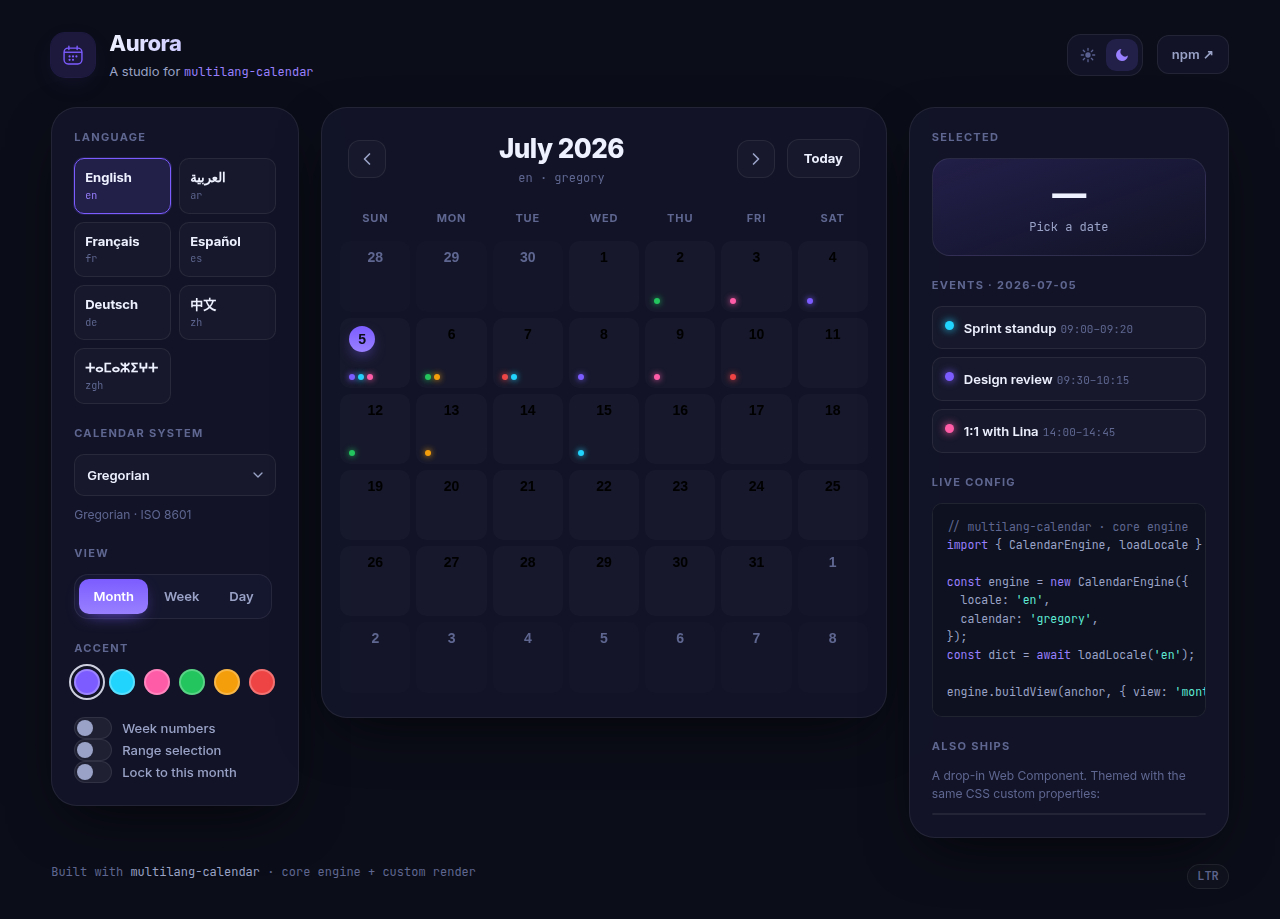
A framework-agnostic, fully internationalized calendar with built-in locale dictionaries (incl. Tamazight/Tifinagh), Gregorian, Hijri/Islamic, Persian, Hebrew and Amazigh (Berber) calendar systems, date selection, ranges and event markers.

Maintainers
 eyoussef
Readme
multilang-calendar
A framework-agnostic, fully internationalized calendar for the web.
- Framework-agnostic core — pure TypeScript, no DOM dependency. Use it from React, Vue, a Web Component, or a server.
- All languages via lazy dictionaries — built-in dictionaries (English, Arabic, French, Spanish, German, Chinese, and Tamazight / Tifinagh) are code-split and loaded on first use. Register your own anytime.
- Multiple calendar systems — Gregorian, Hijri/Islamic (Umm al-Qura, civil, …), Persian, Hebrew, Buddhist and Chinese via the
IntlAPI, plus a custom Amazigh (Berber) calendar. No date-conversion tables shipped. - Month / Week / Day views — month grid plus time-grid week & day views with overlapping-event layout and all-day rows.
- Date selection & ranges, event markers (date-only or timed), optional week numbers, RTL auto-detection.
- Timezone-safe — all internal date math is anchored to UTC midnight, so days never shift across timezones.



📦 npm: https://www.npmjs.com/package/multilang-calendar 🚀 Live demo: https://calendarmulti.netlify.app/
Install
npm install multilang-calendar
# optional peers, depending on which binding you use:
npm install react react-dom   # for the React binding
npm install vue                # for the Vue 3 binding
Quick start
Web Component
<intl-calendar locale="zgh" calendar="gregory" week-numbers></intl-calendar>

<script type="module">
  import 'multilang-calendar/web';
  const cal = document.querySelector('intl-calendar');
  cal.markers = [{ date: '2026-07-14', label: 'Review', color: '#dc2626' }];
  cal.addEventListener('select', (e) => console.log('picked', e.detail.date));
</script>
The component ships its own Shadow DOM styling. For the React/Vue bindings (or if you render the grid yourself), import the stylesheet:
import 'multilang-calendar/style.css';React
import { Calendar } from 'multilang-calendar/react';
import 'multilang-calendar/style.css';

export function App() {
  return (
    <Calendar
      locale="ar"
      calendar="islamic-umalqura"
      value="2026-07-04"
      markers={[{ date: '2026-07-14', label: 'Review', color: '#dc2626' }]}
      onSelect={(iso) => console.log('picked', iso)}
    />
  );
}
Vue 3
<script setup lang="ts">
import { Calendar } from 'multilang-calendar/vue';
import 'multilang-calendar/style.css';
</script>

<template>
  <Calendar
    locale="zgh"
    :week-numbers="true"
    :markers="[{ date: '2026-07-14', label: 'Review', color: '#dc2626' }]"
    @select="(iso) => console.log('picked', iso)"
  />
</template>
Core only (any framework / server)
import { CalendarEngine, loadLocale } from 'multilang-calendar';

const engine = new CalendarEngine({ locale: 'ar', calendar: 'islamic-umalqura' });
const dict = await loadLocale('ar');
const view = engine.buildView(
  new Date(Date.UTC(2026, 6, 1)),
  { weekNumbers: true, markers: [{ date: '2026-07-14', label: 'Review' }] },
  dict,
);

console.log(view.monthName, view.yearLabel); // e.g. "محرم 1448"
for (const week of view.weeks) for (const cell of week.cells) {
  console.log(cell.year, cell.month, cell.day, cell.inMonth, cell.isToday);
}
API
CalendarEngine
new CalendarEngine({ locale?: string; calendar?: CalendarSystem })| Method | Returns | Description |
| --- | --- | --- |
| buildView(anchor, options, dictionary) | CalendarView | Immutable render snapshot for the month containing anchor. |
| addMonth(date, delta) | Date | Move by N months in the active calendar system. |
| firstOfMonth(year, month) | Date | First day of a system month. |
| parts(date) | {year, month, day, weekday} | System-field breakdown of a Date. |
CalendarSystem = 'gregory' | 'islamic' | 'islamic-umalqura' | 'islamic-civil' | 'islamic-tbla' | 'persian' | 'hebrew' | 'chinese' | 'buddhist' | 'amazigh'
Amazigh (Berber) calendar
Intl/CLDR has no built-in Berber calendar, so calendar: 'amazigh' is a
custom system: it reuses the Gregorian grid (months and days are identical)
and overlays Tifinagh month/weekday names from the zgh dictionary, with
the Amazigh year = Gregorian year + 950. The new year (Yennayer) rolls
on January 14 per the Moroccan official convention, so January 1–13 belong
to the previous Amazigh year.
The year label shows both eras, e.g. 2976 ⴰⵎ (2026) (ⴰⵎ = "AM" era in
Tifinagh; Latin AM is used for non-zgh locales). The month-view title uses
the Amazigh year of the month's first day, so January 2026 is labeled 2975
(the year it begins in) while day-view titles reflect the roll — Jan 13 is
2975, Jan 14 is 2976.
const am = new CalendarEngine({ locale: 'zgh', calendar: 'amazigh' });
const dict = await loadLocale('zgh');
const view = am.buildView(new Date(Date.UTC(2026, 6, 4)), {}, dict);
console.log(view.monthName, view.yearLabel); // ⵢⵓⵍⵢⵓⵣ  2976 ⴰⵎ (2026)
Options
| Option | Type | Default | Notes |
| --- | --- | --- | --- |
| locale | string | 'en' | Any BCP-47 tag, e.g. 'ar-EG', 'zgh'. |
| calendar | CalendarSystem | 'gregory' | Intl calendar system. |
| firstDayOfWeek | 0..6 | auto from locale | Overrides the locale-derived start of week. |
| weekNumbers | boolean | false | Show ISO week numbers column. |
| min / max | string \| null | null | Inclusive ISO bounds; out-of-range cells are disabled. |
| rtl | boolean | auto from locale | Force text direction. |
| markers | CalendarMarker[] | [] | { date, label?, color?, class?, start?, end? } — see timed events. |
| selection | CalendarSelection | null | {kind:'single',date} or {kind:'range',start,end}. |
| view | 'month' \| 'week' \| 'day' | 'month' | Active view. Week/day render a time-grid. |
| hourStart | 0..23 | 0 | First hour shown in the time-grid. |
| hourEnd | 1..24 | 24 | Last hour (exclusive) in the time-grid. |
Views: month, week, day
The calendar has three views, switchable from the in-component Month / Week / Day
tabs or via the view option/prop. Navigation (◀ / ▶ / Today) moves by month,
week, or day depending on the active view.
In week and day views, markers with start/end times (HH:mm, 24h)
are laid out as positioned event blocks in an hour grid; overlapping events are
packed side-by-side. Markers without times appear as all-day chips at the top
of their day column.
markers = [
  { date: '2026-07-06', label: 'Standup', start: '09:00', end: '09:30', color: '#2563eb' },
  { date: '2026-07-06', label: 'Sprint planning', start: '09:15', end: '10:30' }, // overlaps
  { date: '2026-07-08', label: 'Out of office', color: '#16a34a' },              // all-day
];
The engine exposes buildTimeGrid(anchor, 'week' | 'day', options, dict) returning
a TimeGridView, and advance(anchor, mode, delta) to move by the right unit.
Locales
Built-in lazy loaders are registered for: en, ar, fr, es, de, zh, zgh (Standard Moroccan Tamazight, Tifinagh script).
import { loadLocale, registerLocale, registerLocaleLoader, availableLocales } from 'multilang-calendar';

await loadLocale('zgh'); // fetch + cache on first use

registerLocale({
  code: 'kab', name: 'Taqbaylit',
  today: "Ass-a", prevMonth: "Aggur yezrin", nextMonth: "Aggur d-iteddun",
  week: "Dduṛt", events: "Tidyanin", noEvents: "Ulac tidyanin",
});
Tamazight (zgh) ships month and weekday names in Tifinagh as dictionary
overrides, since Intl coverage for Tifinagh is uneven across runtimes.
Web Component
<intl-calendar> attributes: locale, calendar, first-day, week-numbers,
min, max, value ("yyyy-mm-dd" or "start|end" for a range), markers
(JSON string), view (month | week | day), hour-start, hour-end.
Properties of the same names (camelCased) are also accepted.
Events: select (detail.date), navigate (detail.anchor, detail.view),
viewchange (detail.view), eventclick (detail.marker). Methods:
navigate(delta), goToday(), setView(mode).
The React/Vue bindings add view / defaultView, hourStart, hourEnd,
onViewChange, and onEventClick props.
Styling
All classes are .mlc- prefixed. Override the exposed CSS custom properties:
.mlc-calendar {
  --mlc-accent: #16a34a;
  --mlc-radius: 14px;
  --mlc-font: "Noto Sans Tifinagh", system-ui, sans-serif;
}
Building & developing
npm install
npm run dev      # open the printed URL for the live demo
npm run build    # type-check + bundle to dist/
npm run typecheck
License
MIT