
n8n-nodes-entity-enricher
v1.2.1
Published
n8n community node for Entity Enricher — enrich entities with multi-model LLM fusion, multilingual output, and expertise-driven strategies

Maintainers
 entityenricher
Readme
n8n-nodes-entity-enricher


An n8n community node that integrates with Entity Enricher — a multi-model LLM enrichment platform with schema-driven structured output, multilingual support, and automated fusion.
Installation
From the n8n UI
- Go to Settings > Community Nodes
- Click Install a community node
- Enter
n8n-nodes-entity-enricher - Click Install
From the command line
npm install n8n-nodes-entity-enricherPrerequisites
- An Entity Enricher instance (cloud or self-hosted)
- An API key (create one in API Keys > App Access Keys)
Credential Setup
- In n8n, go to Credentials > New Credential
- Search for Entity Enricher API
- Enter your API key (format:
ent_XXXXXXXXXXXX) - Set the Base URL (default:
https://entityenricher.ai)
The credential is verified against the API on save.
Operations
| Category | Operation | Description | |----------|-----------|-------------| | Enrichment | Enrich Entity | Enrich a single entity using one or more LLM models with SSE streaming | | Enrichment | Batch Enrich | Enrich all input items as a single batch with parallel execution | | Schema | List Schemas | List available saved schemas | | Schema | Get Schema Details | Get full schema content with extracted search key properties | | Record | List Records | Query enrichment records with pagination and filters | | Record | Get Record | Retrieve a specific enrichment result by ID | | Fusion | Merge Results | Merge multiple model results with optional LLM arbitration | | Configuration | Get Options | Get available models, languages, and strategies |
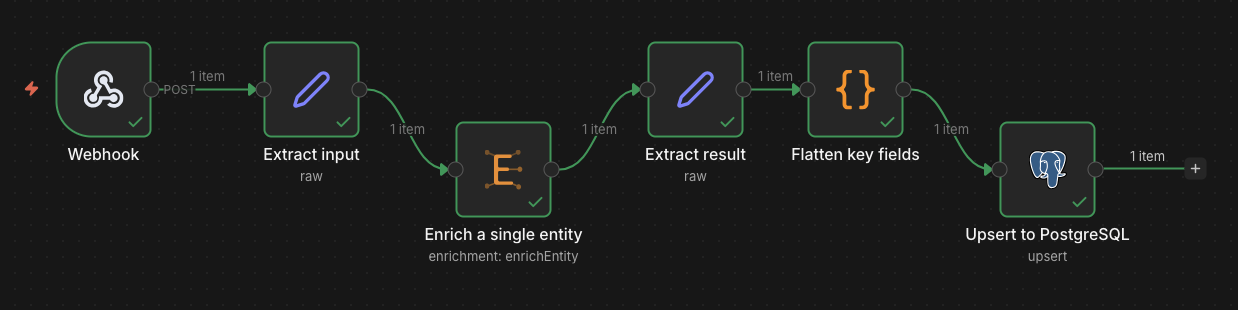
Single Entity Enrichment
Enrich a single entity against a schema with one or more LLM models.
Configuration:
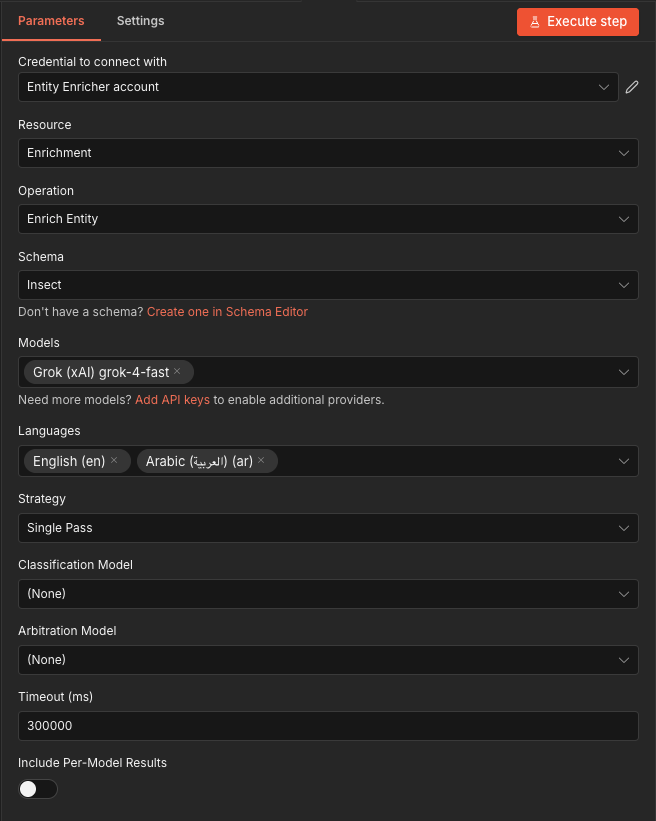
- Schema: Select from saved schemas (dynamic dropdown, pinned schemas shown first)
- Models: Choose one or more models (pricing displayed per model)
- Languages: Output languages (at least one required)
- Strategy:
multi_expertise(parallel per-domain) orsingle_pass - Classification Model (optional): Pre-flight entity type verification to prevent hallucination
- Arbitration Model (optional): LLM-based conflict resolution when using multiple models
- Timeout: Max wait time (default: 5 minutes)
Output (default):
By default, the output contains only the enriched data at the top level for direct field access:
{
  "company_name": "Pfizer",
  "headquarters": "New York",
  "revenue_usd": 58496000000,
  "..."
}
Toggle Include Enrichment Metadata to add cost, tokens, fusion details, and record IDs:
{
  "result": { "company_name": "Pfizer", "headquarters": "New York", "..." : "..." },
  "record_id": "uuid",
  "success": true,
  "is_fused": true,
  "cost_usd": 0.0042,
  "input_tokens": 1250,
  "output_tokens": 890,
  "fusion": { "agreed_fields": 18, "conflicted_fields": 2, "total_fields": 20 },
  "source_models": ["anthropic::claude-sonnet-4-5", "openai::gpt-4o"]
}
Toggle Include Per-Model Results to also output individual model results alongside the fused output.
Batch Enrichment
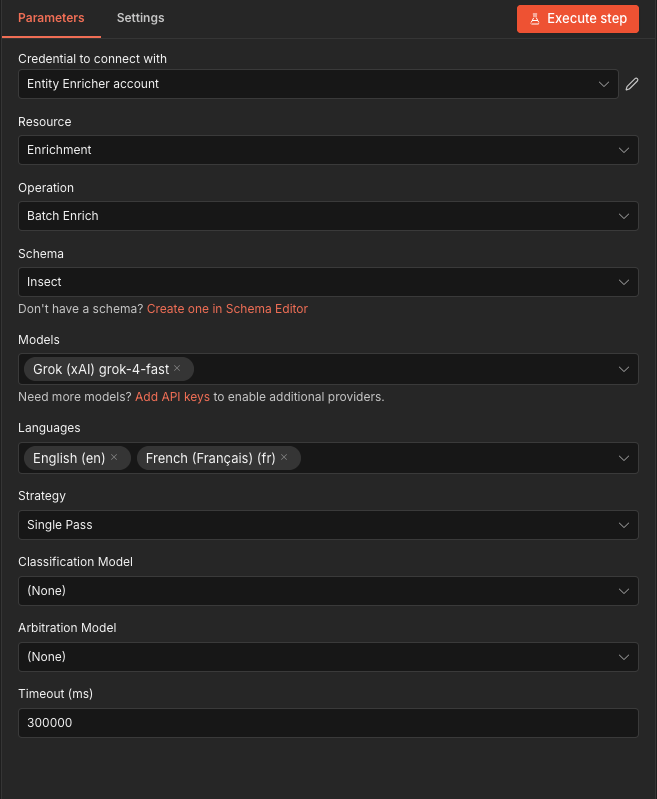
Enrich all input items in a single batch with parallel execution and per-provider rate limiting.
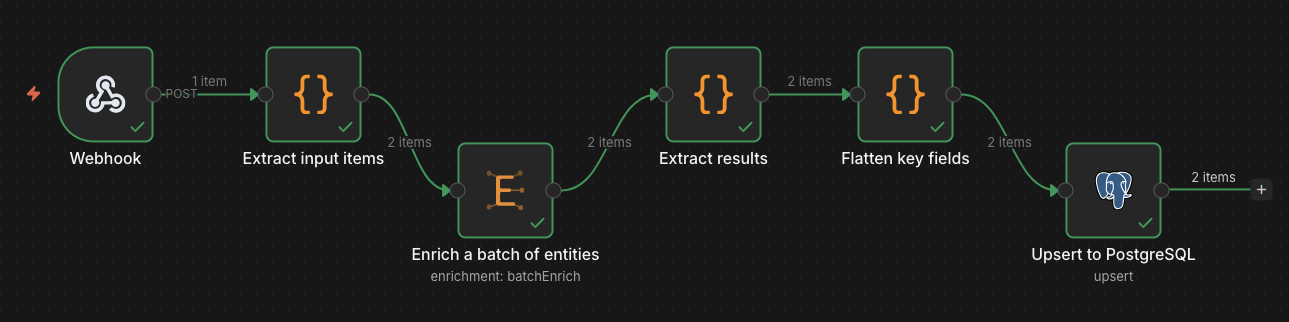
Each input item is treated as one entity. The node outputs one item per entity with the enrichment result, making it easy to chain with database upserts or further processing.
Key Features
- Dynamic dropdowns — Schemas, models, languages, and strategies are loaded from the API at configuration time
- SSE streaming — Uses server-sent events internally to wait for job completion with automatic lifecycle management (pause/continue/cancel)
- Auto-continue — Automatically continues past classification mismatch pauses (non-interactive)
- Search key validation — Validates that input entities contain the required search keys from the schema
- Multi-model fusion — When using 2+ models, results are automatically merged with field-level conflict detection. Conflicts are resolved via rule-based merging (majority vote, median, union) by default, or via LLM arbitration when an arbitration model is selected. Fusion can also be triggered manually on existing records with the Merge Results operation
- Inactivity timeout — The timeout resets on each progress event, so large batches won't time out as long as entities keep completing. The job is automatically cancelled if no event arrives within the configured period (default: 5 minutes)
Workflow Ideas
| Pattern | Description | |---------|-------------| | CRM Enrichment | Webhook trigger > Extract company > Enrich > Upsert to CRM | | Spreadsheet Pipeline | Read CSV/Google Sheet > Batch Enrich > Write enriched data back | | Waterfall Enrichment | Enrich with cheap model > Check quality > Re-enrich failures with premium model | | Scheduled Refresh | Cron trigger > Fetch stale records > Batch re-enrich > Update database | | Webhook-Driven | HTTP webhook > Validate input > Enrich > Return result in response |
Documentation
- n8n Connector Guide — Full setup and usage documentation
- API Integration Guide — REST API reference and code examples
- API Keys — Creating and managing API keys
Development
# Install dependencies
npm install

# Build
npm run build

# Lint (type check)
npm run lint
Releasing a New Version
Publishing is automated via GitHub Actions. To release a new version:
git tag n8n-v1.2.0 && git push origin n8n-v1.2.0This triggers the CI/CD pipeline which will:
- Build & lint the connector
- Run integration tests (module loading + n8n startup verification)
- Publish to npm with the version extracted from the tag
- Create a GitHub Release with an auto-generated changelog from commits touching the connector directory
The tag name must follow the n8n-v<semver> format (e.g., n8n-v1.0.0, n8n-v1.2.3). The version in package.json is updated automatically during publish — no need to change it manually.
Changelog
See CHANGELOG.md for a full list of changes in each version.