
n8n-nodes-finnhub
v1.0.4
Published
n8n node to consume the finnhub.io REST API

Maintainers
 niefuend
Readme

n8n is a fair-code licensed workflow automation platform.
Features
- Covers 90+ Finnhub REST endpoints grouped by resource (stocks, ETFs, funds, forex, crypto, technical analysis, enterprise, institutional, economic, and alternative data).
- Premium toggle surfaces additional paid endpoints only when your credential allows it.
- Generated operations automatically include argument descriptions straight from Finnhub docs.
- Ships with build, lint, and test scripts to keep the node production-ready.
Installation
Credentials
Compatibility
Usage
Operations
Resources
Development
Version history
Installation
Follow the community node installation guide in the n8n documentation.
Credentials
- Create an account and API token in the Finnhub dashboard.
- In n8n, add a new Finnhub.io API credential and paste the token into the
Tokenfield. - Enable the
Premium Accesscheckbox if your subscription unlocks premium endpoints. The node exposes the premium-only resources and operations automatically when this flag (or the credential) is set.
Tip: You can keep two credentials—one with a sandbox token and one with a live token—to switch between environments quickly.
Compatibility
- n8n: v1.x
- Node.js for local builds: 18+ (tested with 18, 20, 22)
Usage
- Drop the Finnhub.io node into your workflow.
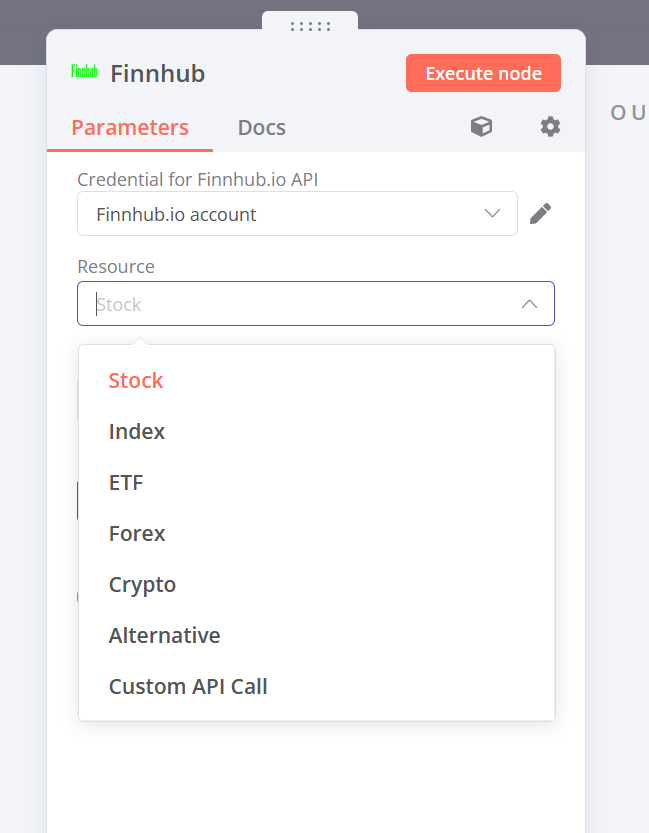
- Select the credential you created earlier. The node prefills the
Premium Accesstoggle based on the credential setting. - Choose a
Resource, then pick anOperation. Field names and descriptions come directly from the Finnhub API and match the official documentation. - Provide any required parameters. Optional parameters can be left empty and are excluded from the request automatically.
Operations
Every REST route defined in nodes/Finnhub/route-definitions.json is available in the node. Resources are grouped to mirror the Finnhub documentation:
- Stock: Symbol search, quotes, profiles, filings, transcripts, market status, calendars, alternative metrics, and 30+ premium analytics such as ESG, supply chain, valuations, corporate actions, and similarity indexes.
- ETF & Mutual Fund: Holdings, profiles, country/sector allocation; premium access adds EET/Pai disclosures and segmentation.
- Index: Current and historical constituents, including premium-only datasets.
- Bond: Yield curves, tick data, price snapshots, and profiles (premium).
- Forex & Crypto: Exchange and symbol directories, candles, and premium rate/profile endpoints.
- Technical Analysis: Pattern scans, technical indicator screens, and indicator calculations (premium).
- Institutional & Enterprise Data: Ownership, portfolios, bank branches, global filings search/download, AI chat, and more.
- Economic & Alternative Data: Country codes, macroeconomic indicators, and the FDA advisory calendar.
Premium-only endpoints are clearly marked inside n8n. Disable Premium Access to limit the operation list to free APIs.
Resources
Development
Local development and contributions:
Requirements
- Node.js 18+ and npm
- TypeScript 5, ESLint 8, Prettier 3 (installed as devDependencies)
Helpful scripts
npm run build– compiles TypeScript and copies icons with Gulp 5npm run dev– TypeScript watch mode for rapid iterationnpm run lint– validates code with ESLint and n8n node rulesnpm run lintfix– same as above with automatic fixesnpm run format– formats source files with Prettiernpm run test– builds the project and executes Node.js test suites
Notes
- ESLint replaces the deprecated TSLint setup.
- TypeScript uses
skipLibCheckto avoid noise from third-party typings. - Security-sensitive sub-dependencies (for example,
axios,form-data) are pinned viapackage.jsonoverrides.
Version history
- 0.2.0
- Dependencies bumped (TypeScript 5, Prettier 3, ESLint; removed TSLint)
- Updated to n8n v1.x APIs and adjusted node inputs/outputs
- Migrated Gulp to v5
- Added security overrides for axios and form-data
- Documented development setup and usage guidance