
n8n-nodes-questionstar
v0.1.45
Published
Official n8n community nodes for integrating Questionstar online surveys and questionnaires via OAuth2 API.

Maintainers
 questionstar
Readme
n8n-nodes-questionstar
This node connects QUESTIONSTAR with n8n to automate survey workflows, collect and process responses, sync data with external systems, and trigger actions based on survey activity.

📌 Overview
The QUESTIONSTAR Community Node enables deep integration between QUESTIONSTAR surveys and your n8n automation workflows.
With this integration you can:
- Trigger workflows when a survey is completed
- Retrieve full survey data and responses
- Sync survey results to CRM, Google Sheets, databases, or other systems
- Automate follow-up actions (emails, notifications, API calls)
- Authenticate securely using OAuth2
✨ Features
- Trigger node for survey completion events
- Action node for retrieving full survey data
- OAuth2 authentication with QUESTIONSTAR API
- Fully compatible with n8n workflows
🛠️ Installation (Self-Hosted n8n)
If you run a self-hosted n8n instance (on your own server and not in n8n Cloud), you must install the QUESTIONSTAR Community Node first. Once installed, you will be able to build automations using your surveys and survey data from QUESTIONSTAR.
⚠️ Important: Installing the QUESTIONSTAR Community Node requires administrator rights. If you do not have administrator rights, please send this guide to your n8n administrator so they can install the QUESTIONSTAR integration for your account.
Installation Steps
Log in to your n8n instance.
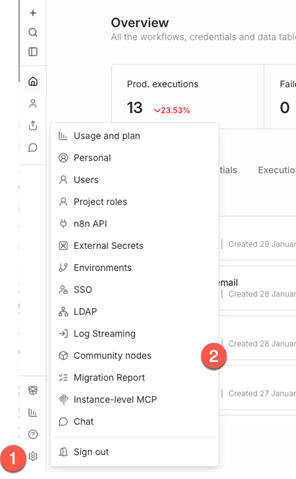
- Click the Settings button (gear icon) in the lower-left corner.
- In the Settings menu, click Community Nodes.
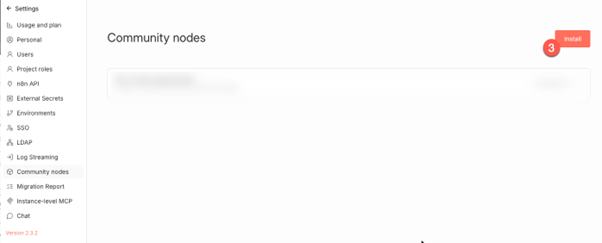
- Click the Install button (upper-right corner).
- If no community nodes are installed yet, click Install a community node in the center of the screen.
The Install community nodes dialog opens.
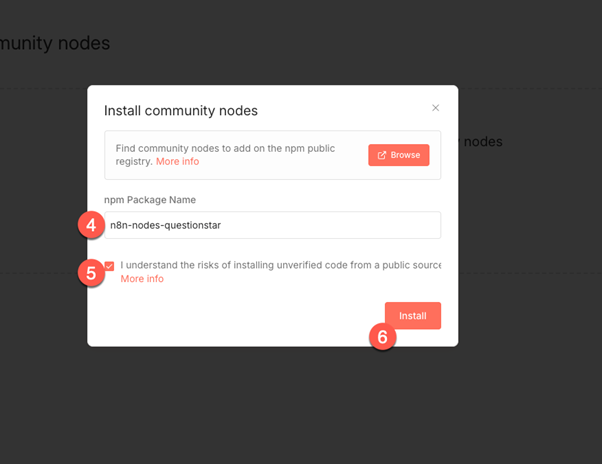
Type n8n-nodes-questionstar into the field npm Package Name
n8n-nodes-questionstarEnable the checkbox confirming that you understand the risks of installing third-party code from a public source.
Click the Install button to finish the installation.
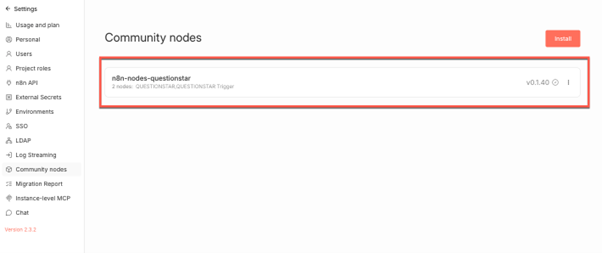
✅ The installation is now complete.
The QUESTIONSTAR Community Node is available in your organization and ready to be used in workflows.