
n8n-nodes-sentinelone-platform
v0.3.1
Published
n8n community nodes for SentinelOne alerts and SDL

Maintainers
 pemontto
Readme
SentinelOne Platform for n8n
SentinelOne Platform provides n8n nodes to read and update SentinelOne alerts, manage alert notes, and run SDL PowerQueries. Triggers fire on new or updated alerts and on alert activity.
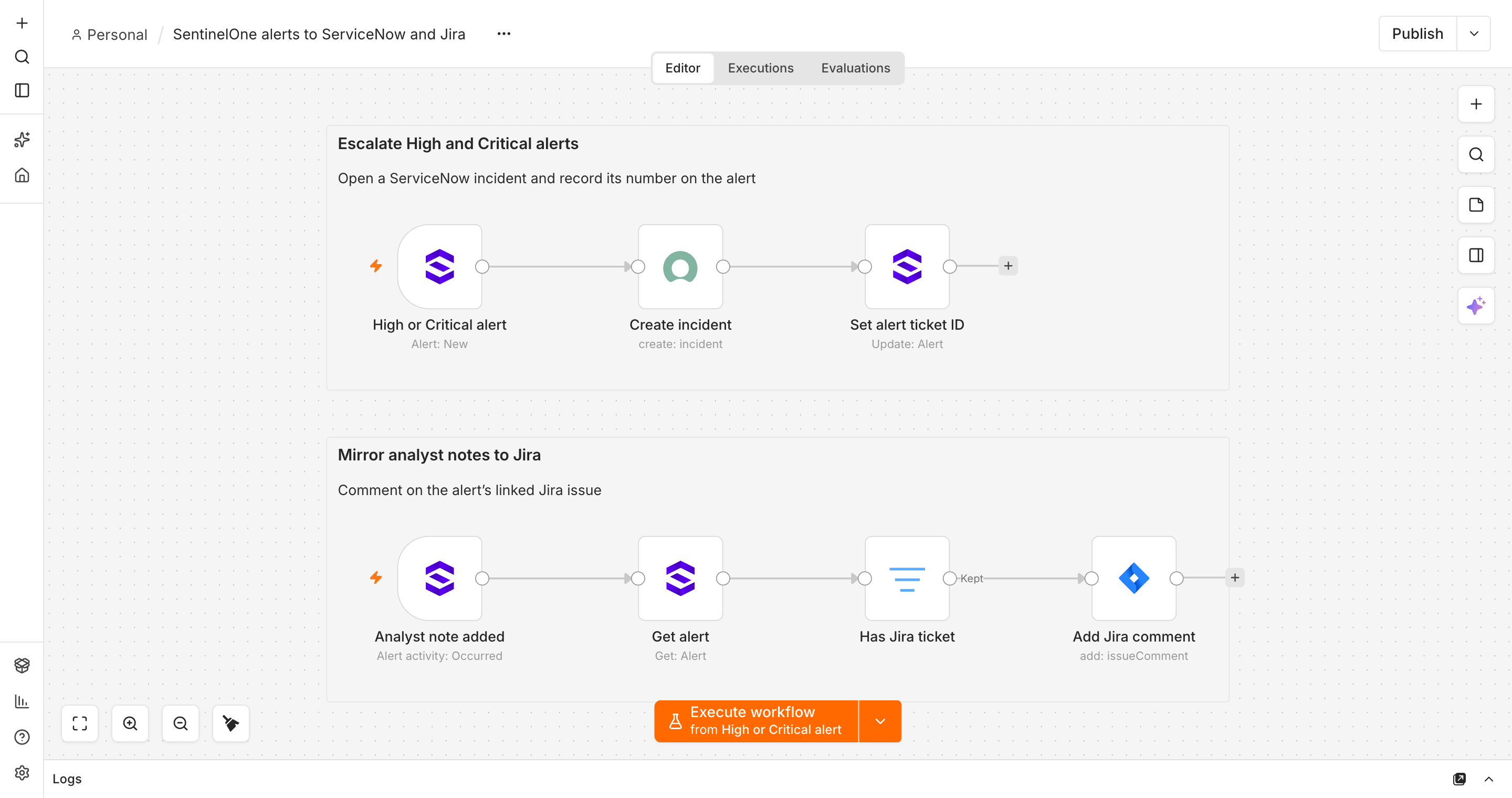
For example, escalate High and Critical alerts to ServiceNow and write the incident number back to the alert, or copy analyst notes to the linked Jira issue as comments.
Actions
| Resource | Operations | | ---------- | ---------------------------------------------------------- | | Alert | Get, Get Many, Update (status, analyst verdict, ticket ID) | | Alert Note | Get Many, Create | | SDL Query | Execute |
Trigger
| Resource | Events | | -------------- | ---------------------------- | | Alert | New, Updated, New or Updated | | Alert Activity | Activity types |
Alert Activity covers alert creation, status, verdict, severity and assignee changes, mitigation activity, notes and agentic investigations. Other (Unrecognised Types) selects alert-linked types outside the named list, including 16006, and can be combined with named types. Choose activity types with the Operation multi-select, which defaults to Any. Simplify defaults to enabled and returns concise changes such as { "field": "status", "from": "NEW", "to": "IN_PROGRESS" }. Scope is its own section straight after Credential and Poll Times for both trigger resources, containing Accounts, Sites, and Groups; Alert Get Many keeps scope under Options. Alert Get Many also supports Alert Filters rows and Advanced Filters in Options; see the actions guide for its conjunction rules. Alert summaries include flat scope names. Regular node and simplified Alert trigger output use SentinelOne filter field IDs, including alertName, alertNoteExists, ticketId, status, and severity. Nested fields such as detectionSource, assets, process, analytics, and assignee retain their API shape. Raw trigger output keeps the API object. Alert Activity summaries keep their alert prefixes. Use Alert Filters for GUI filter rows, or Advanced Filters for JSON rules; see the alert filter field reference and trigger output examples for field support, simplified and full activity and alert records, conditions and delivery limits.
For example, a simplified Alert trigger item can contain:
{
	"eventId": "tenant.example/alert/alert-123/new",
	"eventType": "alert.new",
	"eventTime": "2025-02-03T09:55:00Z",
	"id": "alert-123",
	"alertName": "Example detection",
	"severity": "HIGH",
	"status": "NEW",
	"analystVerdict": "UNDEFINED",
	"accountName": "Example account",
	"siteName": "London",
	"groupName": "Workstations"
}
Every trigger event includes a stable eventId for downstream deduplication. Rare duplicates can occur after crashes, state restores, overlapping runs, or overload; see the trigger delivery limits.
Documentation
- Credentials
- Actions
- Triggers
- Verification
- Acceptance workflows
- Architecture and n8n references
- Behavior contract
Development
Use pnpm install --frozen-lockfile, pnpm build, pnpm test, and pnpm lint. Run pnpm dev for the normal package-local n8n development process. See development runtime checks for maintainer-specific runtime checks.
Source and issues. MIT licence; see LICENSE.
Severity options use Critical, High, Medium, Low, Info, Unknown order. Status options use New, In Progress, Resolved order.