
nano-string-utils
v0.28.1
Published
Modern string utilities with zero dependencies. Tree-shakeable (<1KB each), TypeScript-first, type-safe. Validation, XSS prevention, case conversion, fuzzy matching & more.

Maintainers
 zheruel
Keywords
Readme

nano-string-utils is a modern string utility library for JavaScript and TypeScript: case conversion (camelCase, kebabCase, snake_case, PascalCase), slugify, truncate, email and URL validation, HTML escaping and XSS sanitization, fuzzy matching, Levenshtein distance, pluralization, Unicode and emoji-safe helpers, and more. It has no runtime dependencies, ships ESM and CommonJS, and every function is independently importable — so a lodash or underscore.string replacement costs you bytes, not kilobytes.
Works in Node.js, Deno, Bun, browsers, and edge runtimes.
Interactive playground and API docs → · Migrating from lodash →
Why nano-string-utils
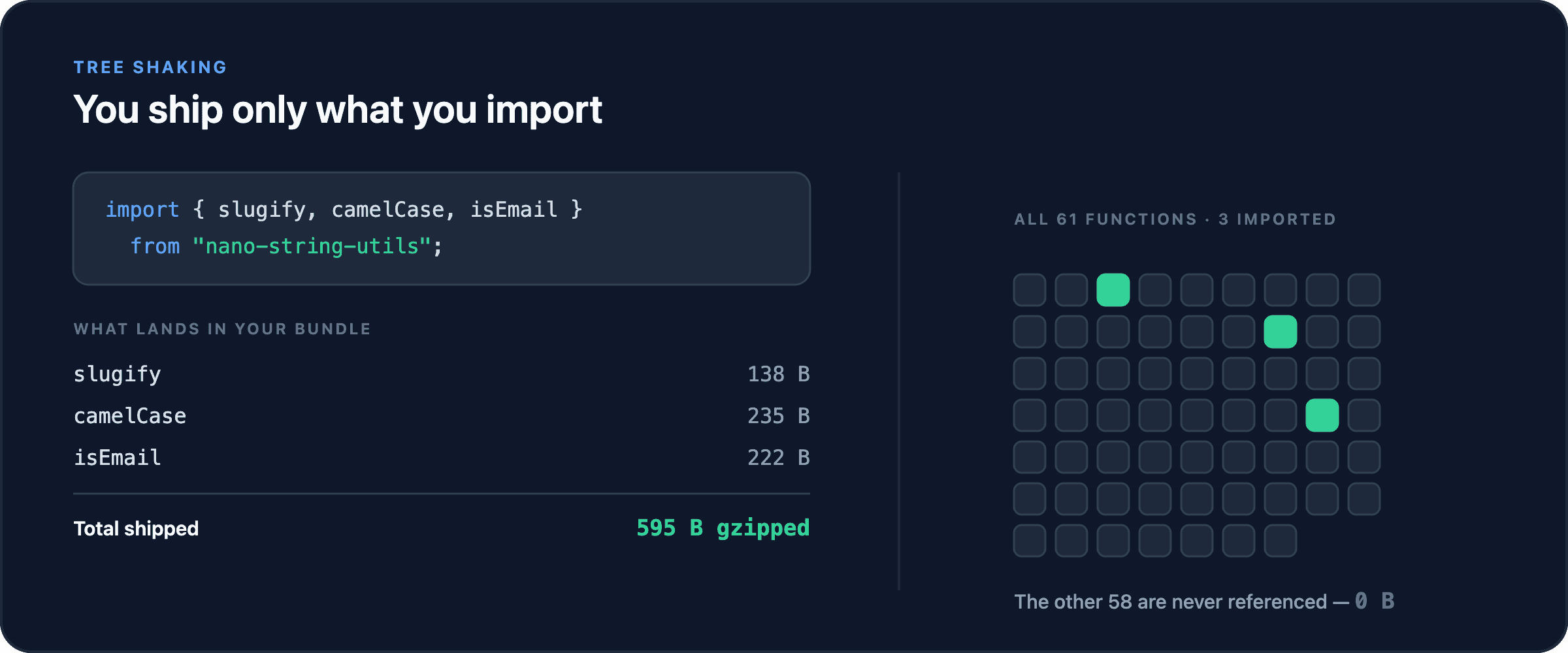
- Nothing you didn't ask for. Zero runtime dependencies means zero transitive supply-chain surface. The whole library is 9.6 KB brotlied; a typical import is a few hundred bytes.
- Real tree-shaking. Every function lives in its own module and is marked side-effect free, so bundlers drop what you don't reference.
- Types that do work. Branded types make a validated
EmailorURLunforgeable, and template literal types compute exact return values at compile time. - Null-safe by default. Almost every function takes
nullorundefinedand passes it straight through instead of throwing. See Null safety for the four that don't. - Unicode-aware where it counts.
graphemes,codePoints,reverse, andtoASCIIhandle emoji, combining marks, and surrogate pairs correctly. - Batteries for real apps. XSS sanitization, PII redaction, fuzzy search scoring, and sentence splitting are in the box, not in three more dependencies.
- 1,686 tests across 69 files, run in CI on Node 20, 22, and 24.
Install
npm install nano-string-utils
pnpm add nano-string-utils
yarn add nano-string-utils
bun add nano-string-utils
# Deno, from JSR
deno add jsr:@zheruel/nano-string-utils<!-- ES modules -->
<script type="module">
import {
slugify,
camelCase,
} from "https://unpkg.com/nano-string-utils/dist/index.js";
slugify("Hello World"); // 'hello-world'
</script>
<!-- Or a global build -->
<script src="https://unpkg.com/nano-string-utils/dist/index.iife.js"></script>
<script>
nanoStringUtils.slugify("Hello World!"); // 'hello-world'
</script>Quick start
import {
  slugify,
  camelCase,
  truncate,
  isEmail,
  fuzzyMatch,
  sanitize,
} from "nano-string-utils";

// Reshape
slugify("Hello World!"); // 'hello-world'
camelCase("hello-world"); // 'helloWorld'
truncate("Long text here", 10); // 'Long te...'

// Validate
isEmail("[email protected]"); // true
isEmail("invalid.email"); // false

// Search
fuzzyMatch("gto", "goToLine"); // { matched: true, score: 0.546 }
fuzzyMatch("abc", "xyz"); // null

// Make safe
sanitize("<script>alert('xss')</script>Hello"); // 'Hello'
sanitize("<b>Bold</b> text", { allowedTags: ["b"] }); // '<b>Bold</b> text'

// Null-safe, always
slugify(null); // null — no throw
The 61 functions
Every function links to a live, editable example in the playground. Sizes are gzipped, measured per function with the rest of the library tree-shaken away.
Case conversion
| Function | What it does | Gzipped |
| --- | --- | --- |
| camelCase | Convert to camelCase | 235 B |
| pascalCase | Convert to PascalCase | 222 B |
| kebabCase | Convert to kebab-case | 201 B |
| snakeCase | Convert to snake_case | 200 B |
| constantCase | Convert to CONSTANT_CASE | 228 B |
| dotCase | Convert to dot.case | 207 B |
| pathCase | Convert to path/case | 207 B |
| sentenceCase | Convert to Sentence case | 414 B |
| titleCase | Convert to Title Case, keeping small words lowercase | 561 B |
String manipulation
| Function | What it does | Gzipped |
| --- | --- | --- |
| slugify | Turn any string into a URL-safe slug | 138 B |
| truncate | Cut a string to a max length and append a suffix | 276 B |
| excerpt | Truncate at a word boundary instead of mid-word | 261 B |
| capitalize | Uppercase the first character | 99 B |
| reverse | Reverse a string, surrogate-pair safe | 229 B |
| pad | Pad both ends to a target length | 214 B |
| padStart | Pad the start to a target length | 176 B |
| padEnd | Pad the end to a target length | 180 B |
| trim | Trim arbitrary characters from both ends | 179 B |
| trimStart | Trim arbitrary characters from the start | 165 B |
| trimEnd | Trim arbitrary characters from the end | 170 B |
| mask | Mask characters, e.g. for card or phone numbers | 229 B |
| wrap | Word-wrap text to a given column width | 329 B |
| randomString | Generate a random string of a given length | 227 B |
| wordCount | Count words | 123 B |
| countSubstrings | Count non-overlapping occurrences of a substring | 134 B |
Validation
| Function | What it does | Gzipped |
| --- | --- | --- |
| isEmail | Validate an email address, with opt-in international support | 222 B |
| isUrl | Validate a URL | 168 B |
| isUUID | Validate a UUID | 123 B |
| isHexColor | Validate a hex colour such as #ff5733 | 138 B |
| isNumeric | Check the string represents a number | 122 B |
| isInteger | Check the string represents an integer | 115 B |
| isAlphanumeric | Check the string is letters and digits only | 123 B |
| isASCII | Check the string is pure ASCII | 145 B |
| isBlank | Check the string is empty or only whitespace | 65 B |
| detectScript | Detect the dominant writing system, e.g. Latin or Cyrillic | 540 B |
| classifyText | Classify text as prose, code, an identifier and more | 897 B |
Security and escaping
| Function | What it does | Gzipped |
| --- | --- | --- |
| sanitize | Strip dangerous HTML to prevent XSS | 811 B |
| stripHtml | Remove every HTML tag | 85 B |
| escapeHtml | Escape &, <, >, " and ' | 136 B |
| unescapeHtml | Decode HTML entities back to characters | 155 B |
| redact | Redact emails, phone numbers, cards and other PII | 728 B |
| templateSafe | Interpolate a template with automatic HTML escaping | 501 B |
Search, diff and matching
| Function | What it does | Gzipped |
| --- | --- | --- |
| fuzzyMatch | Fuzzy match with a relevance score, for command palettes | 595 B |
| levenshtein | Edit distance between two strings | 413 B |
| levenshteinNormalized | Edit distance normalised to a 0–1 similarity | 472 B |
| diff | Character-level diff between two strings | 265 B |
| highlight | Wrap search terms in markup for result highlighting | 461 B |
| template | Interpolate {{placeholders}} from an object | 302 B |
| hashString | Fast non-cryptographic string hash | 155 B |
| memoize | Memoise a string function with an LRU-bounded cache | 334 B |
Unicode and international
| Function | What it does | Gzipped |
| --- | --- | --- |
| graphemes | Split into user-perceived characters, emoji-aware | 171 B |
| codePoints | Split into Unicode code points | 131 B |
| deburr | Strip accents and diacritics, café becomes cafe | 273 B |
| toASCII | Transliterate to an ASCII-safe representation | 1.2 KB |
| normalizeWhitespace | Collapse exotic Unicode spaces into plain spaces | 268 B |
| removeNonPrintable | Strip control and non-printable characters | 304 B |
Natural language
| Function | What it does | Gzipped |
| --- | --- | --- |
| pluralize | Pluralise an English word, with irregulars | 459 B |
| singularize | Singularise an English word | 562 B |
| humanizeList | Join a list as a, b, and c | 251 B |
| smartSplit | Split into sentences without breaking on Dr. or 3.5 | 586 B |
| extractEntities | Pull emails, URLs, mentions, hashtags and dates out of text | 572 B |
Size and speed
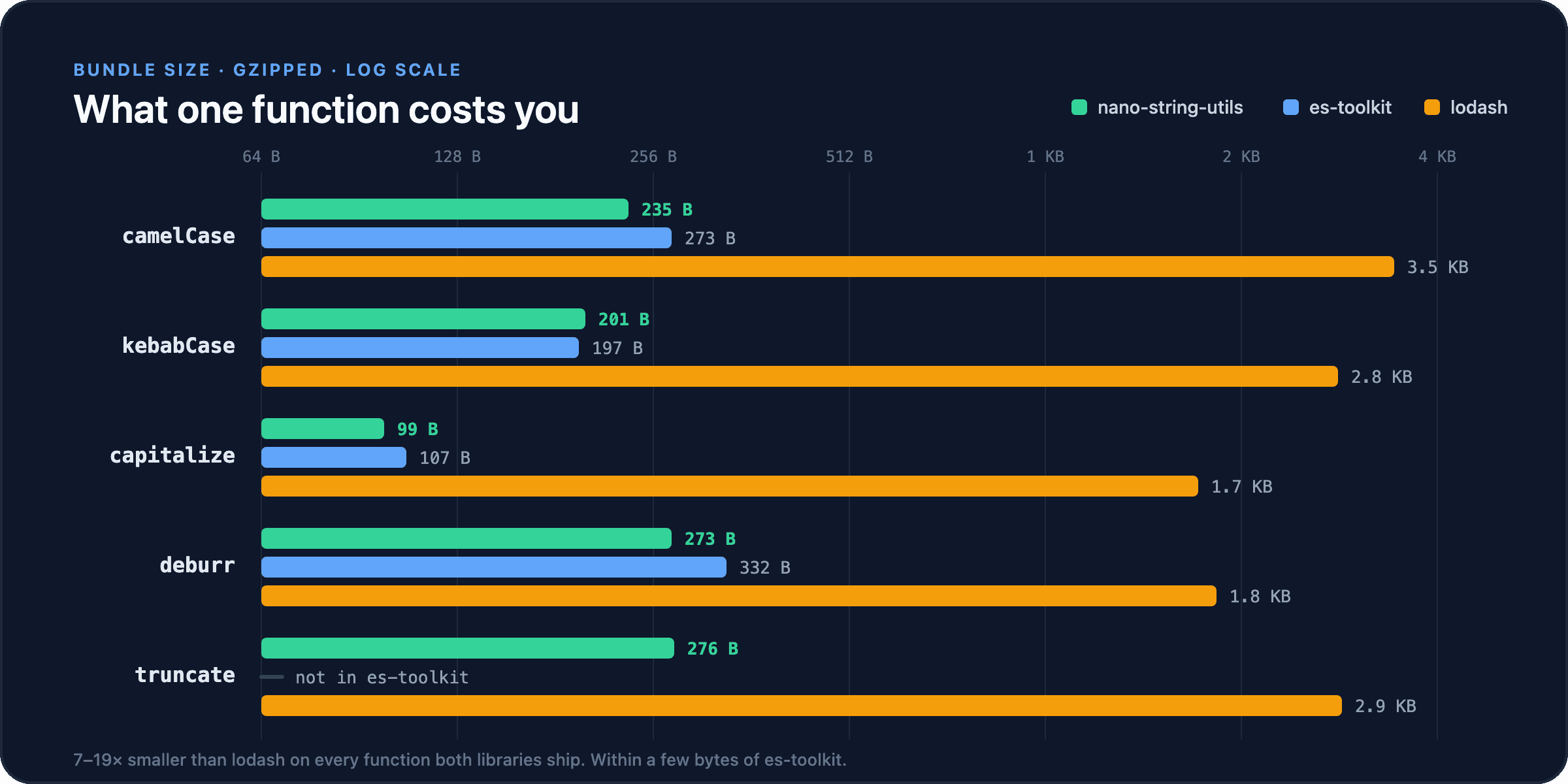
The whole library is 9.6 KB brotlied with every function included. In practice you import a handful and ship a few hundred bytes.
Against lodash and es-toolkit
Numbers below are gzipped bytes, generated by npm run bench:data.
| Function | nano | es-toolkit | lodash |
| ------------ | ----- | ---------- | ------ |
| capitalize | 99 B | 107 B | 1.7 KB |
| kebabCase | 201 B | 197 B | 2.8 KB |
| snakeCase | 200 B | 197 B | 2.8 KB |
| pascalCase | 222 B | 231 B | — |
| camelCase | 235 B | 273 B | 3.5 KB |
| deburr | 273 B | 332 B | 1.8 KB |
| truncate | 276 B | — | 2.9 KB |
| template | 302 B | — | 5.6 KB |
Against lodash, nano is 7–19× smaller on every function both libraries ship. Against es-toolkit, sizes are within a few bytes either way — the difference there is scope, not weight: validation, sanitization, PII redaction, fuzzy matching, and Unicode helpers have no es-toolkit equivalent.
Throughput
Operations per second, higher is better. Across the 16 benchmarked functions nano leads on 8, lodash on 4, and es-toolkit on 4.
| Function | nano | lodash | es-toolkit |
| ------------ | ------ | ------ | ---------- |
| capitalize | 21.2M | 16.2M | 21.2M |
| snakeCase | 4.2M | 3.1M | 4.1M |
| camelCase | 3.3M | 2.2M | 3.3M |
| template | 996K | 53K | — |
| padStart | 7.9M | 18.8M | — |
| deburr | 2.3M | 2.9M | 2.3M |
Case conversion is on par with es-toolkit and roughly 1.4× faster than lodash; template is about 19× faster than lodash's. lodash is genuinely faster at padding and at truncating long strings. Run npm run bench to reproduce any of this on your own machine.
Type safety
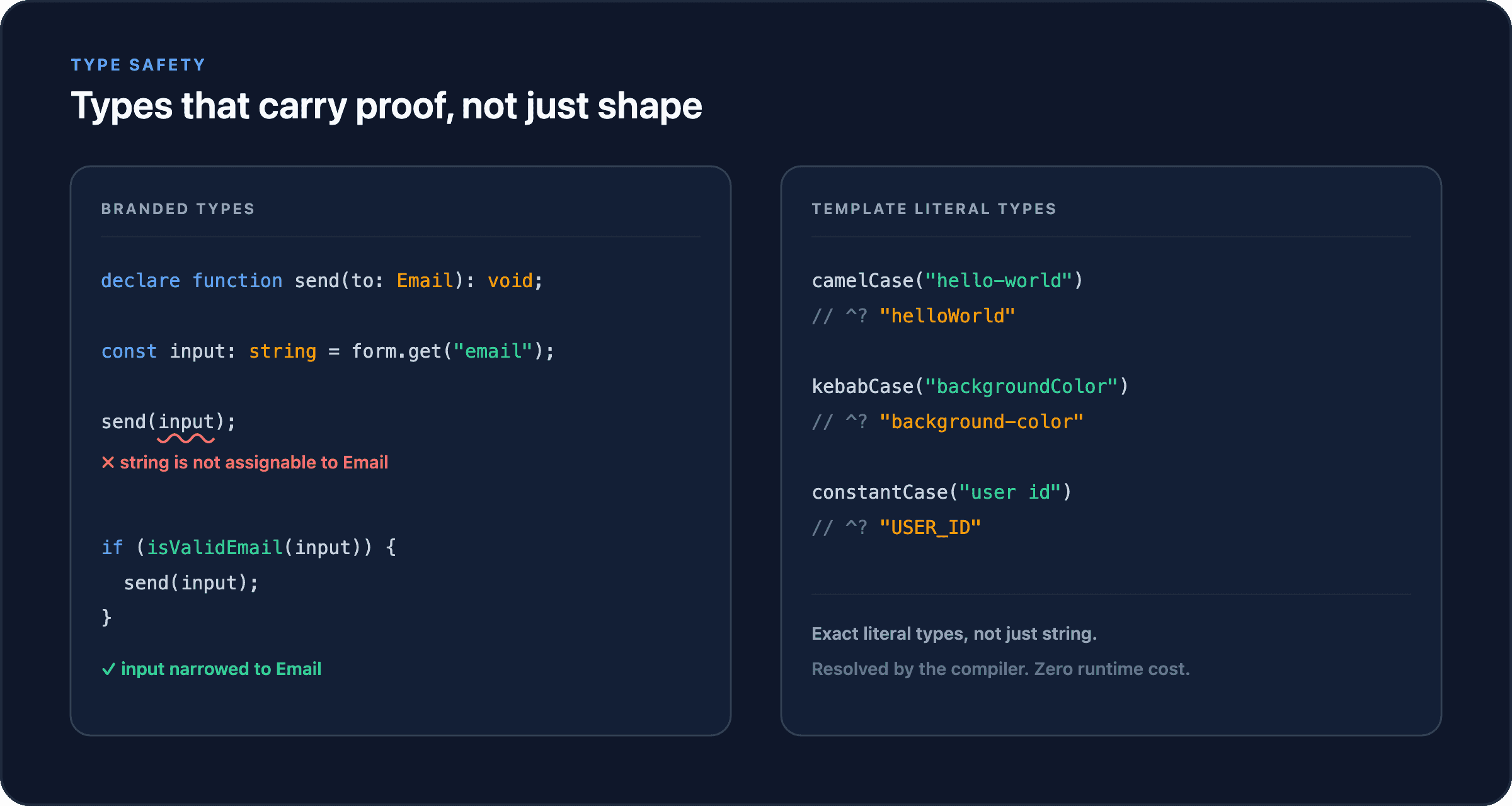
Branded types
A string that has been validated is a different type from one that hasn't, so you can't lose the validation on the way through your code.
import { toEmail, isValidEmail, assertEmail } from "nano-string-utils";
import type { Email } from "nano-string-utils";

declare function sendWelcome(to: Email): void;

const input: string = form.get("email");

sendWelcome(input); // ✗ Type error: string is not assignable to Email

// Narrow it — type guard
if (isValidEmail(input)) {
  sendWelcome(input); // ✓ input is Email here
}

// Or convert — returns Email | null
const email = toEmail(input);
if (email) sendWelcome(email);

// Or assert — throws BrandedTypeError on invalid input
assertEmail(input);
sendWelcome(input); // ✓Email, URL, Slug, SafeHTML, HexColor, NumericString, AlphanumericString, UUID, and IntegerString each come with a toX converter, an isValidX guard, an assertX assertion, and an unsafeX escape hatch for values you have already validated elsewhere.
Template literal types
When the compiler knows the input string, it knows the exact output string.
const a = camelCase("hello-world");
//    ^? const a: "helloWorld"

const b = kebabCase("backgroundColor");
//    ^? const b: "background-color"

const c = constantCase("user id");
//    ^? const c: "USER_ID"
Pass a runtime string and you get string back — no cost, no ceremony.
Null safety
Almost every function tolerates null and undefined rather than throwing, so you can drop them into pipelines handling untrusted input. The input type flows through: string in, string out; null in, null out.
slugify(null); // null
camelCase(undefined); // undefined
truncate(null, 10); // null
isEmail(null); // false
wordCount(undefined); // 0
Four functions are the exception and will throw on a nullish argument — guard them yourself:
| Function | Throws on |
| ----------------------- | --------------------- |
| levenshtein | either argument |
| levenshteinNormalized | either argument |
| redact | the input string |
| humanizeList | the input array |
CLI
npx nano-string-utils slugify "Hello World" # hello-worldInstall it globally for everyday use, or reach for npx, deno run, or bunx on demand.
npm install -g nano-string-utils

nano-string camelCase "hello-world"          # helloWorld
nano-string truncate "Long text here" --length 10
nano-string template "Hello {{name}}" --data '{"name":"World"}'
nano-string isEmail "[email protected]"       # true
nano-string levenshtein "kitten" "sitting"   # 3

# Reads stdin, so it pipes
echo "Hello World" | nano-string slugify     # hello-world
cat post.md | nano-string excerpt --length 160
nano-string --help lists every command; nano-string <function> --help explains one.
Runtime compatibility
| Runtime | Supported | Install | CLI |
| ------------ | --------- | ------------------------------------- | --- |
| Node.js ≥ 18 | ✅ | npm install nano-string-utils | ✅ |
| Deno | ✅ | deno add jsr:@zheruel/nano-string-utils | ✅ |
| Bun | ✅ | bun add nano-string-utils | ✅ |
| Browsers | ✅ | bundler or CDN | — |
| Edge / workers | ✅ | bundler | — |
Only standard JavaScript APIs are used, so behaviour is identical everywhere. Both ESM and CommonJS builds ship in the package, with full type definitions for each.
Compared with the alternatives
| Library | Full size | Dependencies | Tree-shakeable | TypeScript | Scope |
| ------------------- | --------- | ------------ | --------------------- | ---------- | ---------------------------------- |
| nano-string-utils | 9.6 KB | 0 | ✅ | ✅ strict | Strings only, 61 functions |
| lodash | ~70 KB | 0 | ⚠️ needs lodash-es | ✅ via DT | General purpose |
| es-toolkit | ~30 KB | 0 | ✅ | ✅ | General purpose |
| underscore.string | ~20 KB | 0 | ❌ | ❌ | Strings only |
| voca | ~30 KB | 0 | ❌ | ✅ via DT | Strings only |
If you already use es-toolkit for arrays and objects, nano-string-utils composes with it — the two overlap on seven functions and disagree on almost nothing.
Step-by-step lodash migration guide →
Documentation
- Interactive playground — run any function against your own input in the browser
- Bundle size explorer — per-function comparison against lodash and es-toolkit
- Performance benchmarks
- Migration guide — lodash and underscore.string equivalents
- JSR package — TypeScript source, published for Deno
Development
git clone https://github.com/Zheruel/nano-string-utils.git
cd nano-string-utils
npm install

npm test              # watch mode
npm run test:coverage # once, with coverage
npm run typecheck
npm run build
npm run size          # enforce the bundle budget
npm run bench         # performance benchmarks
Adding a function means a module in src/, a test file in tests/, an export from src/index.ts, and an entry in docs-src/src/metadata.ts. CLAUDE.md has the full checklist.
Contributing
Issues and pull requests are welcome. For anything substantial, open an issue first so we can agree on the shape of it.
- Fork and branch (
git checkout -b feature/thing) - Add tests — every function has a matching file in
tests/ - Run
npm run typecheck && npm run test:coverage && npm run build && npm run size - Open a pull request
License
MIT © Zheruel