
navid-react-captcha-generator
v1.0.2
Published
navid-react-captcha-generator is a fully customizable CAPTCHA generator for React applications. It provides advanced image manipulation features like random-sized and distorted letters, background noise, and security lines, making it harder for bots to de
Downloads
284


Readme
React CAPTCHA Component



A customizable CAPTCHA component for React, allowing various styles and configurations to protect forms from bots.
Features
- Customizable dimensions and font sizes
- Background and text colors
- Noise and lines for added security
- Distortion effects
- Individual character styles
- Regeneration on demand
Installation
To install the package via npm:
npm install navid-react-captcha-generatorOr with yarn:
yarn add navid-react-captcha-generatorUsage
Here’s a basic example of how to use the Captcha component:
import { useState } from "react";
import { Captcha } from "navid-react-captcha-generator";

function App() {
  const [captchaValue, setCaptchaValue] = useState("");
  const [regenerate, setRegenerate] = useState(false);

  const handleCaptchaChange = (value: string) => {
    setCaptchaValue(value);
  };

  const regenerateCaptcha = () => {
    setRegenerate((prev) => !prev);
  };

  return (
    <div>
      <Captcha
        onChange={handleCaptchaChange}
        regenerate={regenerate}
        width={200}
        height={50}
        length={5}
        fontSize={24}
        bgColor="#fff"
        textColor="#000"
        noise={true}
        lines={true}
        distortion={true}
      />
      <p>Captcha Value: {captchaValue}</p>
      <button onClick={regenerateCaptcha}>Regenerate Captcha</button>
    </div>
  );
}

export default App;
Props
| Prop | Type | Default | Description |
| ------------------ | ------------------------------------------------------ | ----------- | ------------------------------------------------------------------------------------------------- |
| width | number | 200 | Width of the CAPTCHA canvas. |
| height | number | 50 | Height of the CAPTCHA canvas. |
| length | number | 6 | Number of characters in the CAPTCHA text. |
| fontSize | number | 30 | Font size of the CAPTCHA text. |
| bgColor | string | #ffffff | Background color of the CAPTCHA canvas. |
| textColor | string \| string[] | #000000 | Color of the CAPTCHA text; can be a single color or an array of colors for individual characters. |
| noise | boolean | true | Whether to add noise to the CAPTCHA. |
| noiseColor | string | #000000 | Color of the noise. |
| noiseDensity | number | 0.05 | Density of the noise; control how much noise is added. |
| lines | boolean | true | Whether to add random lines to the CAPTCHA. |
| lineColor | string | #000000 | Color of the lines. |
| lineWidth | number | 1 | Width of the lines. |
| distortion | boolean | true | Whether to apply distortion effects to the CAPTCHA. |
| distortionAmount | number | 4 | Amount of distortion applied. |
| onChange | (captcha: string) => void | undefined | Callback function that is called when the CAPTCHA value changes. |
| regenerate | boolean | false | triggers CAPTCHA regeneration by changing false and true. |
| charStyles | { [key: number]: { size?: number; color?: string } } | {} | Individual styles for each character, including size and color. |
Examples
Example 1: Basic Usage
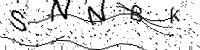
<Captcha
  width={200}
  height={50}
  length={5}
  fontSize={24}
  bgColor="#fff"
  textColor="#000"
  noise={true}
  lines={true}
  distortion={true}
/>
Example 2: Custom Colors and Noise
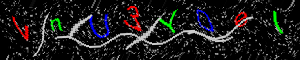
<Captcha
  width={300}
  height={60}
  length={8}
  fontSize={28}
  bgColor="#000000"
  textColor={["#ff0000", "#00ff00", "#0000ff"]}
  noiseColor="#aaaaaa"
  noiseDensity={0.1}
  lines={true}
  lineColor="#cccccc"
  lineWidth={2}
  distortion={true}
  distortionAmount={6}
/>
Example 3: Individual Character Styles
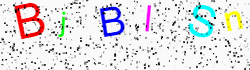
<Captcha
  width={250}
  height={70}
  length={6}
  fontSize={36}
  bgColor="#fafafa"
  textColor="#000"
  noise={true}
  lines={false}
  distortion={false}
  charStyles={{
    0: { size: 40, color: "#ff0000" },
    1: { size: 30, color: "#00ff00" },
    2: { size: 35, color: "#0000ff" },
    3: { size: 32, color: "#ff00ff" },
    4: { size: 38, color: "#00ffff" },
    5: { size: 30, color: "#ffff00" },
  }}
/>
License
This project is licensed under the MIT License - see the LICENSE file for details.