
nekyia
v1.3.1
Published
Search every agent CLI session on your machine and resume the right one
Downloads
1,188

Maintainers
 araneadev
Readme
Nekyia
Find the session. Pick up the thread.
Nekyia indexes and searches past CLI agent sessions locally in your terminal using Bun and SQLite FTS5.









bun install -g nekyiaNeeds Bun 1.1 or newer. Then run nek.
Nekyia (Νέκυια) is the rite in the Odyssey through which Odysseus calls up the dead and asks them what they know. This tool does something less dramatic with old agent sessions: it brings back the useful context, and an account of what they did to your files.
TL;DR: Nekyia searches local histories from several agent CLIs and helps you resume the right session. It indexes transcript metadata in SQLite, ranks matches with full-text search, and either launches a verified session or builds a deterministic handover for a fresh one.
It can also show which files a session touched, in what order, and whether git currently tracks them. Everything stays local, with no model-written summaries or tool-output indexing.
Features
- One Search Surface: query Claude Code, Codex, Cursor, GitHub Copilot CLI, opencode, Kilo Code, Codebuff, Freebuff, goose, and Antigravity histories together
- Verified Resume: attach to the selected session by ID only where that exact command was tested
- Deterministic Handovers: start search-tier clients with every indexed user prompt, each message kept whole and in order, touched files, branch context, bounded assistant prose, and a note of whatever had to be left out
- Two-Phase Indexing: discover cheap fingerprints first, then hydrate only sessions that changed
- Fast Local Search: SQLite FTS5 combines weighted prompt relevance with recency decay
- Exact File History: ask which sessions touched one file, resolved against each session's own directory
- Directory Timelines: see every file operation recorded under a directory, grouped by session, with each path marked against what git already has
- Interactive and Scriptable: use the virtualized Ink picker or plain, JSON-capable CLI commands
- Privacy Controls: forget one session, prune deleted sources, or exclude a directory and everything under it
- Extensible Manifests: describe another client locally and use the conservative sniffer to scaffold a draft
- Local by Design: no network service, API key, telemetry, model-written summary, or tool-output indexing
Installation
Nekyia requires Bun 1.1 or newer. It runs on Bun, not on Node, and the command says so plainly if Bun is missing rather than failing on an import.
From npm
bun install -g nekyiaFrom a release
bun install -g github:AraneaDev/Nekyia#v1.3.1Every published version is listed on the releases page.
From source
git clone https://github.com/AraneaDev/Nekyia.git
cd Nekyia
bun install --frozen-lockfile
bun link
All three install paths expose nekyia and the shorter nek, which do the same thing. The
examples below use nek.
Quick start
1. Build the local index
nek indexThe first run shows what Nekyia plans to inspect and asks for consent before it
opens a transcript store or creates the index. Use nek index --yes only when
you have already reviewed that boundary and need a non-interactive run.
2. Find a session
nek                         # interactive picker
nek search reconnect race   # table output
nek search reconnect --json # machine-readable output
nek blame src/sse.ts        # recent sessions that touched this file
nek last                    # newest session under this directory
Search defaults to the current directory. Pass --all to search everywhere,
--client <id> for one client, or --file <path> for sessions that touched a file.
nek blame <path> resolves the path from the current directory, then searches
globally and newest-first for that exact normalized file. "Touched" means the path
appeared in indexed tool input; it does not prove that the session modified the file.
--json returns a versioned agent contract with sourcePaths, launch capability,
quality state, and explicit limitation codes, so an agent can decide whether to
trust the indexed summary or inspect the source itself.
nek timeline covers a directory rather than one file. Ordering inside a session is
exact; between sessions it is by end time, which the index knows coarsely, so events stay
grouped by session rather than merged into one stream. A session whose own directory sits
elsewhere and which named these files relatively is not found, the same limit blame has.
Search, blame, and timeline accept --since and --until to select sessions whose
activity overlaps a time window. The lower bound is inclusive: a session ending
exactly at --since still matches. The upper bound is exclusive: a session starting
exactly at --until does not. A long session that crosses the window matches even
if it started earlier or ended later. Timeline filters whole session groups, so its
operations are not necessarily all inside the requested window.
Both bounds accept spans (30m, 12h, 2d, 3w), calendar dates (YYYY-MM-DD),
or ISO date-times with an explicit timezone (Z or a numeric offset). Spans count
back from the same invocation time. Calendar dates mean midnight UTC; to include
October 7, use --until 2026-10-08. Equal or reversed bounds are rejected.
nek search reconnect --since 7d
nek search reconnect --since 2026-10-01 --until 2026-10-08
nek search --since 2026-10-07T14:00:00+02:00 --until 2026-10-07T17:00:00+02:00
nek blame src/server.ts --since 2w
nek timeline --since 7d --until 2d
A session with only one known timestamp is treated as a point. Sessions with no
known timestamps appear only when no time filter is active. Filtering uses the
existing index and needs no reindex. Search JSON remains an array; timeline JSON
adds until only when an upper bound is supplied.
$ nek timeline --dir . --since 7d --limit 2

/home/dev/work/api-gateway · 2 sessions · 12 events · git was not consulted
exact order inside a session, end-time order between them

*  claude      23m  api-gateway       the retry budget is shared across tenants, it should be per tenant
      2  read    src/gateway/retry-budget.ts
      3  edit    src/gateway/retry-budget.ts
      8  read    src/gateway/tenant.ts
      9  edit    src/gateway/tenant.ts
     14  read    src/gateway/router.ts
     15  edit    src/gateway/router.ts
     20  read    test/retry-budget.test.ts
     21  write   test/retry-budget.test.ts
     26  read    docs/rate-limits.md
     27  write   docs/rate-limits.md

o  codex        6h  api-gateway       add structured logging around the upstream timeout path
      2  read    src/gateway/logging.ts
      3  edit    src/gateway/logging.ts
The number beside each operation is the turn it happened on, so it points back into the
session's own history. Where the directory is a git repository, each path git does not
track is marked untracked; you should inspect both tracked and untracked
paths when recovering session changes, because tracking only means git knows the path,
not that it has your latest edits. The header says outright when git could not be asked,
as it does above, since a missing marker would otherwise read as "git tracks this".
File operations are recorded from the next hydration onward, so sessions already in the
index list their files without any operations until you run nek index --rebuild. A
plain nek index will not fill them in: it hydrates only sessions whose transcript
changed, and an old session's transcript has not. Timeline output says which sessions are
in that state rather than showing them as though nothing happened.
The picker opens on the project you are standing in. Started from your home
directory, from a filesystem root, or from somewhere nothing has been indexed under,
it opens on the whole index instead, because a scoped list there would be empty.
tab widens to every directory, and pressing it again narrows to the project of the
row under the cursor, so you can start anywhere and end up in one project. The count
beside the search line always names what is being searched.
The picker starts with all time selected. ctrl+d cycles Today, Yesterday,
Last 7 days, Last 30 days, then All time. Today and Yesterday follow local
calendar days; the last 7 and 30 days are rolling 24-hour periods. All presets
capture a new reference time when selected or refreshed. ctrl+u clears only the time
filter, including when no sessions match, keeping your search text, project,
and client. Changing the range resets the cursor and closes the history.
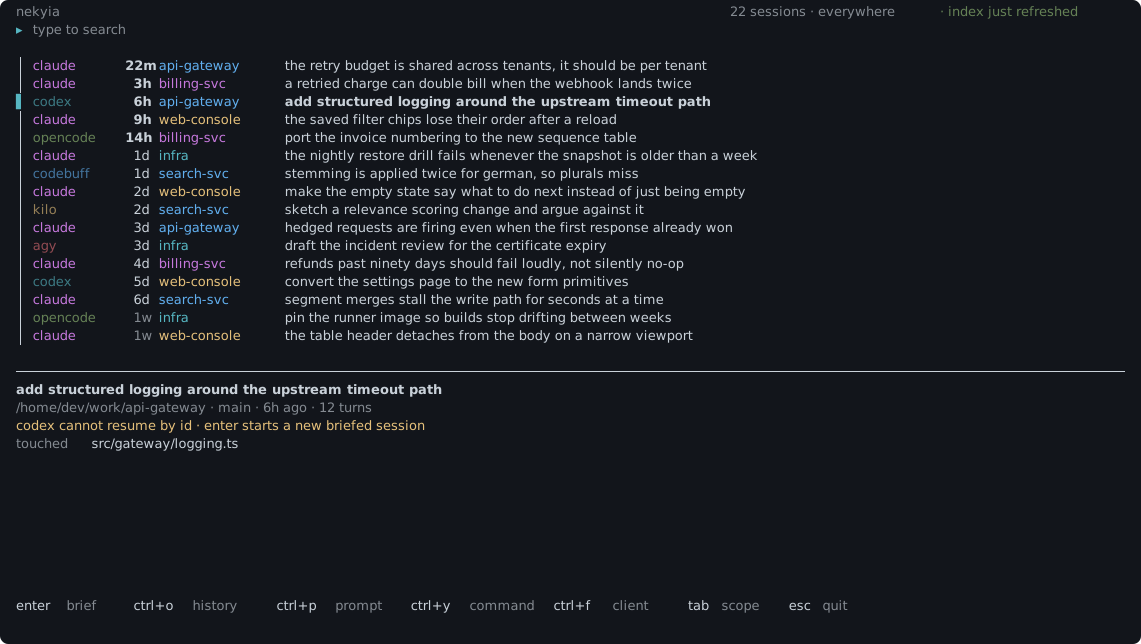
Typing filters as you go. The unfinished last word matches prefixes: retry ten
finds tenant; a trailing space or punctuation completes the word. CLI searches
keep their literal defaults. The selected preview shows native search evidence from
the title, prompt, or reply, including matches in related sessions. Inspecting a
verified match jumps to its retained turn; unavailable locations are labeled.
ctrl+g opens Filters: project, client, time, sort, exact branch, file path
(contains or exact), and bookmarks. Edit a draft and Apply with ctrl+s or the
Apply button; Escape discards it. Tab/Shift+Tab select fields, arrows or Enter
change choices, and ctrl+r resets the focused field. Individual reset controls
and Clear all filters preserve the query and configured hidden clients.
Custom time accepts open bounds, UTC dates such as 2026-10-01, explicit-zone
ISO timestamps such as 2026-10-08T12:00:00+02:00, or relative values such as
7d. Since is inclusive, until exclusive, and session intervals must overlap.
Relative custom input resolves once on Apply; refreshing keeps those resolved
bounds fixed.
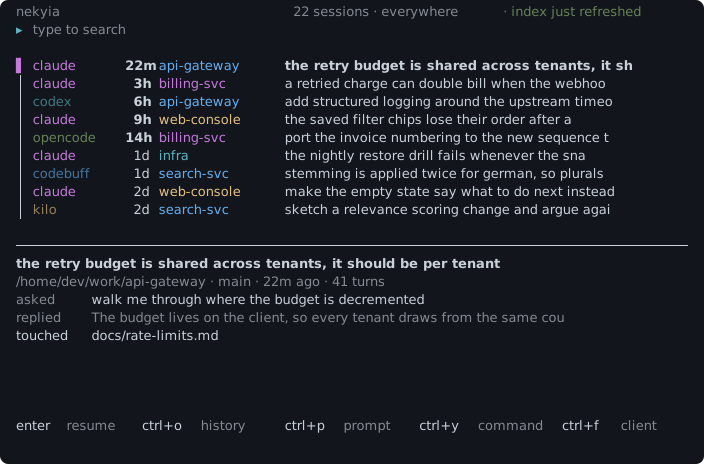
The quick preview prioritizes matching evidence, then the latest retained request and reply, branch, file count and launch capability. Older indexes use honest unordered-text labels. A compact quality badge links through Actions to Session details with the full source, completeness and availability explanations.
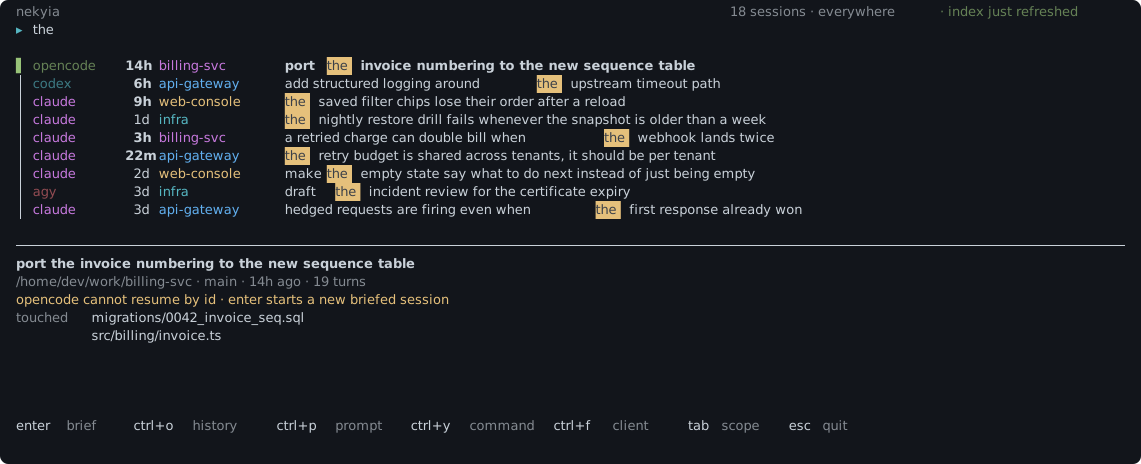
Narrowing to one project names it, so you always know what is being searched:
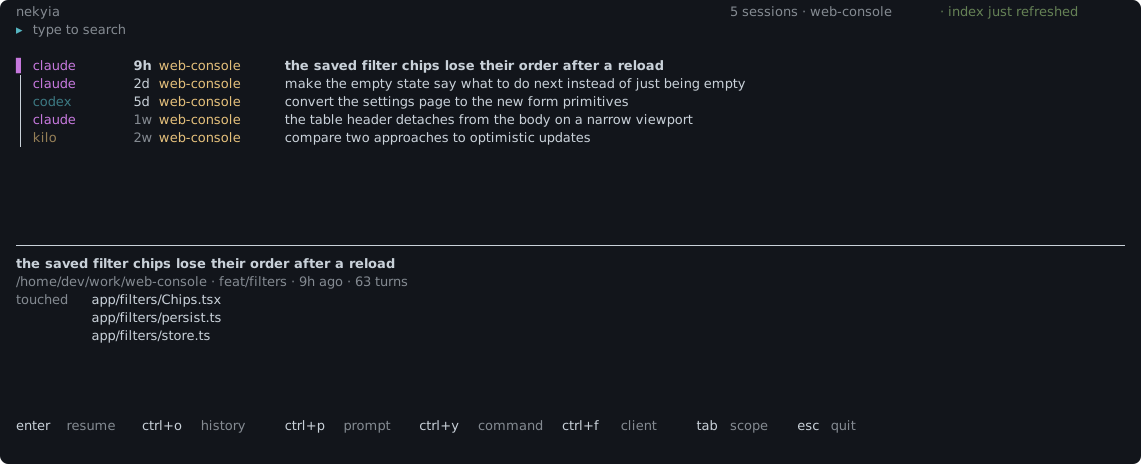
A query that matches nothing says what to try rather than leaving an empty screen:
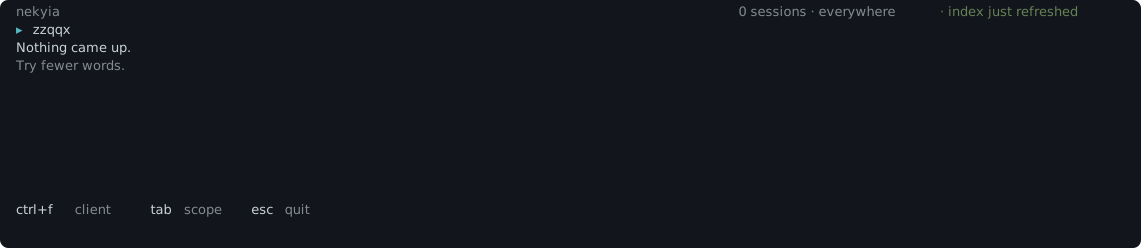
3. Read the history before you commit to it
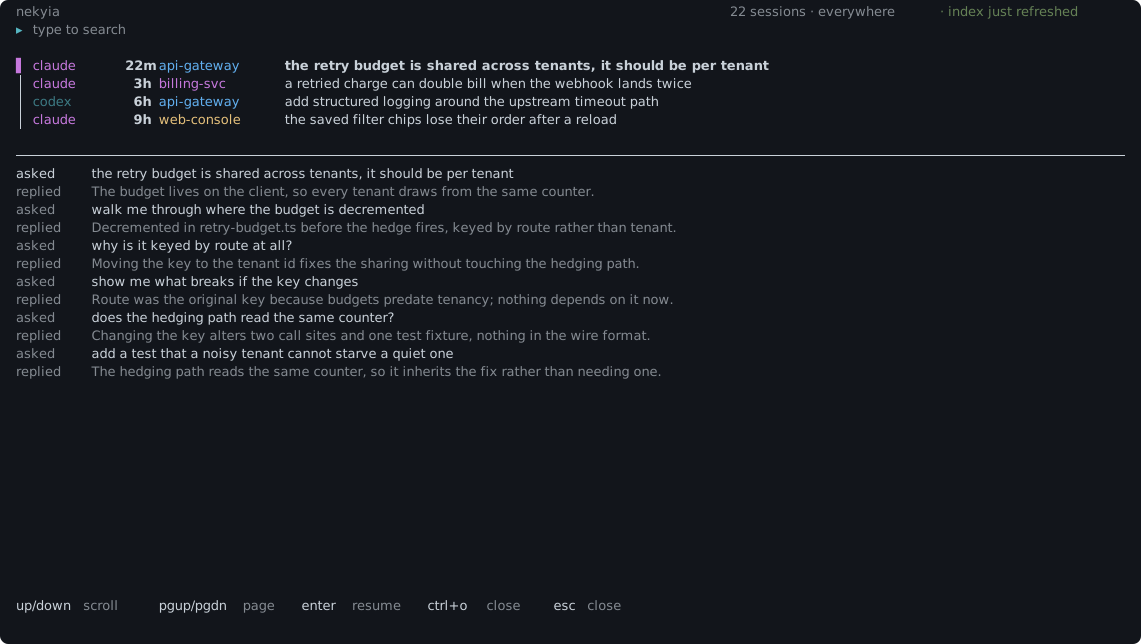
ctrl+o opens the session under the cursor and gives it the screen: what you asked
and what came back, in the order it was said, and which files moved. A long reply
wraps rather than running off the right edge. Arrow keys scroll a line, the page keys
scroll a screen; Home/End reach the retained beginning/end. ctrl+f opens literal
conversation find, and F3/Shift+F3 select next/previous hits. Position and hit
counters show where you are; capped history labels the search scope. Escape closes
find first, then returns to the same browse selection. Resizing preserves a turn
anchor rather than resetting the reader.
4. Resume or hand over
Press Enter in the picker, or run nek last. A resume-tier row launches the
verified exact-session command. A search-tier row asks for confirmation, builds a
deterministic handover, and starts a new client session with that context.
Keys in the picker
| Key | What it does |
| --- | --- |
| type | Search as you go with unfinished last-word prefix matching |
| ctrl+k / F1 | Searchable Actions menu / contextual help |
| ctrl+g | Edit filters, individual resets, and custom time bounds |
| ctrl+b | Bookmark or unbookmark the exact selected session |
| ctrl+e | Inspect the full visible related-session chain |
| up / down | Move the cursor, or scroll the history while it is open |
| enter | Resume the session, or start a briefed one once you confirm it; on a row for a store two clients share, the first Enter asks which client instead, when both are installed |
| ctrl+o | Open the session's history, and close it again |
| ctrl+t | Choose another client and confirm a fresh session with this session's context (r for a review framing, n for a custom note) |
| ctrl+l | Choose which client opens a store that Codebuff and Freebuff share |
| tab | Widen to everywhere, or narrow to the project under the cursor |
| ctrl+f | Cycle indexed clients in browse; find text in history |
| F3 / Shift+F3 | Next / previous conversation hit |
| Home / End | Beginning / end of retained history |
| ctrl+d | Cycle All time, Today, Yesterday, Last 7 days, and Last 30 days |
| ctrl+u | Clear only the time filter |
| ctrl+p / ctrl+y | Copy the opening prompt, or the command that would run |
| ctrl+r | Refresh now, preserving query, filters, selection and reader position |
| esc | Back out of a confirmation, or close the history, or quit |
The status line names the index age. Refresh closes the alternate screen for
indexing progress, then restores the query, filters and selected UID. When that
UID no longer matches, the nearest surviving result is selected with a notice.
A failed refresh reopens the readable existing index, keeps its prior age, and
shows the error. On startup, the picker automatically refreshes an index that
is at least one hour old. Set autoReindexAfterHours in config to change that
threshold; 0 refreshes on every open with a known index age.
The preview spans the full terminal width below the session list. At 140+
columns and 18+ rows, a compact stats panel shows counts, seven local days of
activity, and client distribution for the current filtered results. When the
result window is capped, charts explicitly describe shown results only.
ctrl+s or Actions toggles the panel; it hides automatically in smaller
terminals. Long selected titles wrap onto a second line. Under 12 rows the
quick preview becomes a summary. Explicit
history uses the full screen. Actions and Help expose shortcuts that cannot fit
in the footer, and empty results offer deliberate filter-reset suggestions.
ctrl+e shows all policy-visible chain members, including members outside the
current filters. The collapsed +N counts additional matching members; the chain
picker labels its full visible count. Inspect or launch the explicitly chosen
member without changing the browse filters. Native actions say Resume session;
synthesized briefs say Start fresh with context, with confirmation of command,
directory and context transfer. Missing launchers have visible reasons.
Bookmarks store only session UIDs in $XDG_CONFIG_HOME/nekyia/ui-state.json
(default ~/.config/nekyia/ui-state.json), with private permissions and a limit of
256 entries. They do not change ranking. Use Bookmarked in Filters, or Manage
bookmarks in Actions to remove indexed or unavailable saved UIDs. Failed writes
retain the prior durable state; no query or conversation text is persisted.
Commands
| Command | What it does |
| --- | --- |
| nek | Open the interactive picker |
| nek search <query> | Search from the terminal, with optional JSON or id-only output |
| nek blame <path> | List recent sessions that touched this exact file |
| nek timeline [--dir <path>] | What happened to files in a directory, in the order it happened |
| nek last | Launch the newest visible session in this directory |
| nek index [--rebuild] | Refresh fingerprints and changed session content |
| nek show <uid> | Print a deterministic handover as Markdown |
| nek handoff <uid> --to <client> | Start a fresh target client with the source session's indexed context |
| nek doctor [--sniff] | Report clients, paths, size caps, unreadable transcripts, and unsupported stores |
| nek forget <uid> | Remove one session and every searchable facet from the index |
| nek prune --missing | Remove indexed sessions whose sources disappeared |
| nek exclude <glob> | Add an index-time directory exclusion |
--ids prints only the session ids, one per line, so a session you picked out by eye
can be handed straight to another command:
nek search "sse reconnect" --ids | head -1 | xargs nek showRun nek --help for search filters, sort modes, limits, and command-specific options.
To continue work in another client:
nek handoff claude:<session-id> --to codex
nek handoff claude:<session-id> --to codex --dry-run
nek handoff claude:<session-id> --to codex --dry-run --json
nek handoff claude:<session-id> --to codex --intent review
nek handoff claude:<session-id> --to codex --note "focus on the retry logic"
Agents can export structured indexed context without parsing Markdown:
nek show claude:<session-id> --json --max-chars 12000See agent integration notes for the versioned JSON contract, quality signals, bounded errors, and privacy boundary.
Handoff starts a fresh session using the target's brief command and the source's
recorded directory (unless a custom manifest overrides it). It uses the last indexed
context; run nek index first if the source conversation has changed. It transfers
no native conversation state, tool state, or file snapshots, and does not restore a
historical branch. Treat the brief as historical context: current instructions and
the current repository take precedence. Same-client handoff is also allowed.
--max-chars <n> follows show's character budget (default 40,000). User prompts are
preserved even when the budget is zero or too small. Launching refuses a brief whose
command or argument text alone would exceed a conservative 128 KiB allowance,
measured in UTF-8 bytes; it never truncates prompts to make them fit. If this happens,
export with nek show <uid> and transfer the relevant context manually.
By default the target is told this is a handover to continue, the same framing
show produces on its own. --intent review asks the target to critique the
session's changes instead of extending them: look for bugs, missed edge cases, and
better approaches. --note <text> replaces that framing with your own instruction
(up to 2,000 characters) and cannot be combined with --intent. Either framing is
prepended to the brief and, like the rest of the mandatory header, is never dropped
to fit the character budget. The ctrl+t picker offers the same choice interactively:
r for review, n to type a note, plain enter to continue as before.
--dry-run prints the planned shell command without checking whether the target is
installed. --dry-run --json prints { cmd, args, cwd, briefChars }; --json requires
--dry-run. Both outputs include the brief in the arguments and are content exports,
which may contain private information or secrets retained in user prompts. Execution
also passes the brief through process arguments, visible where OS permissions permit.
The target client may send this context to its configured model provider and incur
token costs. Repeated handoffs can retain earlier briefs inside later prompts.
Supported clients
Support means the store format was exercised against real or fidelity-matched local data, not guessed from a likely path. Resume means the selected ID can be passed to a verified resume command. Search means Nekyia starts a fresh briefed session because exact attachment was not confirmed.
| Client | Tier | Command Nekyia runs |
| --- | --- | --- |
| Claude Code | Resume | claude --resume <id> |
| Codex | Resume | codex resume <id> |
| Antigravity CLI, agy | Resume | agy --conversation <id> |
| GitHub Copilot CLI | Resume | copilot --resume=<id> |
| Cursor | Resume | cursor-agent --resume <id> |
| opencode | Search | opencode --prompt <brief> |
| Kilo Code | Search | kilo --prompt <brief> |
| Codebuff / Freebuff | Freebuff: Resume, Codebuff: Search | freebuff --continue <id> --cwd <cwd> or codebuff --cwd <cwd> <brief> |
| goose | Search | goose run -t <brief> -s |
Cursor and Freebuff were both verified against a real install: cursor-agent --resume <id>
and freebuff --continue <id> --cwd <cwd> each reopened the session they were given.
Freebuff and Codebuff share one store and nothing in it records which of the two wrote a
chat, so Nekyia lists each chat once and lets you choose the client that opens the store.
With one of them installed it uses that one. With both, the first Enter on one of their
chats asks, and ctrl+l flips the choice afterwards. Freebuff takes no prompt argument, so
it cannot receive a handover; Codebuff can.
The goose adapter was written from goose's published source and CLI reference rather
than from a local install, so it is derived rather than observed. Its documented resume
flag, goose session --resume --session-id <id>, is deliberately not wired up: this
project claims the resume tier only where attachment was verified against a real client.
Kilo shares opencode's tested store format, but its executable was not installed during command verification. opencode and Codebuff were exercised against real local IDs, but the result did not prove attachment to the requested context. I do not call any of those three resumable. Search-tier clients always start fresh briefed sessions. They never claim to recover tool state or file snapshots, and sending a handover can cost tokens.
How it works
Nekyia separates indexing into two phases. Discovery reads bounded metadata and stable fingerprints. Hydration runs only for new or changed sessions, streams or projects the relevant content, and commits metadata plus search facets atomically to SQLite.
Search weights titles, user prompts, and selected assistant prose differently, then can blend relevance with recency. Fork chains collapse to one visible result. Tool output is excluded because command results and file dumps are noisy, large, and likely to contain private material that does not belong in search.
The index normally lives at ~/.local/share/nekyia/index.db; configuration lives at
~/.config/nekyia/config.json. Nekyia honours XDG_DATA_HOME and XDG_CONFIG_HOME.
Privacy and data retention
Nekyia makes no network requests. There is no network service, no API key, and no telemetry. The handover is deterministic and makes no model call.
The index reads transcripts already on your disk and stores selected paths and text locally. That indexed copy can survive deletion of the original transcript. You control that retention explicitly:
nek forget <uid>purges one indexed sessionnek prune --missingpurges sessions whose source files disappearednek exclude '/work/private'adds an exclusion covering that directory and everything under it, expanding a leading~and resolving a relative directory against the one you ran it in, and the nextnek indexthen deletes what was already indexed there, including sessions whose transcripts have since been deleted
exclude and hiddenClients are instructions rather than preferences, and the values
they fall back to are the permissive ones, so a config file Nekyia cannot read would
otherwise widen what it holds. Indexing refuses outright on a config whose exclusions
could not be honoured, before it writes anything, and names the file. Searching still
answers, because a typo should not cost you your history, but it says on stderr that the
config was not honoured. A malformed preference, such as halfLifeDays, is still just
ignored for that run.
Nekyia does not promise secret redaction or index encryption. Review show, doctor,
and JSON output before pasting it into a public issue.
Adding a client
User manifests live in ~/.config/nekyia/clients/*.json. Schema version 1 describes the
client roots, storage format, support tier, and optional launch templates. A minimal flat
JSONL manifest looks like this:
{
  "schema": 1,
  "id": "my-client",
  "name": "My client",
  "roots": ["~/.local/share/my-client"],
  "format": "jsonl-transcript",
  "tier": "search",
  "jsonl": {
    "glob": "sessions/*.jsonl",
    "variant": "generic",
    "generic": {
      "idFrom": "filename",
      "cwdPath": "cwd",
      "tsPath": "timestamp",
      "rolePath": "role",
      "textPath": "text",
      "userRoles": ["user"],
      "assistantRoles": ["assistant"]
    }
  },
  "brief": {
    "cmd": "my-client",
    "args": ["{prompt}"],
    "cwd": "{cwd}"
  }
}
A SQLite manifest can add "revision" to its sqlite block, naming a projected column
that moves whenever its session does, usually the one already aliased to ended_at. With
it each session is fingerprinted from its own row, so editing one session re-reads only
that session. Without it the whole database shares one fingerprint and any change re-reads
every session in it, which is slower and is the right default: declaring a revision the
store does not honour means edits nobody notices.
nek doctor --sniff looks for session-shaped stores without declaring them supported.
nek doctor --sniff --emit-manifest ./my-client.json writes a non-overwriting draft
for the first store it can describe. Inspect and test that draft before moving it into the
user manifest directory or contributing it.
Development
bun install --frozen-lockfile
bun run lint
bun run typecheck
bun run test
bun pm pack --dry-run
CI runs the frozen install, lint, typecheck, full suite, and package check on Linux and macOS. Releases use Conventional Commits and Release Please.
Run bun run test:coverage for a terminal coverage report. To save an LCOV report
outside the checkout, use:
bun run test:coverage --coverage-reporter=lcov --coverage-dir=/tmp/nekyia-coverageCoverage measures code executed in the test process; CLI and concurrency tests also launch subprocesses whose execution is not included in that report. Use uncovered lines to find missing behavior checks, alongside those integration tests. Regression tests should verify observable results, including failed writes, hidden-client policy, Unicode offsets, and terminal size limits.
Source docblocks explain intent, contracts, and limits. TypeScript already documents parameter and return types; avoid repeating those signatures in prose.
Roadmap
These clients still need hands-on testing before I ship a built-in manifest: Aider, Crush, Qwen Code, Continue CLI, Droid, Amazon Q Developer CLI, Plandex, OpenHands, Amp, Warp Agent, Grok CLI, Rovo Dev, Auggie, Trae, Cline CLI, and Zed.
I also plan compiled standalone binaries through bun build --compile for Linux and
macOS on x64 and arm64. Those do not exist yet, so Bun is required for now.
Further reading
Agent integration notes - the structured output contract for automation
Recovering a Claude Code session your picker will not show you
License
Nekyia is available under the MIT license.
Built by Tim Schipper and released as open source under
Aranea Development. In the Odyssey, Odysseus
digs the trench and the dead crowd forward; he holds them back until the one shade he
needs may speak. nek --version says the same thing in one line.