
nest-traffic-desk
v0.2.2
Published
Reusable NestJS traffic logging module with live dashboard
Downloads
585

Maintainers
 lithin5
Readme
nest-traffic-desk


A plug-and-play NestJS module that captures every inbound and outbound HTTP request and serves a live dashboard — directly from your running application. Zero configuration required to get started.
Overview
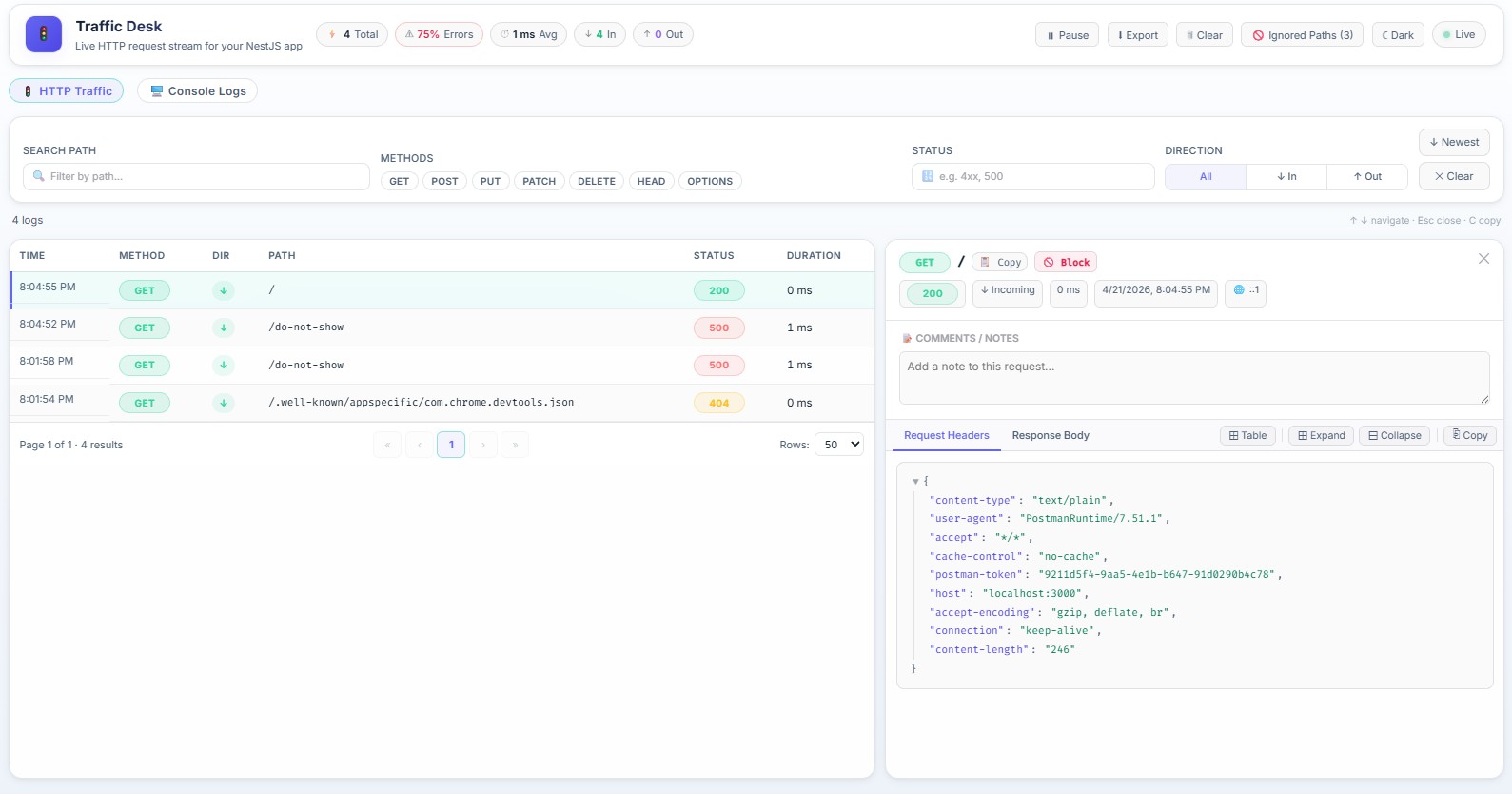
nest-traffic-desk registers a global interceptor, a REST data endpoint, and a WebSocket gateway in your NestJS app. A built-in React SPA (served by Nest itself) connects to the WebSocket and renders an inspectable, filterable log of all HTTP traffic in real time.
Key capabilities
Live HTTP stream: Real-time request/response monitoring via WebSockets.
Console & process errors: Capture
console.log/warn/error/ etc., plusuncaughtExceptionandunhandledRejection(optional; see Capturing console & runtime errors).Outbound HTTP Patching: Monitor external requests made via global
fetch.Advanced Filtering: Filter by path, method, status class (e.g.,
4xx), direction, and duration.JSON Inspector: Beautifully formatted and searchable request/response payloads.
Persistent Annotations: Add client-side notes to specific logs for easier debugging.
Integrated Analytics: Live stats bar showing request counts, error rates, and average latency.
Smart Throttling: Pause the live feed to focus on a specific trace without losing incoming data.
Exporting: Download filtered logs as JSON for post-mortem analysis.
Modern UI: High-end light/dark modes with glassmorphism and local persistence.
Zero Config: Pluggable storage (memory/file) that works out of the box.
Requirements
- Node.js ≥ 18
- NestJS 10 or 11
@nestjs/platform-expressor@nestjs/platform-fastify@nestjs/websocketsand@nestjs/platform-socket.iopeer dependencies
Installation
npm i nest-traffic-deskInstall the required peer dependencies if they are not already in your project:
npm i @nestjs/websockets @nestjs/platform-socket.ioQuick Start
Import and register the module in your root AppModule. The dashboard will be available at /_logs as soon as your app starts.
import { Module } from '@nestjs/common';
import { NestTrafficDeskModule } from 'nest-traffic-desk';

@Module({
  imports: [
    NestTrafficDeskModule.register({
      maxEntries: 500,
    }),
  ],
})
export class AppModule {}
Start your app and open http://localhost:3000/_logs in a browser.
Configuration
NestTrafficDeskModule.register(options?: TrafficDeskModuleOptions)
| Option | Type | Default | Description |
|---|---|---|---|
| enabled | boolean | true | Set to false to disable the module entirely. No routes, interceptors, or gateways are registered. |
| maxEntries | number | 1000 | Maximum number of entries kept in memory or passed to the store. |
| maxBodySizeBytes | number | 16384 | Request and response bodies are truncated at this byte limit. |
| captureRequestBody | boolean | true | Whether to capture request bodies. |
| captureResponseBody | boolean | true | Whether to capture response bodies. |
| redactHeaders | string[] | ['authorization','cookie','set-cookie','x-api-key'] | Header names to redact from logs. Values are replaced with [REDACTED]. |
| enableOutgoingHttp | boolean | false | Patch the global fetch to capture outbound HTTP calls. |
| captureConsoleLogs | boolean | true | Instrument the global console to capture application logs. |
| captureRuntimeErrors | boolean | true | Register process listeners for uncaughtException and unhandledRejection and append them to the same console feed as console.error (with context set on the entry). |
| maxConsoleEntries | number | 1000 | Maximum number of console logs to keep in memory. |
| uiBasePath | string | '/_logs' | URL path where the dashboard SPA is served. |
| dataPath | string | '/_logs/data' | URL path for the REST data endpoint. |
| enableUi | boolean | true | Whether to serve the dashboard SPA. |
| enableWebsocket | boolean | true | Whether to attach the Socket.IO gateway. |
| websocketNamespace | string | '/' | Socket.IO namespace for the live feed. |
| ignorePaths | string[] | ['/_logs','/_logs/data','/socket.io'] | Paths excluded from traffic capture (prefix match after normalization). |
| excludePaths | string[] | — | Deprecated. Merged into ignorePaths at register time; prefer ignorePaths. |
| storage | TrafficDeskStorageOptions | { type: 'memory' } | Storage backend. See Storage below. |
| storeFactory | () => TrafficLogStore | — | Factory for a fully custom store implementation. Takes precedence over storage. |
| uiDistPath | string | '' | Absolute path to a custom-built SPA asset directory. Leave empty to use bundled UI. |
Storage
In-Memory (default)
The default ring buffer keeps the most recent maxEntries entries in memory. Data is lost on process restart.
NestTrafficDeskModule.register({
  maxEntries: 2000,
  storage: { type: 'memory' },
})
File-backed JSONL
Persists traffic logs to a rotating JSONL file. Entries survive restarts and are re-loaded on start.
NestTrafficDeskModule.register({
  storage: {
    type: 'file',
    filePath: './var/logs/traffic.jsonl',   // default: <cwd>/traffic-desk.log.jsonl
    maxFileSizeBytes: 5 * 1024 * 1024,      // default: 5 MB per file
    maxFiles: 4,                            // default: 3 rotated files kept
  },
})
Custom Store
Implement the TrafficLogStore interface to use any storage backend (database, Redis, S3, etc.).
import { TrafficLogStore, TrafficLogEntry } from 'nest-traffic-desk';

class MyCustomStore implements TrafficLogStore {
  private entries: TrafficLogEntry[] = [];

  add(entry: TrafficLogEntry): void {
    this.entries.push(entry);
  }

  getAll(): TrafficLogEntry[] {
    return [...this.entries];
  }

  clear(): void {
    this.entries = [];
  }

  count(): number {
    return this.entries.length;
  }
}

NestTrafficDeskModule.register({
  storeFactory: () => new MyCustomStore(),
});
Filtering for the REST endpoint and UI is applied in TrafficLoggingService after getAll(); custom stores only need to implement the four methods above.
Capturing Outbound HTTP
Setting enableOutgoingHttp: true patches the global fetch function and logs all outbound requests alongside inbound ones. Both directions appear in the same dashboard stream with a direction column (incoming / outgoing).
NestTrafficDeskModule.register({
  enableOutgoingHttp: true,
})
Note: Only calls made via the global
fetchare captured. Calls viaaxios,got,http, or other clients are not affected unless they internally delegate tofetch.When an outbound
fetchthrows (DNS/network/timeout/runtime errors), the entry is logged with:
statusCode: 599errorMessageanderrorStack(when available)responseBody.errorfor backward compatibility
Capturing console & runtime errors
Console methods
If captureConsoleLogs is true (default), the library wraps global console methods (log, error, warn, info, debug, trace). Each call is formatted, timestamped, and pushed to the console buffer and WebSocket feed.
- Call-site stack traces are attached when possible.
- Arguments are sanitized so complex values are safe to serialize over Socket.IO.
- Buffer size is capped by
maxConsoleEntries.
Process-level runtime errors
If captureRuntimeErrors is true (default), the library also registers:
process.on('uncaughtException', …)process.on('unhandledRejection', …)
Those events are stored as console entries with level: 'error', message prefixed with [uncaughtException] or [unhandledRejection], and context set to the same label. They appear in the dashboard console stream and in console:snapshot / console:new events.
You can capture only process-level errors (no console monkey-patch) with:
NestTrafficDeskModule.register({
  captureConsoleLogs: false,
  captureRuntimeErrors: true,
});
To turn off both:
NestTrafficDeskModule.register({
  captureConsoleLogs: false,
  captureRuntimeErrors: false,
});
More configuration examples
Development: full capture
NestTrafficDeskModule.register({
  maxEntries: 2000,
  enableOutgoingHttp: true,
  captureRequestBody: true,
  captureResponseBody: true,
  captureConsoleLogs: true,
  captureRuntimeErrors: true,
});
Staging / locked-down dashboard
Serve the UI and data under a custom prefix and skip bodies if payloads are sensitive:
NestTrafficDeskModule.register({
  uiBasePath: '/internal/traffic-desk',
  dataPath: '/internal/traffic-desk/data',
  ignorePaths: ['/internal/traffic-desk', '/internal/traffic-desk/data', '/socket.io'],
  captureRequestBody: false,
  captureResponseBody: false,
  redactHeaders: ['authorization', 'cookie', 'set-cookie', 'x-api-key', 'proxy-authorization'],
});
After changing
uiBasePath/dataPath, extendignorePathsso the desk does not log its own traffic (see defaults above).
File persistence + outbound fetch
NestTrafficDeskModule.register({
  enableOutgoingHttp: true,
  storage: {
    type: 'file',
    filePath: './var/traffic-desk.jsonl',
    maxFileSizeBytes: 10 * 1024 * 1024,
    maxFiles: 5,
  },
});
API-only (no SPA, no Socket.IO)
Useful if you only want GET …/data JSON from automation or a reverse proxy:
NestTrafficDeskModule.register({
  enableUi: false,
  enableWebsocket: false,
});
Log Annotations
The dashboard allows you to add persistent notes (annotations) to any traffic log entry.
- Persistence: Notes are stored in your browser's
localStorageand remain available as long as the log entry ID exists. - Visibility: A small note icon appears in the log list indicating which entries have annotations.
Performance & Throttling
The dashboard includes a Pause feature that suspends the UI from rendering new incoming logs while you are inspecting a specific entry. This does not stop the backend from capturing data; it only stabilizes the UI state.
Capturing Guard/Auth Errors (401/403)
nest-traffic-desk includes a global exception filter so HTTP errors that happen before controller handlers (for example JwtAuthGuard failures) are still captured and shown in the UI.
This covers common cases like:
401 Unauthorizedfrom global auth guards403 Forbiddenfrom role/permission guards- other exceptions raised before the route interceptor emits a normal success/error flow
If your app uses a custom global exception filter
If you register your own filter with app.useGlobalFilters(...), make sure it also forwards uncaptured errors into TrafficLoggingService. Otherwise guard-level failures may be handled by your filter but never recorded by Traffic Desk.
Pattern:
// main.ts
const trafficLogging = app.get(TrafficLoggingService, { strict: false });
app.useGlobalFilters(new HttpExceptionFilter(trafficLogging));
And inside your custom filter, call trafficLogging.add(...) when the request was not already captured by the interceptor/filter pipeline.
Disabling in Production
The module respects the enabled flag and registers nothing when it is false. A common pattern is to tie it to an environment variable:
NestTrafficDeskModule.register({
  enabled: process.env.NODE_ENV !== 'production',
})
REST API
The data endpoint supports the following query parameters for server-side filtering.
GET /_logs/data
| Parameter | Type | Description |
|---|---|---|
| q | string | Substring match on the request path. |
| method | string | Comma-separated HTTP methods, e.g. GET,POST. |
| status | string | Exact code (500) or class (4xx, 2xx). |
| sort | string | asc or desc (default desc). |
| limit | number | Maximum number of items to return. |
Response
{
  "total": 1024,
  "filteredCount": 12,
  "items": [
    {
      "id": "01HXYZ...",
      "direction": "incoming",
      "correlationId": "abc-123",
      "timestamp": "2026-04-15T10:30:00.000Z",
      "method": "POST",
      "path": "/api/users",
      "statusCode": 201,
      "durationMs": 48,
      "requestHeaders": { "content-type": "application/json" },
      "requestBody": { "name": "Alice" },
      "responseBody": { "id": 99, "name": "Alice" },
      "remoteAddress": "127.0.0.1"
    }
  ]
}
WebSocket Events
The module emits two events on the configured Socket.IO namespace.
| Event | Payload | Description |
|---|---|---|
| traffic:snapshot | TrafficLogEntry[] | Full current log emitted to a client immediately on connect. |
| traffic:new | TrafficLogEntry | Emitted to all connected clients each time a new entry is logged. |
| console:snapshot | ConsoleLogEntry[] | Full current console log buffer emitted immediately on connect. |
| console:new | ConsoleLogEntry | Emitted for each intercepted console call and for uncaughtException / unhandledRejection when captureRuntimeErrors is enabled. Check context for process-level events. |
The dashboard handles reconnection automatically with exponential backoff and displays a live connection status indicator.
TypeScript Types
All public types are exported from the package entry point.
import {
  TrafficLogEntry,
  TrafficDirection,
  TrafficDeskModuleOptions,
  TrafficDeskStorageOptions,
  TrafficFilterQuery,
  TrafficLogStore,
  FileTrafficLogStore,
  ConsoleLogEntry,
} from 'nest-traffic-desk';
Security
- Header redaction —
authorization,cookie,set-cookie, andx-api-keyheaders are redacted by default. Extend theredactHeaderslist to cover any additional sensitive headers. - Access control — The dashboard and data endpoint are not protected by any authentication layer. In any shared or production environment, guard
/_logsand/_logs/datawith an auth guard, IP allowlist, or reverse proxy rule. - Body capture — Consider setting
captureRequestBody: falseandcaptureResponseBody: falseif requests carry PII or secrets that should never be logged.
Publishing (maintainers)
- Ensure you are logged in:
npm login(ornpm login --auth-type=webwith 2FA). - Bump
versioninpackage.jsonif that version was already published. - From the repo root:
npm publish
prepublishOnly runs npm run build automatically so dist/ and assets/ui/ are always fresh in the tarball. Use npm publish --dry-run to inspect contents without uploading.