
nestjs-doctor
v0.9.9
Published
The deterministic NestJS devtool that catches AI mistakes. Static analysis for NestJS with a health score, diagnostics and an interactive report.

Maintainers
 pachangas
Readme
An opinionated rule set for an opinionated framework. nestjs-doctor scans your codebase and reports findings across security, correctness, architecture, performance, and schema, then scores it 0-100.
No AI at scan time, and nothing about your code leaves the machine. The same commit scores the same on your laptop and in CI. Reads schemas from Prisma, TypeORM, Drizzle and MikroORM, and handles monorepos.
Install
1. Quick start
Run this at your project root:
npx nestjs-doctor@latest .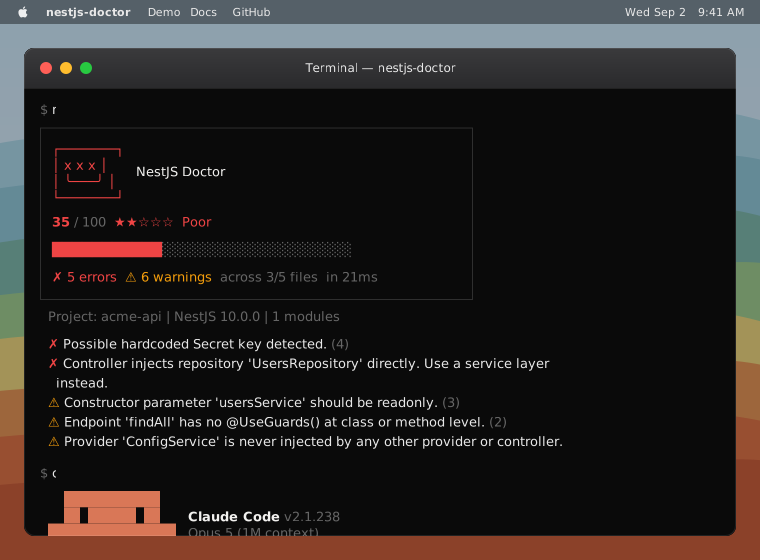
A clean scan prints the score and nothing else. That is the expected result on
a project the rules already agree with, and --report still draws the module
graph, the traced endpoints and the schema diagram.
Add --verbose for file paths and line numbers.
2. Open the report
Build nestjs-doctor-report.html:
npx nestjs-doctor@latest . --reportWrites to the project root, or wherever --output names. One file: score
summary, findings with a code viewer, and an interactive module
graph. Traced HTTP endpoints, the schema ER diagram, and a
rule playground get their own tabs.
Module graph docs →
The report's share button, and --share-sections on the CLI, write a JSON slice
of a scan: pick the score, a findings category, the endpoints, the schema, or the
module graph.
Sharing docs →
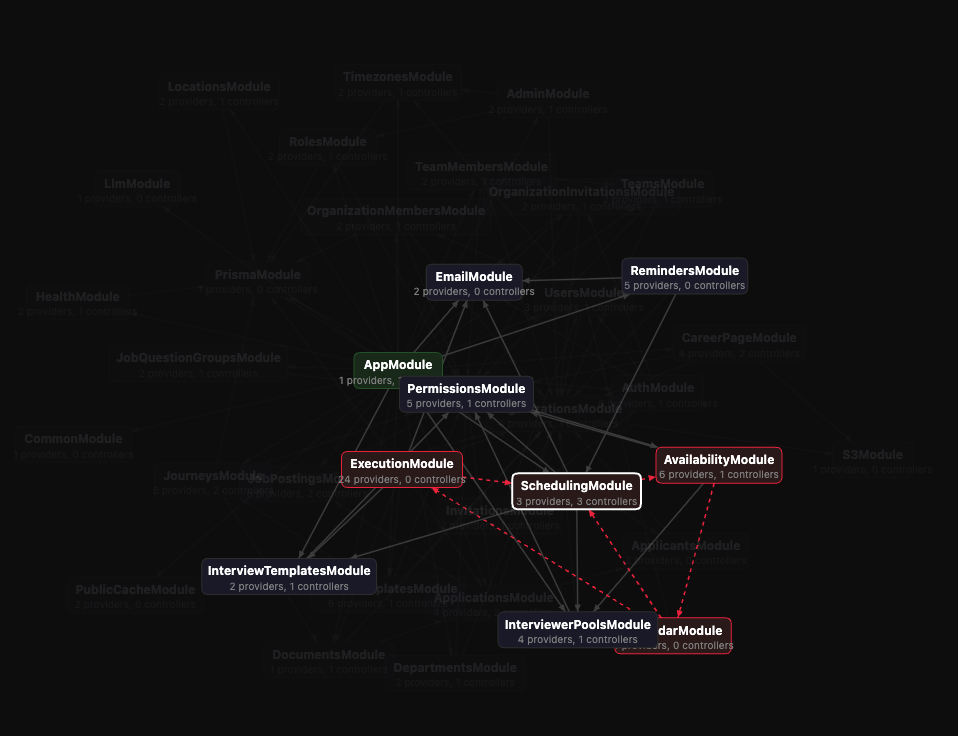
Add a few lines to main.ts, boot once, and --timings gives the report a
Boot trace tab. Every class sits on one absolute timeline, with a hover card
per bar and graph nodes that say what each module cost.
Boot trace docs →
3. Run in CI
Write .github/workflows/nestjs-doctor.yml:
npx nestjs-doctor@latest ci installThe action reviews every pull request and reports only what the change introduced, not the existing backlog. It posts a sticky summary comment, inline review comments on the changed lines, and a commit status with the score.
It never fails a check until you ask it to. Set blocking or min-score when
ready. CI docs →
4. Install for agents
Install the agent skill:
npx nestjs-doctor@latest --initInstalls three skills: nestjs-doctor for scanning after a change,
nestjs-boot-trace for a slow start, and nestjs-doctor-create-rule for
conventions of your own. The first runs without being asked, after the agent
writes Nest code. Works with Claude Code, Cursor, Codex, OpenCode, Windsurf,
Gemini CLI, and more.
Agent docs →
5. Configure rules
Optional. Drop a nestjs-doctor.config.json at your project root to turn rules
or categories off, set a score floor, or point at a custom rules directory:
{
  "minScore": 80,
  "rules": {
    "performance/no-sync-io": false,
    "architecture/no-manual-instantiation": {
      "excludeClasses": ["Logger", "PinoLogger"]
    }
  },
  "categories": { "performance": false }
}
The same shape works as .nestjs-doctor.json, or as a "nestjs-doctor" key in
package.json.
Configuration → · Custom rule configuration →
Rules
52 built-in rules. Every finding carries a file and a rule id you can suppress or configure, plus a line unless it reports against a schema entity.
| Category | Rules | Catches |
|---|---|---|
| Security | 12 | Hardcoded secrets, eval, weak crypto, TypeORM synchronize: true, endpoints with no guard, dependencies with a published advisory |
| Correctness | 20 | Fire-and-forget promises, missing @Injectable(), lifecycle hooks without their interface, param decorators that do not match the route |
| Architecture | 10 | ORM in controllers, business logic in controllers, circular module dependencies, manual instantiation instead of DI |
| Performance | 7 | Sync I/O, blocking constructors, request-scope abuse, orphan modules, unused providers |
| Schema | 3 | Missing primary keys, missing timestamps, relations with no onDelete |
Suppress a single finding inline:
// nestjs-doctor-ignore-next-line architecture/no-orm-in-controllers
constructor(private readonly prisma: PrismaService) {}
Editors and tooling
- VS Code: NestJS Doctor surfaces the same rules as you type. Docs →
- Any other editor:
npx nestjs-doctor-lsp --stdiospeaks LSP, so Neovim, Helix, and Emacs get the same rules. Docs → - Other CI: GitLab Code Quality, SARIF for any code-scanning backend, or a markdown body to post yourself. Docs →
- Node API:
diagnose()plus an incremental API for editors and long-running processes. Docs → - Monorepos: detected from
nest-cli.json, pnpm workspaces,package.jsonworkspaces, Nx, or Lerna. Docs →
Telemetry
The CLI reports rule errors and anonymous run data to help us catch bugs and prioritize work.
We collect:
- Environment: CLI version, platform, Node version, and how it ran (npx, script, coding agent, or CI)
- Project shape: file count, framework, ORM, Nest version (NO file contents)
- Rules fired: rule ids and counts only (e.g.
security/no-eval) (NO code or specific findings) - Rules that threw during the scan
To opt out, run: npx nestjs-doctor@latest --no-telemetry. Details →
Contributing
Issues and pull requests welcome. pnpm check && pnpm typecheck && pnpm test
before opening one.
MIT © RoloBits