
netlens
v1.0.4
Published
Lightweight, framework-agnostic network inspector for frontend apps

Maintainers
 ehteshamnasim
Readme
NetLens – The Missing Network Inspector for Frontend Developers




A lightweight, framework-agnostic network debugging tool that makes API monitoring as easy as adding a single import. No more switching between tabs or losing track of requests in browser DevTools.
✨ Why NetLens?
Traditional debugging is painful:
- Browser Network tab gets cluttered with assets
- Lose request history on page refresh
- Hard to debug on mobile devices
- No easy way to filter API calls only
- Copying request/response data is tedious
NetLens solves this:
- API-focused – Only shows your actual network requests
- Persistent – Survives page refreshes and navigation
- Responsive – Works on desktop and mobile
- Smart filtering – By method, status, or URL patterns
- Copy-friendly – One-click copy for any data
- Beautiful UI – Clean, dark theme with syntax highlighting
- Replayable – Replay and edit requests on-the-fly
🚀 Quick Start
Installation
npm install netlensBasic Usage
import { initNetTab } from 'netlens'

// One line to start monitoring
initNetTab({
  enableConsole: true,   // Pretty console logs
  enableOverlay: true,   // Floating debug panel
})

// Your existing code works unchanged
fetch('/api/users').then(response => response.json())
That’s it! 🎉 All your network requests are now being monitored.
CDN
<!-- Latest version -->
<script src="https://unpkg.com/[email protected]/dist/index.global.js"></script>

<!-- Alternative CDNs -->
<script src="https://cdn.jsdelivr.net/npm/netlens@latest/dist/index.global.js"></script>
<script src="https://cdn.skypack.dev/netlens@latest/dist/index.global.js"></script>

<script>
  FrontendNetTab.initNetTab({
    enableConsole: true,
    enableOverlay: true
  })
</script>
🖼️ Screenshots
Request Details View
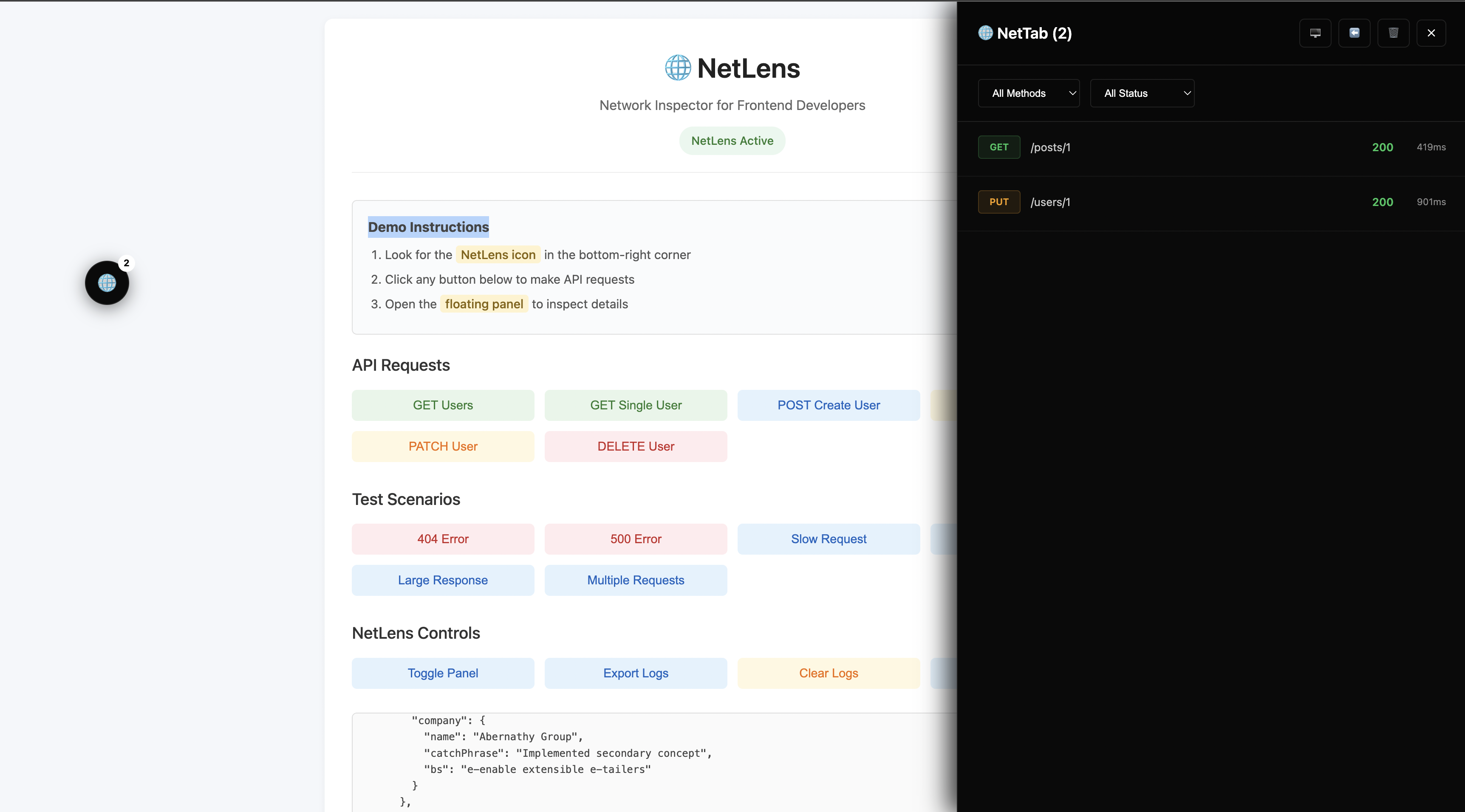
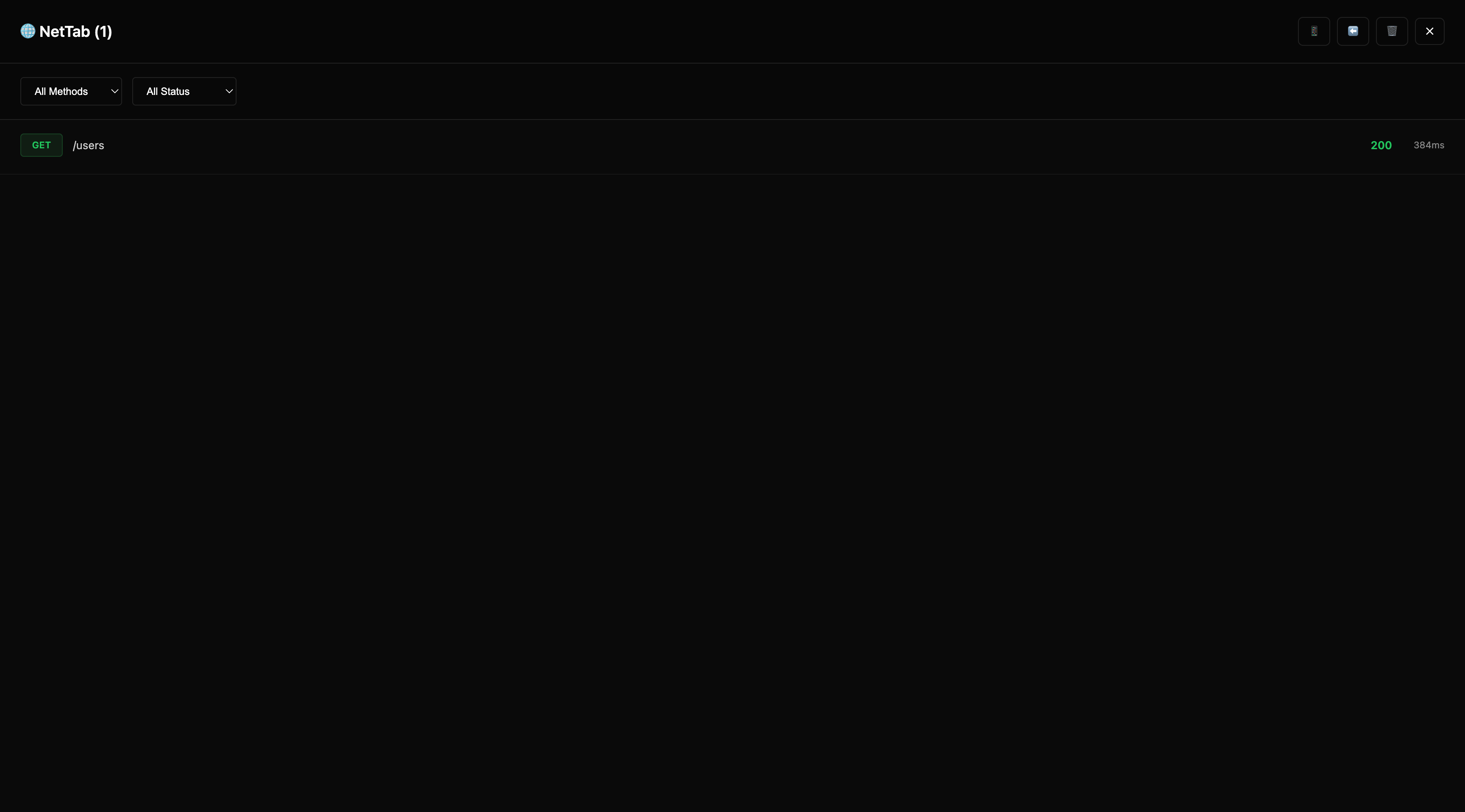
Fullscreen Inspector
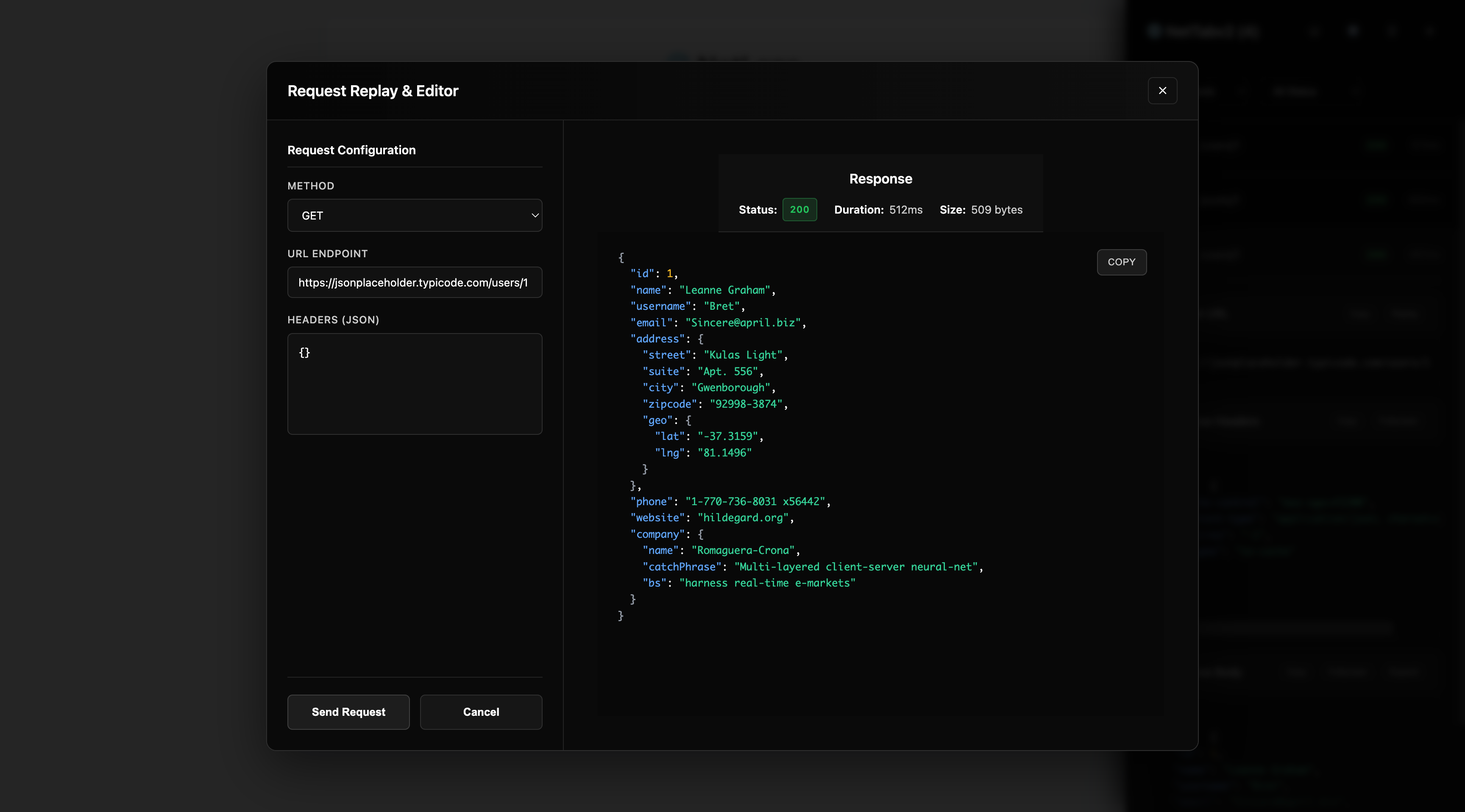
Request Replay
⚙️ Configuration
interface NetTabConfig {
  enableConsole?: boolean     // Show logs in console (default: true)
  enableOverlay?: boolean     // Show floating panel (default: false)
  maxLogs?: number            // Maximum requests to store (default: 100)
  redact?: string[]           // Headers/fields to redact (default: [])
  urlFilter?: RegExp|string   // Only monitor matching URLs
  formatter?: LogFormatter    // Custom console formatter
}
📦 Framework Examples
React
import { useEffect } from 'react'
import { initNetTab } from 'netlens'

function App() {
  useEffect(() => {
    if (process.env.NODE_ENV === 'development') {
      initNetTab({
        enableOverlay: true,
        redact: ['Authorization'] // Hide sensitive headers in production
      })
    }
  }, [])

  return <YourApp />
}
Vue 3
<script setup>
import { onMounted } from 'vue'
import { initNetTab } from 'netlens'

onMounted(() => {
  initNetTab({
    enableConsole: true,
    enableOverlay: true,
    urlFilter: '/api/' // Only monitor API calls
  })
})
</script>
Next.js
// pages/_app.tsx
import { useEffect } from 'react'
import { initNetTab } from 'netlens'

function MyApp({ Component, pageProps }) {
  useEffect(() => {
    if (typeof window !== 'undefined') {
      initNetTab({ enableOverlay: true })
    }
  }, [])

  return <Component {...pageProps} />
}
Vanilla JavaScript
<!-- Latest version -->
<script src="https://unpkg.com/[email protected]/dist/index.global.js"></script>

<!-- Alternative CDNs -->
<script src="https://cdn.jsdelivr.net/npm/netlens@latest/dist/index.global.js"></script>
<script src="https://cdn.skypack.dev/netlens@latest/dist/index.global.js"></script>

<script>
  FrontendNetTab.initNetTab({
    enableConsole: true,
    enableOverlay: true
  })
</script>
🎛️ Features
Smart Request Monitoring
- Auto-detects fetch and XMLHttpRequest calls
- Preserves request/response data with timing
- Filters by HTTP method, status code, or URL patterns
- Survives page refreshes and SPA navigation
Beautiful Interface
- Dark theme optimized for development
- Syntax highlighting for JSON responses
- Expandable sections for large payloads
- Responsive design works on any screen size
Developer-Friendly
- One-click copy for URLs, headers, and bodies
- Fullscreen mode for detailed inspection
- Console integration with pretty-printed logs
- TypeScript support with full type definitions
Privacy-First
- Local only – data never leaves your browser
- Configurable redaction for sensitive information
- No external dependencies or tracking
- Lightweight – <20KB minified
Request Replay & Editing
How to Use:
- Click on any captured request to expand details
- Click the Replay button next to the request URL
- Edit the endpoint URL and headers as needed
- Click Send Request to see the new response
Perfect for:
- Testing API endpoints with different parameters
- Debugging authentication by modifying headers
- Trying different URLs without changing your code
- Quick API experimentation during development
📊 API Reference
Core Functions
// Initialize monitoring
initNetTab(config?: NetTabConfig): void

// Get captured requests
getLogs(): RequestLog[]

// Clear request history
clearLogs(): void

// Toggle overlay visibility
toggleOverlay(): void

// Export logs as JSON
exportLogs(): string

// Update configuration
updateConfig(config: Partial<NetTabConfig>): void

// Cleanup
destroy(): void
Request Log Format
interface RequestLog {
  id: string
  method: 'GET' | 'POST' | 'PUT' | 'DELETE' | 'PATCH' | 'HEAD' | 'OPTIONS'
  url: string
  requestHeaders: Record<string, string>
  requestBody: unknown
  status: number
  statusText: string
  responseHeaders: Record<string, string>
  responseBody: unknown
  duration: number
  timestamp: number
  type: 'fetch' | 'xhr'
  failed: boolean
  error?: string
}
🏗️ Use Cases
Development Debugging
// Perfect for catching API issues during development
initNetTab({
  enableConsole: true,
  enableOverlay: true,
  urlFilter: /\/api\//,  // Only API calls
  redact: []             // Show everything in dev
})
Production Monitoring
// Lightweight monitoring in production
initNetTab({
  enableConsole: false,
  enableOverlay: false,
  maxLogs: 50,
  redact: ['Authorization', 'Cookie'],
  urlFilter: /\/api\//
})

// Export logs when user reports an issue
function reportBug() {
  const logs = exportLogs()
  sendToSupport({ logs, userAgent: navigator.userAgent })
}
Testing & QA
// Useful for QA teams to capture network behavior
initNetTab({
  enableOverlay: true,
  maxLogs: 200
})

// Easy to export test evidence
document.addEventListener('keydown', (e) => {
  if (e.ctrlKey && e.key === 'e') {
    downloadLogs()
  }
})
🎥 Examples & Demos

☕ Support
If you find NetLens useful, consider supporting my work:
📄 License
MIT © Ehtesham Nasim
Keywords: network inspector, fetch debugger, API monitor, xhr interceptor, devtools alternative