
neuralis
v0.3.2
Published


Readme

Your agents. Your infrastructure. One package protocol.
Website · Documentation · Install · Releases · Docker Hub · npm · X · Threads · YouTube
Runs on Linux and Windows (WSL2) with Docker, or from source on Linux and macOS · License: FSL-1.1-ALv2
Neuralis is a self-hosted, multi-agent and multiplayer AI platform built around one package protocol. It gives organizations a shared place to run agents, work with their knowledge and extend the workspace on infrastructure they control. Models, tools, files and everyday applications meet inside projects with explicit identities and permissions.
An agent has a persistent identity, memory, access to a scoped filesystem and a place on the team's calendar. It can work through chat, scheduled workflows, tools and a virtual desktop. The aim is useful ongoing work with clear responsibility, rather than a succession of disconnected prompts.
Requirements
Recommended: the Docker install, on Linux or Windows with WSL2.
| Install | Tested on | You need |
|---|---|---|
| Docker image | Linux, Windows with WSL2 | Docker Engine with Compose v2 (install guide): docker compose version answers and your user reaches the daemon without sudo (docker info). Nothing else — setup runs from the image. |
| npm (npm create neuralis) | Linux, Windows with WSL2 | The same Docker, plus Node.js 26 or newer and, on Linux, python3, make and a C++ compiler for the terminal's native module (Debian/Ubuntu: sudo apt install build-essential python3). |
| Native, from a clone (no Docker) | Linux, macOS | git, Node.js 26 or newer and, on Linux, python3, make and a C++ compiler; on macOS the terminal's native module ships prebuilt. Vector store: setup downloads and starts Qdrant on Linux, connects to a Qdrant you run, or runs in-memory only. |
Ubuntu's own nodejs package is older than 26: install 26 from NodeSource or with sudo snap install node --classic --channel=26. Native Windows (without WSL2) has not been tested end to end. The maturity rows predate the release checks of the published version, which pass on Linux (Docker and native) and natively on macOS (Apple silicon and Intel).
Quick start
Setup runs from the image itself: it writes the session secret, the data folders, the first owner account and a docker-compose.yml into a folder of your own, and the stack runs from that folder. Node.js is not needed. On Linux or WSL2, one command checks Docker, creates ~/.neuralis and ~/neuralis, runs setup from the image in your terminal and offers to start Neuralis:
curl -fsSL https://neuralisapp.com/install.sh | shTo read the script first: curl -fsSLO https://neuralisapp.com/install.sh && sh install.sh. The manual form, which is what the installer runs:
NEURALIS_TAG=latest   # or a release tag: https://hub.docker.com/r/neuralisapp/neuralis/tags
mkdir -p ~/.neuralis ~/neuralis && cd ~/neuralis
docker run -it --rm --user "$(id -u):$(id -g)" \
  -v /var/run/docker.sock:/var/run/docker.sock --group-add "$(stat -c %g /var/run/docker.sock)" \
  -v "$HOME/.neuralis:/.neuralis" -e NEURALIS_HOST_HOME="$HOME/.neuralis" \
  -v "$PWD:$PWD" \
  neuralisapp/neuralis:"$NEURALIS_TAG" node bin/neuralis.mjs setup --output "$PWD"
docker compose up -d
Setup asks for the owner account (the password twice) and the address users reach Neuralis on, plus a free port when one is taken; provider keys, embedding and local LLM servers are added in the app afterwards, and setup --advanced asks every question instead. The first line picks the release: latest, or the tag of the release you want. Setup records the exact release it ran from in .env (NEURALIS_IMAGE_TAG), so the stack never runs a moving tag. Neuralis then answers on http://localhost:3100 with Qdrant beside it — when a port is already taken, setup names it and offers a free one; sign in with the owner account setup created.
An instance that has not been set up yet (no NEXTAUTH_SECRET, or no owner account) answers every page with a static "Neuralis is not set up yet" page (HTTP 503) that names the setup commands. Every other API call gets 503 {"error":"setup_required"}, and /api/health answers 503 {"status":"setup_required","code":"secret_missing"} (or "setup_incomplete"). /api/health answers 200 only on a configured instance whose runtime is ready. The image carries a HEALTHCHECK on /api/health (wget every 30 s after a 50 s start period, 3 retries), so a container started without setup turns unhealthy. The compose file setup writes defines its own healthcheck, which takes precedence.
The same install as an npm project, with every operator command as npx neuralis <command> (what it needs: the npm row of the requirements above):
npm create neuralis my-neuralis   # an install folder pinned to one exact release
cd my-neuralis
npx neuralis setup                # data folders, secret, first owner, docker-compose.yml
docker compose up -d
The installation guide covers updating, other topologies and what to do if something fails; first run covers the first steps in the workspace.
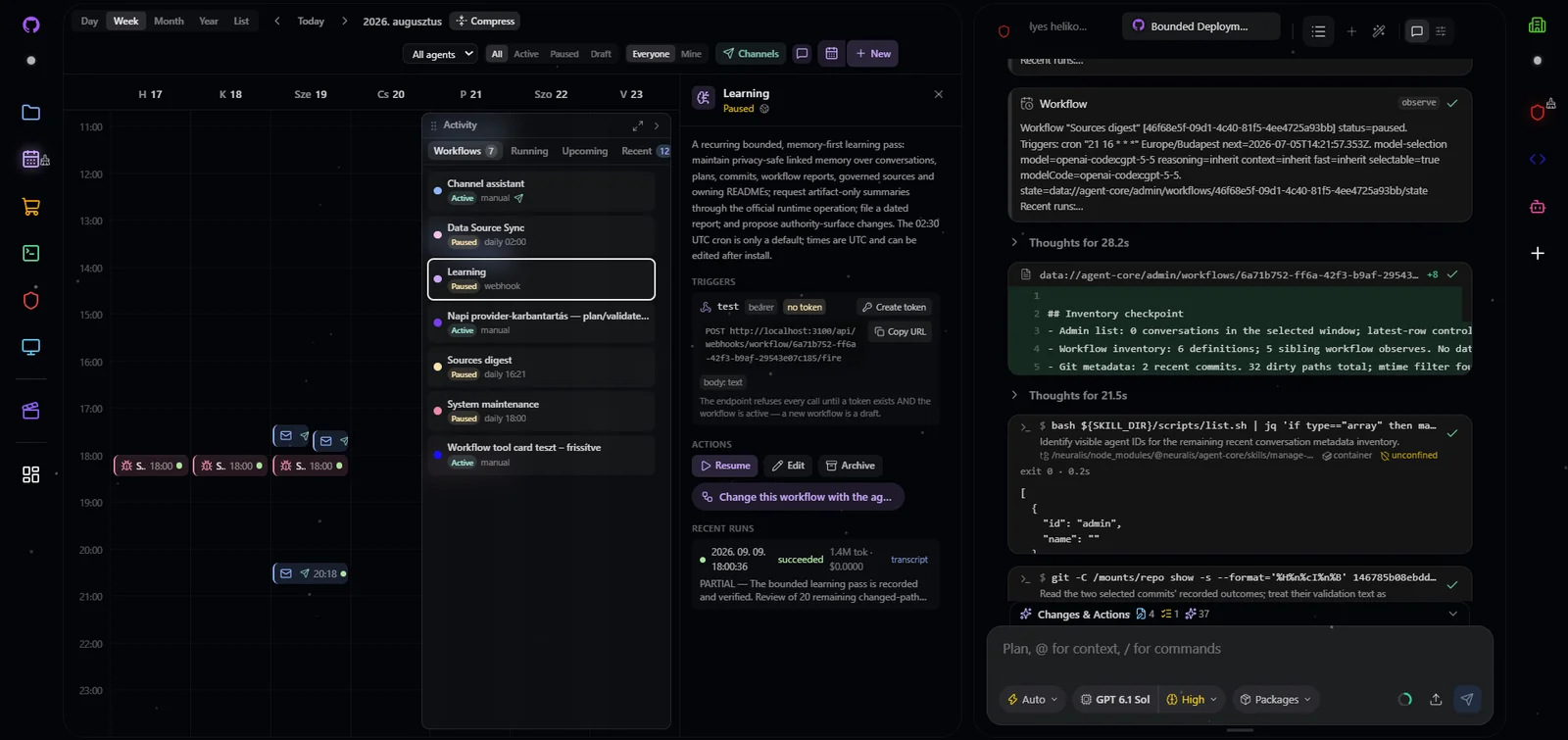
A configured installation with Calendar and Chat beside each other. The workspace, agent choices and installed packages reflect this installation.
Watch the workspace demo: connect a sample channel, schedule a briefing and open a package-contract Launch board. This scripted demonstration uses local sample data.
A workspace for people and agents
Multiplayer means people collaborate with agents in shared projects and conversations. A project holds its members, agents, files, roles and limits. Agents can have different instructions and model choices while working with the knowledge their project makes available.
The workspace brings together Chat, Files, Calendar, Terminal, Admin and Machine applications. Open applications can be arranged in tiled, canvas or grid layouts, minimized to the dock and restored. Packages contribute these applications through App surfaces: widgets, dock entries and chat cards described by the same contract.
Shared projects do not imply simultaneous writes to one conversation or a highly available cluster. Workflows and messaging channels currently run in a single process. The maturity table below records those boundaries so an installation can be planned around what works today.
Four capability packages, one host
The host supplies sign-in, project membership, roles, limits, the workspace shell and generic package routing. The product capabilities belong to packages:
- Agent core runs agents across multiple model providers, with durable conversations, skills, delegation, approvals, workflows, scheduling, messaging channels and the terminal. Agents can use external MCP servers, and authorized external clients can reach their tools through MCP.
- Brain core provides the shared URI-addressed filesystem, memory and search. Indexing, text search and source-discovered skills work without an embedding model or embedding API costs; an optional model adds semantic search. Connectors bring sources into the filesystem, with scope and path policies governing what each caller can read or change.
- Admin provides project and platform administration: members, roles, credentials, configuration, usage, audit and health. Its server-side gates govern every action, including actions initiated outside its interface.
- Machine core provides a Linux virtual desktop that people can view and authorized agents can drive through browser and desktop automation. Machines require a Docker engine and have their own grants and isolation boundaries.
These packages share a contract without putting their business logic into the host.
Extend work through the package protocol
A package declares what it contributes: skills, instructions, rules, agents, workflows, tools, routes, connectors and App surfaces. Contributions have explicit schemas and access requirements. The host discovers and routes them through the package system, so adding a capability does not require a new product-specific branch in the host.
Packages reach an installation in three ways. Administrators can install real packages as host dependencies; these run with first-party trust and must be vetted like other dependencies. Project packages can be dropped into a project's _packages/ directory, with code confined to the WebAssembly sandbox. Markdown source packages are discovered directly in synced sources, without a separate installation step.
Agent Skills and recognized Claude Code, Cursor, Codex, Gemini and Copilot markdown conventions can join the same scoped catalog. This imports supported content, not entire foreign runtimes: hooks and MCP server definitions from those layouts are not loaded. The protocol is designed to connect an ecosystem of capabilities while keeping the installing host responsible for trust.
Knowledge that stays connected to its source
Brain core treats reachable sources as one governed filesystem. Local folders, shared project data, stored brain content and supported connectors are addressed through URIs. Files remain associated with their source and scope while indexing makes their content searchable to callers who have access.
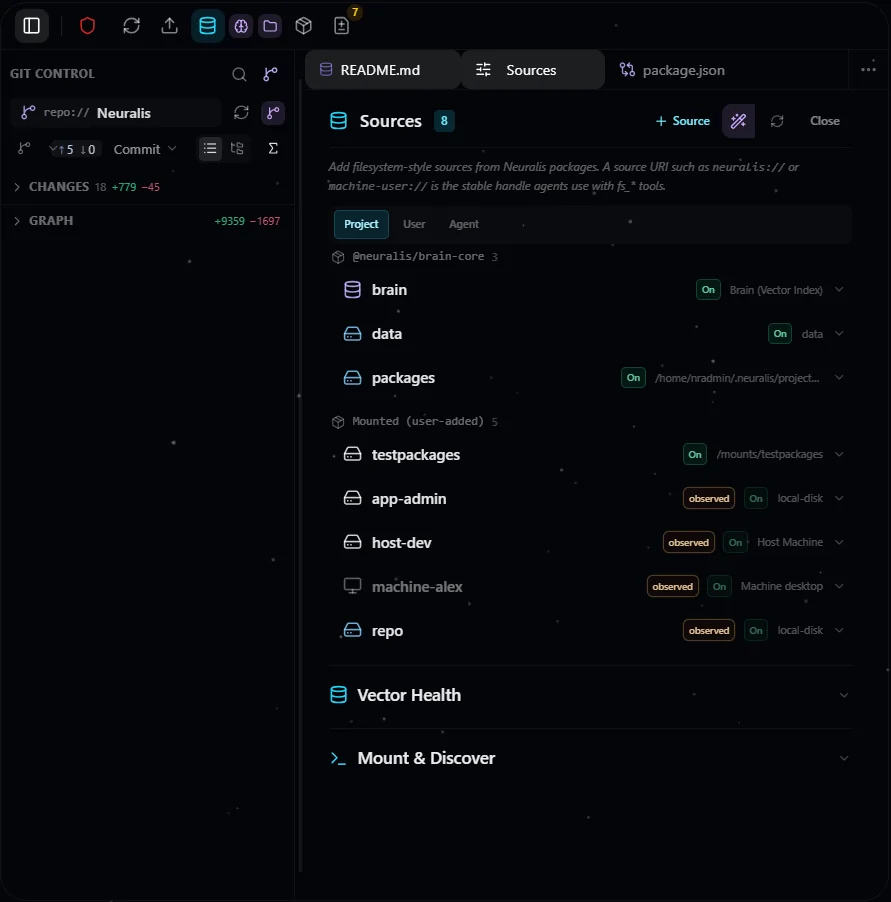
Files and Sources in a configured workspace. Source attachment and path policies determine which content a person or agent can reach.
The loop works in both directions: sources supply knowledge and markdown capabilities, while packages add connectors that bring further sources into the brain. Credentials remain in the encrypted credential store, rather than becoming workspace files or agent instructions.
Infrastructure and governance you control
Neuralis is intended for organizations running on their own machines, on-premises infrastructure or private cloud. Model choice includes supported hosted providers and operator-configured endpoints. Provider credentials can resolve at different scopes, while project roles and spending limits govern work under the caller's identity.
Requests from people, agents, scheduled workflows, skill scripts, the neuralis command-line client and external MCP clients pass the same deny-by-default boundaries. Identity, project membership, feature grants, package trust and path policies each have a role. Audit records make sensitive actions inspectable.
Today sign-in uses email and password; OIDC and SAML single sign-on are not available. Confined shells depend on a Linux kernel with Landlock support. The optional host access plane reaches a machine only after its owner pairs it as a device; anyone else's commands run there only while it is confined (Linux), and an unconfined device — the only kind on macOS and Windows — serves its owner alone. Review the security model and deployment guide before choosing a topology.
Start with a deployment that fits
The Neuralis beta is available through npm create neuralis, the neuralisapp/neuralis Docker image and a validated, history-free public host repository snapshot. Review the beta maturity and the requirements above before choosing a deployment. npm create neuralis makes an install folder that is an ordinary npm project depending on one exact neuralis release and carrying that release's dependency overrides and install-script approvals, with every operator command as npx neuralis <command>; npx neuralis update moves the folder, the image tag and the companion images to a published release line together. The setup wizard creates a missing data home and installation state, seeds the first owner and project, and preserves existing decisions on a rerun. Docker setup maps a chosen external MCP port to the fixed container listener. The separate @neuralis/cli client signs a person in from their own machine, calls package routes as that person, and starts Claude Code or Codex with an agent's skills, tools and context.
Continue with first run, the workspace guide and package authoring. Operator procedures live in the shipped operations skill; public source-domain READMEs explain the workspace package bridge, widget lifecycle, server package runtime and package API. Documentation is also available as agent-readable text.
Maturity
As of 2026-10-09. Scores measure development against documented promises and plans; labels also reflect recorded live use, CI and availability. See the maturity method.
| Subject | Level | Score | Main limitation | |---|---|---|---| | Package system | stable | 85 | Source packages are markdown only; code from a synced source runs only when an owner flags that source as a package source, and then in the WebAssembly sandbox. | | Agent core | beta | 80 | Confined shells need a Linux host kernel with Landlock support; without it, lower-trust shells are refused rather than run unconfined. | | Brain core | stable | 90 | Git remote operations use HTTPS only; SSH remotes are not supported. | | Admin | stable | 85 | Admin adds no agent tools or slash commands; agents reach administration through its skills and the routes they wrap. | | Machine core | stable | 90 | Machines need access to a Docker engine; without one the platform runs with no machines. | | Host (neuralis) | stable | 90 | Sign-in is email and password; single sign-on (OIDC, SAML) is not available. | | Install channels | beta | 70 | The beta is published; all-channel non-localhost login and per-channel updates remain unverified. Native ARM runtime acceptance is not recorded. | | Platform: Linux | experimental | 85 | No run on a standalone Linux host is recorded; the live-tested setup is Docker on WSL2. | | Platform: Windows with WSL2 | stable | 90 | Use an in-distro Docker engine. | | Platform: macOS | experimental | 35 | Neuralis has not been run on macOS so far. | | Platform: Windows (native) | experimental | 35 | Neuralis has not been run on native Windows so far. | | Enterprise security and governance | stable | 90 | Give the host access plane only to a single trusted operator's machine. | | Sign-in | stable | 85 | Single sign-on (OIDC, SAML) is not available; sign-in is email and password. | | MCP | stable | 85 | Keep the MCP port private unless remote MCP clients are intended. | | Workflows and scheduling | beta | 75 | Workflows run in a single process; a second replica would run every schedule twice. | | Messaging channels | preview | 55 | Telegram and WhatsApp are the only messaging platforms. | | Ecosystem import | stable | 85 | Imported content is markdown only: hooks and MCP server definitions in a foreign layout are not loaded. | | Marketplace | preview | 70 | The marketplace is not publicly hosted; it runs as a local deployment only. |
License
Neuralis uses FSL-1.1-ALv2, with each version converting to Apache-2.0 two years after release. The package-system contract layer is Apache-2.0. See licensing for terms and the distinction between the platform and packages you build against its contract.