
neurarch-mcp
v0.15.1
Published
MCP server that gives Claude Code, Cursor, Claude Desktop, VS Code and other MCP-aware agents structural awareness of a neural network. Point it at a PyTorch .py file, a Neurarch graph, or a Hugging Face repo and the agent can read layers, parameters and

Maintainers
 neurarch
Readme
neurarch-mcp
PyTorch MCP server: lint, verify and rank a neural network design before you train it, from Claude Code, Cursor, Claude Desktop, VS Code, Windsurf or Codex.






Your coding agent reads your model as source text, so it guesses at shapes, parameter counts, and what an edit breaks. neurarch-mcp hands it the structured graph instead, plus the verifier: the design rules, the full readiness / cost / deployment verdict, and which of several candidate designs is worth the GPU time. Point it at a PyTorch .py, a saved graph, or a Hugging Face repo. Everything runs on your machine, with no API key, no account, and no network call unless you turn one on.
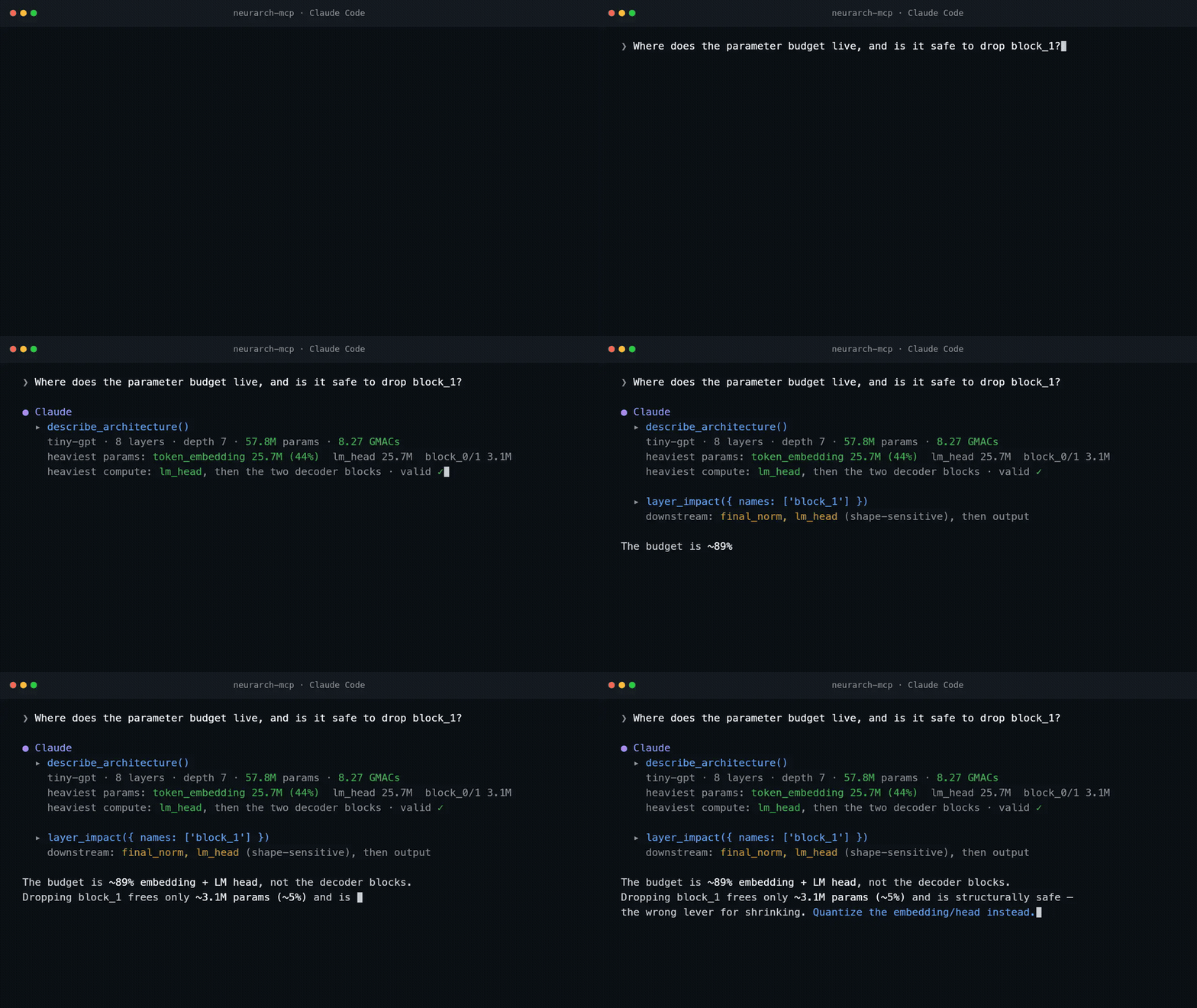
Every number above is produced by the tools, not guessed by the model. 13s webm.
Install
claude mcp add neurarch -- npx -y neurarch-mcp /abs/path/to/model.py # Claude CodePer-client config for Claude Desktop, Cursor, VS Code, Windsurf and Codex is below. Node 20+ is the only requirement; there is no install step beyond npx.
What it looks like
A real exchange against examples/tiny-gpt.neurarch.json:
You ▸ Where does the parameter budget live, and is it safe to drop block_1?

Claude ▸ (calls describe_architecture)
  tiny-gpt: 8 layers, depth 7, 57.8M params, 8.27 GMACs.
  Heaviest by params: token_embedding (25.7M, 44%), lm_head (25.7M), block_0/1 (3.1M each).
  Heaviest by compute: lm_head, then the two decoder blocks. Validation: clean.

  (calls layer_impact { names: ["block_1"] })
  Downstream of block_1: final_norm and lm_head (shape-sensitive, weight-carrying), then output.

  The budget is dominated by the embedding + LM head (~89%), not the decoder blocks,
  so dropping block_1 frees only ~3.1M params (~5%) while removing one of just two
  decoder layers. It is structurally safe (final_norm just re-reads block_0's output),
  but it is the wrong lever if your goal is shrinking the model. Quantizing the
  embedding/head would do far more.
And the one this server is built around. Point it at examples/tiny-vit.py, plain PyTorch source with a bug planted in it, and ask "lint this model":
block  head-dim-divisibility [attn:multiHeadAttention]: embed dim (258) must be
       divisible by numHeads (8); head_dim would be 32.25
That is a runtime crash sitting in source that reads fine, found offline in milliseconds, with no key and no account. The same rule set the Neurarch CI action reports, so a clean result here is a clean CI run. The rules are measured (the crash rules: 96 of 96 blocked graphs crashed PyTorch forward, 80 of 80 passes ran); the static parser in front of them is the weaker half, and we measured that too.
Three ways in
| Input | What the agent gets | How |
|---|---|---|
| A self-contained PyTorch .py file | Layers, types, hyperparameters and wiring, when the file builds its own layers with literal sizes. Shapes and FLOPs are unknown, because the source never says what goes in, and are reported as unknown rather than as zero. On real repositories this is the weak path: see what the parser can read. | npx -y neurarch-mcp model.py |
| A traced graph (neurarch-trace) | Everything, with real shapes. Handles what static parsing cannot: from_pretrained, timm, models spread across files, anything built dynamically. | pip install neurarch-traceneurarch-trace my_pkg.model:build --input 1,3,224,224 |
| A Hugging Face repo | The architecture from config.json, with the published parameter count next to the graph's so you can see how close it is (Qwen2.5-0.5B: 494.00M against 494,032,768). | npx -y neurarch-mcp hf:Qwen/Qwen2.5-0.5B --hf |
A .neurarch.json saved from the Neurarch app (File → Save) is the fourth, and carries shapes, groups and design notes. Add --watch so the agent sees app-side saves without a restart.
What the static parser can read
We measured it rather than describe it: docs/REAL_REPOS_STUDY.md runs the parser and linter over 116 model files from 59 popular repositories (nanoGPT, HF modeling_*.py, timm, torchvision, DiT, MAE, CLIP, Mamba, SAM, diffusers and more). Re-measured 2026-09-03 with the current engine: the parser returns a graph for 86% of files and a graph a person would recognise as the model for 41% (Llama, Qwen2, Mistral and Gemma come back as 58-node graphs; nanoGPT as 72), up from 63% and 8% in August. The linter's findings on those graphs are still not trustworthy: every block and warn it raised was hand-judged and none was a real defect, because the parser records construction order as data flow and never sees forward(), so residual adds, functional activations and config-selected heads all read as missing or misordered. The graph is good enough to orient with and not yet good enough to lint from; run trace_model before acting on a finding from a .py.
Three consequences are in this release. A graph from source carries a parseQuality grade (full, partial, thin) on describe_architecture and lint_model, with the fix named. Dimension rules are held back on layers whose dimension is still source text, and the count is reported as suppressed rather than dropped. And find_models marks thin parses partial so an agent does not build a plan on two layers. For real repositories, use neurarch-trace: it reads the numbers at runtime, which is the only place they exist.
Every read tool also takes an optional model_path, so one server covers a whole repository: ask about baseline.py, then variant_b.neurarch.json, then zoo:llama-3-8b, without restarting anything. find_models tells the agent what is there.
Tools
Three tools grade the model, and they are a ladder worth climbing in order. Each is free, offline and instant; check_design runs five pipeline stages, so an agent that starts at the top still pays for an answer two thirds of which a cheaper tool had.
| | Tool | Answers |
|---|---|---|
| 1 | validate_model | Is this a well-formed graph at all: cycles, dangling refs, duplicate names, orphans. |
| 2 | lint_model | Does it break a design rule: attention head-dim and GQA divisibility, norm/activation ordering, dropout and feature ranges, missing residuals in deep stacks, the shape rules decidable statically. Returns provenance: for every rule that fired and has a published measurement behind it, the measurement. A rule with no number is absent rather than dressed up. |
| 3 | check_design | Will it train, what will it cost, where can it run: readiness, parameter and cost estimates, the best deployment target and its latency, and the decisions still left to the human. Same code path as the app and POST /api/v1/check. |
| 4 | rank_designs | Which of k candidate designs deserves the training budget. Candidates are paths, zoo:/hf: refs or inline graphs. Blocked ones (a pre-flight finding that means the graph will not forward-pass) rank last and come back as reclaimable budget; that part is measured, 96 of 96 blocked graphs crashed PyTorch forward and 80 of 80 passes ran. Legal candidates are ordered only by rules with a trained outcome behind them, and a tie stays a tie: recommended is null when nothing measured separates the top, which is the common answer. Params, cost and GPU fit are returned per candidate for you to break ties on your own budget; they never order on their own, but tie_break: "cost" or "params" will break a measured tie on them, echoed and labelled as your rule with measuredRank kept. calibration ships inside every result (pairwise accuracy 51.4% at 8.3% coverage, in-sample, not quotable; out of sample the score abstained on 11 of 15 pairs while Claude Opus 5 reading the code got 12 of 15 and always picking the larger design got 11 of 15), so the ordering cannot be read as a quality prediction. |
| 5 | suggest_fix | The finding as a change to the file. A unified diff per finding: exact where the rule pins a number or an order (the head-dim crash above becomes a 7-line diff that changes every 258 to 256), proposal where a layer is missing. Apply, then lint again. |
Inspect
| Tool | What it does |
|---|---|
| describe_architecture | One-call orientation: topo-ordered pipeline, depth, IO shapes, total params and MACs, top-5 param and compute hotspots, validation rollup. Start here. |
| get_model_summary | Layer count, total params, dominant types, input/output shape. |
| get_layer | One layer by name: params, shapes, notes, upstream/downstream. |
| find_layers | Search by type, name regex, scope prefix or augmentation; rank by parameter count. |
| compare_layers | Structural diff of two layers. |
| layer_impact | Blast radius of changing a layer or matched set: shape-sensitive and weight-carrying downstream layers. Call it before recommending an edit. |
| find_path, list_connections | Directed path between two layers; the edge list. |
| param_count_by_block, flops_by_block | Params and MACs grouped by block, scope or type. |
| list_blocks, get_block | Collapsed groups and what crosses their boundary. |
| diff_models | Structural diff against another .neurarch.json. |
| mermaid_diagram | The model as Mermaid flowchart TD. |
| list_hyperparams, get_design_notes | What the user set and wrote in the app. |
Reference library and other models
| Tool | What it does |
|---|---|
| list_architectures | Search the 81 reference architectures bundled with this server (DeepSeek-V3, Qwen2.5, Llama, Mixtral, Gemma, Whisper, CLIP, BERT, ViT, ResNet and more), each with real dimensions from the model's config and a parameter count checked against the published one. Offline. |
| load_architecture | Open one and describe it. Then model_path: "zoo:<id>" on any tool. |
| load_hf_model | A Hugging Face repo as a graph. Listed only under --hf, because it is the one tool that opens a socket. |
| find_models | Walk a directory for nn.Module definitions and saved graphs, try the parser on each, and say which need neurarch-trace instead. |
| trace_model | Run neurarch-trace in your Python with the input dims and get a graph with real shapes back as a model_path. The way past the static parser. |
| export_pytorch | The graph as a runnable nn.Module, the app's own generator. save_to needs --write and never targets the file the server was started from. |
Write (opt in with --write)
add_layer, modify_layer, add_connection, delete_layer, delete_connection, save_model. Mutations always target the file passed on the command line; write tools refuse model_path, so an agent cannot edit, and then save over, a path it invented. Refused on a .py (the graph was derived from it; use export_pytorch to emit new source).
Every tool declares what it does to your files (MCP annotations): read tools are read-only and closed-world, load_hf_model is open-world, the three that can destroy something say so. Results carry structuredContent alongside the JSON text.
Prompts and resources
In Claude Desktop, Cursor and VS Code these show up as slash commands. Each is the tool ladder written out in order, with one rule on top: every number in the answer comes from a tool result, never from memory of similar models.
| Prompt | Argument | What it does |
|---|---|---|
| /review_design | focus? | Structured review: readiness, risks, where the budget lives, the edits worth making with their blast radius. |
| /pre_train_checklist | | Pass / fail / unknown per line, each backed by the tool that decided it, before you spend GPU time. |
| /shrink_for_target | target | Fit "under 100M params" or "a T4 with batch 32": find where the budget lives, propose variants, rank them. |
| /compare_with_reference | architecture? | The model next to a published one from the library, with the differences that would change training. |
| /explain_finding | rule | What a finding means for this model, the evidence behind it, the smallest edit that clears it. |
Resources a client can pin as context: neurarch://model (the graph), neurarch://model/mermaid, neurarch://model/pytorch, neurarch://zoo, neurarch://zoo/{id}, neurarch://rules (the provenance table), neurarch://docs and neurarch://docs/{tool} (every tool's full contract).
check_design can also ask the person when the verdict ends in a decision only they can make (which data, whether to spend the money): pass ask_user: true and, in a client that supports MCP elicitation, the question is put to them and their answer comes back with the verdict.
Whether an agent reaches for the right tool is measured, not assumed: npm run eval:tools runs six fixed asks through Claude Code against the built server and grades the tool calls (lint before proposing an edit, rank_designs for a which-of-k question). The latest result is in docs/tool-selection-eval.json.
Also a CLI
npx -y neurarch-mcp lint model.py                 # findings, exit 1 on a block
npx -y neurarch-mcp lint a.py b.py --json         # for CI
npx -y neurarch-mcp check model.py                # the full verdict
npx -y neurarch-mcp check zoo:qwen2.5-7b          # on a reference architecture
Client setup
Use an absolute path in any global config: npx does not run from your project directory. Relative paths work in project-scoped configs (.mcp.json, .cursor/mcp.json, .vscode/mcp.json).
claude mcp add neurarch -- npx -y neurarch-mcp /abs/path/to/model.pyOr commit a project-scoped .mcp.json so every collaborator gets the server:
{ "mcpServers": { "neurarch": { "command": "npx", "args": ["-y", "neurarch-mcp", "./model.py"] } } }Download the .mcpb from Releases and open it, or edit the config (Settings → Developer → Edit Config; macOS ~/Library/Application Support/Claude/claude_desktop_config.json, Windows %APPDATA%\Claude\claude_desktop_config.json):
{ "mcpServers": { "neurarch": { "command": "npx", "args": ["-y", "neurarch-mcp", "/abs/path/to/model.py"] } } }Fully quit and reopen Claude Desktop; the config is read at startup.
Click Add to Cursor above, or create .cursor/mcp.json (project) or ~/.cursor/mcp.json (global):
{ "mcpServers": { "neurarch": { "command": "npx", "args": ["-y", "neurarch-mcp", "./model.py"] } } }Click Install in VS Code above, or create .vscode/mcp.json (note the servers key):
{ "servers": { "neurarch": { "command": "npx", "args": ["-y", "neurarch-mcp", "${workspaceFolder}/model.py"] } } }Same command + args shape; only the file location differs. For HTTP clients, run npx neurarch-mcp model.py --http and point the client at:
{ "mcpServers": { "neurarch": { "type": "http", "url": "http://127.0.0.1:8787/mcp" } } }Verify: ask the agent "List the Neurarch tools you can see." From a shell, npx -y neurarch-mcp --help prints usage and the full tool list.
Flags
--write: expose the six mutation tools. Off by default.--watch: reload the model file on change. Pair with the app.--hf: allowhf:<org/name>refs and listload_hf_model. The one network switch.HF_TOKENis sent for gated repos; results are cached for a day under~/.cache/neurarch-mcp.--tools=full: advertise every read tool. The default is the core thirteen; every tool stays callable by name either way, andneurarch://docs/<tool>has the full contract. The default listing costs the agent about 3.9k tokens per turn, the full one 5.8k.--http[=PORT],--host=ADDR: serve over Streamable HTTP. See Remote access.--version,--help.
Network: one switch, off by default
| Switch | What it sends | When |
|---|---|---|
| --hf | A request to huggingface.co for a repo's config.json (and HF_TOKEN, if set). Never your model. | Only on load_hf_model or an hf: ref. |
| NEURARCH_REPORT=1 | One anonymous structure+verdict row: structural fingerprint, layer-type histogram, edge count, (rule id, severity) pairs. Structurally incapable of carrying the graph. | After each validate_model, lint_model or check_design call, fire and forget, 5s cap. |
With both unset, this server makes no network calls at all, and no tool is an exception: the parser, the rule engine, the verifier, the ranker and the reference library are vendored into the package. Your model never leaves the machine. Corpus policy: neurarch.com/rules.html#data.
Remote access
By default the server talks stdio, so the agent and the model file live on the same machine. --http serves the same tools over Streamable HTTP, so a hosted or phone-based agent can drive a model running on your machine, for example behind a Cloudflare or Tailscale tunnel.
npx neurarch-mcp model.py --http                        # loopback, no auth needed
NEURARCH_MCP_TOKEN=$(openssl rand -hex 16) \
  npx neurarch-mcp model.neurarch.json --write --http --host=0.0.0.0
Binds to 127.0.0.1 by default with DNS-rebinding protection; NEURARCH_MCP_TOKEN requires Authorization: Bearer <token> on every request and is required before --write may bind to a non-loopback host.
Hosted, with no model on disk: npx neurarch-mcp --http --hf serves a server that answers about whatever each call names (model_path: "zoo:..." / "hf:...", or model_source with the model text inline). Dockerfile, fly.toml and docs/HOSTED.md carry the deploy. A hosted server sees the model text a client sends it, which the local one never does; say so wherever a URL is published.
Real shapes from real code: neurarch-trace
Static parsing stops at the source. python/neurarch-trace instantiates the model, runs one forward pass with hooks, and writes a .neurarch.json with every shape filled in, functional residual adds and concats included:
pip install neurarch-trace
neurarch-trace models/resnet.py:ResNet18 --input 1,3,224,224 -o resnet18.neurarch.json
neurarch-trace hf:bert-base-uncased --input 1,128 --dtype long          # needs transformers
npx -y neurarch-mcp resnet18.neurarch.json
Shapes come out batchless ([3,224,224], never [1,3,224,224]), the convention every tool here expects.
Development
git clone https://github.com/neurarch-ai/neurarch-mcp && cd neurarch-mcp
npm install
npm run typecheck && npm run build && npm test     # vitest, 260+ tests
node dist/index.js --help
npm run build:mcpb                                 # the Claude Desktop bundle
CI runs typecheck, build and test on Node 20 and 22. The package vendors from the main Neurarch repo so that it works with no network, no key and no second install: src/vendor/engine.bundle.mjs (registry, PyTorch parser, rule set, code generator, HF config converter) and src/vendor/verifier.bundle.mjs (five pipeline stages, provenance table, ranker). Both are generated, contract-tested, and asserted to contain no import (and, for the verifier, no fetch). @modelcontextprotocol/sdk is the only runtime dependency. zoo/ is synced from awesome-llm-model-zoo with npm run sync:zoo.
A new tool is a small, self-contained PR: see CONTRIBUTING.md. The agent skill that teaches an evidence-gated edit loop over these tools lives in skills/ (npx skills add neurarch-ai/neurarch-mcp).
Troubleshooting
- The server never appears in the client. The model path must be absolute in any global config;
npxdoes not run from your project directory. Relative paths only work in project-scoped configs (.mcp.json,.cursor/mcp.json,.vscode/mcp.json). - Read tools work but write tools are missing. You did not pass
--write. It is off by default so accidental writes can't clobber a file you're editing in the app. npxfails on first run. Node >= 20 is required (node --version).- Claude Desktop shows nothing after editing the config. Fully quit and reopen the app; the config is only read at startup.
- The agent sees a stale graph after you edit in the app. Add
--watch, or restart the server.
What this is not
- Not a generic codebase indexer. It reads model definitions (
.py,.neurarch.json,zoo:,hf:), not your whole tree. For codebase structure, use GitNexus or similar. - Not a trainer. It tells you whether a run would start, what it would cost and where the result could be served; it never spends your GPU time.
check_designsays when a decision is yours. - Not connected to your Neurarch workspace. It reads files. Live editing happens in the Neurarch app;
--watchfollows its saves.
Issues & Feedback
This repo is the public home for both:
- neurarch-mcp (this MCP server): bugs, protocol changes, integration questions.
- Neurarch (the app): canvas bugs, agent issues, linter rules, feature requests.
| | | |---|---| | 🐛 Report a bug | Something is broken or behaving unexpectedly. | | 💡 Request a feature | An idea that would make Neurarch or the MCP server better. | | ❓ Ask a question | Something specific you can't figure out. | | 💬 Start a discussion | Open-ended ideas, design feedback, "how would you…". |
Please tag issues with mcp, app, linter, or feature-request so we can triage faster.
Star this repo
If neurarch-mcp saved you from pasting an nn.Module into chat, a ⭐ helps other ML engineers find it. It is the lowest-effort way to support the project.
Contributing
A new tool is a small, self-contained PR. See CONTRIBUTING.md for the 3-step "add a tool" guide.
Development
git clone https://github.com/neurarch-ai/neurarch-mcp
cd neurarch-mcp
npm install
npm run typecheck             # tsc --noEmit
npm run build                 # tsup → dist/index.js
npm test                      # vitest (≈190 unit + end-to-end tests)
node dist/index.js --help     # confirm bin works
CI runs typecheck + build + test on Node 20 and 22 for every push and PR.
The package vendors from the main Neurarch repo, and everything is vendored for the same reason: this server has to work with no network, no API key and no second install step.
src/lib/: pure-TypeScript utilities (model types, parameter and FLOP estimators, impact analyzer), maintained as source here.src/vendor/engine.bundle.mjs: the compiled Neurarch engine: the component registry, the PyTorch parser behind.pysupport, and the rule set behindlint_model. Generated, never hand-edited; the header says how to regenerate it, andsrc/vendor/engine.contract.test.tsfails if its exports drift or it ever acquires an import.src/vendor/verifier.bundle.mjs: the compiled Neurarch verifier behindcheck_design: the five pipeline stages, plus the rule-provenance table. Same code path as the app and the hosted endpoint, so an agent here and a person in the app get the same answer. Same rules: generated, contract-tested (verifier.contract.test.ts), and asserted to contain no import and nofetch.
Neither adds a runtime dependency: @modelcontextprotocol/sdk is still the only one.
Privacy Policy
This server runs on your machine and is built not to phone home:
- Data collection: none by default. The server makes no network calls unless you enable a switch. Your model files, graphs and source code are read from your disk and never transmitted.
--hf(optional): fetches a model's publicconfig.jsonfrom huggingface.co. What is sent: the repo id you asked for, and yourHF_TOKENif you set one (to huggingface.co only). Responses are cached locally under~/.cache/neurarch-mcpand can be deleted at any time.NEURARCH_REPORT=1(optional, off by default): sends one anonymous structure row per graded graph to the Neurarch corpus: a structural fingerprint (8-char hash), a layer-type histogram, an edge count, and (rule id, severity) pairs. The payload format cannot carry your graph, parameter values, layer names, file paths, or any identity. Policy and examples: neurarch.com/rules.html#data.- The hosted instance (
neurarch-mcp.fly.dev) is different by nature: it processes the model text or references a client sends it, in memory, to answer that call. Nothing is stored server-side beyond a one-dayhf:config cache; there are no accounts and no request logs of graph content. It runs withNEURARCH_REPORT=1, so each graded call also sends the anonymous structure row described above; use the local server if you do not want that. - Retention: the local server stores nothing beyond its local caches. Corpus rows (opt-in) are retained indefinitely as anonymous aggregates.
- Third parties: no data is shared with anyone. The only third-party endpoint ever contacted is huggingface.co, and only under
--hf. - Contact: [email protected], or open an issue.
The app-wide policy at neurarch.com/privacy covers the Neurarch web app; this section covers this server.
License
MIT. See LICENSE.
Links
- Neurarch: the visual neural-network editor that produces the model files this server reads.
- Model Context Protocol: the spec this server implements.
- npm: package page.