
next-dev-inspector
v0.4.1
Published
Dev-only floating inspector for Next.js + React 18/19: click any DOM element to open its source file in your editor (click-to-component), view live props and store state, reverse-lookup i18n keys, flash component re-renders, and copy element context for A

Maintainers
 harshadpatel1507
Readme
next-dev-inspector


Dev-only floating inspector for Next.js + React 18/19. Hover or click any DOM element to see which source file (with line number) rendered it, open it straight in your editor, view live props and store state, reverse-lookup i18n keys from rendered text, flash component re-renders, and copy the whole context for your AI assistant.
Zero runtime dependencies. Never ships to production when gated correctly (see Production safety).
Contents
- Features
- Requirements
- Quick start
- Production safety (dead-code elimination)
- Controls
- True re-render flashes (optional hook)
- Copy for AI
- Configuration
- API reference
- How it works
- Limitations
- Troubleshooting
- Demo app
- Development
- Project status
Features
Find the source
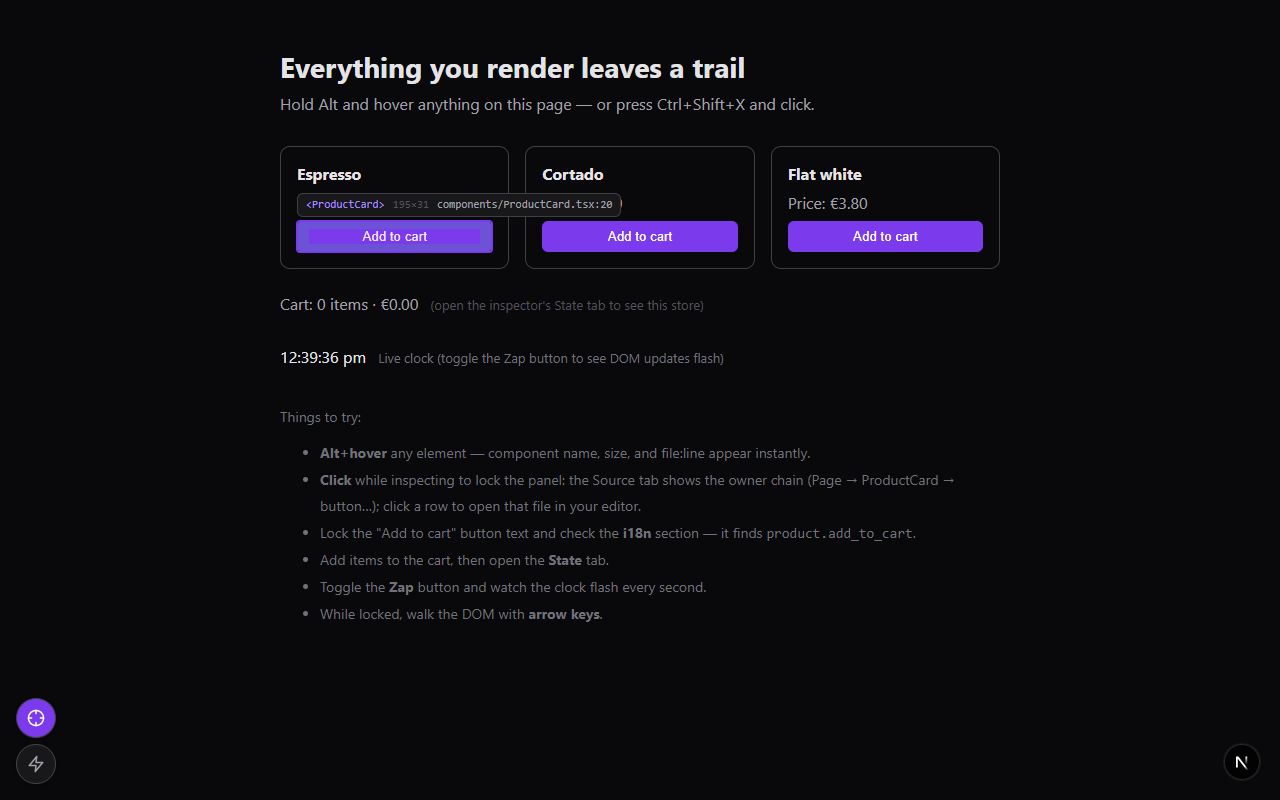
- Hover highlight with a
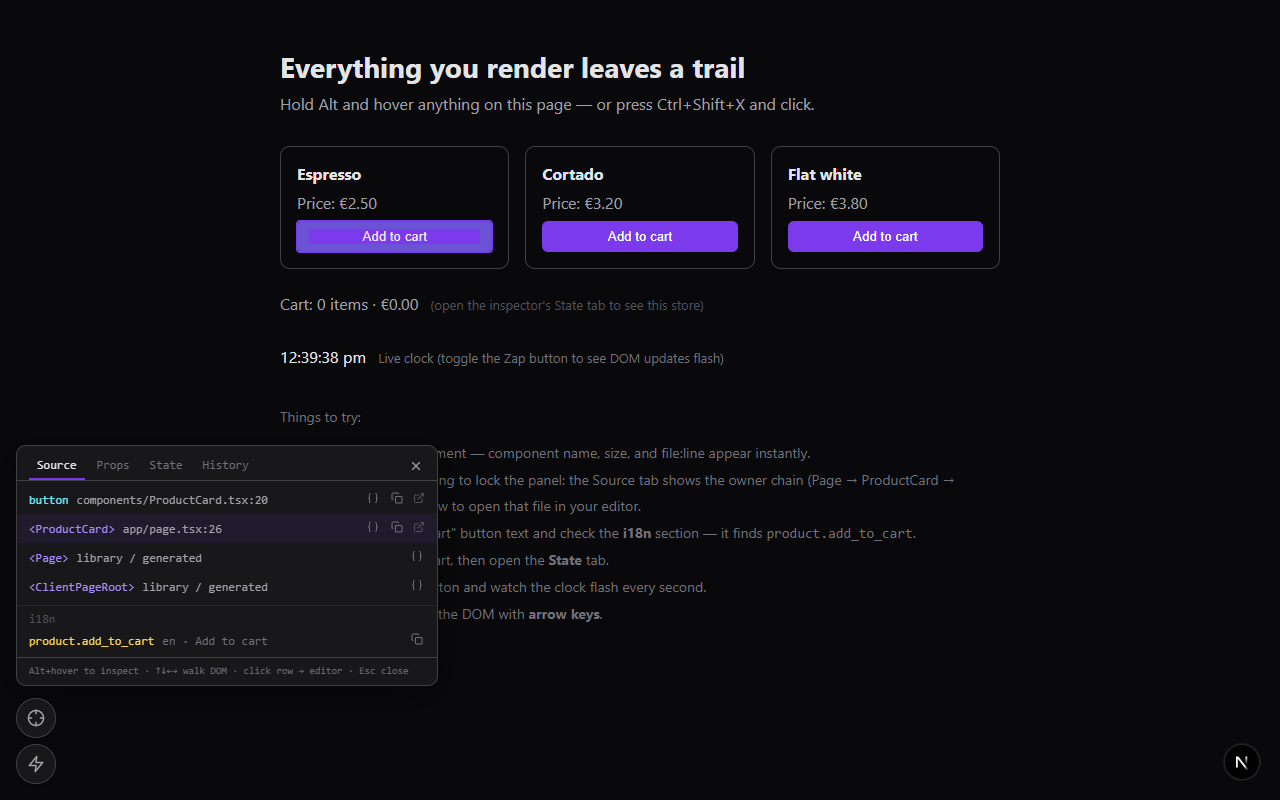
<Component> · file.tsx:42chip and element dimensions - Click to lock the full owner-component chain, each entry with
file:line - Click any entry to open that file in your editor at the exact line
- Box-model overlay (margin/padding bands) like browser devtools
Understand the state
- Props tab — live props of any component in the chain (compact JSON tree)
- State tab — snapshot of your store; Redux, Zustand, Jotai, anything — you supply the getter
- i18n reverse lookup — which translation key produced this rendered text (i18next-shaped resources)
- History tab — revisit the last 8 inspected elements
See it move
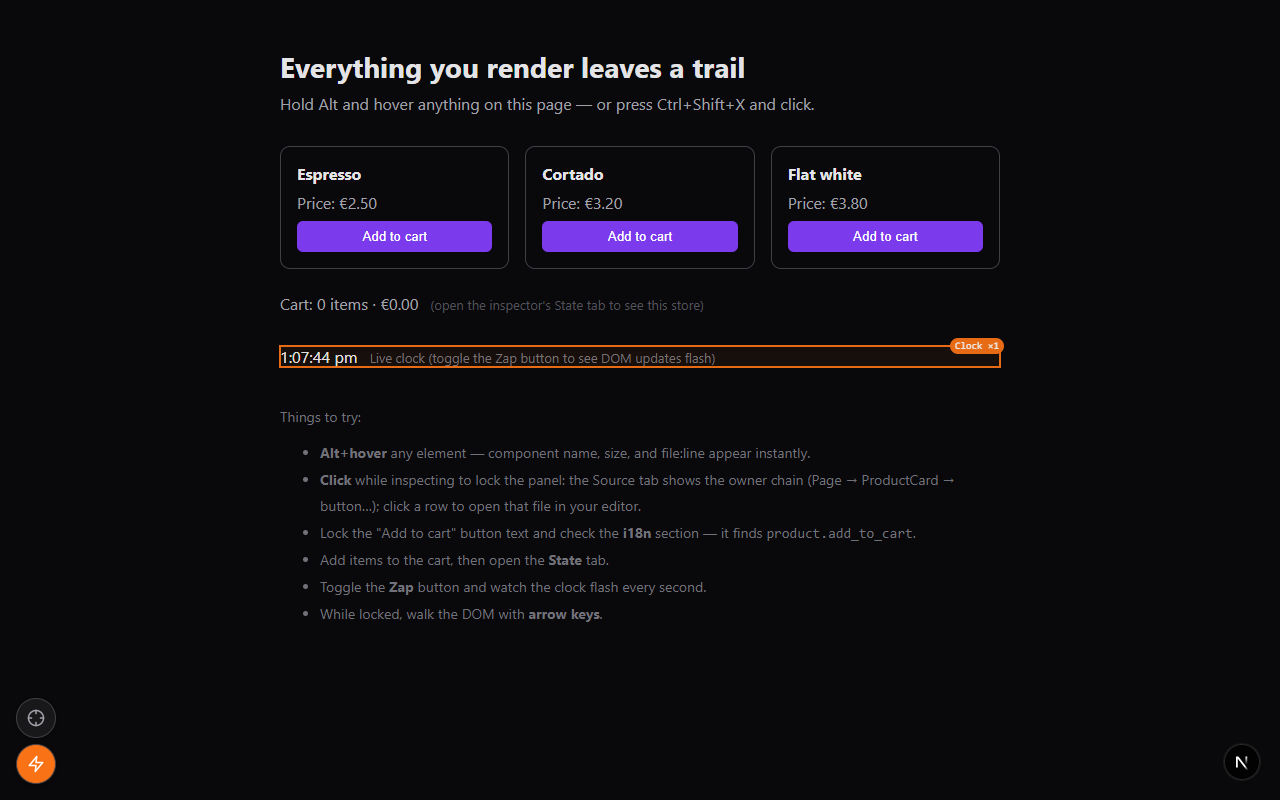
- Re-render flasher — with the optional early hook,
outlines components as they re-render, labeled
Clock ×3; without it, falls back to flashing raw DOM mutations
Work fast
- Copy for AI — one click copies chain + paths + props + i18n keys, ready to paste into Claude Code, Cursor, or any coding assistant
- Alt+hover quick inspect, arrow-key DOM walking, configurable hotkeys
- Single draggable launcher button that expands into the action menu, position persisted to
localStorage
Requirements
| | |
|---|---|
| React / ReactDOM | >= 18 (peer deps); best on 19 |
| Next.js | next dev — Turbopack and webpack (--webpack) both verified |
| Environment | Development builds only — relies on React's dev-only fiber internals |
| Runtime deps | None |
Quick start
npm i -D next-dev-inspectorMount it anywhere in your client tree:
import DevInspector from "next-dev-inspector";

<DevInspector />
Then hold Alt and hover anything — or press Ctrl+Shift+X and click. For real projects, use the env-gated mount below so the package never reaches production bundles.
Production safety (dead-code elimination)
The inspector reads React's dev-only fiber internals (_debugStack,
_debugOwner), so it only works in development — and it should be compiled
out of production bundles. Gate it on constants your bundler can statically
evaluate:
App Router
// app/dev-inspector.tsx
"use client";
import dynamic from "next/dynamic";

const Inspector = dynamic(() => import("next-dev-inspector"), { ssr: false });

export function DevInspectorMount() {
  if (
    process.env.NODE_ENV !== "development" ||
    process.env.NEXT_PUBLIC_DEV_INSPECTOR !== "true"
  ) {
    return null;
  }
  return <Inspector />;
}
Render <DevInspectorMount /> at the end of your root layout's <body>.
Pages Router
// pages/_app.tsx
import dynamic from "next/dynamic";

const DevInspector =
  process.env.NODE_ENV === "development" &&
  process.env.NEXT_PUBLIC_DEV_INSPECTOR === "true"
    ? dynamic(() => import("next-dev-inspector"), { ssr: false })
    : null;

export default function App({ Component, pageProps }) {
  return (
    <>
      <Component {...pageProps} />
      {DevInspector && <DevInspector />}
    </>
  );
}
Run with the flag:
NEXT_PUBLIC_DEV_INSPECTOR=true next devBecause both conditions are build-time constants, the import() — and the
whole package — is eliminated from production output.
Controls
| Action | Effect |
|---|---|
| Ctrl+Shift+X | Arm / disarm the inspector (configurable via hotkey) |
| Alt + hover | Quick inspect without arming (configurable via hoverModifier) |
| Click (while inspecting) | Lock the details panel on that element |
| ↑ ↓ ← → | Walk the DOM (parent / first child / siblings) while locked |
| Esc | Close panel, disarm |
| Wrench button | Open / close the action menu — also the drag handle |
| Crosshair button (in menu) | Arm / disarm the inspector |
| Zap button (in menu) | Toggle the re-render / DOM-update flasher |
| Source row click | Open that file in your editor |
| { } icon on a row | Jump to that entry's Props tab |
True re-render flashes (optional hook)
By default the Zap button flashes DOM mutations — a memoized re-render that changes no DOM stays invisible. For true re-render tracking, React must see a DevTools hook before it loads, which a widget rendered by React cannot provide. So the package ships one as an inline script you mount yourself:
// App Router — top of app/layout.tsx's <body> (it's a server-safe component)
import { DevInspectorHook } from "next-dev-inspector/hook";

<body>
  <DevInspectorHook />   {/* renders nothing in production */}
  {children}
</body>
// Pages Router — pages/_document.tsx, inside <Head>
import { devInspectorHookScript } from "next-dev-inspector/hook";
{process.env.NODE_ENV === "development" && (
<script dangerouslySetInnerHTML={{ __html: devInspectorHookScript }} />
)}With the hook installed, flashes carry component names (Clock ×3) and fire
per re-render — the widget detects it automatically. If the real React
DevTools extension is present, the script piggybacks on its hook instead of
replacing it.
Copy for AI
The locked panel's footer has a Copy for AI button that puts a compact, paste-ready context block on the clipboard:
Inspected element (via next-dev-inspector):

Component chain (innermost first):
1. button — components/ProductCard.tsx:20
2. <ProductCard> — app/page.tsx:26
3. <Page> — (library / generated)

Props of <ProductCard>:
{ name: "Espresso", price: 2.5 }

i18n matches:
- product.add_to_cart (en) = "Add to cart"
Paste it into your AI assistant and it knows exactly which file and component
you're talking about. (buildAiContext / serializeValue are also exported
if you want the same block programmatically.)
Configuration
All props are optional:
<DevInspector
  enabled={true}
  hotkey="ctrl+shift+x"
  hoverModifier="alt"
  storageKey="dev-inspector-pos"
  zIndex={2147483000}
  colors={{ accent: "#7c3aed", accentLight: "#a78bfa", flash: "#f97316" }}
  editorEndpoint="/__nextjs_launch-editor"
  stackFramesEndpoint="/__nextjs_original-stack-frames"
  getI18nData={() => ({ data: i18n.store.data, language: i18n.language })}
  getStateSnapshot={() => store.getState()}
  stateLabel="Redux store"
/>
| Prop | Type | Default | Description |
|---|---|---|---|
| enabled | boolean | true | Render nothing when false (combine with env gating for DCE) |
| hotkey | string | "ctrl+shift+x" | Arm/disarm combo — modifiers + key joined with + |
| hoverModifier | "alt" \| "ctrl" \| "meta" \| "shift" \| "none" | "alt" | Held key that enables hover-inspect without arming; "none" disables |
| storageKey | string | "dev-inspector-pos" | localStorage key for the launcher-button position |
| zIndex | number | 2147483000 | Base z-index for all overlay layers |
| colors | { accent?, accentLight?, flash? } | violet / orange | Palette overrides, hex #rrggbb |
| editorEndpoint | string | "/__nextjs_launch-editor" | GET endpoint that opens file/line1/column1 in the editor |
| editor | "vscode" \| "vscode-insiders" \| "cursor" \| "windsurf" | — | Force an editor via its URL scheme instead of the dev server (see below) |
| projectRoot | string | — | Absolute project root; needed by editor to absolutize relative source paths |
| stackFramesEndpoint | string \| null | "/__nextjs_original-stack-frames" | POST fallback resolver for webpack-dev frames; null disables |
| getI18nData | () => { data, language? } \| null | — | Enables i18n reverse lookup (see below) |
| getStateSnapshot | () => unknown \| Promise<unknown> | — | Enables the State tab (see below) |
| stateLabel | string | "Store" | Heading shown in the State tab |
Store snapshots (getStateSnapshot)
The State tab appears only when you pass a getter. Any store works — sync or async:
// Redux (dynamic import keeps the store out of the widget's graph)
getStateSnapshot={async () => (await import("@/lib/redux/store")).store.getState()}

// Zustand
getStateSnapshot={() => useBoundStore.getState()}

// Jotai (with a store instance)
getStateSnapshot={() => Object.fromEntries(myAtoms.map(a => [a.debugLabel, store.get(a)]))}
i18n reverse lookup (getI18nData)
Pass i18next-shaped resources ({ [lng]: { [namespace]: nestedTree } }) and
the current language:
getI18nData={() => ({ data: i18n.store.data, language: i18n.language })}When you lock an element, the Source tab lists translation keys whose value
matches its rendered text — exact matches first, then {{interpolated}}
values matched by static prefix.
Forcing a specific editor
By default, clicking a source row asks the Next dev server to open the file,
and Next's launch-editor guesses the editor from running processes. Two ways
to pin it:
Env var (no code) — set
REACT_EDITORwhen starting the dev server; Next's launch-editor respects it:REACT_EDITOR=code next deveditorprop — bypass the dev server entirely and open the editor's own URL scheme (vscode://file/…:line:col) from the browser. Relative source paths (Turbopack/webpack) need an absoluteprojectRoot, which you can inline at build time:// next.config.mjs const nextConfig = { env: { NEXT_PUBLIC_PROJECT_ROOT: process.cwd() }, };<DevInspector editor="vscode" // or "vscode-insiders" | "cursor" | "windsurf" projectRoot={process.env.NEXT_PUBLIC_PROJECT_ROOT} />If a path can't be made absolute, the click falls back to the dev-server endpoint, so this is safe to leave on.
Other dev servers
editorEndpoint and stackFramesEndpoint exist so non-Next dev servers can
be targeted (e.g. Vite's /__open-in-editor, with
stackFramesEndpoint={null}) — but Vite serves different source-map URLs and
this is untested territory. The package is Next-first.
API reference
next-dev-inspector
| Export | Kind | Purpose |
|---|---|---|
| DevInspector (also default) | component | The inspector widget |
| buildAiContext(input) | function | The "Copy for AI" text, programmatically |
| serializeValue(value) | function | The compact, cycle-safe value renderer it uses |
| DevInspectorProps, DevInspectorColors, HoverModifier, AiContextInput, InspectedEntry, ResolvedLocation, ResolverOptions, RawStackFrame, I18nMatch, FlashEvent, BoxModel, BoxEdges, SourceMapPayload, OriginalPosition | types | Public types |
next-dev-inspector/hook
| Export | Kind | Purpose |
|---|---|---|
| DevInspectorHook (also default) | component | Server-safe inline <script> mount; renders nothing outside development |
| devInspectorHookScript | string | The raw script, for _document or custom injection |
The main bundle is marked "use client"; the hook bundle is not, so it can
be imported from server components.
How it works
- React 18/19 source metadata: React 18 locations come from
_debugSource; React 19 client locations come from_debugStack. App Router Server Components are recovered from React 19's_debugInforecords and their server stack frames. These fields exist only in development React. - Turbopack (
next dev): the widget fetches the chunk's sibling<chunk>.js.mapand decodes it client-side (index maps withsections[],file:///sources). The dev server'sPOST /__nextjs_original-stack-framesresolver is not used for browser chunk frames — it hangs onhttp://file URLs and returns identity mappings. - webpack (
next dev):webpack-internal:///frames fall back to the server resolver endpoint. - SSR / React Server Components:
about://React/Server/frames are sent to the Next resolver with the server + App Router compilation flags. - Open in editor uses
GET /__nextjs_launch-editor?file=&line1=&column1=, which acceptsfile://URLs, absolute paths, and project-relative paths. - Re-render hook: the inline script installs a minimal
__REACT_DEVTOOLS_GLOBAL_HOOK__before React loads and walks each commit as a diff against the alternate fiber tree, pruning subtrees whose child pointer is unchanged (the way React DevTools does) —PerformedWorkflags alone are stale on fibers React reused without re-cloning.
Limitations
- Development only — production React builds carry none of the fiber debug data this relies on. Gate the mount so bundlers strip it entirely.
- Fiber internals are not public API. They have been stable across React 18/19 dev builds, but a future React release could move them.
- Without the hook, the flasher shows DOM mutations, not re-renders; a memoized re-render that changes no DOM won't flash.
- Library components resolve to the caller's JSX callsite (the first app-owned frame) — usually what you want anyway.
- Editor opening goes through the Next dev server; it opens whatever editor the server's launch-editor detection finds (VS Code, etc.).
Troubleshooting
| Symptom | Likely cause / fix |
|---|---|
| Every entry says library / generated | Source maps unreachable — make sure you're on next dev (not a production build) and same-origin |
| Server Component rows have no file/line | Upgrade to a version with SSR/RSC _debugInfo support; production next start cannot expose dev-only locations |
| Rows never resolve on webpack dev | The fallback POSTs to stackFramesEndpoint; check it isn't disabled and the dev server is current |
| Clicking a row doesn't open the editor | The dev server's launch-editor couldn't find an editor — try opening a file from a Next error overlay to verify |
| Flashes have no component names | The early hook isn't installed — see the hook section; it must render before React loads |
| Hotkey does nothing | Another extension/app owns the combo — change the hotkey prop |
| Widget visible in production | Your gating isn't statically analyzable — both conditions must be literal process.env checks |
Demo app
A runnable demo lives in demo/:
cd demo
npm install
npm run dev
Open the printed URL and follow the "Things to try" list on the page: Alt+hover anything, click to lock the source chain, open files in your editor, check the i18n and State tabs, toggle the Zap button while the on-page clock ticks, and try Copy for AI.
Development
npm install
npm run test        # vitest — stack parsing, VLQ source maps, i18n lookup, hook script, AI context
npm run typecheck
npm run build       # tsup → dist/ (ESM + CJS + d.ts, two entries: index + hook)
CI runs all three on Node 20 and 22 for every push and PR. Releases are
tag-triggered: bump the version, update CHANGELOG.md, then
git tag vX.Y.Z && git push origin vX.Y.Z — the release workflow publishes
to npm with provenance via trusted publishing.
Layout: src/ widget + pure modules · tests/ vitest suites ·
demo/ runnable Next 16 demo · docs/ README screenshots.
Project status
Pre-1.0. Verified against Next 16 + React 19, on both Turbopack and webpack dev servers. Issue reports welcome.